Week 4 Challenge : CFD Meshing for BMW car
OBJECTIVE
This report details the process of meshing a car model in ANSA, focusing on geometry cleanup, PID assignment, mesh generation, and symmetry application. The target element lengths and quality criteria for different parts of the model are specified, and the meshing of the wind tunnel volume is optional due to the potential computational cost.
PROCEDURE
Import the car model CAD file into ANSA.
First step is to ensure the geometry is free of any topological errors that could hinder the meshing process.
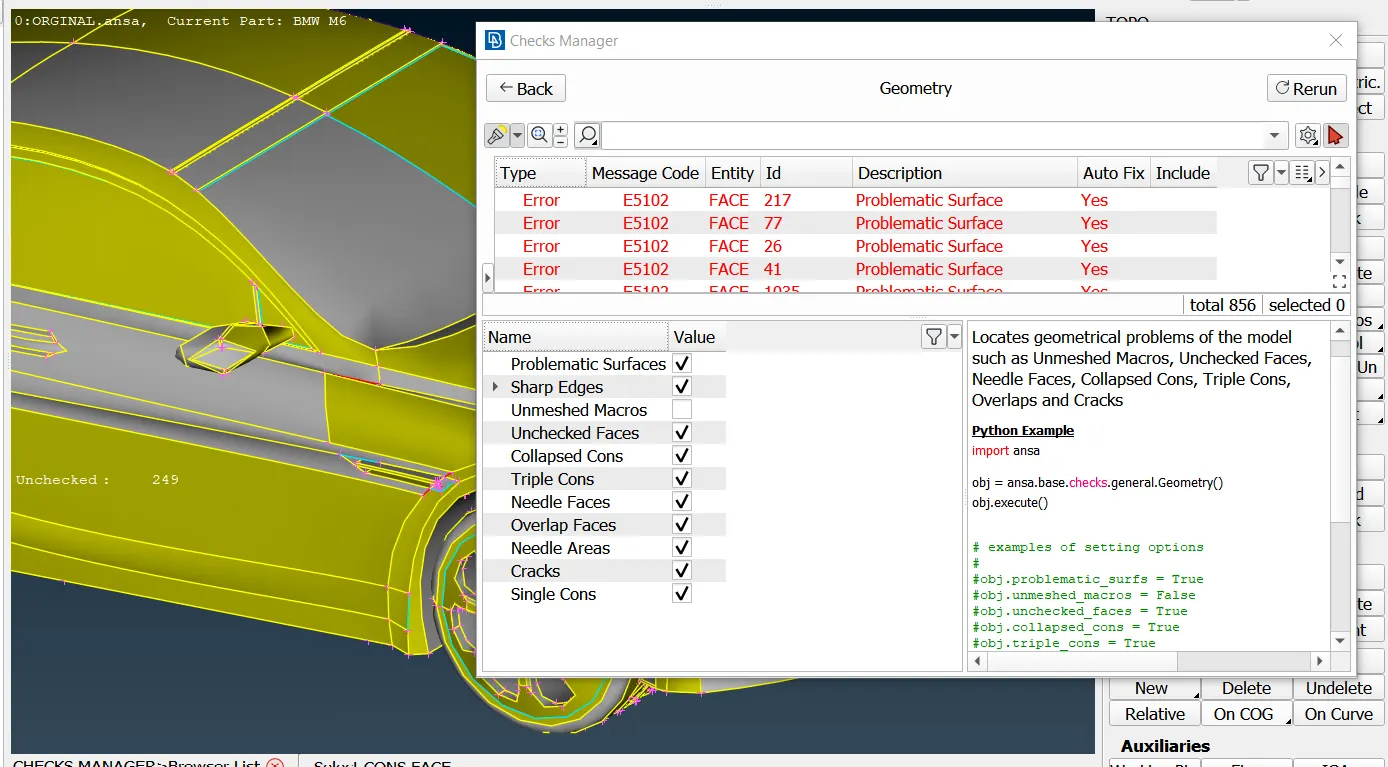
Here it is clear that after topological check Tools>Checks>Geometry function, more than 800 errors need to be fixed, which include problematic surfaces, single cons, Trible cons, open edges, cracks, and overlapping surfaces.
Except for Sharp Edges, Single Cons, and most Triple CONS, all other problems can be fixed by automatic fixing. In case not all problems are fixed automatically, we need to fix them manually.
Due to the car model's symmetry, we can simplify the meshing process by deleting one half and focusing on cleaning up the remaining geometry.
In order to proceed to the correction of the topological problems, each problematic area has to be isolated and each problem is then fixed separately. We don’t need the interior part of the car so we can delete that by selecting manually.
-new tool functions used
Using the Utilities > Fine function from the TOPO or MESH module, one or more times, on the surrounding Faces, a more detailed morphology is achieved, and the collapsed CONS approaches its real shape. The Fine function, as it increases the resolution, decreases the element length of the related perimeter segments.
Activate the CONS>Paste function and select the CONS to be pasted, one after the other. Terminate the selection of CONS using the middle mouse button. All selected CONS are pasted to the last selected one.
Activate Faces> Undelete function. All the deleted Faces appear in white highlight. Using the left mouse button select the Faces to be restored. Press the middle mouse button to end the operation. The topological conditions need to be redefined.
Faces > Proj.Cut function to project these new Hot Points and make vertical cuts on the two surrounding Faces.
Activate the Faces> Extend> Target function In the Options List window, set a “Range” greater than the extension needed for the Faces to meet. If the Topo option has been inactive, the Faces are simply extended up to the target Face.
In order to automatically cut the involved parts at their intersection, the function Modify Geometry > Intersect > Faces / FE Shells is applied.
Use the Curves> Cons2Curves function, New 3D Curves can be defined from existing CONS.
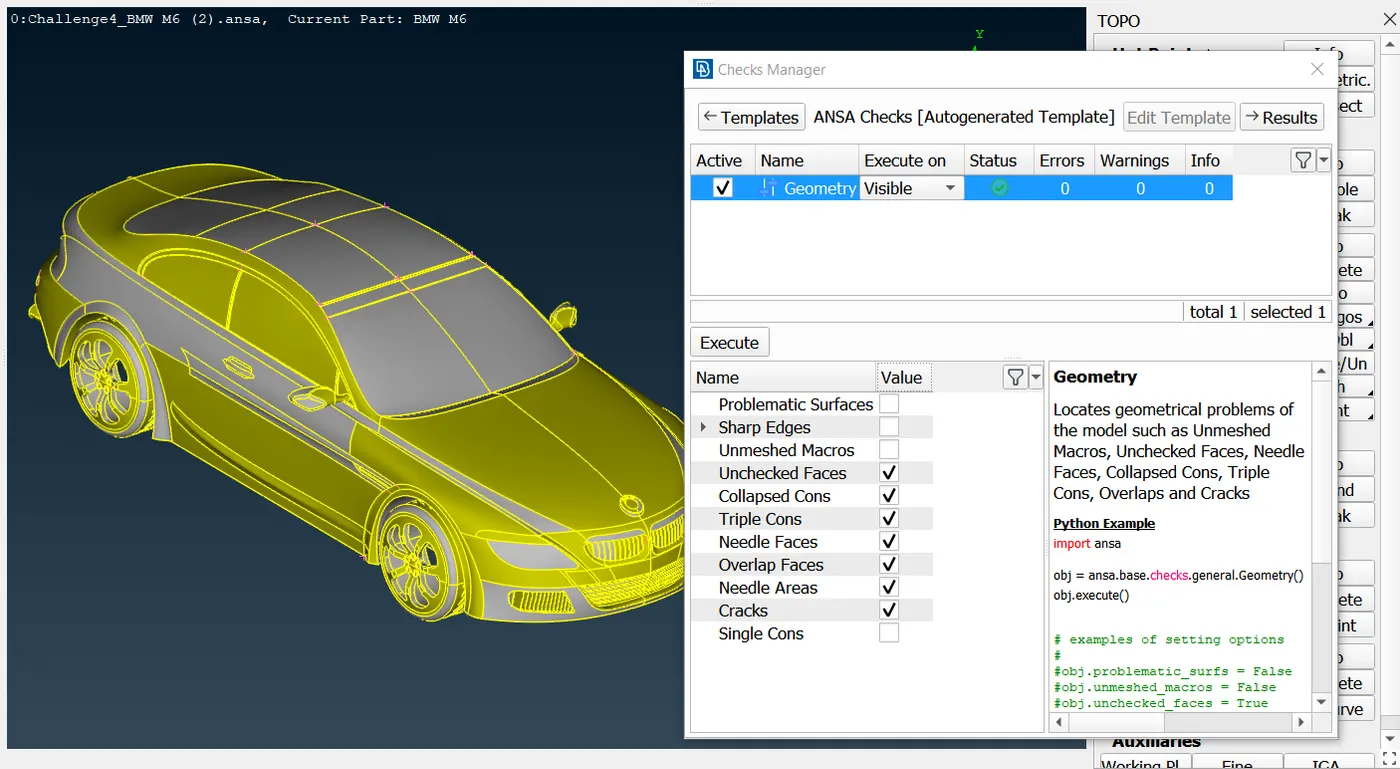
complete topological cleanup of Problematic Surfaces, Sharp Angles, Unchecked Faces, Needle Faces, Collapsed Cons, Triple Cons, Overlaps, Cracks, and Single Cons. ensuring that by the status of checks Manager.
The presence of Single cons and triple cons can be visually visible by turning on the Single, triple perimeter option visibility in the wireframe.
-PID assignment
Assigning PIDs provides a structured framework for mesh, making it easier to manage, analyze, and interpret results effectively.
Different Properties may be assigned to different Faces, either directly from the CAD file or during the ANSA session. By default, in ENT view mode, the Faces are colored gray and yellow, on their positive and negative side, respectively. Switching to PID view mode, the Faces are colored according to their PID. To modify the Property of Faces, activate the function Faces>Set PID.
To assign PIDs go to the PID section and create a new PIDS and right click select apply then select the components for which you want to create PIDs
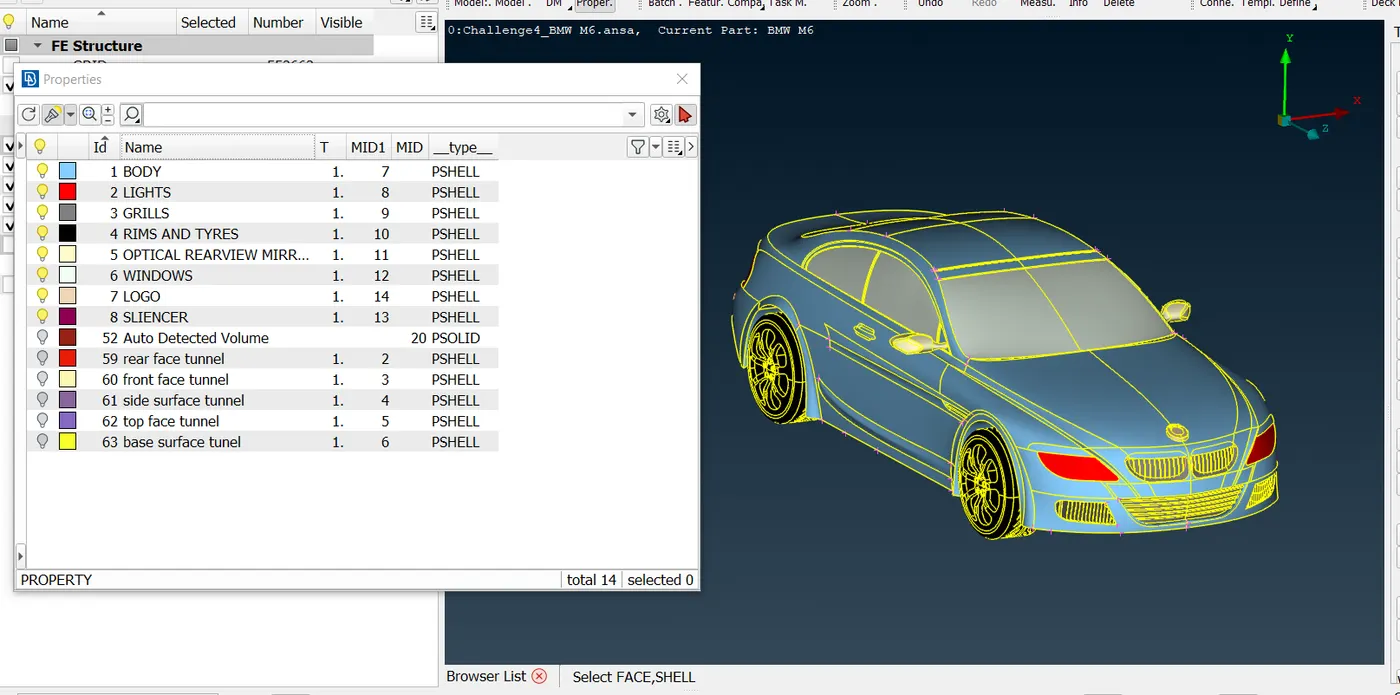
Here 8 PIDs are Created and assigned to their corresponding components. To reduce the size of the database use the Utilities>Compress function. Under the GEOMETRY tree, there are the different entities (Faces, Curves, etc) that have been deleted but are still stored in the ANSA database for undelete. Activating their respective flag and pressing OK will remove them completely from the database.
-Defining Quality criteria
There are numerous element quality criteria available in ANSA. For most of these criteria, there are more than one definition available,
In the “Edit Criteria Visibility”
window that opens, the user may
enable or disable quality criteria
in order to add or remove them
from the respective quality
criteria list.
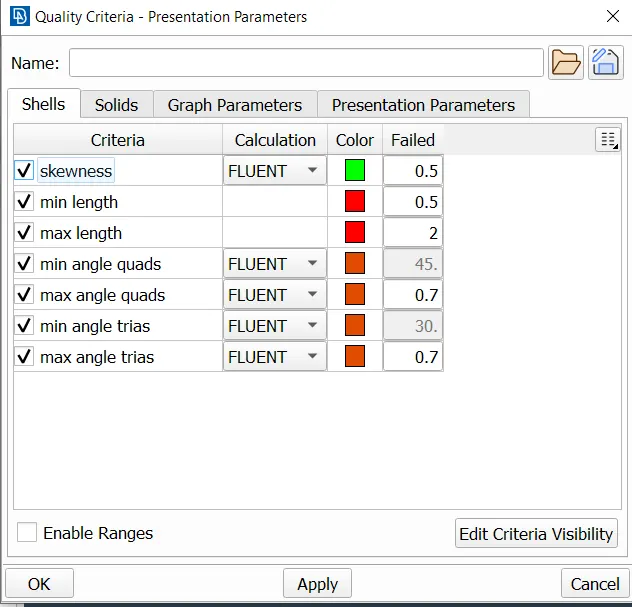
using OpenFOAM quality criteria in ANSA meshing is a valuable practice that can enhance the accuracy, compatibility, and efficiency of CFD simulations using OpenFOAM. By adhering to these criteria, we can improve the overall quality of meshes and obtain more reliable results.
Here, we incorporate skewness, minimum and maximum length, and angle quality criteria, along with fluent calculation.
-Meshing
Set Target Lengths: Specify target element lengths for different components as per the given criteria
Body: 3 mm
Lights: 4 mm
Grills: 1 mm
Rims and Tyres: 2 mm
Optical Rear View Mirror: 2 mm
Window: 2 mm
Silencer: 3 mm
Logo: 1 mm
ANSA provides seven algorithms for shell meshing under the Mesh Generation Group of functions: Free, Map, Spot-Mesh, Adv.Front, CFD, STL, Gradual, 4 Sided and Circular.
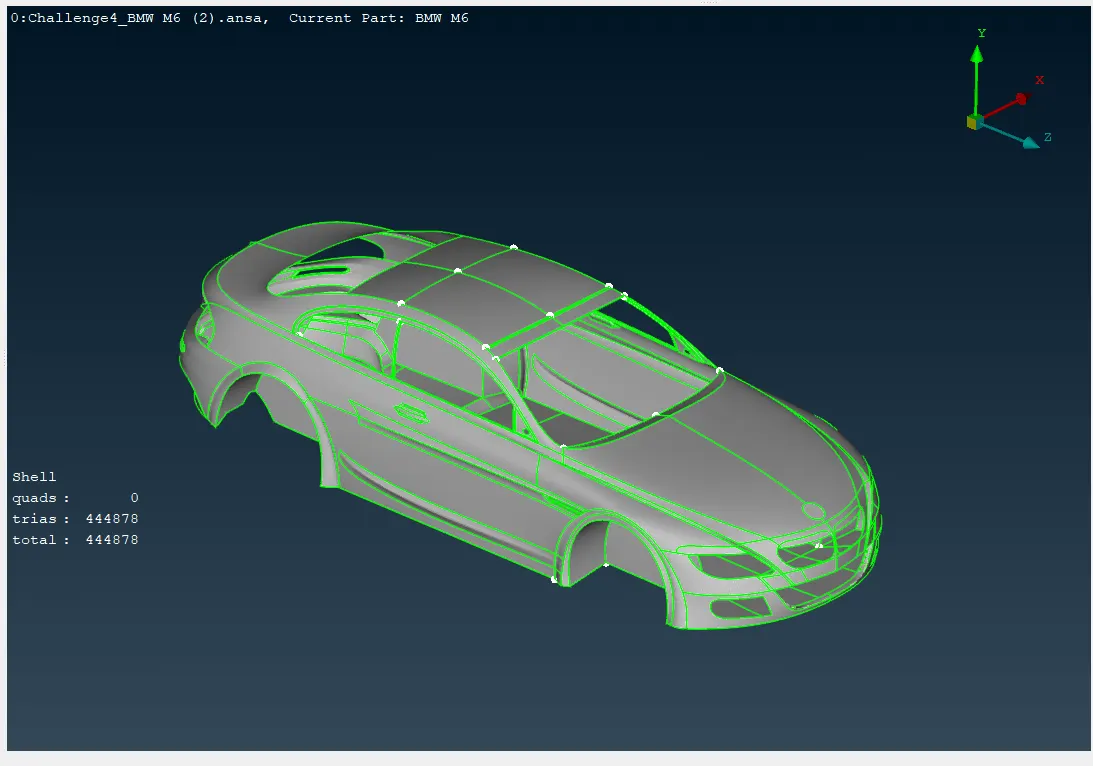
while using the spot-mesh algorithm for the body PID we obtain almost more than 4 lakh shells on the specified target length. we get a refined mesh on spot-mesh that has almost the same element length all over the area, so need more than 4 lakh shells for surface meshing.
The Mesh Generation>CFD algorithm is an advanced meshing algorithm tailor-made to meet CFD specs or other application areas where a variable-size mesh is required.
By using the CFD algorithm Body surface meshing can be done by having less than 2.5 lakh shells.
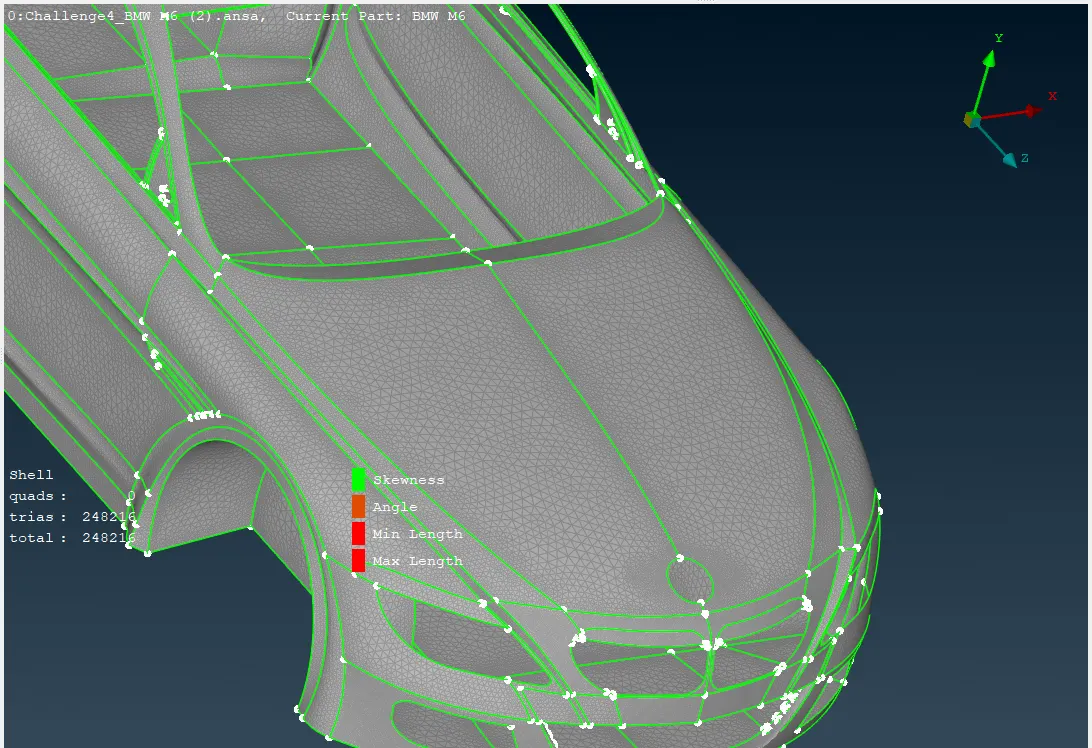
it's generally recommended to minimize the number of elements by using appropriate target length and efficient meshing techniques.
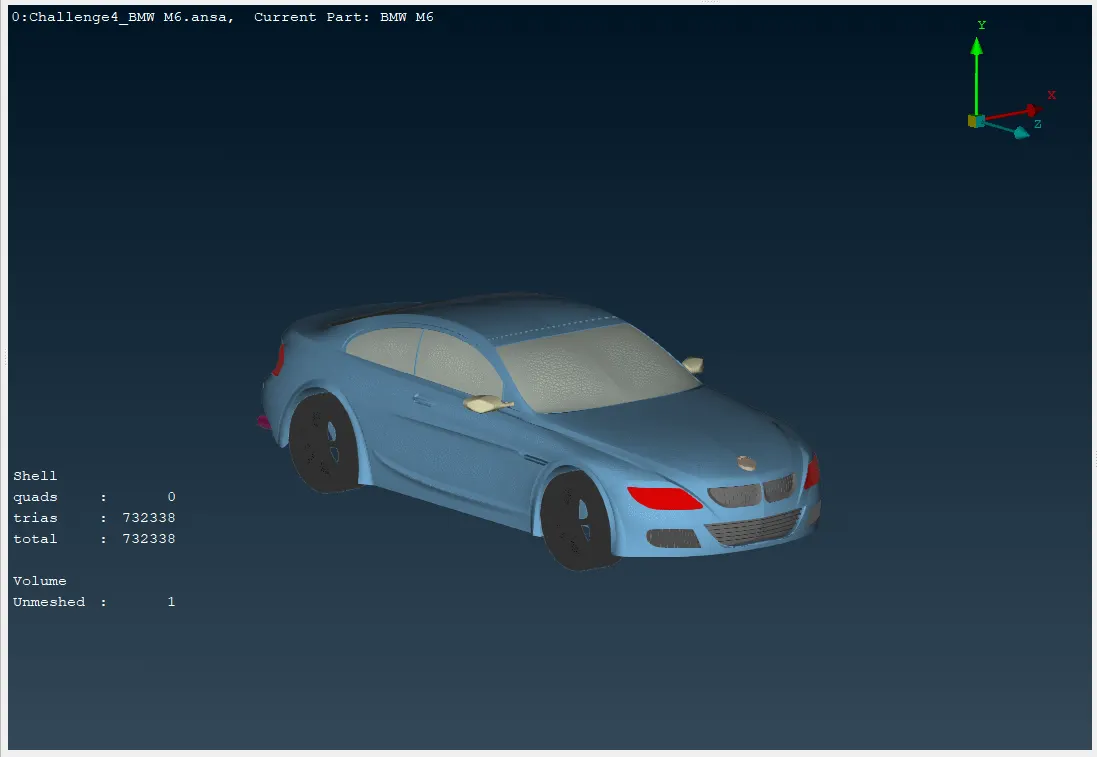
Almost 732k trias-type elements are needed for surface mesh of the car, based on the specified target length for each part.
-Symmetry
Symmetry function creates or moves symmetrical entities by means of the current symmetry plane. Activate Utilities>TRANSF.>LINK function. Select the entities with the left mouse button and confirm with middle mouse button. The Link - Entities window appears. Press Apply to proceed.
Verify that the symmetry operation has been applied correctly and that there are no geometric inconsistencies in the complete model.
- Wind tunnel is used to simulate the aerodynamic forces and pressures that a car experiences while moving. Create a simple, box-shaped geometry representing the wind tunnel. Ensure the dimensions are large enough to accommodate the car and allow for proper airflow development.
Assigning PIDs and Surface Meshing needs to be done before volumetric Mesh.
We can use the spacing option for wind tunnel, Perimeters> Spacing function can be used to automatically assign proper element length and nodal distribution on Perimeters to capture details and minimize computational cost.
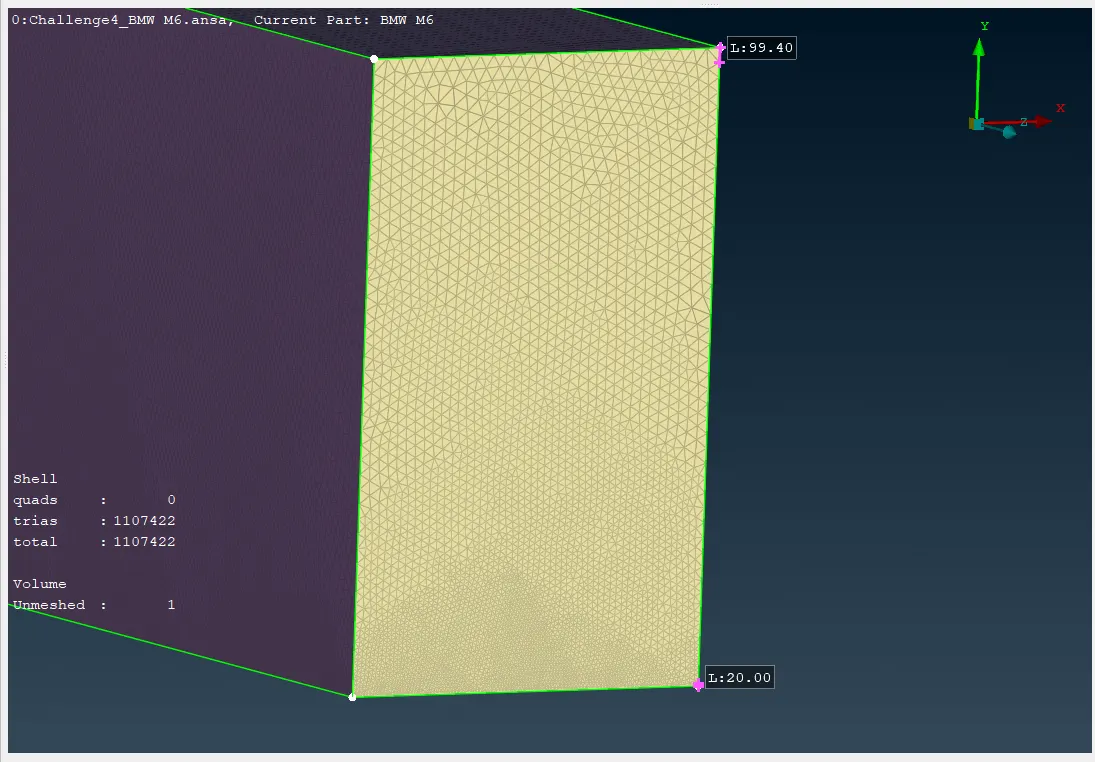
Using the spacing function, the element length increases from 20 to 100, starting from the bottom and going to the top.
LEARNING OUTCOME
-While Meshing two Different Target length entities make sure it is meshed with a smooth transition of target length.
-Utilities>Compress function: To reduce the size of the database. Under the GEOMETRY tree, there are the different entities (Faces, Curves, etc) that have been deleted but are still stored in the ANSA database for undelete. Activating their respective flag and pressing OK will remove them completely from the database.
-The CFD algorithm is sensitive to the local curvature. Any problems in the quality of the CAD data, the topology, and the joining of sharp angle Perimeters that lead to steep curvature discontinuities may cause mesh failure.
-The CFD function grows the mesh size on flat Macros. If a constant mesh size is desired on selected Macros the Adv.Front algorithm can be applied instead.
-The Mesh Generation>STL algorithm can be used for applications where the quality of the elements is not very important but the exact geometry representation is. This algorithm must be used in combination with the Spacing algorithm.
-Reconstruction is a powerful algorithm for the creation of a high-quality surface mesh. It is applied on an existing mesh and performs re-meshing. Reconstruct also has embedded the Fix Quality functionality, so any problems that cannot be fixed by re-meshing, are automatically fixed by nodal movements.
-nodal movements can also be performed while in Hidden View mode with the respective quality criteria check boxes enabled so that the element quality is monitored and displayed during the node movement.
- Actions>Transform from the context menu of the Parts/Groups in the main section of the Model Browser window, the user can alter the position of selected Parts/Groups by applying a series of actions such as Translate, Rotate, Transform, Scale, Symmetry or Mirror.
-A wind tunnel is a testing facility used to study the effects of airflow past an object, This will allow you to examine the aerodynamic forces, drag, lift, and other relevant parameters that influence a car's performance.
RESULT
Initially, the model had more than 800 geometric errors, which included problematic surfaces, single cons, Trible cons, open edges, cracks, and overlapping surfaces. complete removal of geometric errors or inconsistencies that might hinder the meshing process by the long process of geometry clean-up.
Here 14 PIDs are Created and assigned to their corresponding components including PIDs for wind tunnel and volume mesh. PSHELL Represents thin-walled structures like plates, shells, and membranes. PSOLID Represents solid bodies with a 3D volume.
Approximately 732K trias-type elements are required for the surface mesh of the car, according to the specified target length for each part. When including the wind tunnel, more than 1.1 million shells are needed.
Confirm the successful application of symmetry and the absence of any geometric errors in the complete model.
In this process, we integrate skewness, minimum and maximum length, and angle quality criteria, coupled with fluent calculation algorithm. Finally, achieve a state where no elements violate the quality criteria by utilizing approximate meshing algorithms and functions.
CONCLUSION
The report details the meshing process of a car model using ANSA, covering geometry cleanup, PID assignment, mesh generation, and the application of symmetry. Adherence to the specified element lengths and quality criteria was maintained, while the meshing of the wind tunnel volume was excluded to save on computational resources. The resulting mesh is anticipated to meet high-quality standards, ready for further analysis.