Week 4 Challenge : CFD Meshing for BMW car
AIM:
aim of this challenge is to perform geometry checks, topology cleanup, assigning PIDs, surface mesh of BMW M6 and create a wind tunnel for the given 3dmodel for CFD analysis.
PROCEDURE:
- firstly, we need to perform the geometry checks upon given 3d model to find triple and single cons.
- then partition the whole 3d model into small segments as per set of PIDs.
- to make the work easier, isolate a single part that to be worked on, so that viewing and editing of single and triple cons will be simple and faster.
- as the given model is symmetrical about the axis, we can delete one half. and work on the other half then after replicate the geometry to make it whole.
- to perform volumetric and surface mesh, we need eliminate all the single cons and maximum number of triple cons.
- most importantly we need to look out for the intersection of two surface, so that they could cause error for volumetric meshing.
- eliminate all the possible sharp edges and needle faces, so that surface meshing would be smoother.
- delete all unwanted hot points to get good mesh.
- try to keep the whole model as a single and closed volume to perfom volumetric mesh.
- allocate all the PIDs to different regions so that parts can be identified easily, and can also isolate them easily to mesh.
- after completing topo clean up, activate mesh module to start with surface mesh. as all the PIDs are mesh with different targent lengths.
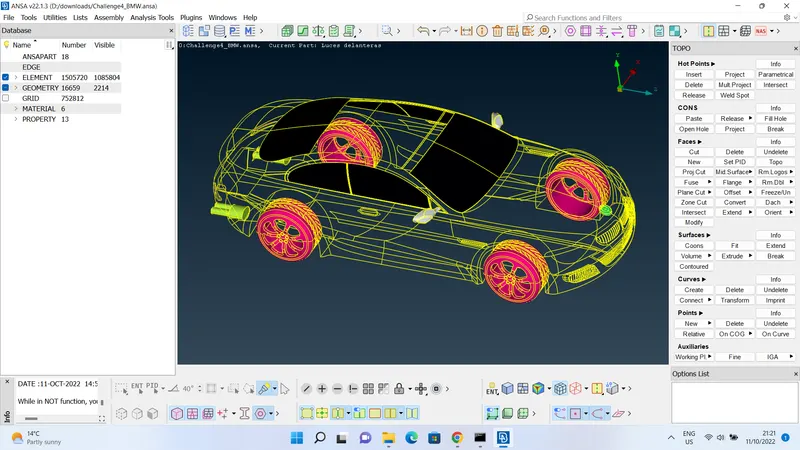
- it would be smarter if we mesh the smaller target lengths first. so start meshing logo and grills, after meshing this PIDs freeze them to prevent any changes and losing of mesh.
- and edit the quality criteria and mesh parameters for every different target length.
- you can turn on hidden mode to view the off elements, if there are any off elements present after meshing, we can run reconstruct algorithm to work on thoose off elements.
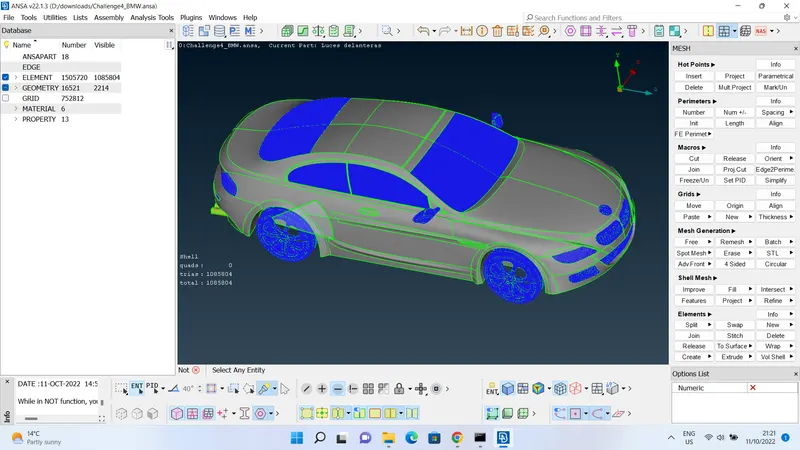
- some of the off elements cannot be solved using reconstruct algorithm, then using other algorithms such as reshape, smooth and fix quality could help.
- if you fail to eliminate off elements by using above mentioned algorithms, we use commands such as split and move manually upon each off element. this process can be used only if the model has a small number of off elements.
- split command is used to split the shell element failed for maximum length, it splits one element into two parts to reduce the mesh length.
- move command is used to move a hotpoint or mesh node to rectify the skewness and minimum mesh length.
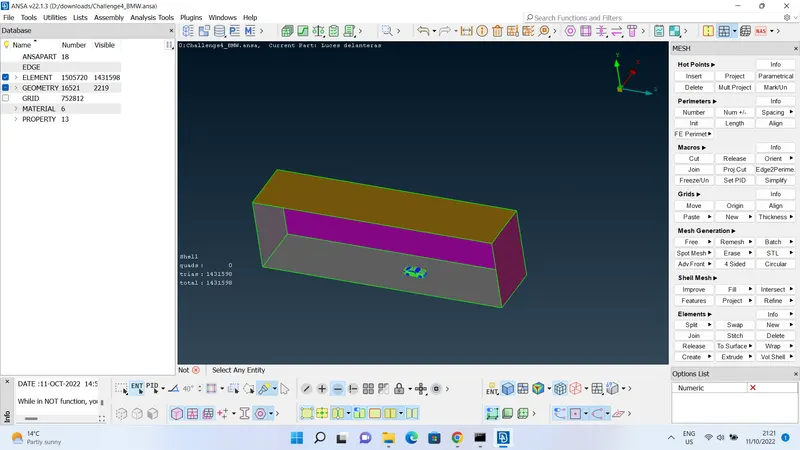
- after meshing all the PIDs, we need to create a wind tunnel for the model.the basic dimensions of wind tunnel are as followng distance away from the model
-front face = 4*length of the car
-rear face = 6*length of the car
-side faces = 1*length of the car
-top face = 3*length of the car
-bottom face = as near to the model as possible.
- to create curves, firstly we need to create relative points of bottom face as close as possible to the model using relative command in points section on topo module.
- after creating points, create curves passing through points using create command in curves section.
- then create a surface using coons algorithm, offset the surface to 3*length of car for top face. then after you can create all sides of wind tunnel using coons algorithm.
- give the mesh properties and quality criteria for both top and bottom faces of wind tunnel, and mesh them with given target length.
- as top and bottom faces are meshed with different mesh lengths, we need to use spacing command to define the varying mesh length for the remaining sides of wind tunnel.
- select spacing command and select geometric algorithm and insert the values for factor, dstart and dlimit as 1.1, 20,100 respectively. and select the four cons joining the remaining sides of wind tunnel. selecting direction is very important as we need finer mesh near bottom face and corse mesh near top face.
- mesh all the sides by selecting one at a time.
LEARNING OUTCOMES:
- learnt symmetry, copy and transform command to replicate the half geometry and make it a whole model, and can reduce work by half to save time and effort.
- in this challenge i have learnt many commands such as symmetry, offset surfaces, freeze faces, inserting relative points and creating curves.
- in mesh module i have learnt spacing command for varying mesh length, move command to adjust the nodes to eliminate off elements, freeze the mesh area to remain uneffected when changing the mesh parameters and quality criteria. algorithms like reconstruct, reshape, smooth and fix quality to eliminate off elements. split command to reduce the failed items of maximum mesh length.
- creating wind tunnel, and basic dimension requirements of wind tunnel. and meshing with varying mesh length.
RESULTS:
i have achieved and created a wind tunnel that mesh concentration is very fine near the model and coarse distant to the given model. succesfully eliminated all the single and triple cons present in the given model. dealt with the bottom surface of car, which had many intersected surfaces and sharp edges and needle faces. removed all the surfaces and created a smooth surface with same shape to ease the meshing.
file link: https://drive.google.com/file/d/1NuW8xf82t-9-k3xdLvlSosj3F2pI6-z2/view?usp=sharing