Week - 4
Our objective is divided into 2 parts:-
1) Implement control logic of a “washing machine” using Stateflow.
2) Make a Simulink chart for the “Gear shift".
Starting with first part i.e washing machine case
Let me first show you the diagram of it so that it will be easy to explain.
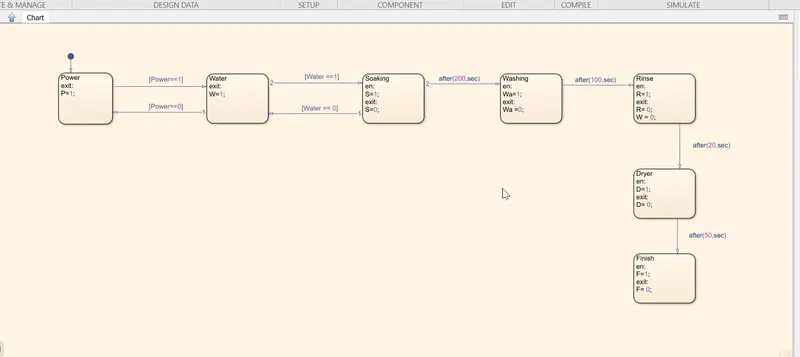
First of all I make 7 block with name and syntax with it as well
Block Name Syntax Connecting Line syntax
1 Power exit:P=1; outgoing [Power==1] incoming [Power==0]
2 Water exit:W=1; outgoing [Water==1] incoming [Water==0]
3 Soaking en:S=1;exit:S=0; outgoing after(200,sec)
4 Washing en:Wa=1;exit:Wa =0; outgoing after(100,sec)
5 Rinse en:R=1;exit:R= 0;W = 0; outgoing after(20,sec)
6 Dryer en:D=1;exit:D= 0; outgoing after(50,sec)
7 Finish en:F=1;exit:F= 0; NONE
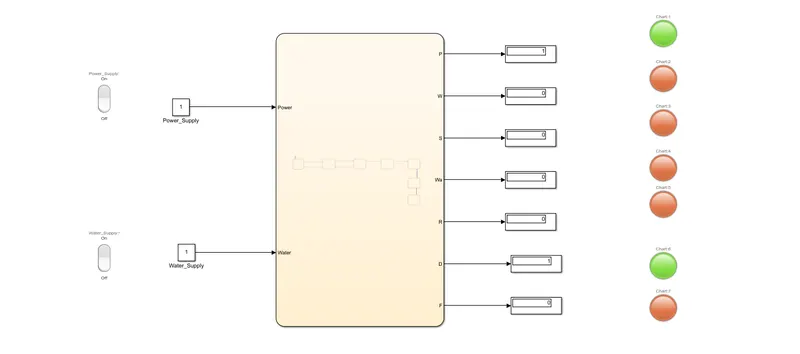
I have also attached 2 switch at power & water port along with constant block and at other side I have connected 7 display along with light attached to it.
WORKING PROCESS
Here when power is on then code will go to next block, here it will check whether water is on or off , if it is on it will go to next block here at entry S is on which mean soaking is on at exit S become off according to question given which mean soaking is completed, after delay of 200 seconds it will go to washing block here clothes are going to be washed with entry as Wa=1; & exit as Wa=0;, here it will delay for 100 seconds afterward rinseing process occur with entry at R=1; & exit R=0; also this is the point where we want to drain water so here apply the code W=0; with delay of 20 seconds , finally there is dryer & Finish process with D=1 , D=0 and F=1 , F=0 respectively.
This is the completion of whole process. Symbol of all parameter are attached with name "symbol washing.png"
\\ In figure given above there is green light just before Finish block this is because I have run code for 350 seconds instead of 400 seconds so the process gone upto dryer process & the light turns green at dryer\\
Turning towards second part i.e Simulink chart for the “Gear shift”
Diagram of gear block is shown
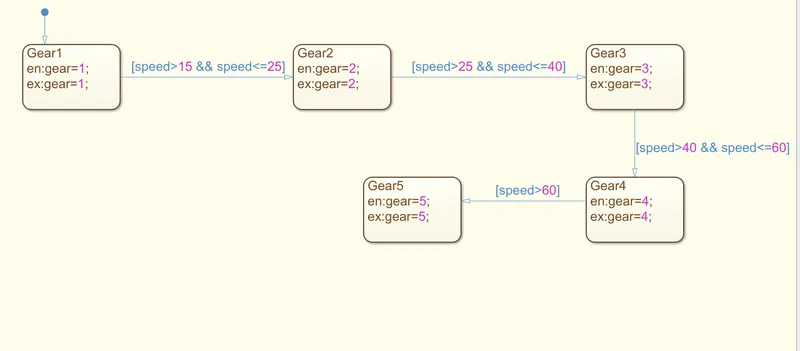
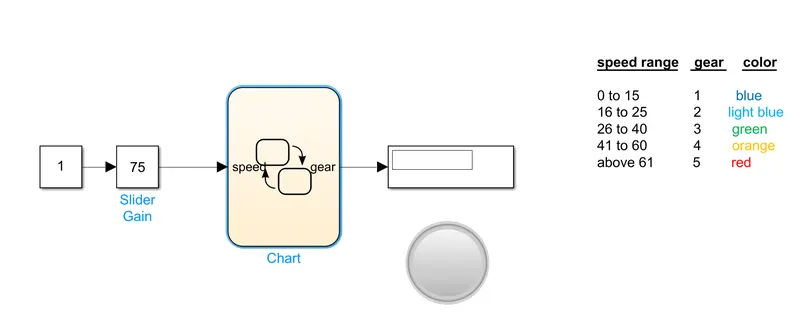
Figure of various speed are shown below so that we can understand the working of code block:-
# Speed at "11" ranges->0 to 15 lamp color->blue
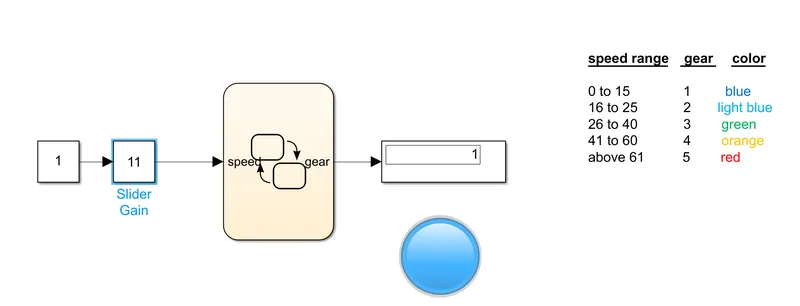
OBSERVE THE LAMP->COLOR BLUE ,VALUE OF SLIDER GAIN ,VALUE OF GEAR IN DISPLAY
# Speed at "22" ranges->16 to 25 lamp color->light blue
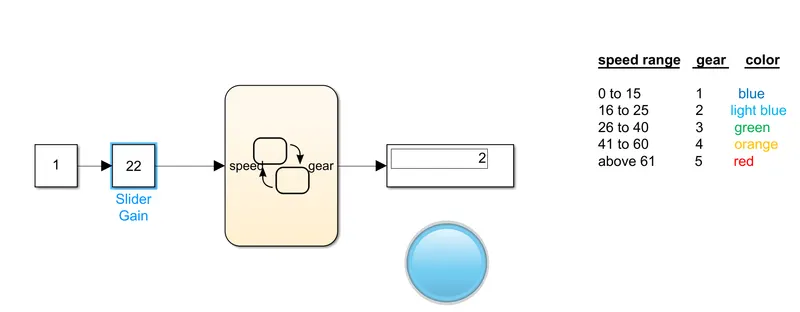
OBSERVE THE LAMP COLOR->LIGHT BLUE ,VALUE OF SLIDER GAIN ,VALUE OF GEAR IN DISPLAY
# Speed at "37" ranges->26 to 40 lamp color->green
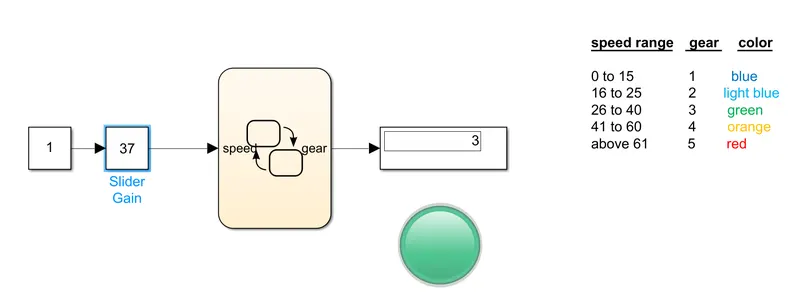
OBSERVE THE LAMP COLOR->GREEN ,VALUE OF SLIDER GAIN, VALUE OF GEAR IN DISPLAY
# Speed at "50" ranges->41 to 60 lamp color->orange
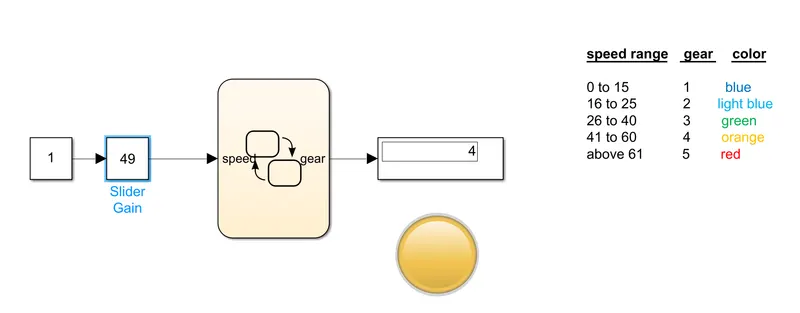
OBSERVE THE LAMP COLOR->ORANGE ,VALUE OF SLIDER GAIN, VALUE OF GEAR IN DISPLAY
# Speed at "75" ranges->above 61 lamp color->red
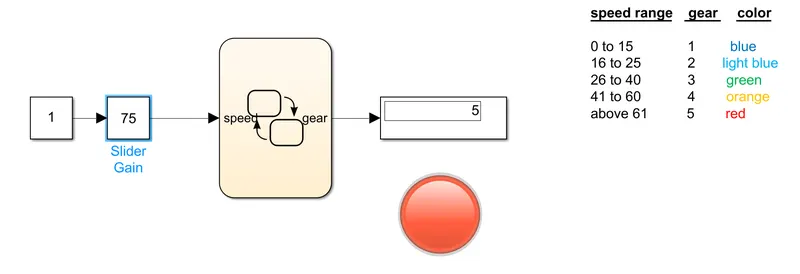
Hence all are working according to question.
\\ Value of symbol are attached with name gear symbol.png\\