Week - 4 Stateflow model of a Washing Machine and Gear Shifter
Que. 1
AIM: To implement control logic of a Washing Machine using Stateflow.
OBJECTIVES :
- To create a model of a washing machine.
- To perform the given sequence and show its working conditions
GIVEN CONDITIONS :
- The system is enabled if the power supply is available.
- Stop the procedure and signal with an LED if the water supply is not available.
- Soaking time should be 200 seconds, followed by 100 seconds of washing time.
- Then it's 20 seconds of rinsing and 50 seconds of drying.
- Turn on the finished LED when all of the operations have been completed.
STATEFLOW CHART :
STATES USED :
Here is the list of logic used in this Stateflow model -
- States
- Transitions
- Junctions
- Conditions
EXPLANATION :
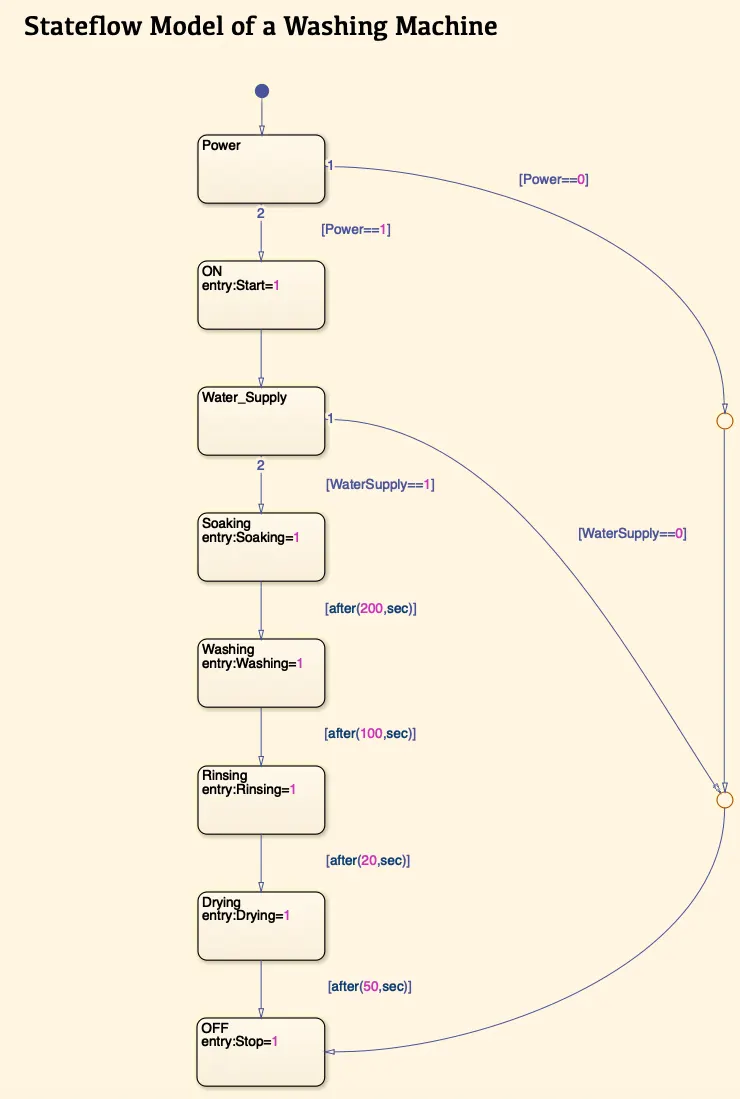
- To create a Stateflow model, we use a Chart block in the Simulink. In Chart we have shortlisted all the process which is required in this Washing Machine model.
- First, we used a State block that has a Default Transition flow line. We denoted this block as a Power which consists of two initial Conditions as [Power==1] & [Power==0] to represent ON & OFF respectively.
- If the Power is ON then it will start the machine.
- Once the machine gets started it will check whether the Water Supply is available or not, based on the condition [WaterSupply==0] & [WaterSupply==1]. If it is available then it will turn ON the Water Supply.
- [WaterSupply==1] represents water supply is available whereas [WaterSupply==0] represents water supply is not available.
- After supplying the water, it will begin its process with Soaking for about 200 seconds.
- Then Washing for about 100 seconds.
- Rinsing for about 20 seconds.
- Later Drying for 50 seconds.
- Once the clothes were dried properly then the appliance will Stop.
- During this, we added a Junction that's to represents any OFF conditions that will directly lead to Stop the appliance.
INPUT & OUTPUT PORTS :
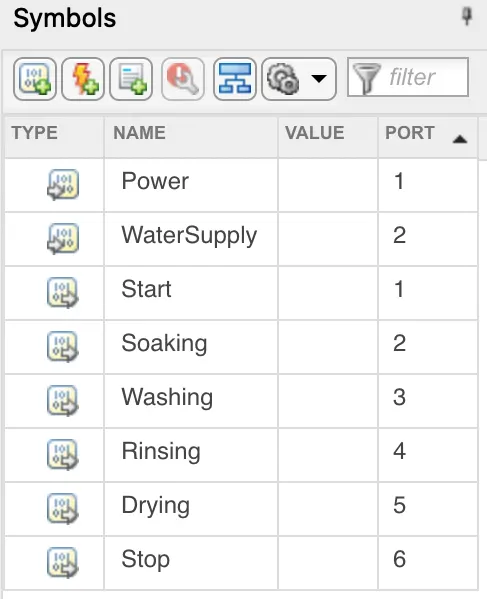
Here is the list of Inputs & Outputs of the Stateflow Model -
SIMULINK MODEL :
BLOCKS USED :
Here is the list of blocks used in this Simulink model -
- Toggle Switches
- Constants
- Stateflow Logic Control Chart
- Displays
- Lamps
EXPLANATION :
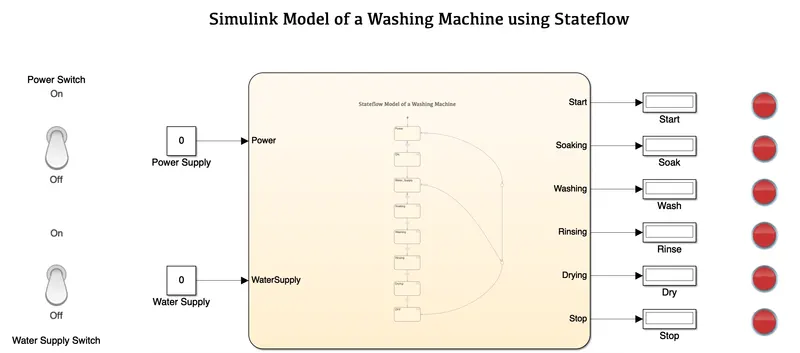
- In this Simulink model, we have used various switches, displays and lamps.
- Using a Stateflow model, we sorted out inputs and outputs ports which can be easily seen in the block diagram.
- In Inputs we have used Toggle Switches to give ON/OFF instructions to the ports with the help of Constant blocks represented in the form of 0 and 1 for OFF & ON conditions.
- Once the inputs supply which is in the form of Power is given then it will process the operation using Chart (Stateflow).
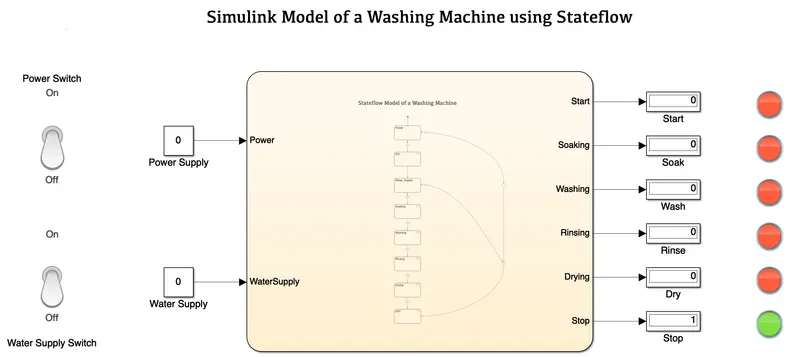
- After every operation, its output ports will show the results in the form of 0 and 1 in the Display along with a LED Lamp either Green or Red based on ON & OFF conditions respectively.
RESULTS :
1). Power & Water Supply in OFF Condition -
2). Power is ON but Water Supply is OFF -
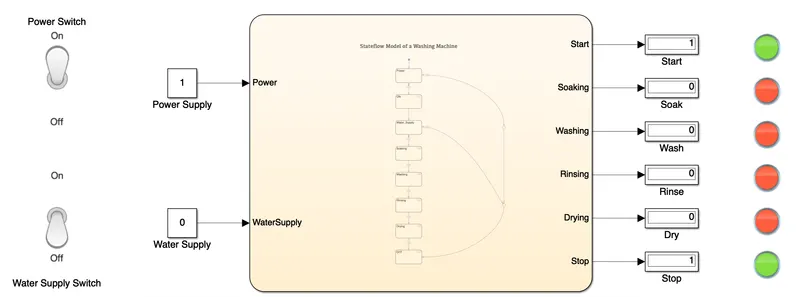
3). Power & Water Supply is ON -
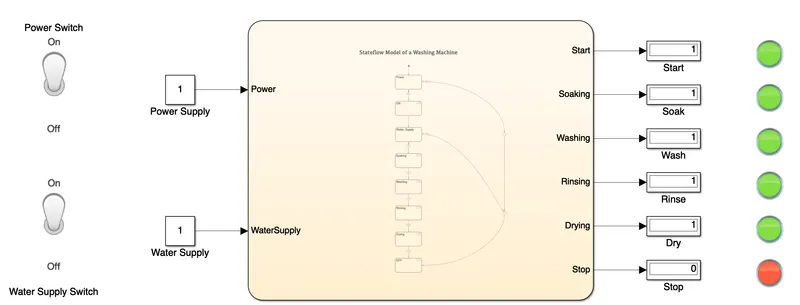
4). Soaking Process -
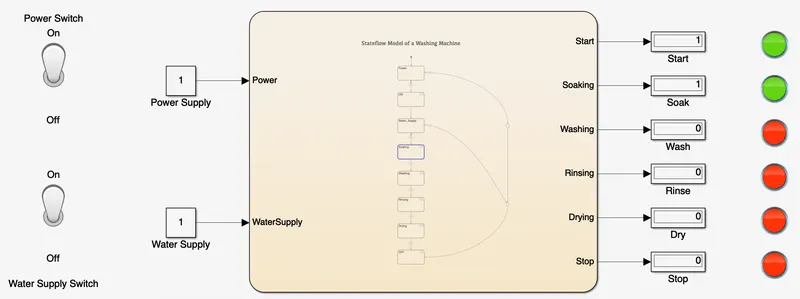
5). Washing Process -
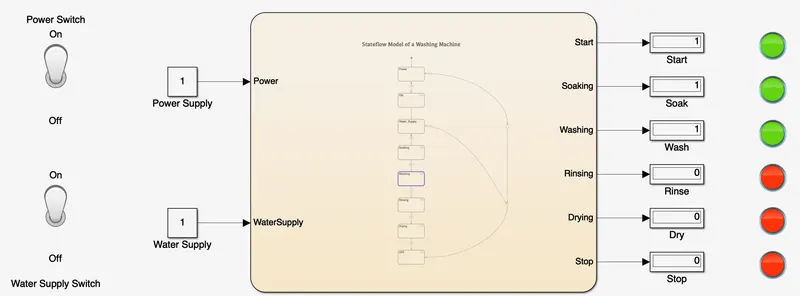
6). Rinsing Process -
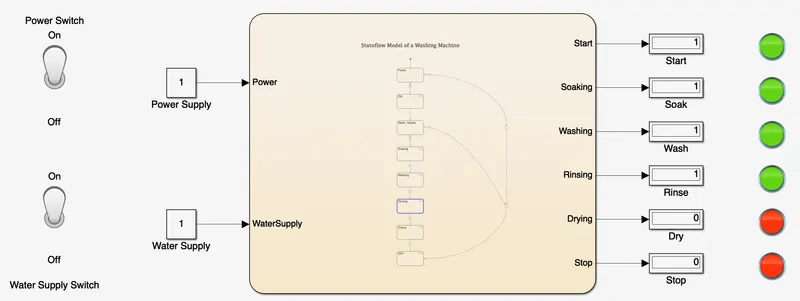
7). Drying Process -
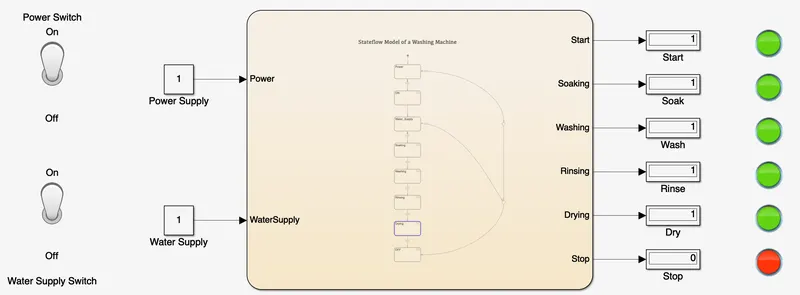
CONCLUSION :
We have executed a washing machine using Simulink and Stateflow chart. Also performed all the specified conditions required during this flow.
REFERENCES :
Que. 2
AIM : To create a Stateflow logic chart for the Gear shift using Simulink.
OBJECTIVES :
- To create a logic chart for a Gear Shifter.
- To perform a Gear Shifter model using the Simulink blocks.
- To provide speed inputs while the simulation is running.
- To display the gear number.
GIVEN CONDITIONS :
| Gear | 1 | 2 | 3 | 4 | 5 |
| Speed Range | 0 to 15 kmph | 16 to 25 kmph | 26 to 40 kmph | 41 to 60 kmph | Above 61 kmph |
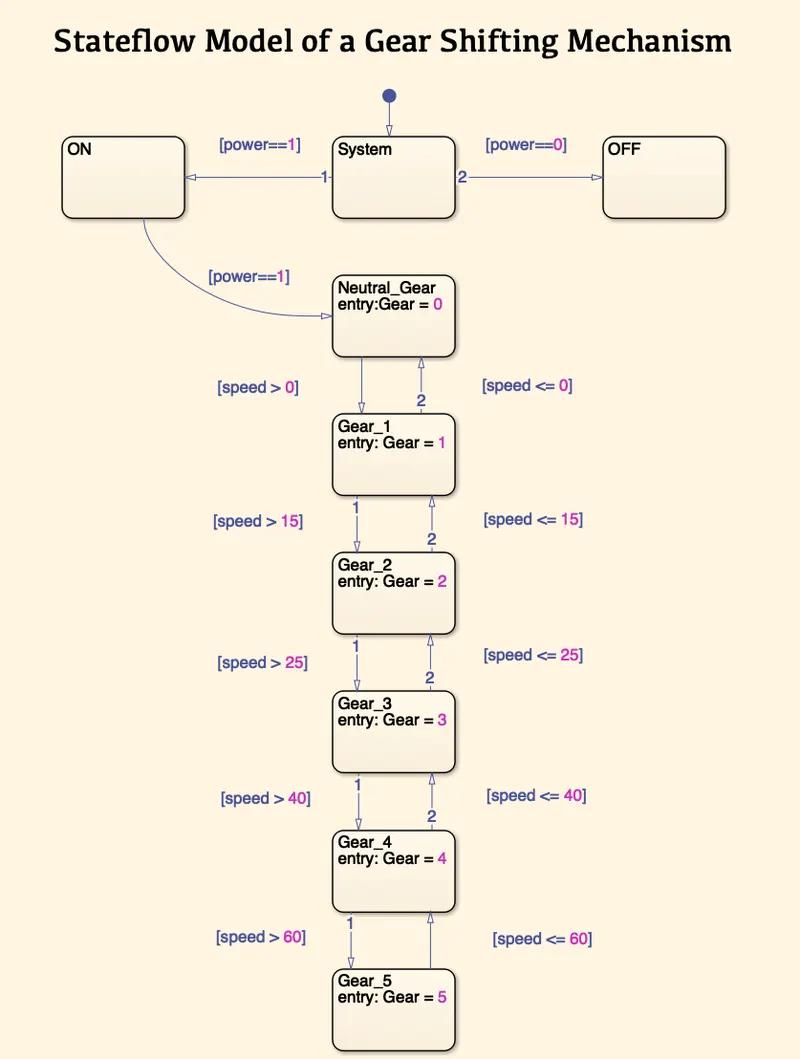
STATEFLOW CHART :
STATES USED :
Here is the list of logic used in this Stateflow model -
- States
- Transitions
- Conditions
EXPLANATION :
- In this Stateflow model, we have two inputs named Power and Speed which are connected with a System State have a Transition line.
- The system has two initial conditions ON & OFF indicated as [power==1] and [power==0] respectively.
- If the system is ON then the process will start.
- During the initial stage, the system will be in Neutral Gear.
- Once the speed is increased from 0 to 15 kmph then Neutral Gear will shift to Gear 1.
- If the speed is increased from 16 to 25 kmph then Gear 1 will shift to Gear 2.
- Similarly, for 26 to 40 kmph then Gear 2 will shift to Gear 3.
- For 40 to 60 kmph, Gear 3 will shift to Gear 4.
- If the speed is above 60 kmph then Gear 4 will shift to Gear 5.
- During this process, if the speed decreases based on the conditions it will shift its Gear either it will move to the next one or it will move to the previous one.
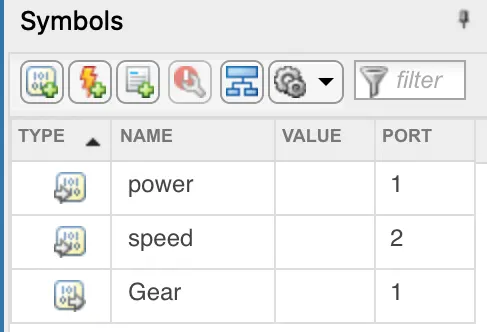
- Below is the list of ports specified during this flow.
INPUT & OUTPUT PORTS :
SIMULINK MODEL :
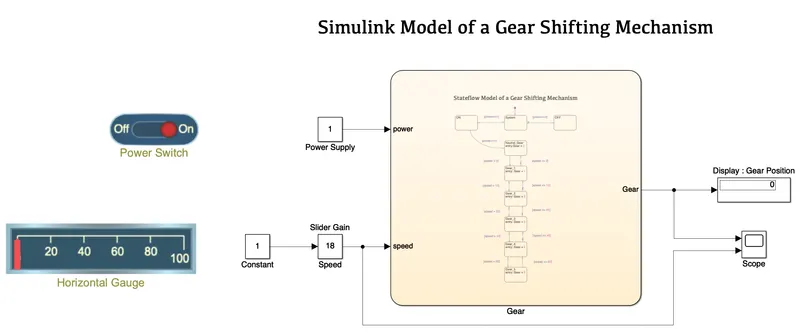
BLOCKS USED :
Here is the list of blocks used in this model -
- Chart
- Slider Switch
- Constants
- Slider Gain
- Horizontal Gauge
- Display
- Scope
EXPLANATION :
- In this Simulink model, we first created a Stateflow Chart having all the conditions required to change gears based on the speed.
- From the chart, we have two inputs (Power Supply and Speed) and one output (Gear).
- In Input, a Slider Switch is connected with a Constant Power block.
- Along with the slider switch, we have a Slider Gain block which is connected with other input termed Speed. It is also connected with a Constant block along with a Horizontal Gauge which shows the change of speed with the help of a slider.
- At Output, we have a Display that helps to shows the gear number from 0 to 5. The Scope shows the graphs for the change of speed to the movement in the gear position.
RESULTS :
1]. Speed = 0 kmph at Neutral Gear
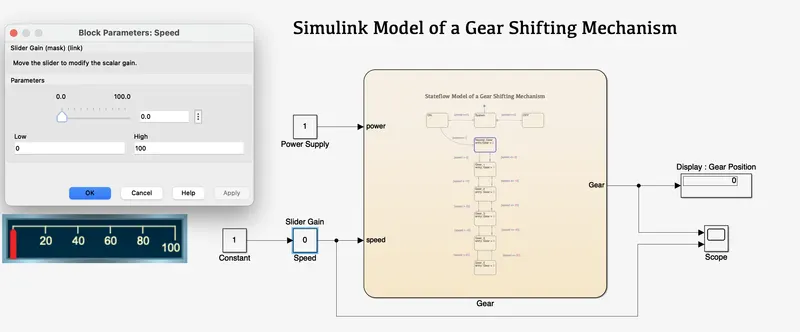
2]. Speed <= 15 kmph at Gear 1
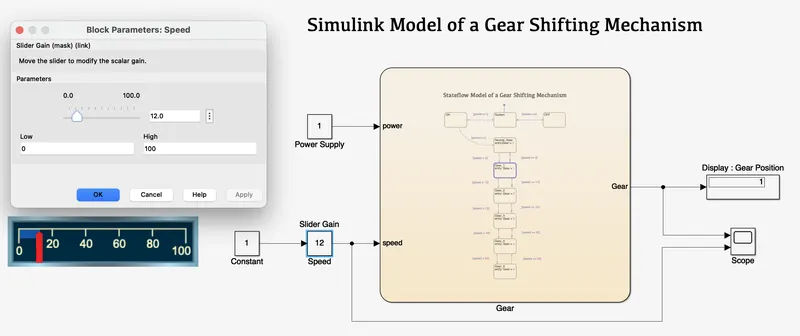
3]. Speed <= 25 kmph at Gear 2
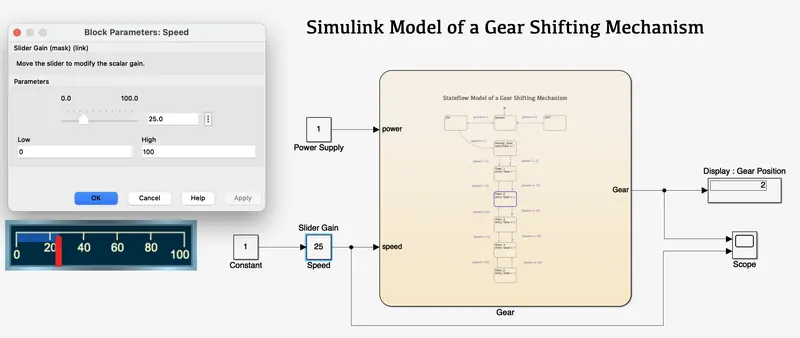
4.]. Speed <= 40 kmph at Gear 3
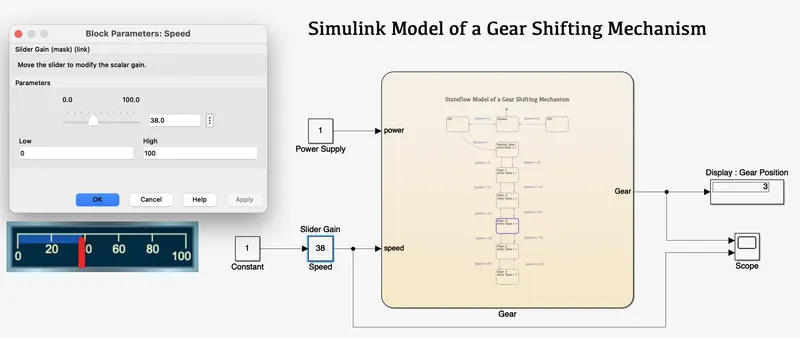
5]. Speed <= 60 kmph at Gear 4
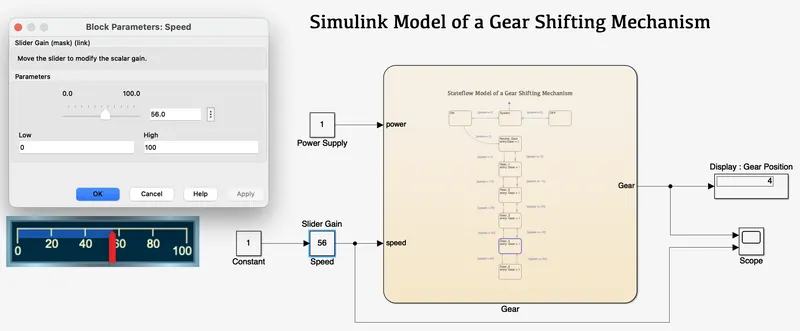
6]. Speed > 60 kmph at Gear 5
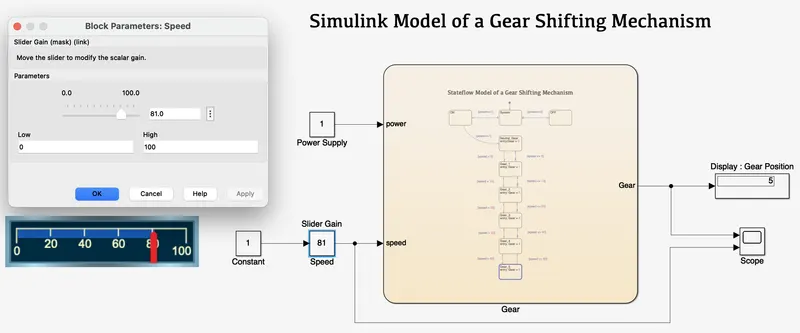
SCOPE :
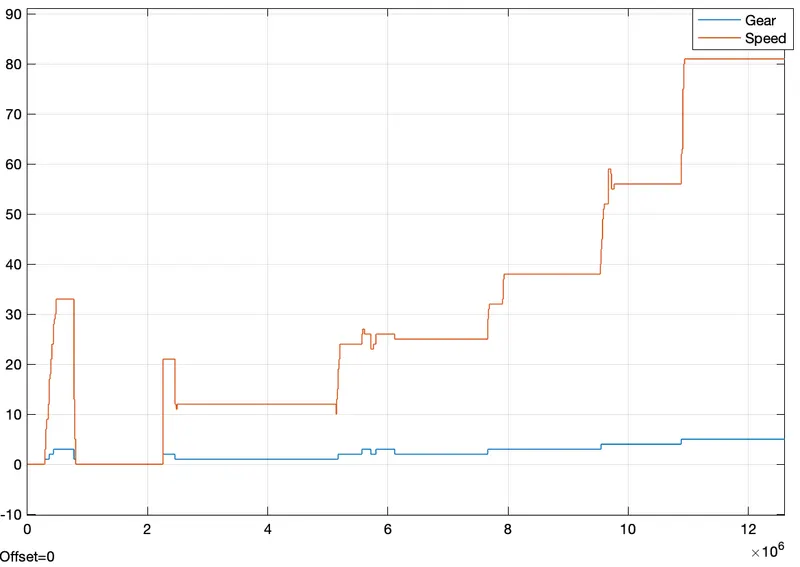
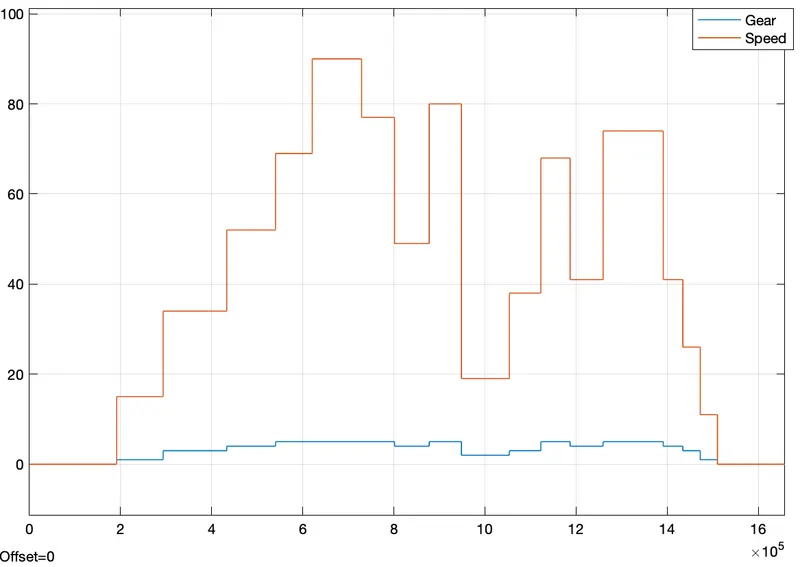
The above graph shows the changes in speed along with the shifting of gears.
CONCLUSION :
We used Simulink to develop a Stateflow model of the Gear Shifting Mechanism based on the following data. The data about gear movement in relation to speed is provided by this model.
REFERENCE :