Week - 4 - 2D meshing for Plastic components
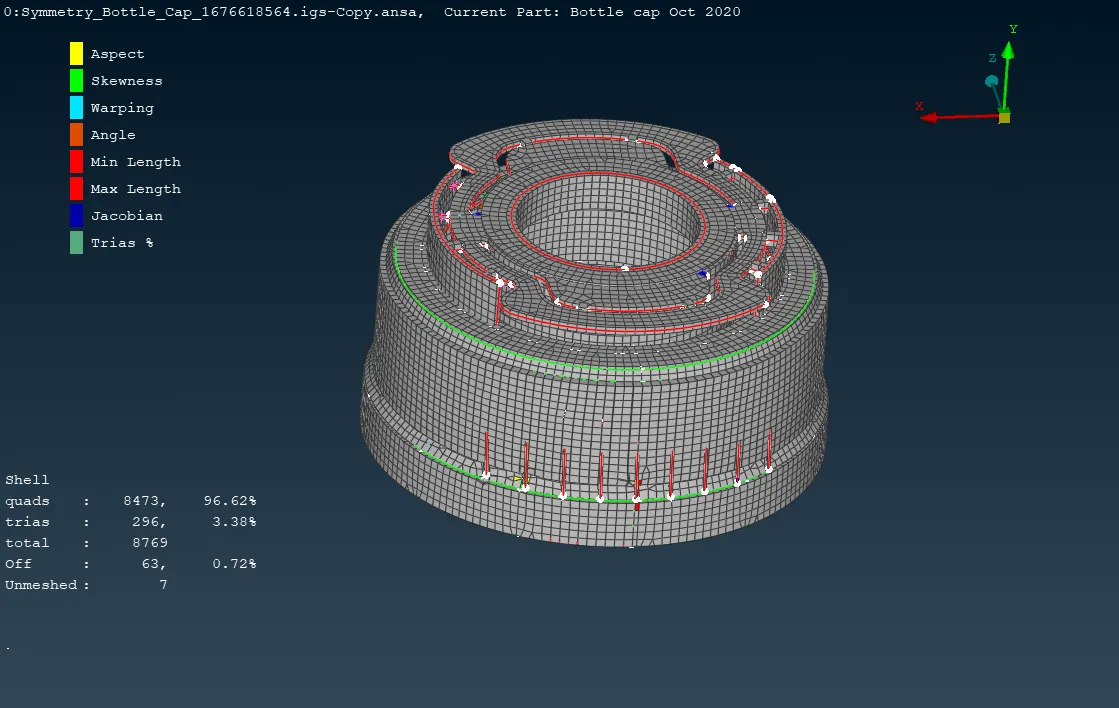
AIM:- To Mesh the plastic bottle cap model with given element Quality criteria.
OBJECTIVES:-
1. To check the geometrical errors and take the mid surface by suitable mid-surfacing techniques for a given model.
2. To set the PID and Thickness for all the mid surfaces drawn.
3. To mesh the given component.
Quality Criteria :-
|
S.No |
Quality Criteria |
Value |
|
1 |
Target/Average length |
1 |
|
2 |
Minimum Length |
0.5 |
|
3 |
Maximum Length |
3 |
|
4 |
Aspect |
3 |
|
5 |
Warpage |
15 |
|
6 |
Skewness |
45 |
|
7 |
Jacobian |
0.7 |
|
8 |
Minimum Quad Angle |
45 |
|
9 |
Maximum Quad Angle |
135 |
|
10 |
Minimum Tria Angle |
30 |
|
11 |
Maximum Tria Angle |
120 |
|
10 |
Tria Percentage |
15 |
PROCEDURE:-
IMPORT THE MODEL and CHECKING FOR GEOMETRY:
1. Import the given Hood Model in ANSA, File >Open.
2. Go to Tool > Checks > Geometry for Geometry Clean up after Importing the CAD Model successfully in ANSA.
3. After clicking on execute, all errors related to the model are shown which can be fixed with an automatic fix option available. But the errors which are not possible to clear can be clear manually by using different options in Topo.
MID-SURFACE CREATION:-
1. Now mid-surfacing is done with various methods. The Mid surface can be done by the automatic method also. Most of the time faces>offset option is used for mid-surfacing and the PID is set manually. In the automatic option i.e. faces > middle the PID is set automatically. Sometimes the middle curve is taken wherever necessary and then the faces are created by joining the curves.
MESHING:-
1. After generating the mid surface, we will move towards the meshing.
2. Set the given Quality Criteria. Go Utilities > Quality Criteria Option and assign the given Quality Criteria Values.
3. Go to Utilities > Mesh Parameters and assign the Average Value, Minimum, Maximum Value for 2D Meshing.
4. Go to Mesh>Perimeters> Length Option and Select the Component to Mesh and enter the Value of Perimeter Length and Macro Length for Meshing.
5. Go to Mesh >Mesh Generation > Best Mesh
6. Go to Shell Mesh>Reconstruct to rearrange the Mesh and Use Shell Mesh>Smooth Option to smoothen the mesh flow.
7. To eliminate, minimize the trias for getting better mesh flow. use Elements>Split / Swap / Joint option and also Grids-->Paste Option.
8. Go to Quality Parameter-->Presentation Parameters and select Draw shell as solid, click Apply, and Ok.
LEARNING OUTCOMES:-
1. Learned that how to remove the geometry errors in models.
2. Learned mid-surfacing the complex component with varying thickness.
3. Learned the 2D meshing for the complex molded component.
CONCLUSION:- Using given quality criteria, the bottle cap is meshed successfully with a minimum percentage of tria and apply the thickness to the given model after meshing is done.
...