Week - 4 - 2D meshing for Plastic components
2D MESHING FOR PLASTIC COMPONENTS
AIM
For the given Plastic Bottle Cap model, check for the geometrical errors and take the mid surface by suitable mid surfacing techniques. PID and Thickness assignment has to be done for all the mid surfaces. Mesh the same with given element Quality criteria.
INTRODUCTION
COMPUTER AIDED ENGINEERING (CAE)
Computer-aided engineering (CAE) is the use of computer software to simulate performance in order to improve product designs or assist in the resolution of engineering problems for a wide range of industries. This includes simulation, validation and optimization of products, processes, and manufacturing tools.
A typical CAE process comprises of preprocessing, solving, and postprocessing steps. In the preprocessing phase, engineers model
the geometry (or a system representation) and the physical properties of the design, as well as the environment in the form of applied loads or constraints. Next, the model is solved using an appropriate mathematical formulation of the underlying physics. In the post-processing phase, the results are presented to the engineer for review.
ANSA
ANSA - Stands for Automatic net generation for stuctural analysis. ANSA is an advanced multidisciplinary CAE pre-processing tool that provides all the necessary functionality for full-model build up, from CAD data to ready-to-run solver input file, in a single integrated environment.
ANSA is the users’ preference due to its wide range of features and tools that meet their needs. The list of productive and versatile features is long and the alternative tasks and processes to be completed using them are countless.
MODEL
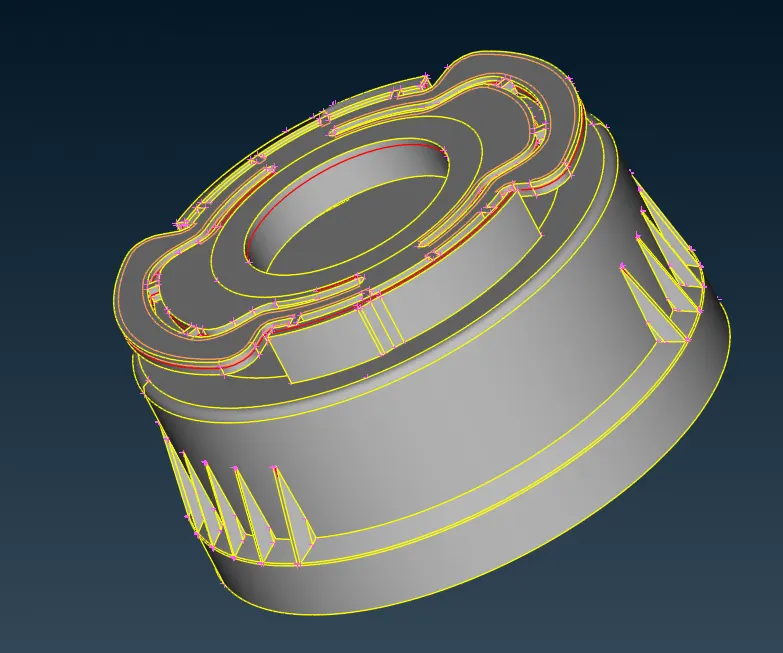
PROCEDURE
- Open the Bottle cap model from the files and it must be carried out for several operations .
- Check the geometry of the model from the 'checks' and execute the operation by selecting required check parameters .
- Fix the geometry manualy or by means of auto fix (geometry clean up ) .
- After geometric clean up , we have to perform 'MID SURFACING' for each property .
- Mid surfacing can be done manualy by offset method or automaticaly .
- Measure the thickness of the component by measure command .
From TOPO ----> Faces --> Offset ( enabling the feature area ON in 40 degree ) select any face of the model , ensure that the other face is not selected .
After selecting the face we are supposed to provide the offset length ( thickness/2) and sign regarding offset direction (+ or - ).
The offseted surface needs to be extracted in order to perform meshing , for this
select 'Not' ( for hiding the selected entities ) and turning ON 'PID' then select the non mid surface and entering by middle clicking .
OR
select ' !Not ' ( to keep only the selected entities ) and turning ON the 'PID' , then select the mid surface and enter .
The neighbouring surfaces can be finded by using " And ".
- Mid surfaces can be obtained by different methods manually or automated .
we can obtain the mid surfaces of each part with respect to their allignation in the model .
Either we can use faces / offset and selecting the face ,then giving the offset direction and offseting thickness
The next way is using middle in faces and selecting the faces .
We can obtain the middle by selecting multiple faces as red,green and blue .
MID SURFACE
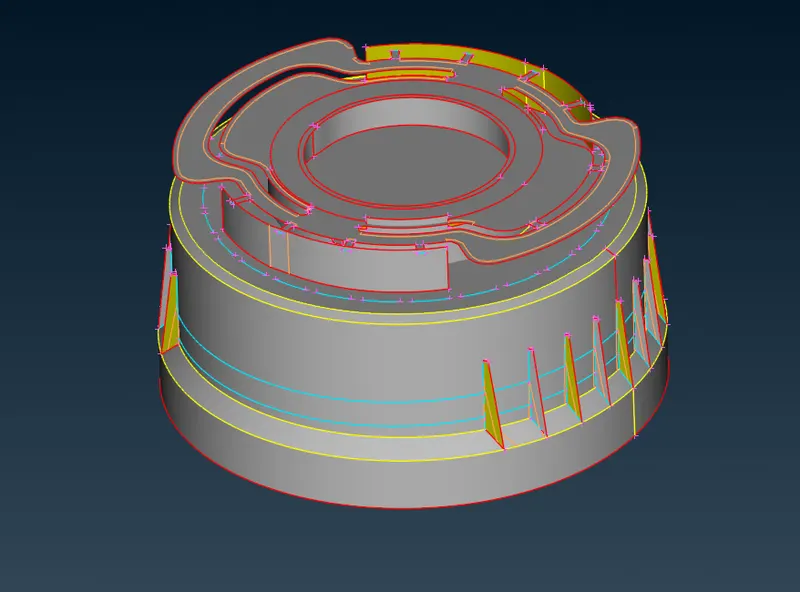
- A proper or given quality parameter criteria must be provided for the components by clicking F11 .
The assaigned quality criteria is,
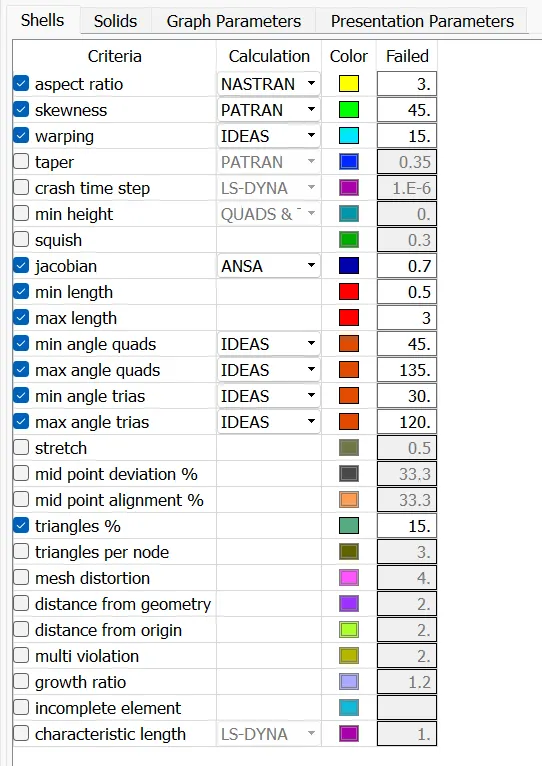
- Go to presentation parameter and turn ON the elements % .
- After the Mid surfacing and setting quality parameters, the meshing needs to be performed .
- For meshing a proper mesh parameters should be given .
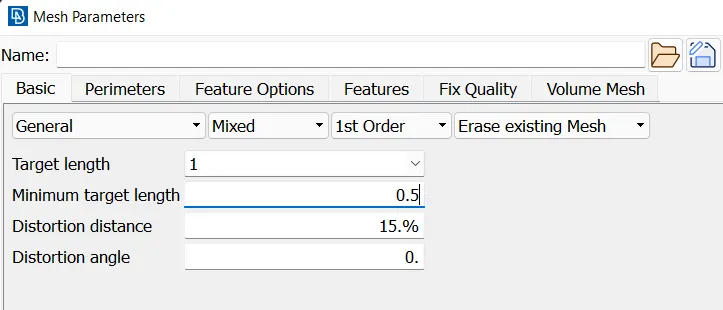
- Give proper Topo for the property ,and set a average length using perimeters in classic mesh option .
- Perform Fine for a perfect edges and actual design .
- Remove un wanted hotpoints from the components using delete/insert option in hotpoint option from TOPO.
- Check for minimum length and if founded supress it using cut in faces at topo .
- For performing mesh select classic mesh and go for mesh generation and select best .
- Modify or make the the mesh perfect by using smooth,reconstruct,split commands .
- Remove the trias from the edges for perfect meshing .
- Perform proper and good assigned mesh in all the components .
LEARNING OUTCOMES
made in practice with new tools in ANSA .
- intersecting the faces is done by using faces/intersect and selecting .
- extenting the surfaces can be performed in faces/extent .
- projecting the cons can be performed in cons/project .
- the curves or the thread and teeth here is midsurfaced by using curves/middle/selecting con/edges.
- these curves can be projected by using project in cons .
for making mesh improved ,
classic mesh - shell mesh - smooth / reconstruct
for changing trias position
classic mesh - element - split
classic mesh - grids - paste
- For performing geometric clean up ,
geometry - execute - finding - fixing manualy/ auto fix
2.for Mid surfacing ,
Topo - faces - offset -select face-enter offset value/direction- ok
3.for mid surface extraction,
!Not - turn on PID - select the mid plane - enter
OR
Not - turn on PID - Select any thickness face - enter
4.for getting neighbouring elements
And - select - enter
5.for deleting hot points ,
hotpoint - insert/delete
6.for deleting un wanted lines ,
topo - faces - cut -select - right click
7.for making the design good,
topo - auxilleries - fine - enter
8.for removing triple cons ,
topo - CONS - release - enter
9. for joining two single cones,
faces -topo - select separate
CONCLUSION
Performed geometric clean up , mid-surface generation,shell meshing and element quality check on the given plastic bottle cap model by using ANSA preprocessor .
note* i have tried to upload my completly finished file having a size more than 50 mb several times . but it dont get uploaded
so that i uploaded the smaller partial file ,which is incomplete.
so iam attaching the screen shots along with that..
i have meshed all the parts and performed smooth and reconstructed and splited it to the good .
but the file is not uploading .please concern