Week 4.1 - Solving second order ODEs
Program to simulate pendulum motion
Sub program
function [dtheta_dt] = ode_func(t,theta,b,g,l,m)

theta1 = theta(1)
theta2 = theta(2)
dtheta1_dt = theta2;
dtheta2_dt = -(b/m)*theta2 - (g/l)*sin(theta1);
dtheta_dt = [dtheta1_dt; dtheta2_dt];
end
Main program
clear all
close all
clc

% Solving the second order ODE and to show the animation

b = 0.05;                  % Damping co-efficient
g = 9.81;                  % Gravity in m/s2
l = 1;                     % Length of the pendulum in, m
m = 1;                     % Mass of the ball in, Kg

% Initial condition
theta_0 = [0;3];

% Time points
t_span = linspace(0,20,500);

% ODE function calling
[t,results] = ode45(@(t,theta) ode_func(t,theta,b,g,l,m),t_span,theta_0);

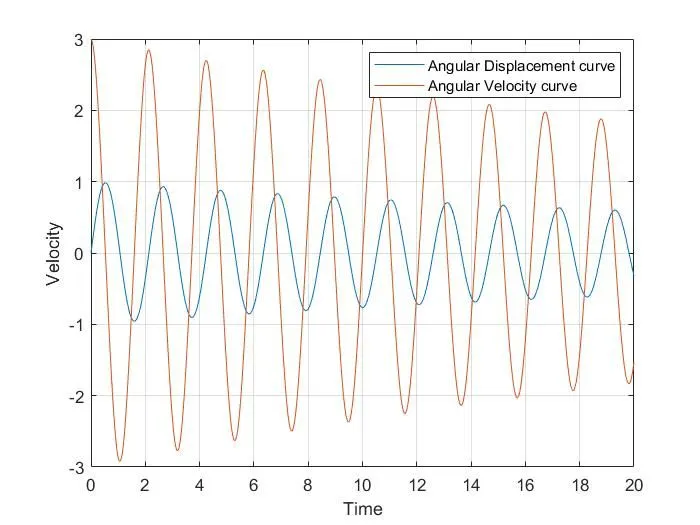
figure(1)
plot(t,results(:,1))
hold on
plot(t,results(:,2))
xlabel('Time')
ylabel('Velocity')
legend('Angular Displacement curve','Angular Velocity curve')
grid on


    theta2 = results(:,1);

for i = 1:length(theta2)

    theta_x = theta2(i);

    % co-ordinates
    x0 = 0;
    y0 = 0;

    x1 = l*sin(theta_x);
    y1 = - l*cos(theta_x);

    % Plotting
    figure(2)
    plot([-1 1],[0 0],'color','b','linewidth',10);
    hold on
    plot([x0 x1],[y0 y1],'color','r','linewidth',5);
    hold on
    plot(x1,y1,'o','markers',20,'markerfacecolor','g');
    hold off
    grid on
    axis([-2 2 -2 2]);
    pause(0.03)
    F(i) = getframe(gcf);
end

videofile = VideoWriter('Simple_Pendulum.avi');
open(videofile)
writeVideo(videofile,F)
close(videofile)
1. Initial displacement of the pendulum is zero and intial velocity is 3.
2. Time span of 0-20 seconds upto 500 values in a form of array is used with help of linspace command.
3. ode45 is a in build solver in Matlab. @(t,theta) it defines ode is a function of 't' and 'theta'. ode_func(t,theta,b,g,l,m) it defines how a ode function is defined and so called ode function definition.
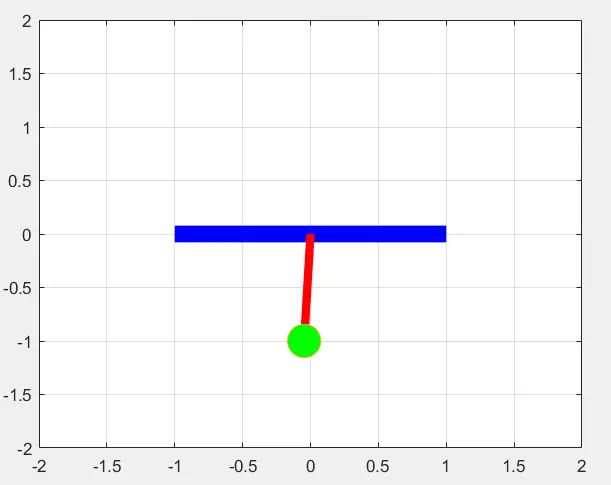
4. figure(2) animation - In which For loop is used. The new value of theta_x is created and saved for each value of theta2 which is going to creare co-ordinates of simple pendulum such as x1,y1 and x0,y0.
5. markers command is used to specify ball shape of simple pendulum.
6. videofile = VideoWriter('Simple_Pendulum.avi'); - Video file is created and saved in the name of ;simple_pendulum'.
7. F(i) = getframe(gcf); - video is saved frame by frame.
figure(1)
figure(2) Motion of simple pendulum
https://drive.google.com/file/d/1cYxTpFJjjHEb58NjhSivyHy7UmHJsfqo/view?usp=sharing