Week 3.2 - 2R Robotic Arm Challenge
AIM
To determine final position of the manipulator if ө1 and ө2 are given.
To calculate position of link1 and link2 of a robotic arm.
Plotting two links of a robot and animating it for different position of ө1 and ө2.
GOVERNING EQUATIONS
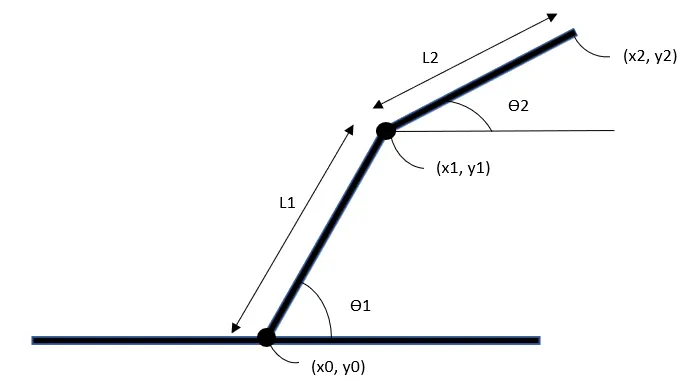
Two links having two different position(angels) which is ө1 and ө2 with respect to x-axis.
l1, l2 are the length of link1 and link2.
Co-ordinate - (x0, y0) is starting point of link1.
Co-ordinate - (x1, y1) starting point of link2 as well as ending point of link1.
Co-ordinate – (x2, y2) ending point of link2.
Each value in co-ordinates is represented by:
x0 = 0;
y0 = 0;
x1 = l1*cosd(THETA1);
y1 = l1*sind(THETA1);
x2 = x1 + l2*cosd(THETA2);
y2 = y1 + l2*sind(THETA2);
In MATLAB cosd, sind represents theta in degrees.
OBJECTIVES
Plotting two links & animating it to understand how ‘ө2’ changes with respect to ‘ө1’
Program to simulate 2R robotic arm:
clear all
close all
clc


%Inputs
l1 = 1;
l2 = 0.5;
theta1 = linspace(0,90,10);
theta2 = linspace(0,90,10);

ct=1;
for i = 1:length(theta1)
    THETA1 = theta1(i);
    for j = 1:length(theta2)
        THETA2 = theta2(j);
        x0 = 0;
        y0 = 0;

        x1 = l1*cosd(THETA1);
        y1 = l1*sind(THETA1);

        x2 = x1 + l2*cosd(THETA2);
        y2 = y1 + l2*sind(THETA2);

        % Plotting

        plot([x0 x1],[y0 y1],[x1 x2],[y1 y2],'linewidth',3)
        axis([-0.1 1.5 0 1.5])
        pause(0.03)
        M(ct) = getframe(gcf);
        ct = ct+1;
    end
end

movie(M)
videofile = VideoWriter('forward_kinematics.avi');
open(videofile)
writeVideo(videofile,M)
close(videofile)
1. For loop is used, for each value of i and j the THETA1 and THETA2 value is going to change with respect to given co-ordinates.
2. while animating writeVideo(videofile,M), in this command v should be capital. This error is incurred during simulation.
3. Similarly videofile = VideoWriter('forward_kinematics.avi'); in this command v and w should be capital.
4. 'linewidth', 3 is going to give thicker line for clear view.
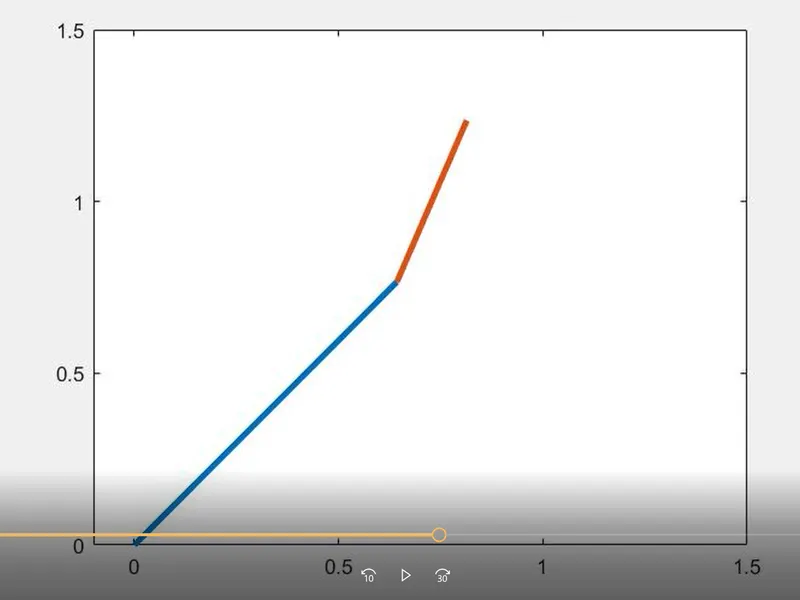
*** I am not able to stitch the simulated video next time i will upload it by knowing it. ***