MATLAB Program to Optimise the Stalagmite Function using Genetic Algorithm
AIM :
To write a code in MATLAB to optimise the stalagmite function and find the global maxima of the function.
OBJECTIVES :
- To optimise the stalagmite function.
- To understand the concept of genetic algorithm and explain the syntax for 'ga' in MATLAB.
- Plot graphs for studies and for 'F maximum vs No. of Iterations'.
THEORY :
The genetic algorithm is a method for solving both constrained and unconstrained optimization problems that are based on natural selection, the process that drives biological evolution. It repeatedly modifies a population of individual solutions. At each step, the genetic algorithm selects individuals at random from the current population to be parents and uses them to produce the children for the next generation.
We can apply the genetic algorithm to solve a variety of optimization problems that are not well suited for standard optimization algorithms, including problems in which the objective function is discontinuous, nondifferentiable, stochastic, or highly nonlinear.
The genetic algorithm uses three main types of rules at each step to create the next generation from the current population:
-
Selection rules select the individuals, called parents, that contribute to the population of the next generation.
-
Crossover rules combine two parents to form children for the next generation.
-
Mutation rules apply random changes to individual parents to form children.
The genetic algorithm differs from a classical, derivative-based, optimization algorithm in two main ways, as summarized in the following table.
| Classical Algorithm | Genetic Algorithm |
|---|---|
|
Generates a single point at each iteration. The sequence of points approaches an optimal solution. |
Generates a population of points at each iteration. The best point in the population approaches an optimal solution. |
|
Selects the next point in the sequence by a deterministic computation. |
Selects the next population by computation which uses random number generators. |
Syntax for ga in MATLAB
- x = ga(fun,nvars)
- x = ga(fun,nvars,A,b)
- x = ga(fun,nvars,A,b,Aeq,beq)
- x = ga(fun,nvars,A,b,Aeq,beq,lb,ub)
- x = ga(fun,nvars,A,b,Aeq,beq,lb,ub,nonlcon)
- x = ga(fun,nvars,A,b,Aeq,beq,lb,ub,nonlcon,options)
- x = ga(fun,nvars,A,b,Aeq,beq,lb,ub,nonlcon,intcon)
- x = ga(fun,nvars,A,b,Aeq,beq,lb,ub,nonlcon,intcon,options)
- x = ga(problem)
- [x,fval] = ga(___)
- [x,fval,exitflag,output] = ga(___)
- [x,fval,exitflag,output,population,scores] = ga(___)
where,
fun - Objective function
nvars - Number of variables
A - Linear inequality constraints (real matrix)
b - Linear inequality constraints (real vector)
Aeq - Linear equality constraints (real matrix)
beq - Linear equality constraints (real vector)
lb - Lower bounds (real vector or array)
ub - Upper bounds (real vector or array)
nonlcon - Nonlinear constraints (function handle function name)
options - Optimization options (structure)
intcon - Integer variables (vector of positive integers)
problem - Problem description (structure)
x - Solution (real vector)
fval - Objective function value at the solution (real number)
exitflag - Reason ga stopped (integer)
output - Information about the optimization process (structure)
population - Final population (matrix)
scores - Final scores (column vector)
EQUATION
`f(x,y) = f_1, xf_2, xf_1, yf_2, y`
`f_1.x = [sin(5.1pix + 0.5)]^6`
`f_1,y = [sin(5.1piy + 0.5)]^6`
`f_2,x = exp [-4ln(2) (x-0.0667)^2/0.64]`
`f_2,y = exp [-4ln(2) (y-0.0667)^2/0.64]`
PROGRAM :
Functional Program
% Stalagmite function
function [F] = stalagmite(input_vector)

x = input_vector(1);
y = input_vector(2);

term1 = (sin(5.1*pi*x + 0.5))^6;              % f_1,x
term2 = (sin(5.1*pi*y + 0.5))^6;              % f_1,y
term3 = exp(-4*log(2).*((x-0.0667)^2)/0.64);   % f_2,x
term4 = exp(-4*log(2).*((y-0.0667)^2)/0.64);   % f_2,y

[F] = -(term1*term2*term3*term4);

end
Main Program
% Genetic Algorithm Program to find global maxima using MATLAB
clear
close all
clc

% Defining our search space
x = linspace(0,0.6,150);
y = linspace(0,0.6,150);

[xx, yy] = meshgrid(x,y);

% For 50 Iteration
num_cases = 50;

% Study 1 : Statistical Behaviour
for i = 1:length(xx)
    for j = 1:length(yy)
        input_vector(1) = xx(i,j);
        input_vector(2) = yy(i,j);
        f(i,j) = stalagmite(input_vector);
    end
end

tic
for i = 1:num_cases
    [inputs, fopt(i)] = ga(@stalagmite, 2);
    xopt(i) = inputs(1);
    yopt(i) = inputs(2);
end
study1_time = toc;

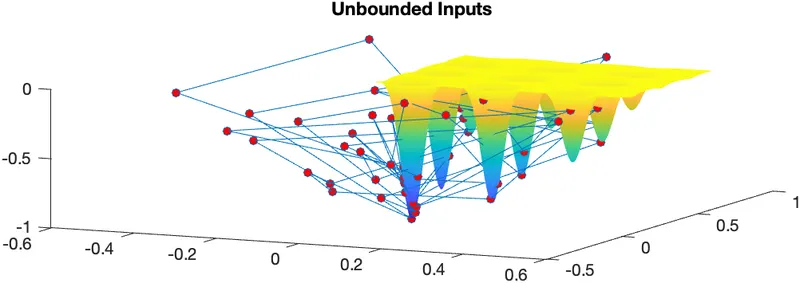
figure(1)
subplot(2,1,1)
hold on
surf(x,y,f)
shading interp
plot3(xopt,yopt,fopt,'Marker','o','MarkerSize',5,'MarkerFaceColor','r')
title('Unbounded Inputs')
subplot(2,1,2)
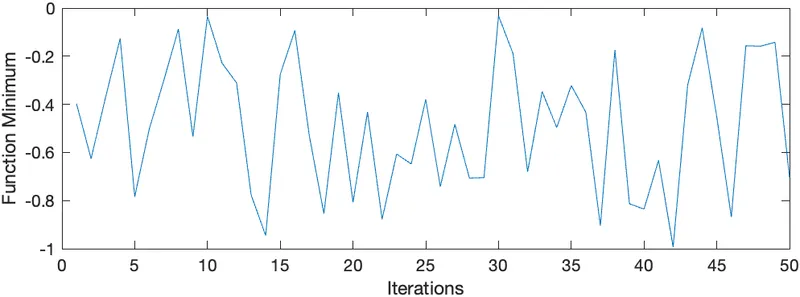
plot(fopt)
xlabel('Iterations')
ylabel('Function Minimum')

tic
% Study 2 : Statistical Behaviour with Upper and Lower bounds
for i = 1:num_cases
    [inputs,fopt(i)] = ga(@stalagmite,2,[],[],[],[],[0;0],[1;1]);
    xopt(i) = inputs(2);
    yopt(i) = inputs(2);
end
study2_time = toc

figure(2)
subplot(2,1,1)
hold on
surf(x,y,f)
shading interp
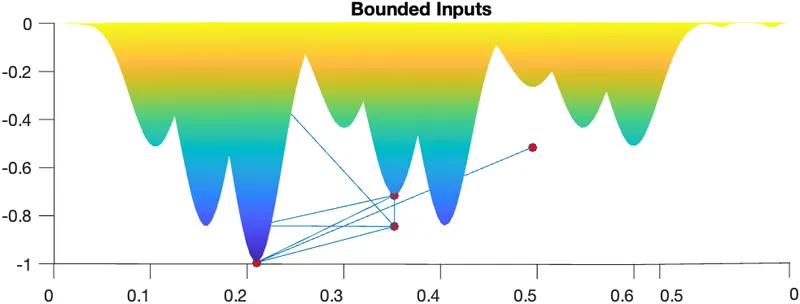
plot3(xopt,yopt,fopt,'Marker','o','MarkerSize',5,'MarkerFaceColor','r')
title('Bounded Inputs')
subplot(2,1,2)
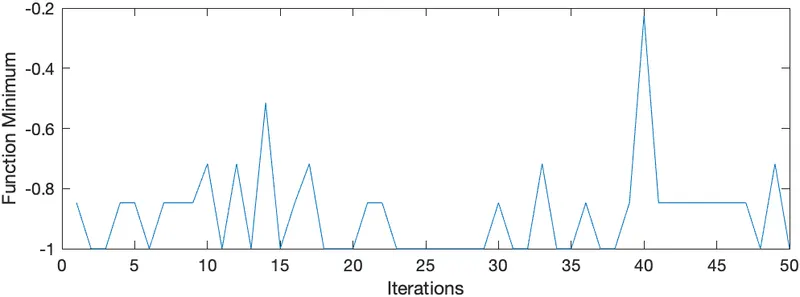
plot(fopt)
xlabel('Iterations')
ylabel('Function Minimum')


% Study 3 : Increasing GA iterations
options = optimoptions('ga');
options = optimoptions(options,'PopulationSize',400);

tic
for i = 1:num_cases
    [inputs,fopt(i)] = ga(@stalagmite,2,[],[],[],[],[0;0],[1;1],[],[],options);
    xopt(i) = inputs(1);
    yopt(i) = inputs(2);
end
study3_time = toc;

figure(3)
subplot(2,1,1)
hold on
surf(x,y,f)
shading interp
plot3(xopt,yopt,fopt,'Marker','o','MarkerSize',5,'MarkerFaceColor','r')
title('Bounded Inputs with Increased Population Size')
subplot(2,1,2)
plot(fopt)
xlabel('Iterations')
ylabel('Function Minimum')
RESULTS :
Study 1 - Unbounded Inputs
Study 2 : Bounded Inputs
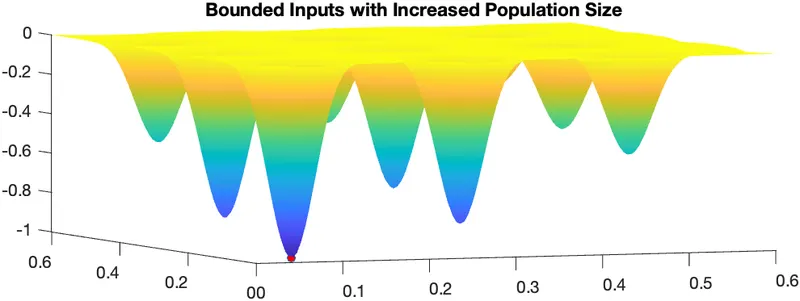
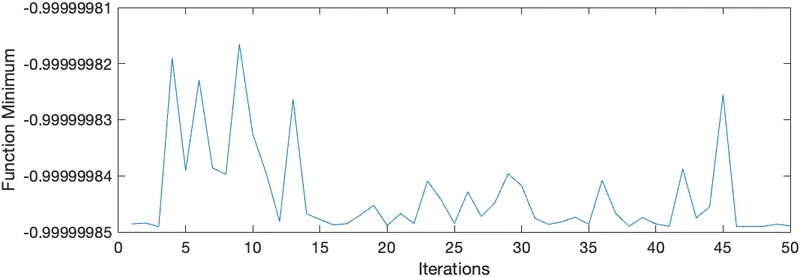
Study 3 - Bounded Inputs with Increased Population Size
Outputs -
CONCLUSION :
Hence,
Study 1 : 'ga' predicts all the possible points for finding 'global maxima'.
Study 2 : Here 'ga' eliminates most of the predicted points, so that we can reach nearby for finding 'global maxima'.
Study 3 : 'ga' predicts the 'global maxima' by increasing population.
REFERENCES :