Week 3 - Solving second order ODEs
"Week 3 - Solving second order ODEs".
Aim:
To write a program to solve a 2nd order ODE that represents the motion of a simple pendulum & also to create the animation of its motion.
Objective:
To write a program that solves the following ODE which represents the equation of motion of a simple pendulum with damping
Where,
g = gravity in m/s2,
L = length of the pendulum in m,
m = mass of the ball in kg,
b=damping coefficient.
And also to simulate the motion between 0-20 sec, for angular displacement=0,angular velocity=3 rad/sec at time t=0.
Inputs from the question:
L=1 metre,
m=1 kg,
b=0.05.
g=9.81 m/s2
Basic Theory:
The ODEs (Ordinary Differential Equations) are very common in solving engineering problems and these can be solved by using the Matlab command "ode45".
In this case, we are solving the ODE that calculates for the change in pendulum angle w.r.t time and the rate of change of the angle by solving for a 2nd order ODE.
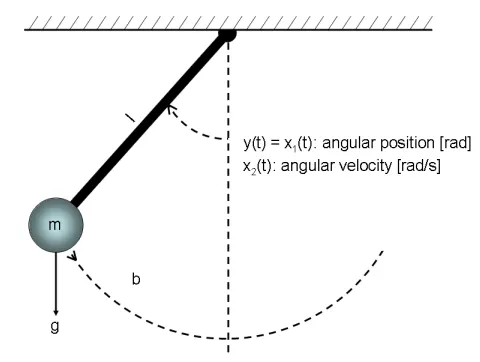
Here,
`theta`= The deflection angle
L = Length of the pendulum (1 m)
m = Mass of the pendulum (1 kg)
g = Acceleration due to gravity (9.81 in m/`s^2`)
b = damping coefficient (0.05)
When the pendulum is agitated it moves by an angle `theta` but due to gravity it decelerates and moves outwards. Then the pendulum returns towards center and then it oscilates.
If there was no resistance for this motion it would continue indefinitely but the surrounding air and bearing friction provides resistance to this motion hence, damps the motion.
The damping is calculated using the damping coefficient(b).
`(d(theta))/dt`: Change in `theta` w.r.t time
`(d^2(theta))/(d^2t)`: rate of change of `theta`w.r.t time
Equation of motion for the pendulum is,
`(d^2(theta))/(d^2t)+(b)/(m)(d(theta))/dt+(g)/(l)sin(theta)`
The above equation defines the values of `theta`
## Function Program:
function[dtheta_dt] = ode_func(t,theta,b,g,l,m)
% Defining 2nd order ODE in the form of 2 separate 1st order ODEs
theta1 = theta(1);
theta2 = theta(2);
dtheta1_dt = theta2;
% Motion Equation
dtheta2_dt = -(b/m)*theta2 - (g/l)*sin(theta1);
% Resulting Matrix
dtheta_dt = [dtheta1_dt; dtheta2_dt];
end
Code Explanation:
Here, as the "ode45" command solves only for 1st order ODE, we have defined the function with two 1st order ODEs that represent the main 2nd order ODE motion equation.
## Main Program:
% Program to simulate motion of a simple pendulum

clear all
close all
clc

% Inputs

 % Damping Coefficient
b = 0.05;
% Gravity in (m/s^2)
g = 9.81;
% Length of the pendulum in metre
l = 1;
% Mass of the ball in kg
m = 1;

% Initial Condition
theta_0 = [0;3];    % [angle displacement, velocity]

% Time Points
t_span = linspace(0,10,500);


% Solve ODE
[t, results] = ode45(@(t,theta)ode_func(t,theta,b,g,l,m),t_span,theta_0);

% Plots
figure(1)
plot(t,results(:,1),'color','b')       % Plot all rows from first column
hold on                                % retain all data from first plot
grid on
plot(t,results(:,2),'color','r')       % Plot all rows from second column
axis([0 10 -3 3])                      % Resize the graph to show X and Y axis from/to X,X(0,10) Y,Y(-3,3)
xlabel('Time')
ylabel('Angular Velocity and Angular Displacement')

x0 = 0;                                % to set a hinge point
y0 = 0;
ct = 1;
z = results(:,1);                      % all rows from first column which are angle values


% Pendulum Motion Animation

for i = 1:length(z)
    figure(2)                          % open in new window, new figure
    x1 = 1*sin(z(i));                % x coordinate from trigonometry
    y1 = -1*cos(z(i));                % y coordinate from trigonometry
    plot([x0 x1],[y0 y1],[-0.5 0.5],[0 0],'linewidth',3)    % a support line for hinge
    hold on
    plot(x1,y1,'marker','o','markersize',15,'markerfacecolor','r','markeredgecolor','k')
    axis([-1.5 1.5 -1.5 0.5])
    grid on
    pause(0.005)
    title('Pendulum motion with Matlab ode45')
    hold off

    M(ct) = getframe(gcf);
    ct = ct+1;
end

movie(M)                               % Starting to create a video file
videofile = VideoWriter('pendulum.avi','uncompressed AVI'); % Creating a video file named pendulum with avi extension
open(videofile)                        % Open the video file
writeVideo(videofile,M)                % write the plot images to the video file
close(videofile)                       % Close the video file
Code Explanation:
- At first, we set physics parameters of the pendulum like mass, length, gravity and damping coefficient.
- Then, set the initial conditions and timespan for which we want to run the simulation.
- To use the ode solver, use ode45 function with main inputs as (t and theta) while we use ode_func (the one we created earlier) with inputs as (t,theta,l,b,g,m) and t_span and theta_0 as the initial conditions.
- Next, these results are stored in an array of [t, results]
- Since results contain two components, angle displacement and velocity, to plot both the graphs, use the (:,1) and (:,2) property of MATLAB and plot those graphs.
- To create a animation, we have used a for loop so that we can get X and Y coordinates by using trigonometry.
- After that, we have used the pause() function to give a pause for every looping of values.
- At last, we have used the movie making command as per code to create a aniamtion video of pendulum.
Results:
Youtube Link: https://youtu.be/JOfFn_yjjR0
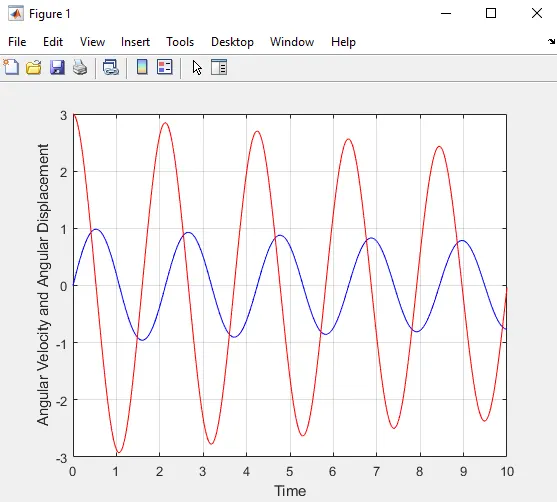
Errors Encountered:
1)
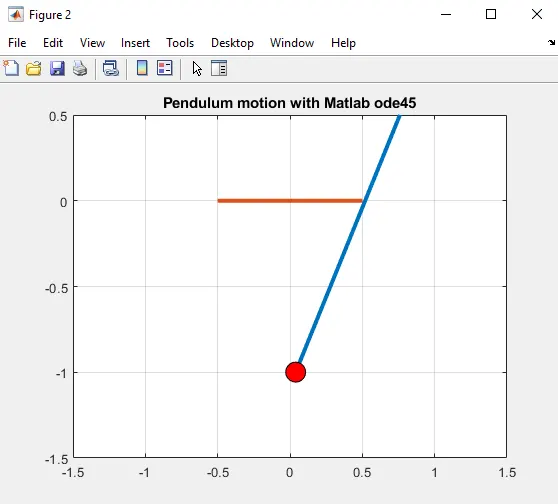
From the above diagram we can clearly see that the diagram of motion of pendulum was wrong as we used the hinge point (X0, Y0) at (1,1) . So, to get the correct motion of pendulum we changed the coordinates of (X0, Y0) at (0,0) .
2)
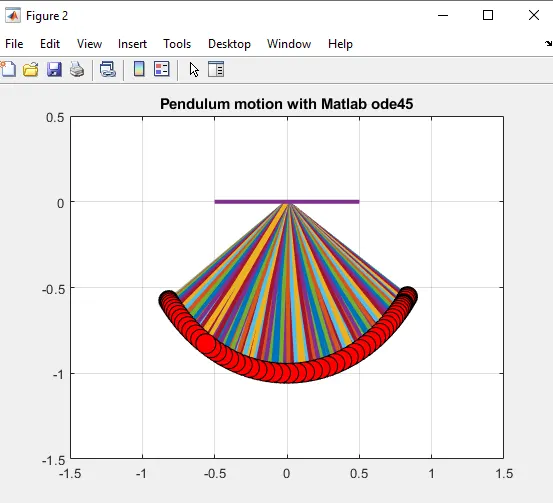
From the above diagram we can clearly see that the animation was overlapping. So, to fix the multiple line issue and to get the correct animation of pendulum we had to use the "hold off" command.
Conclusion:
We have sucessfully created a animation of pendulum by solving the 2nd order ODE in Matlab.