Week 3 - Solving second order ODEs
clear all
close all
clc

b = 0.05;
g = 9.81;
L = 1;
m = 1;

% time span
t_span = linspace(0,20,500);

% initial conditions
theta_0 = [0;3];   % [ displacement ; velocity ]

[t, results] = ode45(@(t,theta) ode_func(t,theta,b,g,L,m),t_span,theta_0);

displacement = results(:,1);
velocity = results(:,2);

figure('windowstate','maximized','Name','Second order ODE')
plot(t,results(:,1))
hold on
plot(t,results(:,2))
legend('Displacement - m','Velocity - m/s')
title('Displacement and Velocity vs time')
xlabel('time')
ylabel('Displacement and Velocity')
grid on


%% Creating Animation

ct=1;

figure('name','pendulum motion animation');

for i=1:length(results(:,1))
    x0=0;
    y0=0;
    x1=L*sin(results(i,1));
    y1=-L*cos(results(i,1));

    % Plot to create animation

    plot([-1 1],[0 0],'linewidth',3,'color','r');
    hold on
    plot ([x0 x1],[y0 y1],'linewidth',3,'color','k');
    hold on
    plot(x0,y0,'-o','markersize',5,'markerfacecolor','b');
    hold on
    plot(x1,y1,'-o','markersize',30,'markerfacecolor','y','markeredgecolor','k');
    hold off
    grid on

    axis([-1.5 1.5 -1.5 1])


   M(ct)=getframe(gcf);
   ct=ct+1;
end


%% creating a movie in video player

figure('name','movie')
movie(M)

%videofile = VideoWriter('simple pendulum.avi','uncompressed avi');

videofile = VideoWriter('simple pendulum.mp4','MPEG-4');
open(videofile)
writeVideo(videofile,M)
close(videofile)
function [dtheta_dt] = ode_func(~,theta,b,g,L,m)

theta1 = theta(1);
theta2 = theta(2);
dtheta1_dt = theta2;
dtheta2_dt = -(b/m)*theta2-(g/L)*sin(theta1);

dtheta_dt = [dtheta1_dt;dtheta2_dt];

end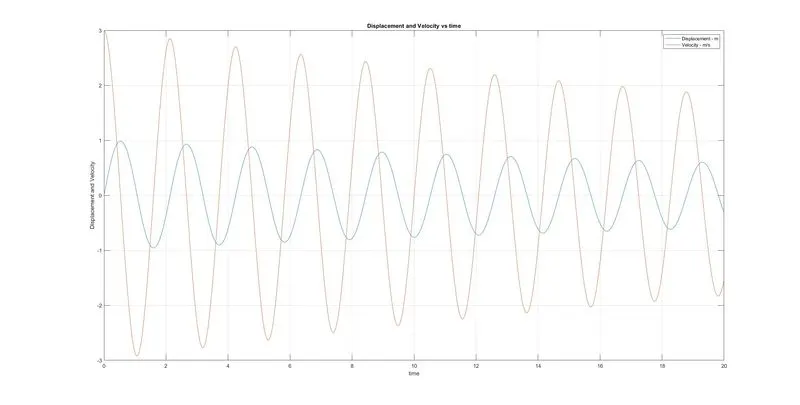
The procedure to be followed is thus,
The general equation of a second ode for a pendulum is;
Put
IMAGES ARE NOT SHOWN HERE, ARE SHOWN IN THE WORD DOC ATTACHED
We first create a column vector defining theta1 and theta2 in each row from the generic equation, theta will be the output of the vector.
We now calculate
Which will lead to
Initial conditions are required in the same form as theta was defined
theta@0 is to be provided as a column matrix of theta@0 and which, is the displacement and angular velocity. This is given in the question and needs to be written in the main script file.
We then use the ode45 syntax, in which (@ t,theta ) the order needs to be maintained.
The ode function defined in an alternate script file is called into the main script along with all the inputs required in the function file.
The time span over which integration needs to be carried out is provided
The initial condition matrix is also provided.
The results will have an N by 2 sized matrixes, N being the number of divisions of the independent variable t.
The first column of the matrix, as an order similar to initial conditions vector, shall have displacement and 2nd column having the angular velocity.
Once the results are obtained, we can continue with plotting the same as follows,
A figure window is plotted with syntax as given
figure('windowstate','maximized','Name','Second order ODE')
Plotting the independent variable t, the dependent variable theta or displacement.
plot(t,results(:,1))
Plotting the independent variable t, the variable dtheta_dt or angular velocity.
plot(t,results(:,2))
Note :
The ‘hold on’ syntax is used to overlay the plotted graph with another.
Legends, titles and axis labels are provided.
Creating Animation
Points are provided in terms of the coordinates x0,y0,x1,y1
plot([-1 1],[0 0],'linewidth',3,'color','r');
A line is plotted which would act as a support.
plot ([x0 x1],[y0 y1],'linewidth',3,'color','k');
the x and y coordinates, within the loop is provided.
M(ct)=getframe(gcf);
ct=ct+1;
A matrix M is created wherein each frame being programmed within the loop is stored progressively as the loop repeats.
figure('name','movie')
another figure window is created for the movie
movie(M)
syntax to make a movie out of the frames stitched in matrix M
videofile = VideoWriter('simple pendulum.mp4','MPEG-4');
open(videofile)
writeVideo(videofile,M)
close(videofile)
syntax to write the frames into an mp4 format.