Week 3 - Solving second order ODEs
Solving Second-Order ODEs
Aim: Solving Second-order differential equation using Matlab.
Objective:
- is to write a program that solves the following ODE which represents the equation of motion of a simple pendulum with damping.
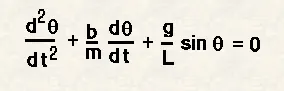
- Simulate the motion between 0-20 sec, for angular displacement=0,angular velocity=3 rad/sec at time t=0.
- Animate the motion of the pendulum
Theory: A simple pendulum consists of a mass m hanging from a string of length L and fixed at a pivot point P. When displaced to an initial angle and released, the pendulum will swing back and forth with the periodic motion. By applying Newton's second law the equation of motion for the pendulum may be obtained.
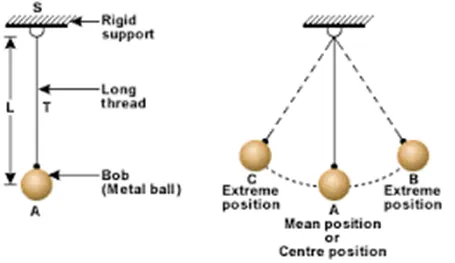
source:https://thefactfactor.com/facts/pure_science/physics/period-of-simple-pendulum/9206/
Explanation of the code:
- We start our code by taking the required inputs from the question given above.
- After considering the given inputs we need to define the initial displacement of the pendulum and the initial velocity.
- Then we get to the duration of the pendulum swing, which is the time span from 0 to 20 with 100 spaces.
- As we got all the initial parameters and values, we get to the core of the program by using the second-order ODEs on a simple pendulum.
- We do this by calling the function by formulating it in a different file, (Filename: ODE) and using a built-in function 'ode45'. which gives us the result of the problem.
-
function [dtheta_dt] = ODE(t,theta,b,g,l,m) theta1 = theta(1); theta2 = theta(2); dtheta1_dt = theta2; dtheta2_dt = -(b/m)*theta2 - (g/1)*sin(theta1); dtheta_dt = [dtheta1_dt; dtheta2_dt]; end - The next part is the animation, to do this we start by considering a counter command.
- Then using the 'for' loop to the outcome we got above, we consider a few parameters keeping the pendulum in mind.
- Considering the above parameters we take a plot with an axis as per the requirements.
- Taking "M" as a function in 'getframe' command and end the "for" loop.
- For the animation "M" as a function of the movie and then create a video file, getting us the video
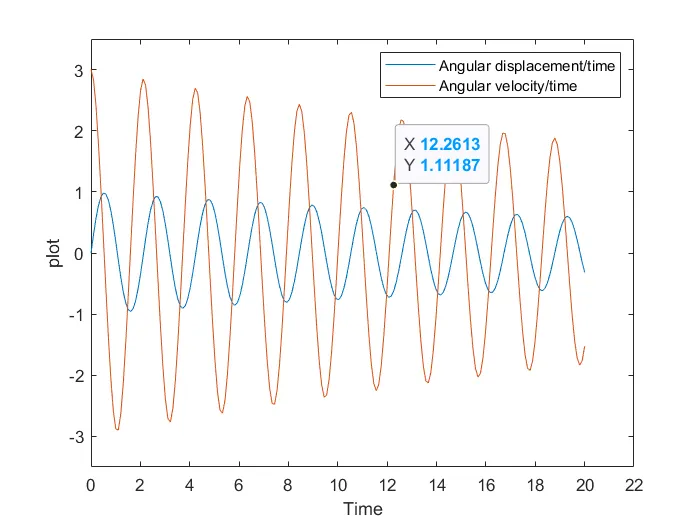
- To find the angular displacement and velocity respectively we just need to consider a plot vs time with the same body.
-
%Plotting plot (t, results(:,1)) hold on; xlabel('Time') plot (t,results(:,2)) hold off; axis ([0 22 -3.5 3.5]) ylabel('plot') legend('Angular displacement/time', 'Angular velocity/time') -
close all
clear all
clc

% Required inputs
% b=damping coefficient
b=0.05;
% g = gravity in m/s^2
g=9.81;
% L = length of the pendulum in m
l=1;
% m = mass of the ball in kg
m=1;

% Initial conditions
% Initial displacemaent of pendulum being 0 and intial velocity being 3m/s
theta_0 = [0 3];

% Time points
t_span = linspace(0,20,150);

% Forumulation of ODE
[t,results] = ode45(@(t,theta) ODE(t,theta,b,g,l,m),t_span,theta_0);
end_result = results(:,1);
ct = 1;
figure(1)
for i = 1:length(end_result)
    pos = end_result(i);
    x0 = 0;
    y0 = 0;

    x1 = 1*sin(pos);
    y1 = -1*cos(pos);

    % plot
    plot([x0 x1], [y0 y1],x1,y1,'g.','markersize',15,'linewidth',3)
    axis([-1.5,1.5,-1.5,1.5])
    hold off
    grid on
    M(ct) = getframe(gcf);
    ct = ct + 1;
end
movie(M)
videofile = VideoWriter('pendulum');
open(videofile)
writeVideo(videofile,M)
close(videofile)
Errors:
- Spelling mistake (length). | By checking clearly. screenshot(102)
- Missed to close the brackets([y0 y1]) | by checking. screenshot(103)
- Mis in decimal point made the animation short. | re-checking. screenshot(105)
Conclusion: We have cleared the basic objectives given.
- Program for the equation of motion of a simple pendulum with damping.
- Simulate the motion between 0-20 sec, for angular displacement=0,angular velocity=3 rad/sec at time t=0.
- Animate the motion of the pendulum. has been achieved in the link given below
https://youtu.be/9ZT_u3a2Ry0