Week 3 - Solving second order ODEs
Program:
%Solving second order ODEs

clear all
close all
clc

%inputs
 b=0.05;
 g=9.8;
 l=1;
 m=0.1;

 %initial condition
 theta_0=[0;3];

 %time points
 t_span=linspace(0,20,500);

 %solve ode
 [t,result]=ode45(@(t, theta) ode_fun(t,theta,b,g ,l,m),t_span,theta_0)

 %plottimg
 figure(1)
 plot(t,result(:,1))
 hold on
 plot(t,result(:,2))
 xlabel('time')
   legend('displacement', 'velocity')

   ct=1;

   theta=result(:,1);
   for i=1:length(t_span)
   angle =theta(i);
   figure(2)
   title('simple pendulam animation')
   x0=0
   y0=0
   x1=l*cos(((3*pi)/2)+angle);
   y1=l*sin(((3*pi)/2)+angle);

    plot([x0 x1],[y0 y1],'linewidth', 3)
    hold on
    plot(x1,y1,'.','markers',50)
    hold on
    plot([-0.5,0.5],[0 0] ,'linewidth', 5)
    hold off
    axis([-0.6,0.6 , -1.5,0.5])
    pause(0.03)
    O(ct)=getframe(gcf);
    ct=ct+1;

   end

     movie(O)
     videofile=VideoWriter('simplependulam.avi','Uncompressed AVI');
     open(videofile)
     writeVideo(videofile,O)
     close(videofile)
Code for the function program:
function[dtheta_dt]=ode_fun(t,theta,b,g,l,m)
theta1=theta(1);
theta2=theta(2);
dtheta1_dt=theta2;
dtheta2_dt= -(b/m)*theta2-(g/m)*sin(theta1);
dtheta_dt=[dtheta1_dt;dtheta2_dt];
Aim:
To solve an ordinary differential equation and use the calculated information to animate the motion of the pendulum.
Objectives:
To write a program that solves the following ODE which represents the equation of motion of a simple pendulum with damping and create an animated video of output obtains by solving this ODE.
(d^2 theta)/(dt^2) + (b/m * dtheta/dt) + (g/l * sin(theta))=0
g = gravity in m/s^2.
L = length of the pendulum in the meter.
m = mass of the ball in kg.
b = damping coefficient.
Code explanation:
In the first step Input and initial condition of a simple pendulum are fed.
Then the program is written to solve the ODE in which Matlab inbuilt function (ode45) is used with constant theta, t, and another function is used, which is defined separately in function program.
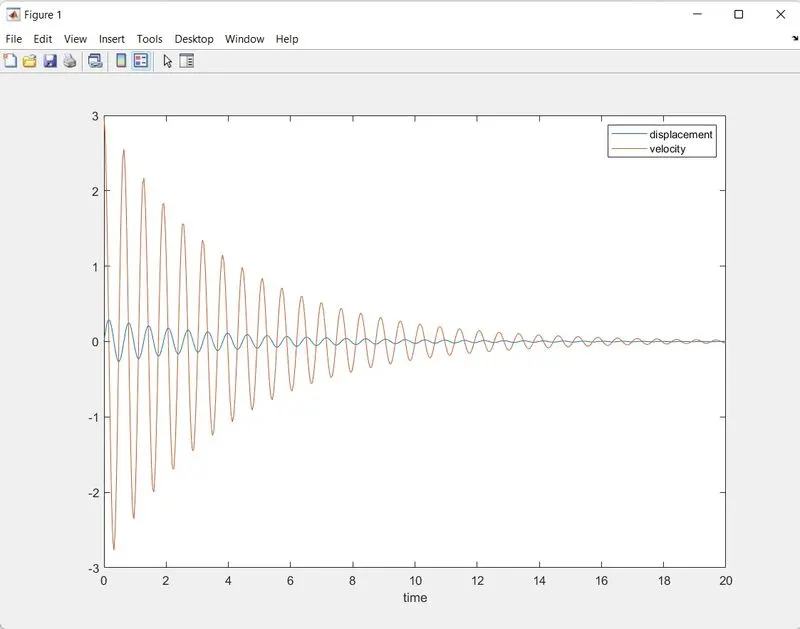
In the next step result of solved ODE is plotted w.r.t time using plot command.
Now iteration of co-ordinate is fed using for loop to create animation.
Then plot command is used to plot pendulum string and bob.
In the next step, the move command is used to create an animated video of the oscillating pendulum.
Output:
Damped harmonic motion of a pendulum
Errors:
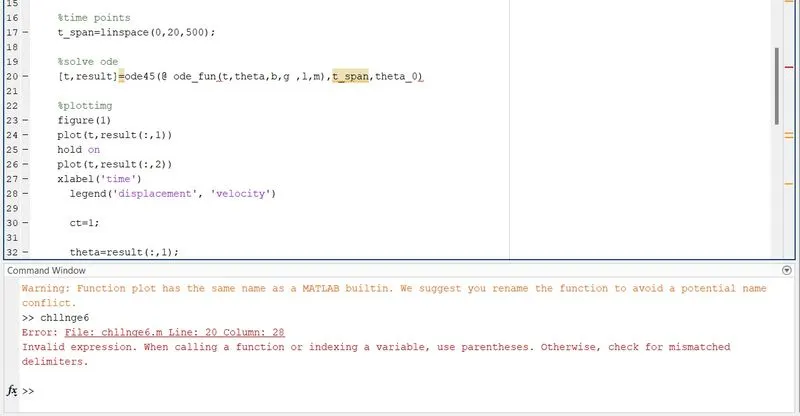
I faced so many errors during this programming. typing mistakes, syntax mistakes etc..
when the command window noticed the errors, i go through it and cross checked the mistakes and corrected it
Aninmation video:
Here the link for the animation video