Week 3 - Solving second order ODEs
Aim : To write the code on the simple pendulum by solving secound order deffrention equation in matlab
Theory : A pendulum is a body suspended from a fixed point so that it can swing back and forth under the influence of gravity.
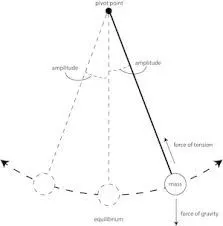
- here a mass is attached to the string of length L and this string is fixed at one end and at another end mass M is attached
- G is the gravitetional force acting on the mass M
- displacement D and velocity
there fore from newton's secound law of motion we have
Input : g = 9.81 m/s^2
L = 1m
b = 0.05
M = 1kg
code for pendulum is fallow below:
% writting program to solve the 2nd order ODE's
 clear all
 close all
 clc

 % defining the inputs given in the quesion
l = 1;              % lenght(L) in M
m = 1 ;             % mass in Kg
b = 0.05 ;          % damping co-efficent
g = 9.81;           % gravity at mass in m/s^2


% definingn the time as given in the question

time_t = linspace(0,20,500);

% defining the angle theta

theta = [0;3];        % hera in 1st colum dispacement is taken and 2nd colum veocity is taken

% now calling the ode_fun

[t,result] = ode45(@(t, theta) ode_fun(t,theta,l,m,b,g),time_t,theta);

% ploting the figure
 figure (1)
 plot(t,result(:,1),'color','r')
 hold on
 plot(t,result(:,2),'color','b')
xlabel('time')
ylabel('velocity[b] & displacemnt[r]')

% creating the animation vedios
ct = 1;
for i = 1:length(result(:,1))
    x0 = 0;
    y0 = 0;
    x1 = l*sin(result(i,1)+pi);
    y1 = l*cos(result(i,1)+pi);
    figure(2)
    plot([x0 x1],[y0 y1],'-o','markersize',10,'markerfacecolor','r','markerEdgecolor','r','linewidth',4)
    axis([-2 2 -2 2])
    hold on
    plot([-1 1],[0 0],'color','g','linewidth',4)
    M(ct) = getframe(gcf);
    ct = ct+1;
    hold off
end
movie(M)  % here we are creating the movie of obtained robertic arm
videofile = VideoWriter('pendulum_motion.avi','Uncompressed AVI'); %here we are creating the vedio file for our robertic arm animation
open(videofile) % here we are opening our vediom file
writeVideo(videofile,M)
close(videofile)   % after opening the vedio file we have to close it by using fallowing lines
explanation:
- 1st we have to start the program with clear all,close all,clc
- then we have to define the inputs
- after that we have to declear the ode 45 and ode_fun function
- then we have to use the vidowritting command to creat th animation vedio
code for farmula fallows below
%writting code to solve the farmula of ode
function[dtheta_dt]=ode_fun(t,theta,l,m,b,g)
theta1=theta(1);
theta2=theta(2);

dtheta1_dt=theta1;
dtheta2_dt=((-b/m)*theta2-(g/l)*sin(theta1));
dtheta_dt=[dtheta1_dt;dtheta2_dt]
end
Animation: https://youtu.be/1OZy0UV-CdE