Week 3 - Solving second order ODEs
A program that solves ODE represents the equation of motion of a simple pendulum with damping
clear all
close all
clc

% Defining inputs

% Damping coefficient
b=0.05;

% Acceleration due to gravity
g=9.81;

%Length of the string
l=1;

%Mass of bob
m=1;

%initial condition for angular displacement and Angular velocity
theta_0=[0;3];

%Time input
t_span =linspace(0,20,400);

%ODE solving
[t,results] = ode45(@(t,theta) ode_function_pendulum(t,theta,b,g,l,m),t_span,theta_0);

%plotting
figure(1)
hold on
plot(t,results(:,1),'Color','r','linewidth',2)
plot(t,results(:,2),'Color','b','linewidth',2)
xlabel('time in seconds')
ylabel('Plot')
title('Damped Harmonic motion of pendulum')
legend('Angular Displacement','Angular Velocity')

%counter is defined for indexing
ct=1;
for i=1:length(results(:,1))
    x1=0;
    y1=0;
    x2=l*sin(results(i,1));
    y2=-l*cos(results(i,1));

    %animation
    figure(2)
    plot([-2 2],[0 0], 'LineWidth',4)
    hold on
    plot([x1 x2],[y1 y2],'color','k')
    hold on

    plot(x2,y2,'marker','.','MarkerSize',50,'Color','r')
    title('Pendulum animation')
    axis([-1.5 1.5 -1.5 1])
        hold off
    M(ct) = getframe(gcf);
    ct=ct+1;
end
%Saving file in avi format
movie(M)
videofile=VideoWriter('Pendulum.avi','Uncompressed AVI');
open(videofile)
writeVideo(videofile,M)
close(videofile)
function [derivation] = ode_function_pendulum(t,theta,b,g,l,m)

%Displacement rep as array
theta1= theta(1)
%Velocity rep as array
theta2= theta(2)

%first differential
dtheta1_dt=theta2;
%second differential
dtheta2_dt=((-b/m)*theta2 - ((g/l)*sin(theta1)));
%Combination of equation that is to be solved
derivation =[dtheta1_dt;dtheta2_dt];
end
Outputs
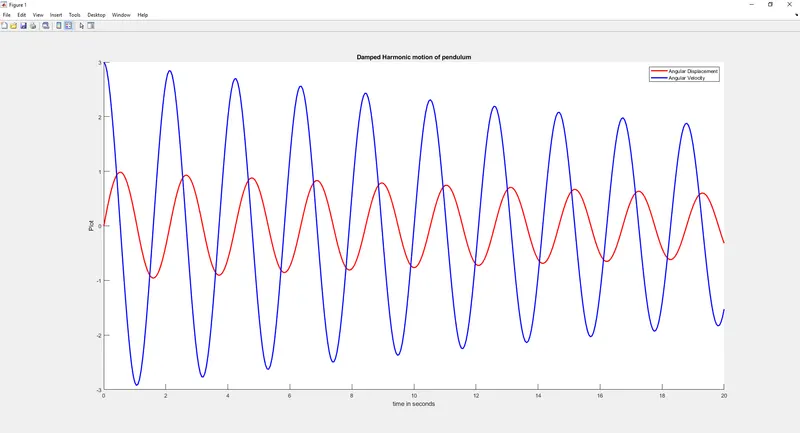
https://drive.google.com/file/d/1lzAXvBGSG8LzL5AaEIiXKyqfLSRWo_fK/view?usp=sharing
Step-wise explanation of code.
First all the inputs such as Damping coefficient,Acceleration due to gravity,Length of the string,Mass of bob are defined then gave the initial condition for angular displacement and Angular velocity where initial value for displacement is 0 and velocity is 3. timespan of 0 to 20 is given with 400 intervals using linspace() command
A Funciton is created for the derivation by the name ode_function_pendulum, inside the function theta1 and theta2 are defined then the first ODE is defined which is dtheta1/dt by the name dtheta1_dt
Second ODE is defined which is "dtheta2/dt=((-b/m)*theta2)-(g/lsin(theta1))" by the name dtheta2_dt
then we combine them to form an array called derivation
that function, ode_function_pendulum will give us the time and the results for theta. since we are solving 2 ODE's the results will be a column vector with 2 columns with displacement and velocity respectievely. We use the inbuilt command ode45 to solve the equations we got from our function
Now for plotting we use the figure(1) and hold on commands and plot() command is used the input is give as time, results we got from ode45, it's column matrix is given as input with all the rows.Title,legend,x and y labels are given
for creating animation we gave a counter is defined for indexing
and a for loop is given with the lenth of 1 to results for theta
the point from which string hanging is taken as origin (x1,y1)
the second point which is the end point of the string or centre of the bob will be changing, and it's equation is given.
x2=l*sin(results(i,1))
y2=-l*cos(results(i,1))
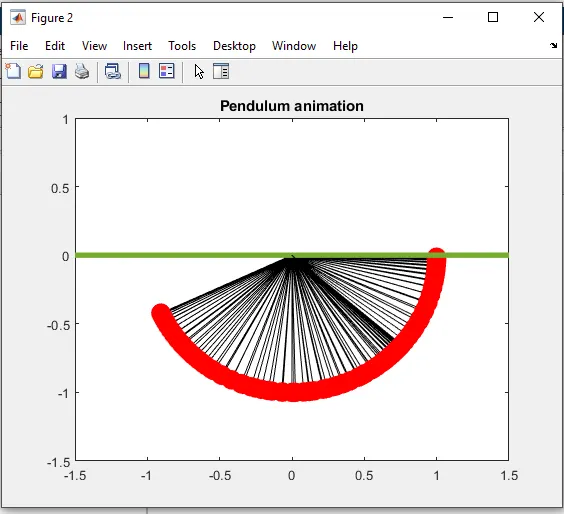
figure(2) is written for animation and plot command is given for making a rod at which string is hanging it is given 4 units of length along x axis (-2,2) and since it is passing through x axis y values are given 0
a higher width is given to the rod now the string is plotted with coordinates as x1 x2 and y1 y2
hold on command is given
now the bob is plotted using marker() '.' and markersize 50. the axis range is given with the axis()
hold off() is given since we dont want to save every instance of pendulum
M array is defined and the inexing value is added +1
getframe is used to capture the figures as frames and gcf refers to the current figure handle in MATLAB where it captures an in turn give the current figure to capture it as a frame for movie creation
the frames are assigned to M array and movie(M) command is used to play the movie frames in array M once.video is saved to the videofile using VideoWriter and given name Pendulum.avi in the file format Uncompressed AVI
the video is opened using open() command and it's saved to harddisk using writevideo()command at the end video is closed using close()
Errors faced
-forgot to put figure(1) and figure(2) so only got animation as the final result
-Used
x2=l*sind(results(i,1));
y2=-l*cosd(results(i,1));
instead of
x2=l*sin(results(i,1));
y2=-l*cos(results(i,1));
and got pendulum without visible animations
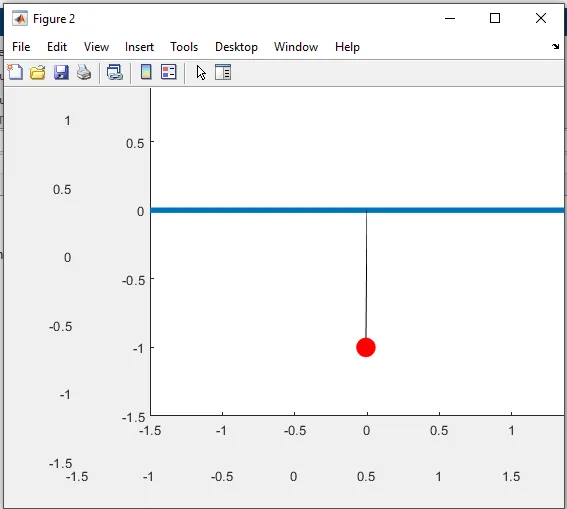
-Forgot to put hold off and got all the instances in the pendulum animation written in the background