Week 3 - Solving second order ODEs
AIM:
- To solve second order ODEs and to crreat an animation of the simple pendulum.
What is ODE:
- In engineering ode is used to describe transient behaviour of a system.
- ODE stands for Ordinary Differential equation.
- The way the pendulum depends on the Newton Second law.
OBJECTIVE:
- The objective is write a program that solve the following ODE. This ODE represents the eqation of motion of a simple pendulum with damping.
- We want to make the above equation in the form of matrix.
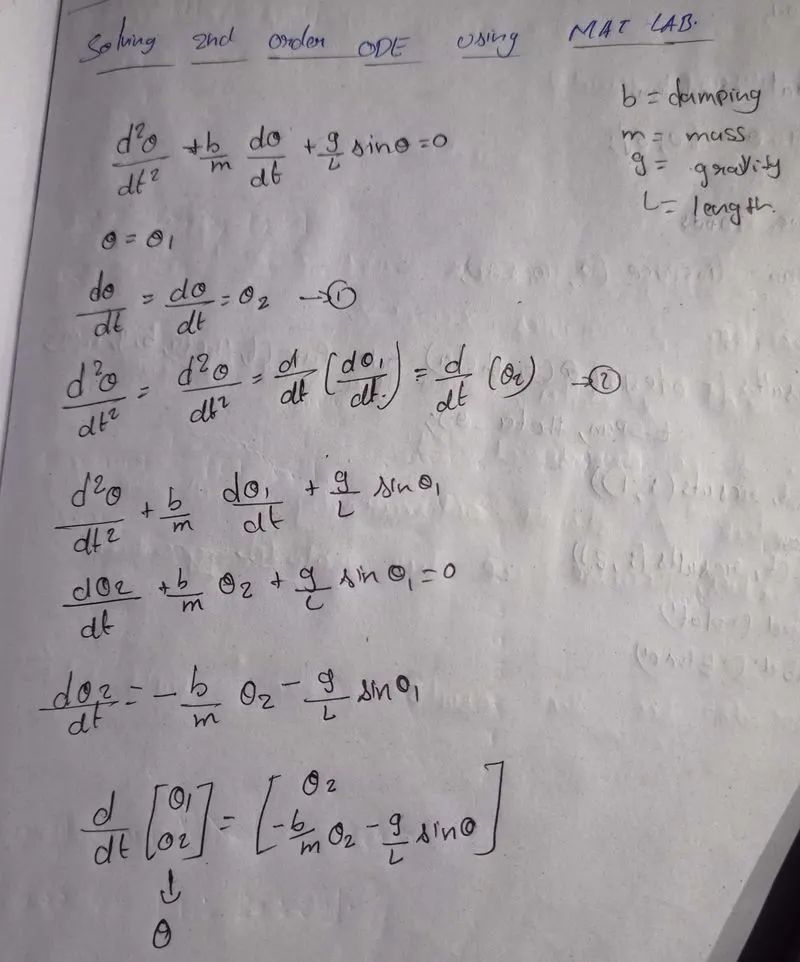
Steps for procedure:
code Discription:
Inputs given:
- g = 9.81m/s2 gravity
- L = 1m length of pendulu
- m = 1kg mass of the ball
- b = 0.05 damping coefficient
Coordinates description:
- From the representation of the pendulum and from the geometry of the fig, we can represent the x_0,y_0,x_1,y_1 as fallows.
- x_0 and y_0 will be the starting points.
- x_1 and y_1 will be the end point .
Function:It is used to solve the Second Order ODE with Euler's Method:
% Second order ODE with Euler's method
function [dtheta_dt]=ode_func(t,theta,b,g,l,m)
theta1=theta(1);
theta2=theta(2);
dtheta1_dt=theta2;
%if we add a viscous damping term, we end up with below eqation
dtheta2_dt=-(b/m)*theta2-(g/l)*sin(theta1);
dtheta_dt=[dtheta1_dt;dtheta2_dt];
end- The above equation provides the position of the ball with respect to time.
- Now write the program for the second order ODE.
CODE EXPLANATION:
- First we want to clear the editor window and command window
- Next we want to give the inputs to the program and we need to give the initial condition theta_0
- Ater giving inputs we should give the time points to oscillate the pendulum with the help of linspace command
- Now we want to make the total inputs into fuction so that we can easily under stand the program
- After that we want to give plots for the results and t
- plots will be given for the x and y values so that we can easily got the oscillation will be get exact output
- To understand the graph easily we ned to give the xlabel and ylabel with the help of names.
- Now we need to give the the timer for the osicalltion of the pendulum and with help of pause command
- Finally we need to create an movie and open the movie file with the help of ()
- Now write a vediowriter and close the videofile.
MATLAB CODE:
clear all
close all
clc

% Solving second order ODEs

%defining inputs
l = 1;
m = 1;
b = 0.05;
g = 9.81;

%Intial Condition
theta_0 = [0,3];

%Time points
t_span = linspace(0,20,500)

%Solve ODE
[t,results]=ode45(@(t,theta)ODEs(t,theta,b,g,l,m),t_span,theta_0)
%plotting
figure(1)
plot(t,results(:,1));
hold on
plot(t,results(:,2));
legend('Displacement','Velocity')
title('Pendulum Motion Graph')
xlabel('time')
ylabel('Amplitude')
ct = 1;

%identifing the for function for animation and multiple values of t
for i=1:length(t)
    %coordinates
    x_0 = 0
    y_0 = 0
    x_1 = l*sin(results(i,1));
    y_1 =-l*cos(results(i,1));
    %Plotting the pendulum with given intial conditions
    figure(2)
    plot([-2 2],[0 0],'linewidth',2,'color','c')
    line([x_0 x_1],[y_0 y_1],'linewidth',4);
    axis([-2 2 -2 2])%the limits of the plot
    hold on
    plot(x_1,y_1,'Marker','o','linewidth',20,'Color','b');
    hold off
    pause(0.03);
    %To create a movie
    M(ct)=getframe(gcf)
    ct = ct+1
end

movie(M)
videofile=VideoWriter('Pendulum_animation.avi','Uncompressed AVI')
%To open, write and close the movie file
open(videofile)
writeVideo(videofile,M)
close(videofile)
Graphical Representation figure output:
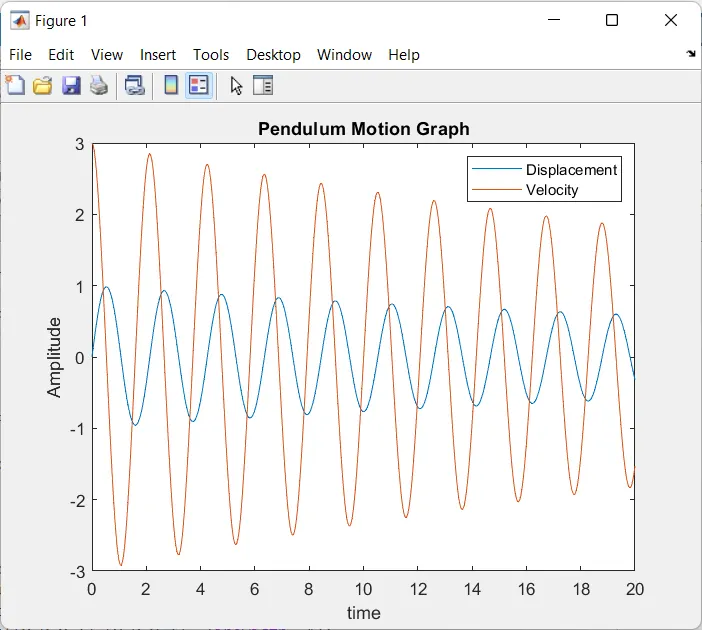
- The above fig shows the oscillations of simple penduluum will have a behoviour that is linear in nature.
- Now we want to create a animation file.
Animation AVI file:
 %To create a movie
    M(ct)=getframe(gcf)
    ct = ct+1
end

movie(M)
videofile=VideoWriter('Pendulum_animation.avi','Uncompressed AVI')
%To open, write and close the movie file
open(videofile)
writeVideo(videofile,M)
close(videofile)- The above MATLAB code will provides the AVI file for the input and coordinate variables given to define the pendulum position with respect to time.
- VideoWriter command is used to create an movie to observe the animation in the MATLAB
Google Drive Link:
https://drive.google.com/file/d/19k2iiZS5LcFe0KoDby62nurZatXKH3JP/view?usp=sharing
Errors while exicuting the program:
Error produced:When iam run the there is an error sown in below fig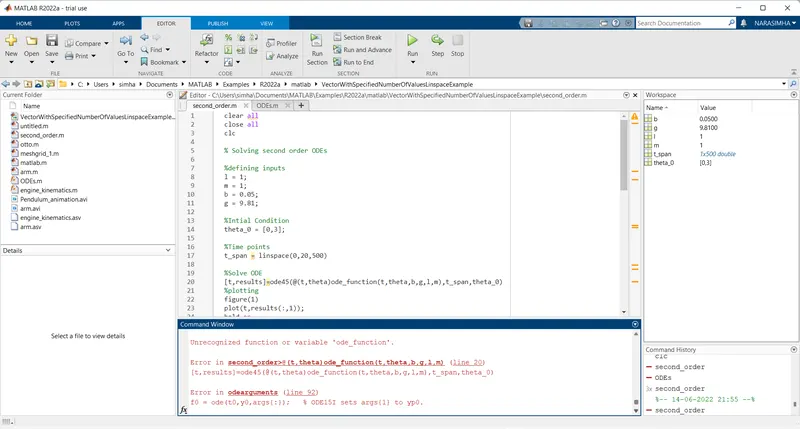
- In the above fig there is an error where i used ode_function insted of ODE.
- This is an small error and and rectified by changing the small letters into capital letters.
- Finally we got an animation video exactly with out error
CONCLISION OF THE PROGRAM:
- In this program we finded an pendulum oscilation with the help of Euler's method and we got an animation video exactly