Week 3 - Solving second order ODEs
Objective :-
To solve the 2nd order diferential eqution using matlab and by use of this equatoin find the transient behavior of a simple pendulum.
Theory :-
2nd ODEs :-
A 2nd order differential equation is a differential equation that consist of a derivative of a function of order 2 and no other higher order derivative of the function appears in the equation. To find ODEs break the 2nd ODE till first ODE.
ODEs phenomena is used for describe to transient behavior of a system, and by the ODEs can solve lot of the engineering parameters.
- The given 2nd order differential equation is:-
d^2*(theta)/(dt)^2 + (b/m)*d(theta)/(dt) + (g/l)*sind(theta) = 0
In this equation :-
b = damping co-efficient
m = mass of the ball in(kg)
l = length of the pendulum in(m)
g = gravity in (m/s2)
This 2nd ODE is the example of simple pendulum and its motion.
After the solving this (equation)2nd ODE . we find theta and the rate of velocity change with respect to time.
Now a program in matlab which simulate the motion between 0-20 sec, For angular displacement = 0,and angular velocity = 3 (rad/sec) at time (t) = 0.
Input data is given by:-
l = 1(meter)
m = 1(kg)
b = 0.05
g = 9.81(m/s2)
% clear all
% close all
% clc

% Input variables

b=0.05;
g=9.81;
m=1;
l=1;

% Initial condition

theta_0 = [0;3];

% Time span

t_span = linspace(0,20,200);

% solve of ODE code

[t,results] = ode45(@(t,theta) second_ode_pendulum(t,theta,b,g,m,l),t_span,theta_0);

% plotting  the displacement graph

figure(1)

plot(t,results(:,1))

hold on

plot(t,results(:,2))

xlabel('time(t) in (sec)')
ylabel('Angular displacement & velocity displacement')
title(' Displacement graph')

% Creating animation of simple pendulum


ct = 1;

for i = 1:length(results(:,1))

    x0 = 0;
    y0 = 0;

    x1 = l*sin(results(i,1));
    y1 = -l*cos(results(i,1));

figure(2)

plot([-1 1],[0 0],'linewidth',2,'color','b')
axis([-2 2 -2 2])

hold on

plot([x0 x1],[y0 y1],'linewidth',5,'color','r')

hold on

plot(x1, y1,'o','markersize',10,'markerfacecolor','g')
pause(0.4)
hold off

M(ct) = getframe(gcf)
ct = ct+1

end

% Creating animation movie

movie(M)
videofile = VideoWriter('sipmle_pendulum_motion','Uncompressed AVI')
open(videofile)
writeVideo(videofile,M)
close(videofile)
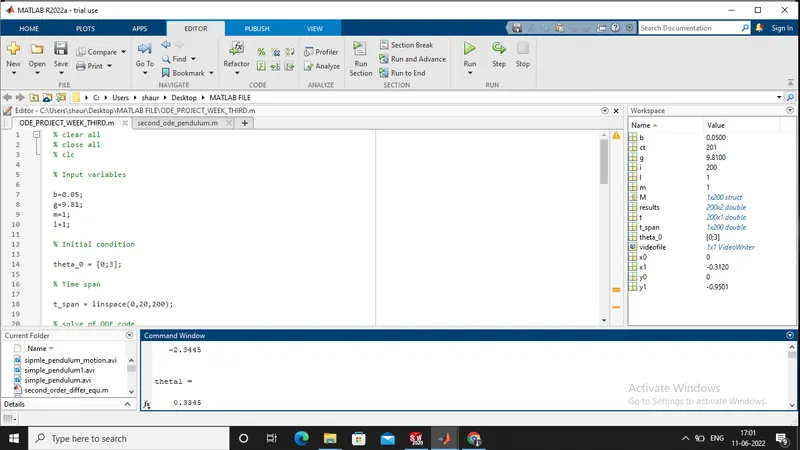
Screen shot of the matlab code:-
Matlab program for create a function:-
% clear all
% close all
% clc

function [dtheta_dt] = second_ode_pendulum(t,theta,b,g,m,l)

theta1 = theta(1)
theta2 = theta(2)

dtheta1_dt = theta2;
dtheta2_dt = -(b/m)*theta2 -(g/l)*sin(theta1);

dtheta_dt = [dtheta1_dt; dtheta2_dt]
end
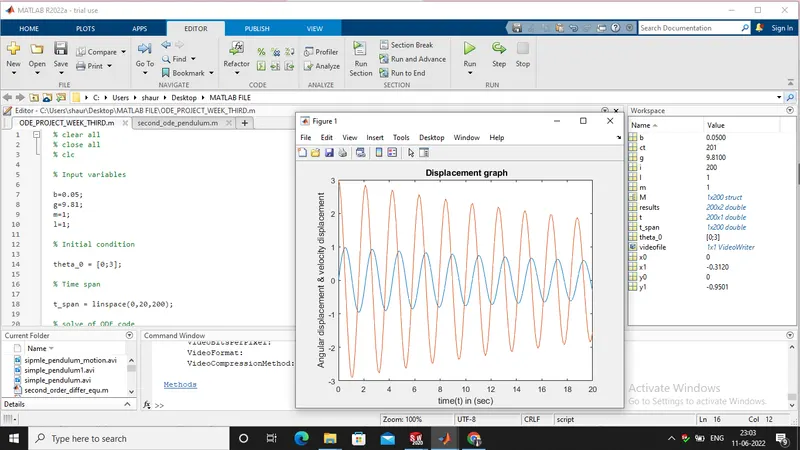
Screen shot of Output (figure (1) plot of time and angular and velocity displacement):-
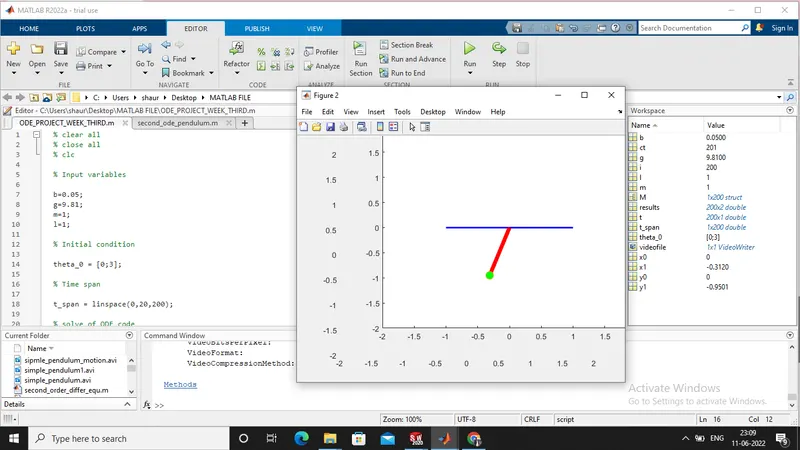
Screen shot of simple pendulum motion -
Explanation step by step of the matlab program:-
- First of give all the input parameters for create simple pendulum , such as:-
b(dumping co-efficient), g(gravity), l(length of the pendulum), m(mass of the ball).
- Next is specify all the initial condition for displacement like:-
At initial condition , Angular displacement = 0 ;
At initial condition , Velocity displacement = 3 ;
- Next is use of the t_span command pendulum will oscilating at 0to 20 second in interval of 200 points.
- Next is to calculate the variables need to create functiion command in which variables are calculated.
- ODE45 solver is a inbuilt function in matlab in which solve the systems equations . By this command we solving this equations and fine the multiple results.
- Next is plotting , by the estimated values create a graph of displacement curve of angular&velocity vs time.
- First of give all the input parameters for create simple pendulum , such as:-
b(dumping co-efficient), g(gravity), l(length of the pendulum), m(mass of the ball).
- Next is specify all the initial condition for displacement like:-
At initial condition , Angular displacement = 0 ;
At initial condition , Velocity displacement = 3 ;
- Next is use of the t_span command pendulum will oscilating at 0to 20 second in interval of 200 points.
- Next is to calculate the variables need to create functiion command in which variables are calculated.
- ODE45 solver is a inbuilt function in matlab in which solve the systems equations . By this command we solving this equations and fine the multiple results.
- Next is plotting , by the estimated values create a graph of displacement curve of angular&velocity vs time.
- syntax using for the simple pendulum motion is such as:-
- Here in the syntax specify the ode45 command and define that our function of a variable t& theta .
- Then provide created function in which has all input variables, and also give time span of the oscilation and initial condition of the angular displacements and velocity displacements.
- Finally get the results as array[t,results] after the calculation.
- Next is plotting the values of 'results' array with respect to time span 't'.
- Hence will get a plot of angular displacement and velocity displacement with respect to time 't' .
- At the need to create animation of simple motion of pendulum .
- Here ball of pendulum oscilating or change with respect to time means command will repeated.
- For repeatation in matlab are using command calles 'for loop' which repeats untill the condition would satisfy.
- For create a movie of animation of simple pendulum by using movie command.
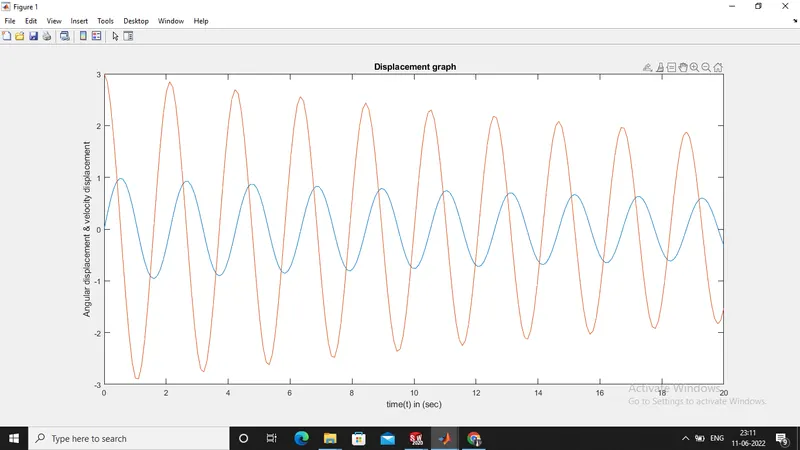
Result :- The program solves ODEs representing the equation of motion of a simple pendulum. And graph is plotted with respect to time and angular displacement and velocity displcement.
Screen shot of result:-
YOU TUBE LINK :-
Error during programming in matlab:-
- During program in linspace command got error cause of semi-colon(;) is used insteated of coma(,).
screen shot of error:-
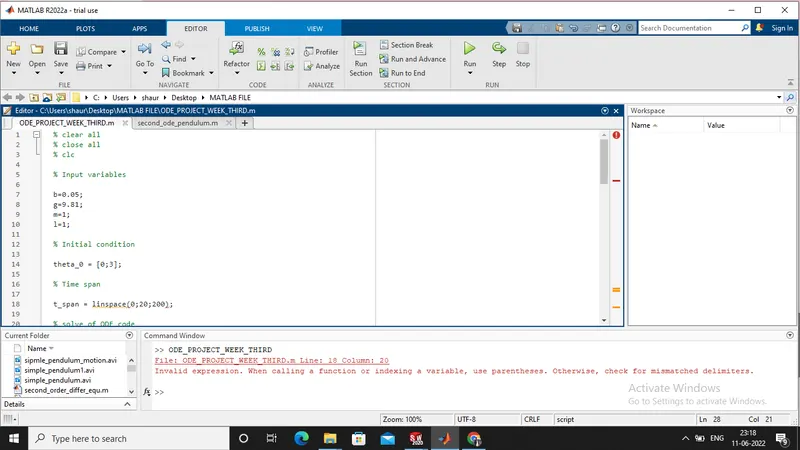
Solution :- When the use of linspace command use coma(,) in the interval like:- linspace(0,20,200)
- Here the missing of multiple bracket cause error
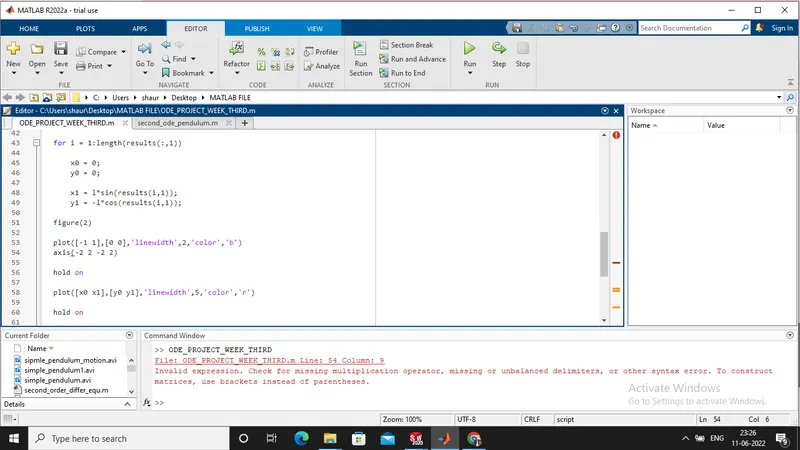
Solution :- While the axis command is use give multiple bracket like:- ([-2 2 -2 2])
- While using for loop their is missing of a bracket cause error as shown in figure:-
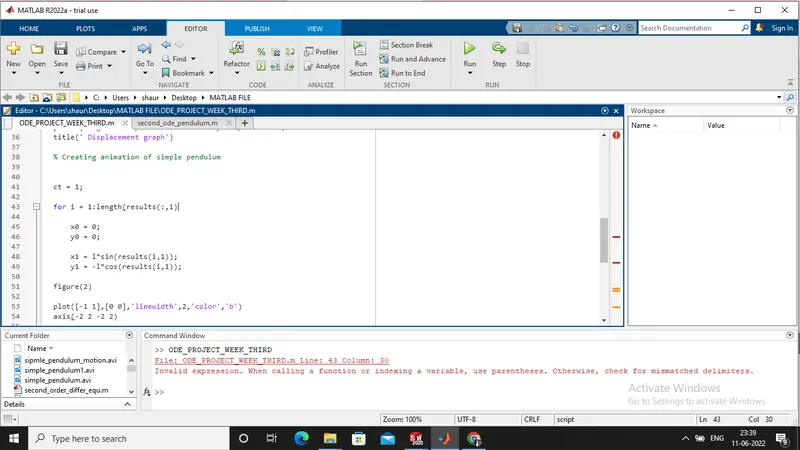
Solution :- Give proper bracket in a expression like:- for i= 1:length(results(:,1))