Project 1 - Parsing NASA thermodynamic data
Objective -
- To create a program that parsing the NASA's thermodynamic data from a given file using matlab.
- To extract the high and low temperature co-efficients from the data file for finding things like specific heat(cp),Entropy(S)and Enthalpy(H) of the atomic elements.
- Also to calculate the molecular weights of each elements.
Proceeding steps -
- The file parsing is the extracting the data from a given file,that means read a perticular given file.
- This parsing is done to get all the values from the data file into the program so with these data we can calculate the values
- in this program we are parsing the NASA's Thermodynamics data to calculate thermodynamic properties of various gas species.
- NASA's came up with polynomials that can be used to evaluate thermodynamic properties,such as Cp,H and S. They have also documented the co-efficient that are required to evaluate these polunomials for 1000+ species.
- The data file consist of 53 gas species with their local tempreture ranges and 14 temperature co-efficient for each species in which the first seven are high temperature co-efficients and next seven are low temperature co-efficients .
- The purpose of the program is create a function that extract the 14 co-efficients and calculates the Enthalpy,Entropy and Cp for all the species in the data file.
- Then create a function to calculate the molecular weight (MW) for all the species in our data file.
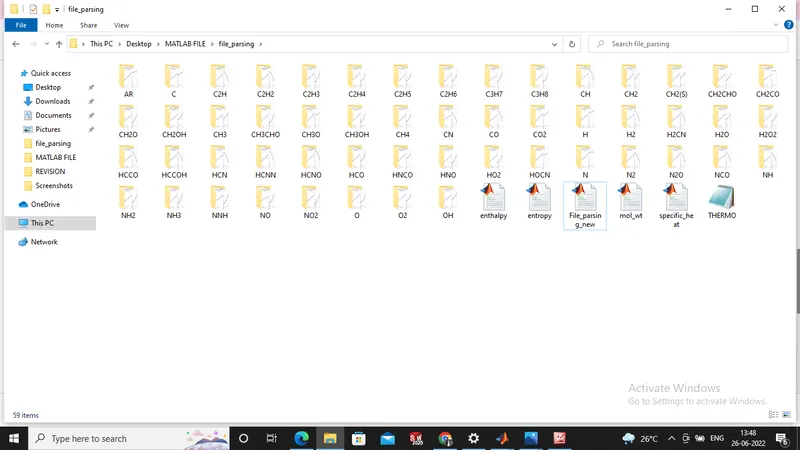
- Finally plot the Cp,Enthalpy and Entropy for the local temperature range and save the plot figures of alll the species into a seperate folder in our computer.
Matlab code to read and extract the data :-
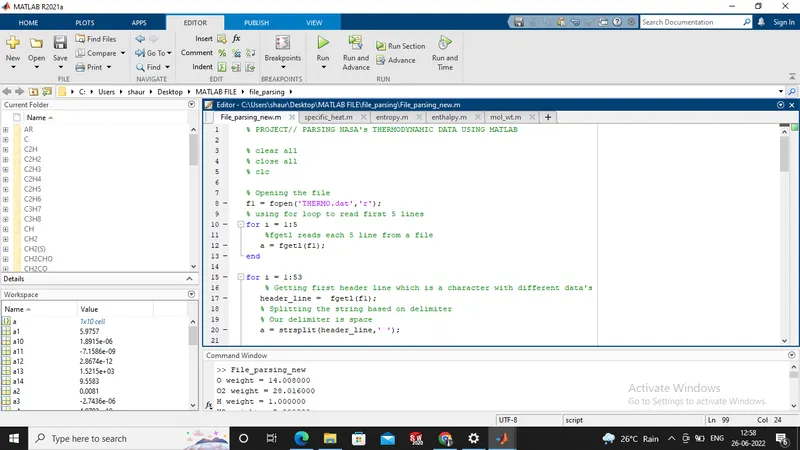
% PROJECT// PARSING NASA's THERMODYNAMIC DATA USING MATLAB

% clear all
% close all
% clc

% Opening the file
f1 = fopen('THERMO.dat','r');
% using for loop to read first 5 lines
for i = 1:5
    %fgetl reads each 5 line from a file
   a = fgetl(f1);
end

for i = 1:53
    % Getting first header line which is a character with different data's
   header_line =  fgetl(f1);
   % Splitting the string based on delimiter
   % Our delimiter is space
   a = strsplit(header_line,' ');

   % We use curly brackets because it is character
   % 1st cell represents the species_name
   species_name = a{1};
   % Local lower, medium, higher temperatures, we are converting string to number
   llt = str2double(a{end-3});
   lmt = str2double(a{end-1});
   lht = str2double(a{end-2});
   % local temperature range
   T = linspace(llt,lht,500);

   % Getting species with exponential coeifficent
   line1 = fgetl(f1);
   % Finding the location of exponent(E) for line 1
   e1 = strfind(line1,'E');
   % We are converting string to number
   a1 = str2double(line1(1:e1(1)+3));
   a2 = str2double(line1(e1(1)+4:e1(2)+3));
   a3 = str2double(line1(e1(2)+4:e1(3)+3));
   a4 = str2double(line1(e1(3)+4:e1(4)+3));
   a5 = str2double(line1(e1(4)+4:e1(5)+3));

   % Getting species with exponential coeifficent
   line2 = fgetl(f1);
    % Finding the location of exponent(E) for line 2
   e2 = strfind(line2,'E');
    % We are converting string to number
   a6 = str2double(line2(1:e2(1)+3));
   a7 = str2double(line2(e2(1)+4:e2(2)+3));
   a8 = str2double(line2(e2(2)+4:e2(3)+3));
   a9 = str2double(line2(e2(3)+4:e2(4)+3));
   a10 = str2double(line2(e2(4)+4:e2(5)+3));

   % Getting species with exponential coeifficent
   line3 = fgetl(f1);
   % Finding the location of exponent(E) for line 3
   e3 = strfind(line3,'E');
   % We are converting string to number
   a11 = str2double(line3(1:e3(1)+3));
   a12 = str2double(line3(e3(1)+4:e3(2)+3));
   a13 = str2double(line3(e3(2)+4:e3(3)+3));
   a14 = str2double(line3(e3(3)+4:e3(4)+3));

   % Defining Universal Gas Constant 'r'
   r = 8.314;

   % Calling functions in main program: specific_heat,enthalpy,entropy
   [cp] = specific_heat(a1,a2,a3,a4,a5,a8,a9,a10,a11,a12,T,lmt,r);
   [H] = enthalpy(a1,a2,a3,a4,a5,a6,a8,a9,a10,a11,a12,a13,T,lmt,r);
   [S] = entropy(a1,a2,a3,a4,a5,a7,a8,a9,a10,a11,a12,a14,T,lmt,r);

   % Creating new folder for species
   mkdir(['C:\Users\shaur\Desktop\MATLAB FILE\file_parsing\',species_name])
   % Entering current folder
   cd(['C:\Users\shaur\Desktop\MATLAB FILE\file_parsing\',species_name])
   % Plot 1
   figure(1)
   plot(T,cp,'LineWidth',3,'Color','r')
   xlabel('Temperature [k]')
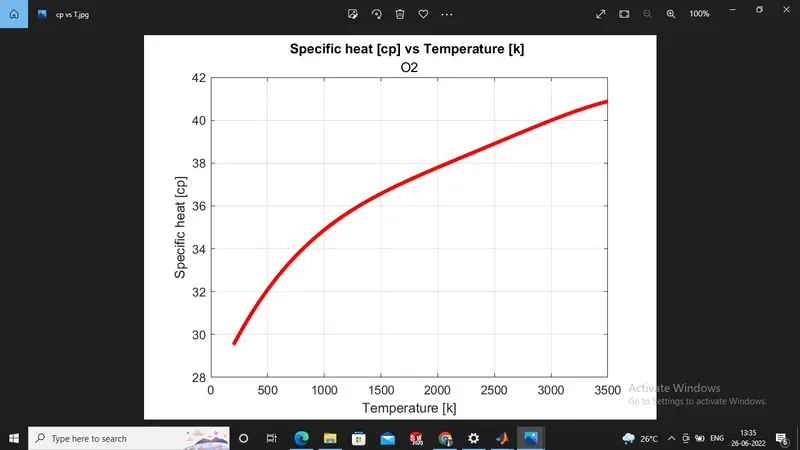
   ylabel('Specific heat [cp]')
   title('Specific heat [cp] vs Temperature [k] ',sprintf('%s',species_name))
   grid on
   % Saveas saves figure to a specific format
   saveas(figure(1),'cp vs T.jpg')

   % Plot 2
   figure(2)
   plot(T,H,'LineWidth',3,'Color','b')
   xlabel('Temperature [k]')
   ylabel('Enthalpy [H]')
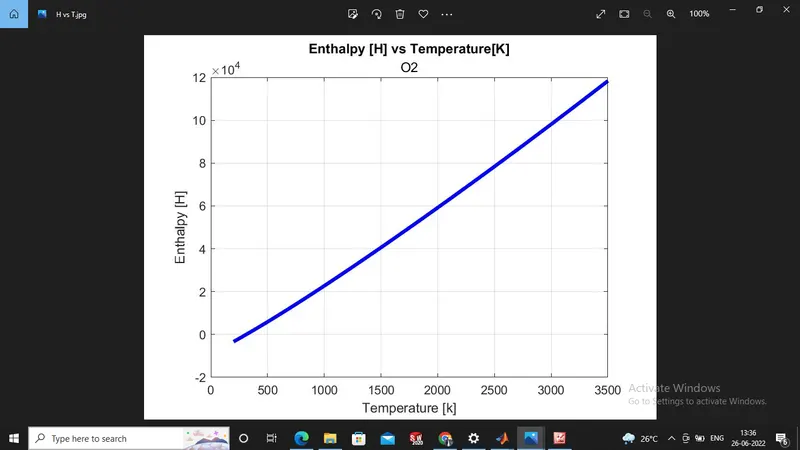
   title('Enthalpy [H] vs Temperature[K]',sprintf('%s',species_name))
   grid on
   % Saveas saves figure to a specific format
   saveas(figure(2),'H vs T.jpg')

   % Plot 3
   figure(3)
   plot(T,S,'LineWidth',3,'Color','k')
   xlabel('Temperature [k]')
   ylabel('Entropy [S]')
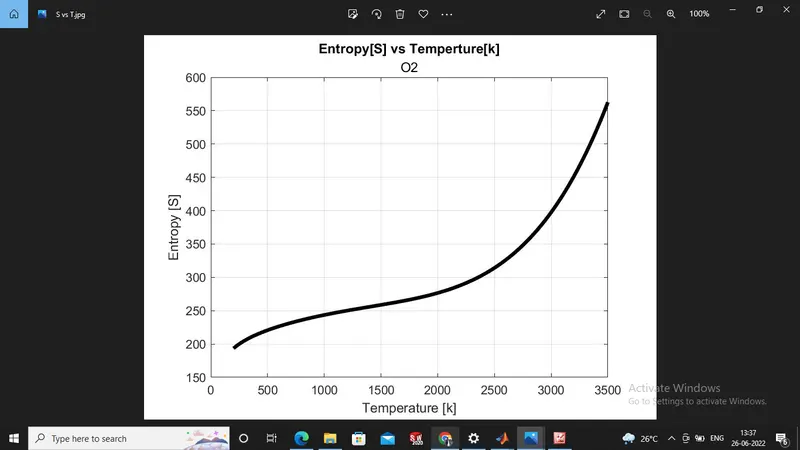
   title('Entropy[S] vs Temperture[k]',sprintf('%s',species_name))
   grid on
   % Saveas saves figure to a specific format
   saveas(figure(3),'S vs T.jpg')

   %Returning back to initial directory
    cd ..

   [M] = mol_wt(species_name);
   K = sprintf('%s weight = %f',species_name,M);
   disp(K)
end

 fclose(f1);
Screen shot of the matlab code :-
Matlab code for function program to find specific heat :-
% NASA's file parsing Specific Heat Function calculation
% Function Code


function [cp] = specific_heat(x1,x2,x3,x4,x5,x8,x9,x10,x11,x12,temp,lmt,const_R)
if temp<=lmt
    cp = (x8+(x9*temp)+(x10*temp.^2)+(x11*temp.^3)+(x12*temp.^4))*const_R;
else
    cp =   (x1+(x2*temp)+(x3*temp.^2)+(x4*temp.^3)+(x5*temp.^4))*const_R;
end
end
Matlab code for function program to find Enthalpy :-
% NASA's Thermodynamic file parsing Enthalpy Function calculation
% Function Code


function [H] = enthalpy(x1,x2,x3,x4,x5,x6,x8,x9,x10,x11,x12,x13,temp,lmt,const_R)
if temp<=lmt
    H = (x8+(x9*(temp/2))+(x10*(temp.^2/3))+(x11*(temp.^3/4))+(x12*(temp.^4/5))+(x13./temp)).*temp*const_R;
else
    H =   (x1+(x2*(temp/2))+(x3*(temp.^2/3))+(x4*(temp.^3/4))+(x5*(temp.^4/5))+(x6./temp)).*temp*const_R;
end
end
Matlab code for function program to find Entropy :-
% NASA's Thermodynamic file parsing Entropy Function calculation
% Function code


function [S] = entropy(x1,x2,x3,x4,x5,x7,x8,x9,x10,x11,x12,x14,temp,lmt,const_R)
if temp>=lmt
    S = (x1*log(temp)+x2*temp+x3*(temp.^2/2)+x4*(temp.^3/3)+x5*(temp.^4/4)+x7)*const_R;
else
    S =   (x8*log(temp)+x9*temp+(x10*(temp.^2)/2)+(x11*(temp.^3)/3)+(x12*(temp.^4)/4)+x14)*const_R;
end
end
Matlab code for function program to find Molecular weight :-
% NASA's Thermodynamic file parsing molecular weight Function calculation
% Function Code

function Mole_wt = mol_wt(species_name)
weight = 0;
elements = ['H','C','N','O','Ar'];
mass = [1.0,29.36,52.37,14.008,15.78,45.63];

for i = 1:length(species_name)
    for j = 1:length(elements)
        if strcmpi(species_name(i),elements(j))
            weight = weight+mass(j);
            y = j;
        end
    end

    number = str2double(species_name(i));
    if(number>1)
        weight = weight+(mass(y)*(number-1));
    end
    Mole_wt = weight;
end
Step by Step explaination of the codes :-
- First of all we are giving the input data for the program. A file which has the NASA's thermodynaimc data is added in the program by specifying the file name into(fopen) command, which opens the file into the program.
- Next is read first five lines by using of (for-loop) command.
- then we are extracting all the data lines from that file using the command (fgetl) which basically extracts the next line at data file and will display in the program.
- By using the fgetl command we are bring the data line by line and are seperating each line according to thier type as the line and so on.
- The first line contains the species name with the local temperature and we are here extract them using (fgetl) command.
- The next line of data file is the local temperature ranges of all the gas species and we are bringing in that using fgetl command and we are use the (strsplit) command to split the lines string to extract the local low,mid and high temperature range.
- To extract all the 53 gas species with their respective temperature co-efficients by using (for-loop) command.
- The next three lines have the temperature co-efficients with the first 7 as high and next 7 as low temperature co-efficients.
- we extract the temperature co-efficients lineby line using (fgetl) command.
- After extracting all the temperature co-efficients the given data file we are need to use the extracting values in some formula to find the specific heat (cp),entropy(S) and enthalpy(H).
- For this we are creating seperate function program to find all the three ,that is we can use the formula and the we can substitute the extracted data into them to find the cp , H, S values for all the gas species as we call these function program for execution into the for-loop.
- For all the three function programs we do the same with their own respective formulas and we find the species data, entropy and enthalpy using the values extracted from the given data file.
- Then we make the directory to save these figures in a folder we create the directory using 'mkdir' command and we change the current folder 'cd' command and it changes the folder and in that current folder we save the figures foe all the species using 'saveas' command .
- Finally we plot the data for the local temperature range (temp) vs specific heat (cp), enthalpy(H)and entropy(S) for all the species name using subplot command so that we may get all the three graphs foe each species in a single figure.
- we save the plots as jpg file.
- Then we find the molecular weights for all the gas species in a seperate function program.
- Finally we use the 'end' keyword to close the for-loop and the program is executed.
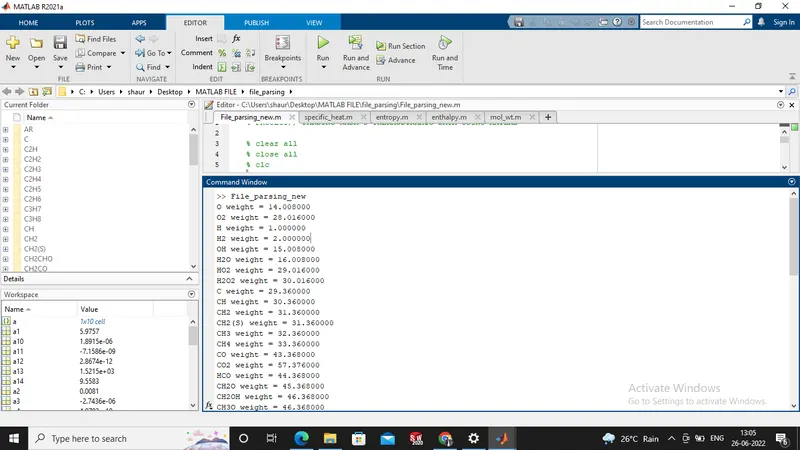
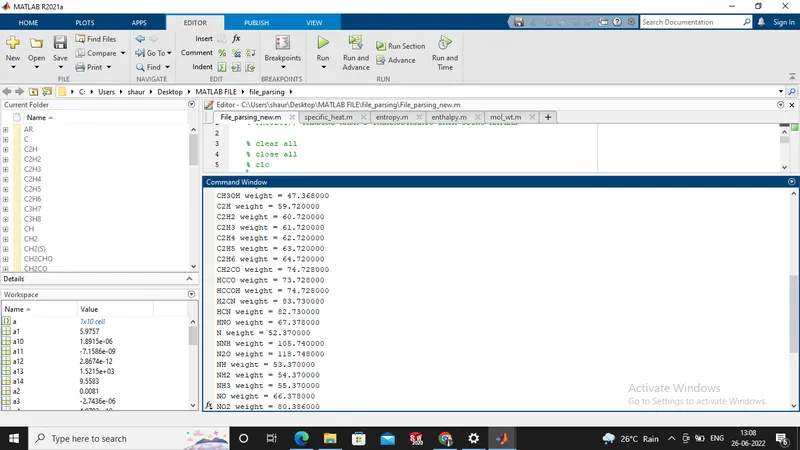
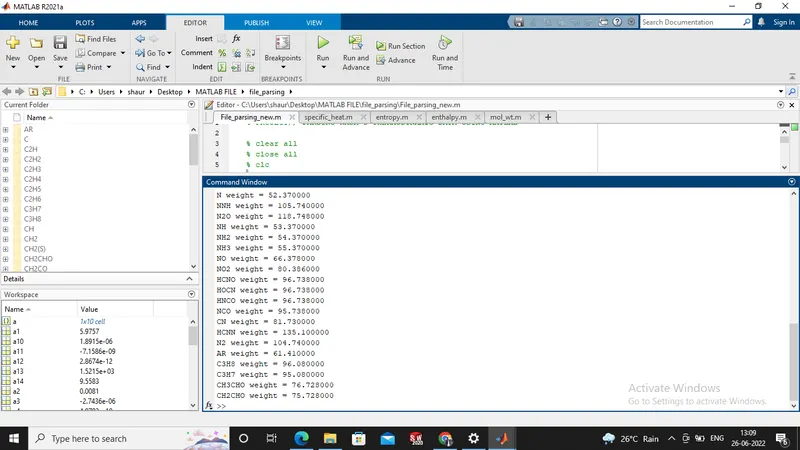
Screen shot Output for the molecular weight :-
[1]:-
[2]:-
[3]:-
Results (plots)of O2 (Oxygen):-
[1]:- specific heat vs Temperature
[2]:- Enthalpy vs Temperature
[3]:- Entropy vs Temperature
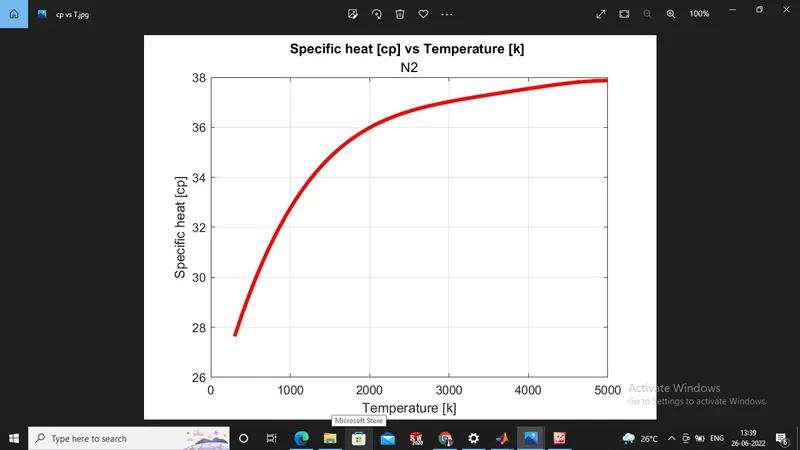
Results (plots)of N2 (Nitrogen):-
[1]:- specific heat vs Temperature
[2]:- Enthalpy vs Temperature
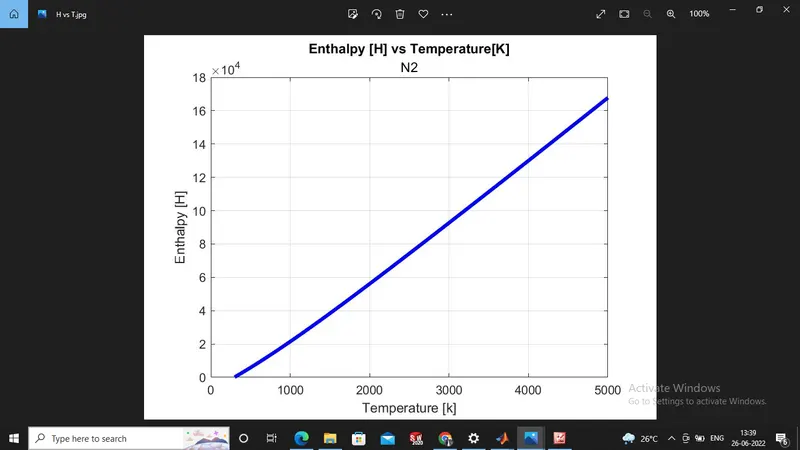
[3]:- Entropy vs Temperature
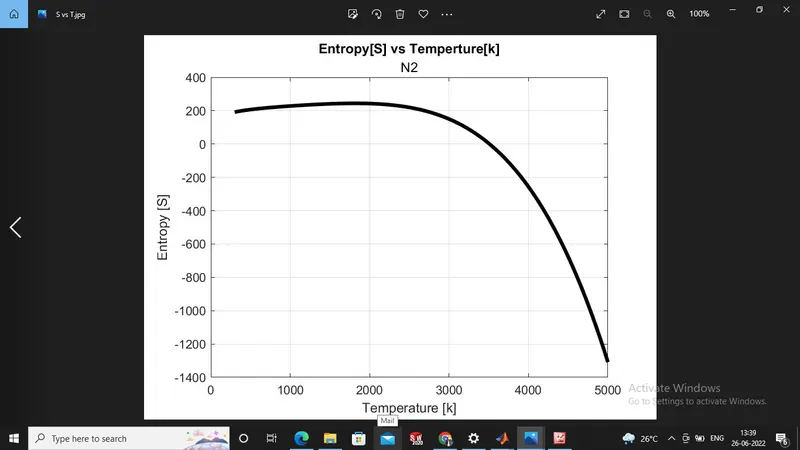
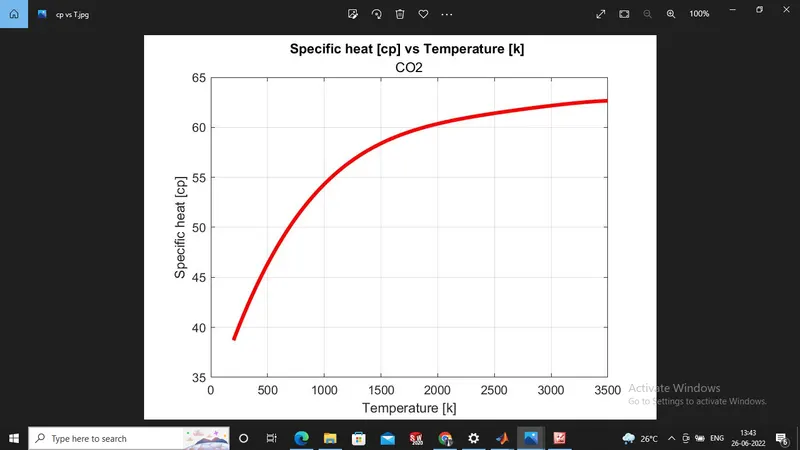
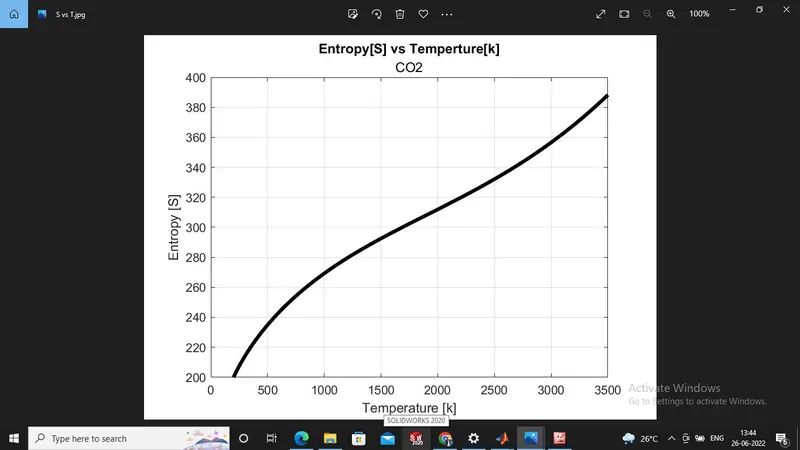
Results (plots)of CO2 (Carbon-diOxide):-
[1]:- specific heat vs Temperature
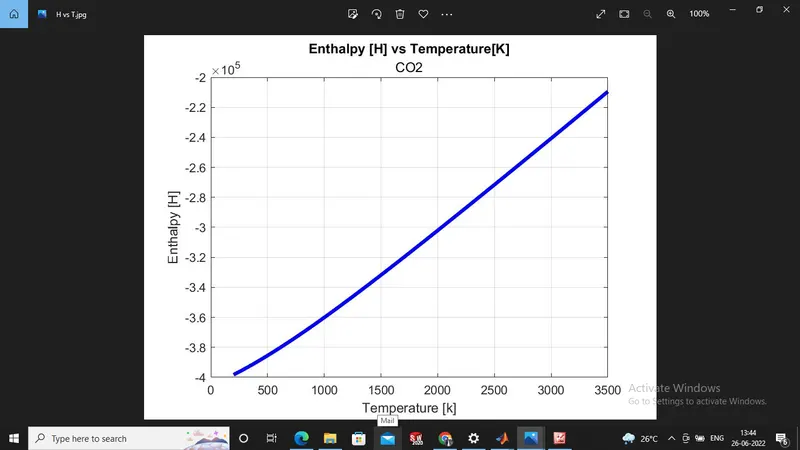
[2]:- Enthalpy vs Temperature
[3]:- Entropy vs Temperature
Screen shot of window folder where all data file saved :-
Error while programming :- There are minor errors while programing like extra use of parantheses and one 'end' keyword are not given then occurs error but as per the requirement of given parantheses and the 'end' keyword the error solved by own.