Week 3 - Solving second order ODEs
given ODE for the motion of pendulum with damping
[d^2θ]/[dt] + [b/m]*[dθ/[dt] + [g/l]*sinθ = 0
In the above equation,
g = gravity in m/s2,
L = length of the pendulum in m,
m = mass of the ball in kg,
b=damping coefficient.
given paramters to solve the equation using matlab
L=1 metre,
m=1 kg,
b=0.05.
g=9.81 m/s2.
time taken = 0 - 20 seconds
angular displacement (θ) = 0
angular velocity [dθ/dt] = 3
now the matlab program
In this program I have used a function called ode_func which is created to breakdwon the second order derivatives into linear derivatives
This is done because the command ode45 recognises only linear diiferntial equations so initially I have broke down the 2 order derivative into 1 order
In the equation
[d^2θ]/[dt] + [b/m]*[dθ/[dt] + [g/l]*sinθ = 0
θ=θ1
so
[d^2θ1]/[dt] + [b/m]*[dθ1/[dt] + [g/l]*sinθ1 = 0
then [dθ1/dt] = θ2
these are substituted to break down the equation
THE FUNCTION
function [dtheta_dt] = ode_func(t,theta,b,g,l,m)
theta1 = theta(1)
theta2 = theta(2)
dtheta1_dt = theta2;
dtheta2_dt = -(b/m)*theta2 - (g/l)*sin(theta1);
dtheta_dt = [dtheta1_dt; dtheta2_dt];
end
THE PROGRAM
close all
clear all
clc

%solving  2 order ode function
%variables
b=0.05;
l=1;
g=9.81;
m=0.1

%initial condition
theta_0 = [0;3];

%time interval
t_span = linspace(0,20,100);


%solve ode
[t,results] = (ode45(@(t,theta) ode_func(t,theta,b,g,l,m),t_span,theta_0));
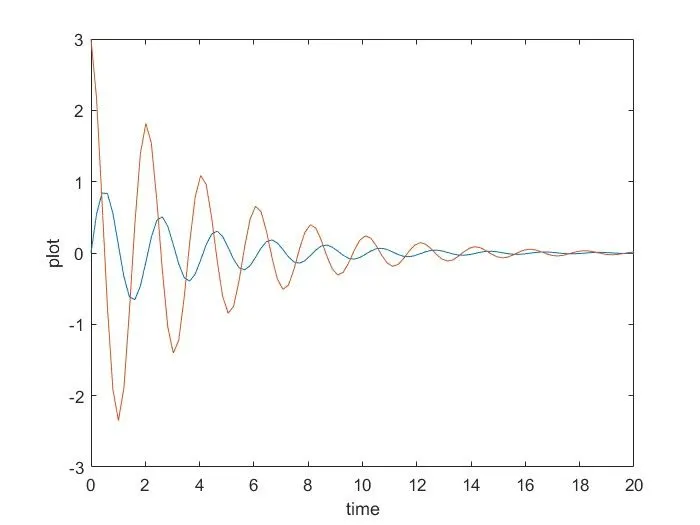
 figure(1)
plot(t,results(:,1))
hold on
plot(t,results(:,2))
xlabel('time')
ylabel('plot')

%displacement=results(:,1);
%velocity=results(:,2);
figure(2)
ct =1;
for i = 1:length(t_span)

    x0 = 0;
    y0 = 0;

    x1 = l*sin(results(i,1));

    y1 = -l*cos(results(i,1));

    % pendulum figure

    plot([-1.5 1.5],[0 0])
    hold on
    plot([x0 x1],[y0 y1],'linewidth',1,'Color','b')
    axis([-2 2 -2 2])
    plot(x1,y1,'o','MarkerSize',20,'Color','r')


    pause(0.01)
    M(ct) = getframe(gcf)
    hold off

    ct = ct+1

end

%movie
movie(M)
videofile = VideoWriter('pendulum.avi','Uncompressed AVI')
open(videofile)
writeVideo(videofile,M)
close(videofile)
PROGRAM EXPLANATION
clear all - used for clearing the variables in workspace
close all - used fo closing the existing plots , graphs
clc - clears the command window
the input paramters are given as mentioned
solving ode
x0 = 0;