Week 3 - Solving second order ODEs
clear all
close all
clc

b=0.05; % damping coefficient
g=9.81; % Gravity(m/s^2)
l=1;    % length of the spring(m)
m=1;  % mass of the bob(kg)

% initial condition
% anguar displacement is 0 and angalur velocity is 3 rad/sec

theta_0=[0;3];

% time span/points
%pendilum oscilates between 0-20 seconds

t_span=linspace(0,20,500);

% solving ODE

[t,results]=ode45(@(t,theta) ode_func(t,theta,b,g,l,m),t_span, theta_0);

y = results(:,1);

%plotting
figure(1)
hold on
plot(t,results(:,1))
plot(t,results(:,2))
title('Damped Harmonic motion of a pendulum')
legend('angular displacement','Angular velocity')
ylabel('plot')
xlabel('Time(seconds)')

% For loop
% Before starting the for loop,a counter value was defined
ct=1;
for i=1:length(t_span)
    x_start=0;
    y_start=0;
    x_end=1*sin(y(i));
    y_end=-1*cos(y(i));

    % plotting the animation
    figure(2)
    % base of pendulum
    plot([-1 1],[0 0],'linewidth',3,'color','g')
    hold on
    % string of pendulum
   line([x_start x_end],[y_start y_end],'linewidth',3,'marker','o')
   hold on
   % bob of pendulum
   plot(x_end,y_end,'marker','o','markersize',25,'markerfacecolor','r')
   axis([-1.5 1.5 -1.5 1])
   pause(0.03)
   hold off
   M(ct)=getframe(gcf); % to change the frame of the movie
   ct=ct+1;

end

% Animmation of the pendulum
movie(M)      % for creating aimation
videofile=VideoWriter('pendulum Animation.AVI','Uncompressed AVI');
open(videofile)         % open the videofile while running the code
%writevideo(videofile,M)
writeVideo(videofile,M)    % for writing the videofile
close(videofile)   % for closing the videofile after code running

% Function Code

function [dtheta_dt]=ode_func(t,theta,b,g,l,m)
theta1=theta(1);
theta2=theta(2);
dtheta1_dt=theta2;
dtheta2_dt=-(b/m)*theta2-(g/l)*sin(theta1);
dtheta_dt=[dtheta1_dt;dtheta2_dt];
end
YouTube Link:
https://youtu.be/J30dWMVJtlM
CODE EXPLANATION:
1.The code starts with Clear all,close all and clc commands
- clear all-commands is used to removes data from the workspace,free up system memory
- close all-commands is used to close all plots and figures
- clc-command is used to clean the command window
2.The next step is enter the inputs b,g,l,m and initial conditions angular displacement and angular velocity and variable 'theta_0'
3.the time span is taken to be 20 seconds with 500 equal intervals
4.TO establish the relation between all the input values in second order ODE, different function code is writtened. the function code is based on the matrix which we have derived,first value is 'theta1' and second value is 'theta2'.
5.next step is to solve ODE,ode45 was used,it is a function in matlab that solves ordinary or partially differential equations using a numerical method. it compares 4th and 5th order methods to estimate the error and determine the stepsize.
6.after calculating the results,a graph has to be plotted, the graph contains two plots, one for angular displacement with respect to time and one for angular veocity with respect to time. The axis abels and legends of the graph has been defined.
7.The next part of the code is to establish a for loop,
a for loop is a repetition control stracture that allows you to efficiently write a loop that needs to execute a specific number of time, a counter loop was added before the for loop,the start and end values of x and y axis have been defined.The loop is used where all the values of timespan are assigned to a variable 'i' one at a time.
8.defined the base of the pendulum with linewidth and color
9.defined the string of the pendulum with linewidth and marker.
10.markersize command was used to form the bob of the pendulum.
11.pause command is used for pausing the command for certain time, for this project a pause of 0.03s was used.
12.The 'M' command was used to capture the current frame every time the for loop runs. the final step of the loop is to add a +1 to the ct variable,this will increament the frame every time the for loop runs.end command is used for plot and for loop to stop running.
13.The Movie command was used to creat the animation of the motion of simple pendulum,the VideoWriter command was used to assign the video format.the open command was used to open the video.the writeVideo command was used to write the video with plot frames and close command was used to close the videofile.
Graph/Output:
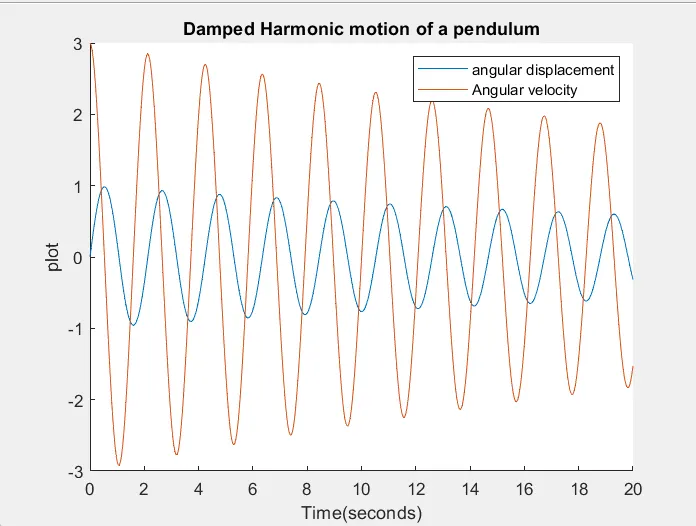
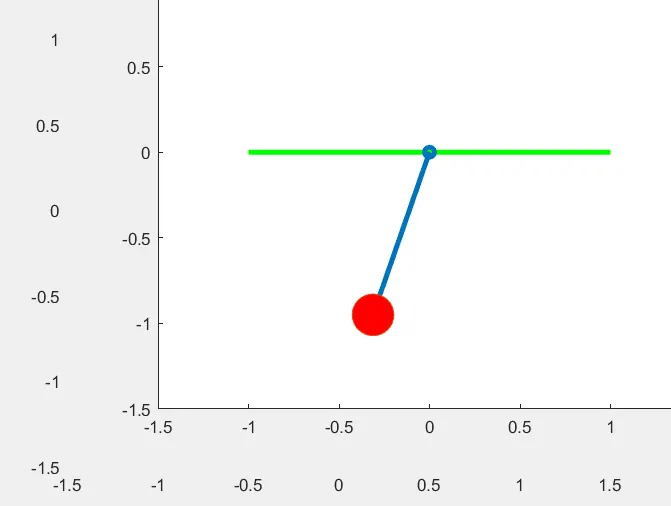
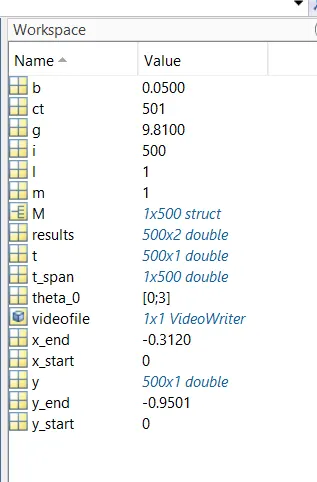
Workspace: