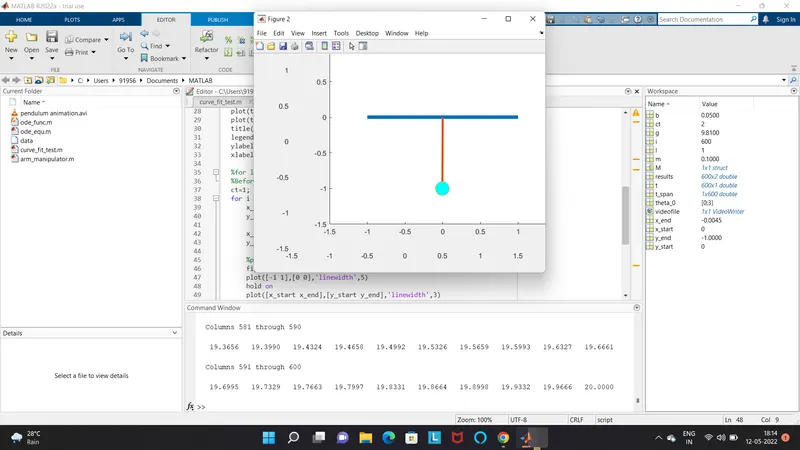
Week 3 - Solving second order ODEs
Main program
%solving second order ODEs of a pendulum
clear all
close all
clc

%input
b=0.05;    %daming coefficient
g=9.81;    %gravity(m/s^2)
l=1;       %length of spring(meter)
m =0.1;      %mass of the bob(kg)


%initial condition
%angular displacement is 0 and angular velocity is 3
theta_0 = [0;3]

%time point
%pendulum ocsilation between o-20 second
t_span = linspace(0,20,600)

%solve ode
[t,results] = ode45(@(t,theta) ode_func(t,theta,b,g,l,m),t_span,theta_0);

%plotting
figure(1)
hold on
plot(t,results(:,1))
plot(t,results(:,2))
title('damped harmonic motion of a pendulum')
legend('angular displacement','angular velocity')
ylabel('plot')
xlabel('time(second)')

%for loop
%Before starting the for loop, a counter value was defined
ct=1;
for i = 1:length(results(:,1))
    x_start =0;
    y_start =0;

    x_end =l*sin(results(i,1));
    y_end =-l*cos(results(i,1));

    %plotting the animation
    figure(2)
    plot([-1 1],[0 0],'linewidth',5)
    hold on
    plot([x_start x_end],[y_start y_end],'linewidth',3)
    hold on
    plot(x_end,y_end,'o','MarkerSize',20,'MarkerFaceColor','c')
    title('Animation of transeint behaviour of the pendulum')
    axis([-1.5 1.5 -1.5 1])
    pause(0.03)
     hold off

    M(ct)=getframe(gcf);
    ct=ct+1;

end
%animation of the pendulum
movie(M)
videofile=VideoWriter('pendulum animation.avi','uncompressed avi');
open(videofile)
writeVideo(videofile,M)
close(videofile)
Function program
% a funtion program will be called in the main program to solve the ODE
function[dtheta_dt] = ode_func(t,theta,b,g,l,m)

theta1 = theta(1);
theta2 = theta(2);

dtheta1_dt =theta2;
dtheta2_dt = -(b/m).*theta2 - (g/l).*sin(theta1);
dtheta_dt =[dtheta1_dt;dtheta2_dt];
end
Result
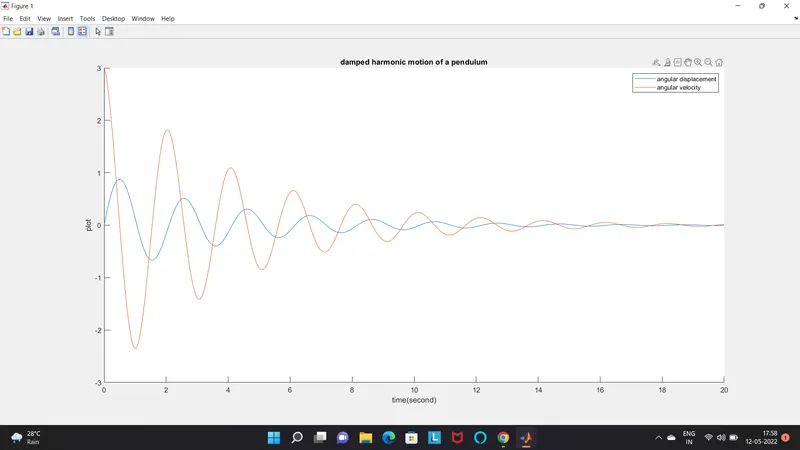
YOUTUBE LINK :https://youtu.be/uuUuFz6_8Bs
REPORT
Before writing the code it is important to start with clear all, close all, clc.
close all- remove data from the workspace ,free up system memory.
clear all- delete the current figure or specified figure
clc-clear all inputs and outputs from the command window ,give clear screen
%initial condition
%angular displacement is 0 and angular velocity is 3
theta_0 = [0;3]
%time point
%pendulum ocsilation between o-20 second
t_span = linspace(0,20,600)
Next step is to define the initial conditions , the angular displacement and angular velocity have been defined.Thenwe provide the time of ocsilation is of 20 seconds using the line sace comand
%solve ode
[t,results] = ode45(@(t,theta) ode_func(t,theta,b,g,l,m),t_span,theta_0);
Next step is to solve ODE,ode45 was used ,It is a funtion in matlab that slolve ordinary differential equation using numerical methord
% a funtion program will be called in the main program to solve the ODE
function[dtheta_dt] = ode_func(t,theta,b,g,l,m)
theta1 = theta(1);
theta2 = theta(2);
dtheta1_dt =theta2;
dtheta2_dt = -(b/m).*theta2 - (g/l).*sin(theta1);
dtheta_dt =[dtheta1_dt;dtheta2_dt];
end
The funtion ode 45 taken 3 input .The 3 input are the funtion to be integrated, the time span and the initial conditions
%plotting
figure(1)
hold on
plot(t,results(:,1))
plot(t,results(:,2))
title('damped harmonic motion of a pendulum')
legend('angular displacement','angular velocity')
ylabel('plot')
xlabel('time(second)')
After that calculating he result a graph has to be plotted the graph contained two plot. one for angular displacement with respect to time and one for angular velocity with respect to time. the legends for the graph and the axis label has been definesd in the graph.
%for loop
%Before starting the for loop, a counter value was defined
ct=1;
for i = 1:length(results(:,1))
x_start =0;
y_start =0;
x_end =l*sin(results(i,1));
y_end =-l*cos(results(i,1));
%plotting the animation
figure(2)
plot([-1 1],[0 0],'linewidth',5)
hold on
plot([x_start x_end],[y_start y_end],'linewidth',3)
hold on
plot(x_end,y_end,'o','MarkerSize',20,'MarkerFaceColor','c')
title('Animation of transeint behaviour of the pendulum')
axis([-1.5 1.5 -1.5 1])
pause(0.03)
hold off
The second part of the code is established a for loop ( a for loop is a repeatition control stucture that allows you to sffectivily write a loop that need to excicute a specific number of times . A counter loop was added before the for liio. The start and end point of x and y axis has been defined
the loop is used where all the values of the timespan are assigned to a variable "i"one at a time
The coordinate of [x0 x1,y0y1] and their corresponding relations are enter to form bob of pendulum
A pause command is used for the pausing of command for a certain time . In this command is 0.03
M(ct)=getframe(gcf);
ct=ct+1;
end
The M command is used to capture the current frame everytime the for loopruns'
the end command is used for plot and for the loop to stop both from running
%animation of the pendulum
movie(M)
videofile=VideoWriter('pendulum animation.avi','uncompressed avi');
open(videofile)
writeVideo(videofile,M)
close(videofile)
The final step of the code to create a movie of the animation of the bob oscilation, so the movie command was used
The VideoWriter command was used to assign the videoformat for this project avi
The open command is used to open the video
videowriter is used to write the video with plot frame
cllose is used to close the file
ERROR
wwhen i wrote
for i = length(results(:,1)) instread of
for i = 1:length(results(:,1)) the bob is not oscilating