Week 2- 2R Robotic Arm Challenge
%program for forward kinematics of 2R robotic arm manipulator animation
clear all
close all
clc

%input
%length of the arm
l1 = 1;
l2 = 0.5;


%Angle of of both links with respect to horizondal axis
theta1 = linspace(0,90,10);
theta2 = linspace(0,90,10);

%program
ct=1
for i=1:length(theta1)
    THETA1=theta1(i);
    for j=1:length(theta2)
        THETA2=theta2(j);


x0 = 0;
y0 = 0;

x1 = l1.*cosd(THETA1);
y1 = l1.*sind(THETA1);

x2 = x1+l2.*cosd(THETA2);
y2 = y1+l2.*sind(THETA2);

%plotting
plot([x0 x1],[y0 y1],[x1 x2],[y1 y2],'LineWidth',3)
axis([-0.1 1.7 0 1.7])


pause(0.03)


M(ct)=getframe(gcf)
ct=ct+1;
end
end


movie(M)
videofile = VideoWriter('2Rarmmechanism.avi','uncompressed AVI');
open(videofile)
writeVideo(videofile,M)
close(videofile)
REPORT
First of all the input should be provided.
%length of the arm
l1 = 1;
l2 = 0.5;
%Angle of of both links with respect to horizondal axis
theta1 = linspace(0,90,10);
theta2 = linspace(0,90,10);
By using the command 10 values for theta will be calculated, which is in between 0 to 90 degree .
ct=1
Counter plot will be addesd to plote plot induvidualy
Plot can be generated manually but it is a tedious work , to make it automatic we will use for loop funtion(to repeat action again and again).
for i=1:length(theta1)
Value of i wiil change from 1 to length of theta1,length(theta1) is nothing but all the 10 theta value between 0 to 90 which is generated by the linspace command.
THETA1=theta1(i);
THETA1 is a variable (that contain only one variable only), where theta 1 is an array (contain 10 value from 0 to 90)
i is the loop counter which determine how many times the for loop get excicuted.
second loop is required because of the 10 position of theta1 , theta2.
for j=1:length(theta2)
THETA2=theta2(j);
Then we have to provide the point equation for calculation value .
x0 = 0;
y0 = 0;
x1 = l1.*cosd(THETA1);
y1 = l1.*sind(THETA1);
x2 = x1+l2.*cosd(THETA2);
y2 = y1+l2.*sind(THETA2);
%plotting
plot([x0 x1],[y0 y1],[x1 x2],[y1 y2],'LineWidth',3)
By this comand plot will generated, in that specific width and colour .
axis([-0.1 1.7 0 1.7])
This commandis used for fixing the work area in the graph .
M(ct)=getframe(gcf)
This command is used for making the plot in an animated form.
ct=ct+1;
Is a forloop increment excecution.
movie(M)
videofile = VideoWriter('2Rarmmechanism.avi','uncompressed AVI');
open(videofile)
writeVideo(videofile,M)
close(videofile)
In order to make the animation to avi vdeo formate we use the above commants
NB: It is very important to note that the comments are case sensitive
ERRORS
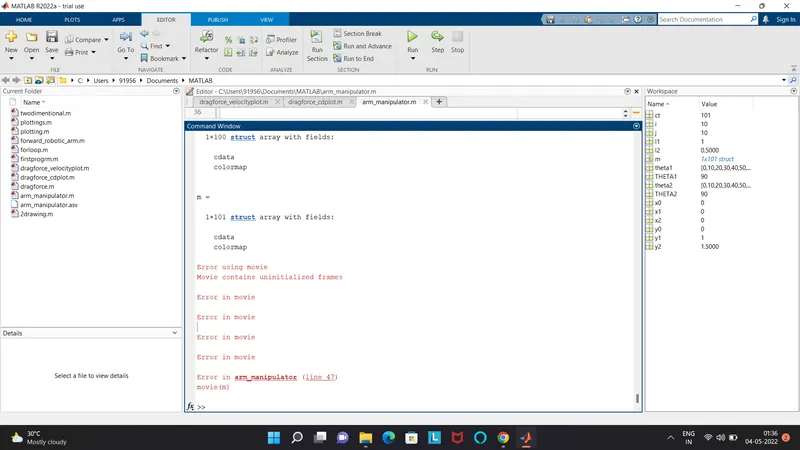
Error 2 : unable to save as video in the system due to the case sensitivity of the
videofile = videowriter('2Rarmmechanism.avi','uncompressed AVI');
open(videofile)
writevideo(videofile,M)
close(videofile)
result:
Unrecognized function or variable 'videowriter'.
Error in arm_manipulator (line 48)
videofile=videowriter('2Rarmmechanism','uncompressed AVI');
Error in arm_manipulator (line 48)
videofile=videowriter('2Rarmmechanism','uncompressed AVI');