Week 3 - Solving second order ODEs
SECOND ORDER DIFFERENTIAL EQUATIONS
In engineering,ODE is used to describe the transient behaviour of a system.A simple example is a pendulum.
the way pendulum moves depends on the newtons second law.when this law was written,we got a second order differential equation that describe the position of the ball with respect to time.
OBJECTIVE:-write a program that solves then following ODE.this ODE represnts the equation of motion of a simple pendulum with damping.
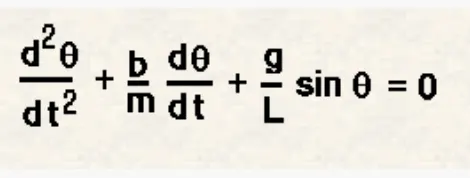
in the above equation,
g = gravity in m/s^2,
L =length of the pendulum,
m = mass of the ball in kg,
b = damping coefficient.
the values are given as follows :-
L = 1 meter
m = 1 kg
b = 0.05.
g = 9.81 m/s^2
simulate the motion between 0-20 sec,
angular displacement = 0
angular velocity = 3rad/sec at time t =0.
solving the differential equation given above,
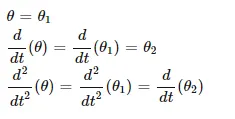
we can write the equation 1 as
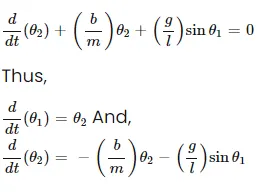
now writing the program in matlab,
clear all
close all
clc

%inputs
L = 1
m = 1
b = 0.05
g = 9.81

%initial conditions
theta_0 = [0;3];

%time points
t_span = linspace (0,20,500);

%solving the ode

[t,results] = ode45(@(t,theta) ode_func(t,theta,b,g,L,m),t_span,theta_0)

figure(1)
plot(t,results(:,1))
hold on
plot(t,results(:,2))
grid on
title('motion of pendulum')
xlabel('time in sec')
ylabel('angular displacement/rad/s')
legend('displacement','angular velocity')
writing a ode function in new file.
function [dtheta_dt] = ode_func(t,theta,b,g,l,m)

theta1 = theta(1)
theta2 = theta(2)
dtheta1_dt = theta2;

dtheta2_dt = -(b/m)*theta2-(g/l)*sin(theta1);
dtheta_dt = [dtheta1_dt; dtheta2_dt];

end
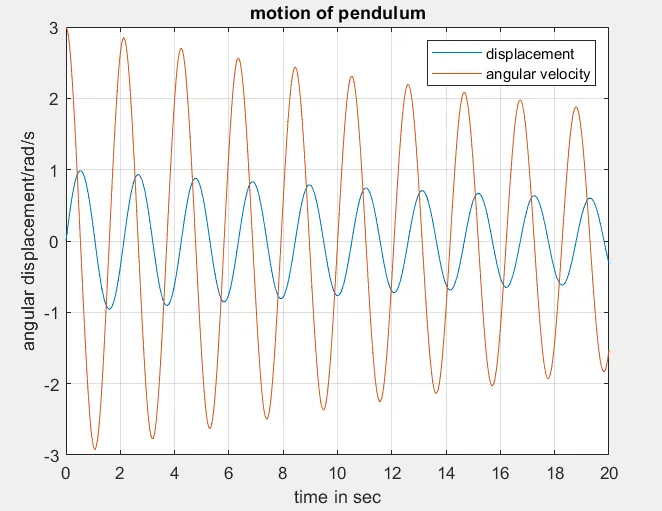
hence,the plot is created.
writing a program to make a movie/animation:-
angle = results(:,1);

ct = 1
figure(2)
title('motion of pendulum')
for i =1: length(angle)
    omega = angle(i);


    %fixed coordinates of one end of a simple pendulum.
    x0 = 0;
    y0 = 0;

     %moving coordinates of the bob
     x1 = L*cos((3*pi/2)+omega);
     y1 = L*sin((3*pi/2)+omega);

     %plotting of the bob motion
     plot([x0 x1],[y0 y1],'linewidth',3,'color','r');
     hold on;
     plot(x1,y1,'o','markers',15,'markerfacecolor','g');

     plot([-3 3],[0 0],'linewidth',2,'color','b');
     hold off
     axis([-3 3 -2 2])
     grid on
     pause(0.1)
     M(ct)=getframe(gcf);
     ct = ct+1;

end

%to create a animation of a simple pendulum
movie(M)
B = VideoWriter('simple_pendulum.avi','uncompressed AVI');
open(B)
writeVideo(B,M)
close(B)
hence, the animation is created he link is provided below:-
https://drive.google.com/file/d/15pfgVRevS9panufrbmcOsGbiK_xDLwTK/view?usp=sharing
EXPLANATION :-
- clear all,close all,clc are used to clear data stored in workspace,the graphs which exist and the command window.
-inputs are specified of the simple pendulum. i.e
L =lemgth of string to connect bob.
g = gravity.
m = mass of the bob.
d =damping coefficient.
t_span = it is the command which specifies the time span of the iterations thatb are going to solve 2nd ODE.
ode45 = ode is a function in matlab whic solves the diffferential equations using a numerical method.
in this equation the highest orderis 2,we will take two constant values.so that we can change the equation.
the ode function has a syntax in which we need to specify which should be ode45 ,which should be ode function,and the t_span for the function to wok and initial vlaue of the equation.
now, the figure(1)is going to show the damping of pendulum.
:-plotting the values for angular velocity and the dispalcement by using plot commands
:-the label command is used to label the x-axis and y-axis.
:-legend command is used to label the angular velocityand the displacement.
:-A for loop is used to set the points to keep the bobat different locations.
ct command:-ct command is used to count each and every positions and stores the data.
movie command-movie(m) is used to cretae a film of the data stored.
videowriter-this command specifies the name of a file.
open-this command is ised to open the file where it is stored.
writevideo-this command is used to create the animation by using M file.
close-this command is used to close the videofile.
ERROR FACED WHILE WRITING A PROGRAM IN ERROR-

error faced because not using the parantheses.

error faced because not using the upper case in 'videoWriter'.
plots and graph has been attached and link of video of motion of a simple pendulum is uploaded on google drive is shared above.