Week 3 - Solving second order ODEs
PENDULUM
AIM
- To create an animation that represents the position of the pendulum.
- To create a plot between velocity and displacement of pendulum.
- The equation of motion of a simple pendulum with damping.
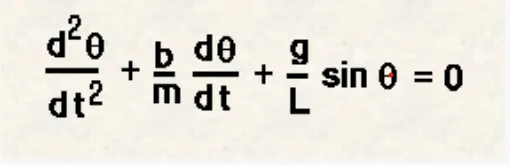
In the above equation,
g = gravity in m/s2,
L = length of the pendulum in m,
m = mass of the ball in kg,
b=damping coefficient.
OBJECTIVE
- Using command ode45 which is an in built solver command in MATLAB.
- The differential equations are written in the form of a matrix
The differential equation in the form of matrix
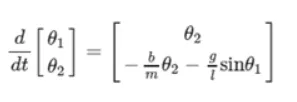
By using this equation we can make the pendulum by coding in matlab.
PROGRAM FOR THE PENDULUM
clear all
close all
clc

%input variables
b=0.05; %damping cofficient
g=9.81; %gravity
l=1; %length of string
m=0.1; %mass

% innitial condition
theta_0 = [0; 3];

% time points
t_span = linspace(0,20,500);

% here i use ode45 function to solve second order ode
[t,results] = ode45(@(t,theta) ode_func(t,theta,b,g,l,m),t_span,theta_0);

%plotting velocity and displacement

%figure 1
plot(t,results(:,1))
hold on
plot(t,results(:,2))
title('motion of pendulum')
xlabel('time')
ylabel('angular velocity/displacement')
legend('displacement','angular velocity')

angle = results(:,1);

%count command for frame
ct = 1;

for i = 1 : length(angle)
    THETA = angle(i);

    %figure 2
    title('motion of pendulum')

    %fixed cordinate of pendulum
    x0 = 0;
    y0 = 0;

    %moving cordinate of pendulum
    x1 = l*cos((3*pi/2)+THETA);
    y1 = l*sin((3*pi/2)+THETA);


    %formula to plot animation
    plot([x0 x1],[y0 y1],'LineWidth',3,'Color','g')
    hold on;
    plot(x1,y1,'o','markers',15,'MarkerFaceColor','k');
    hold on;
    plot([-3,3],[0,0],'LineWidth',2,'Color','b');
    grid on
    hold off
    axis([-3 3 -2 2])
    pause(0.01)

    M(ct) = getframe(gcf);
    ct = ct+1;
end

%To make an animation movie

%data from an array to the video file
movie(M)

%VideoWriter object to create a video file from an array
videofile = VideoWriter('pendulum.avi','Uncompressed AVI');
open(videofile)

%data from an array to the video file
writeVideo(videofile,M)
%closes the figure
close(videofile)
ODE FUCTION
function [dtheta_dt] = ode_func(t,theta,b,g,l,m)

theta1 = theta(1);
theta2 = theta(2);
dtheta1_dt = theta(2);
dtheta2_dt = -(b/m)*theta2 - (g/1)*sin(theta1);
dtheta_dt = [dtheta1_dt; dtheta2_dt];
end
PROGRAM EXPLANATION
- Clear all used to clear the work space.
- close all used to clear the graphs.
- clc used to clear the command window.
- t_span used to specifies the time span of the iterations.
- Ode45 is a command which is used to solve oridinary and partial differential equation.
- Movie(M) is used to create a film.
- videowriter command specifies the name of the file and type of data.
- Open used to open the file from location.
- Writevideo command is used to create the video animation by using M file.
- Close command is used to close the file.
ERRORS
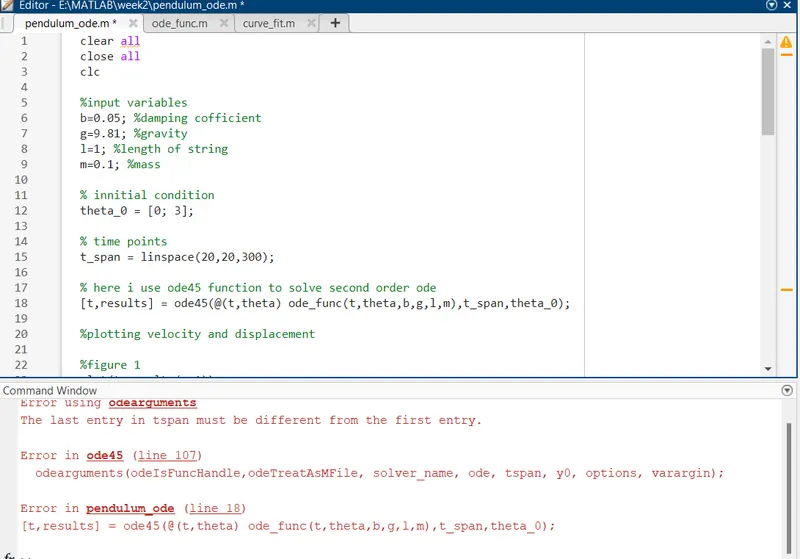
- I have use linspace starting value x1 simmilar to x2 then matlab shows an error.
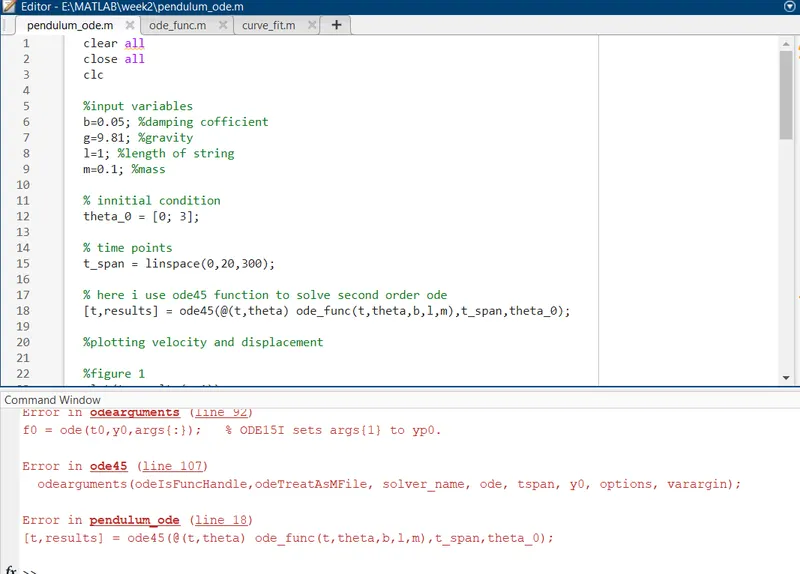
- By mistakely i forgate to match the perameter (b,g,l,m) of function and program.
ANIMATION OF SIMPLE PENDULUM
https://drive.google.com/file/d/15Ifzu6R-vMC32baUqUrNq5Bp431tNexk/view?usp=sharing