Week 3 - Solving second order ODEs
Aim:
The main aim of the plot is to write a program to solve the ssecond order ODE and to animate the pendulum motion with necessory plotting.
Second order ode:
The term second-order differential equation is used for any differential equation whose order is 2, it is a differential equation of the form
where,
g = gravity in m/s2,
L = length of the pendulum in m,
m = mass of the ball in kg,
b=damping coefficient.
Given data:
L=1 metre,
m=1 kg,
b=0.05.
g=9.81 m/s2.
1. program to simulate simple pendulum motion:
clear all
close all
clc

b=0.05
g=9.81
l=1
m=0.1

%initial condition
theta_0=[0;3]
%time points
t_span=linspace(0,20,500)

%solving ODE
[t,results]=ode45(@(t,theta)ode_func(t,theta,b,g,l,m),t_span,theta_0)

% plotting

plot(t,results(:,1))
hold on
plot(t,results(:,2))
xlabel('time')
ylabel('angular velocity')
grid on

%simulating
ct =1
for i=1:length(results(:,1))
    x0=0
    y0=0
    x1=l*sin(results(i,1))
    y1=-l*cos(results(i,1))
    figure(2)
    plot([-1,1],[0,0],'linewidth',3)
    line([x0,x1],[y0,y1],'linewidth',3)
    hold on
    plot(x1,y1,'o','markers',20,'markerfacecolor','r')
    grid on
    axis([-2.5 2.5 -3 2])
    hold off
    M(ct)=getframe(gcf)
    ct=ct+1
end


% creating animation

movie(M)
videofile=VideoWriter('simple_pendulum_animation.avi','uncompressed AVI')
open(videofile)
writeVideo(videofile,M)
close(videofile)
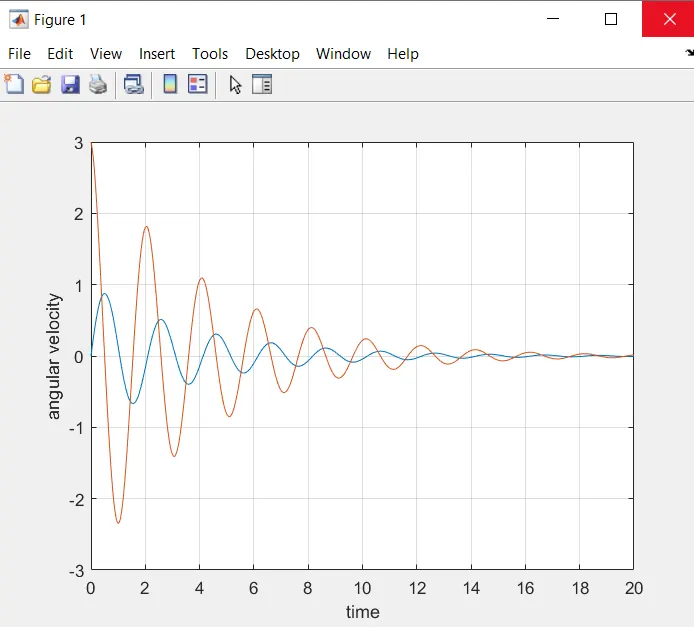
plot :
The below figure is th p,ot diagram for tome and velocity.
Code explaination:
1. The input values of b,g,l,m values are taken
where,
g = gravity in m/s2,
L = length of the pendulum in m,
m = mass of the ball in kg,
b=damping coefficient.
2. From the below code the initial condition theta_0 and the timepoints t_span values are taken, linspace(0,20,500) command is used to generate 500 values from 0 to 20.
%initial condition
theta_0=[0;3]
%time points
t_span=linspace(0,20,500)
3.Then by using the inbuilt solver function ode45 the ode gets solved by giving the necessary inputs and the value gets stored in [t,results].
%solving ODE
[t,results]=ode45(@(t,theta)ode_func(t,theta,b,g,l,m),t_span,theta_0)
4.Then by using the below code plotting is done where the plotting values are given with the necessary xlabel and ylabel'
%ploting
plot(t,results(:,1))
hold on
plot(t,results(:,2))
xlabel('time')
ylabel('angular velocity')
grid on
5.Then the simulation is done by using the for loop and by taking ct as 1 where ct stands for counter value. Then the initial value x0 and y0 are taken as 0 and the final value x1 ans y1 are taken , where
x1=l*sin(results(i,1))
y1=-l*cos(results(i,1))
Then the plotting is done by providing necessary plot values with the command hold on. here marker command is used to generate the sphere.Once the plotting gets done hold off command is used fot the neat simulation.
M(ct)=getframe(gcf)
ct=ct+1
Then the counter value gets changed to ct+1 and the for loop gets ended.
6.The command written below is used to create animation/ movies.
% creating animation
movie(M)
videofile=VideoWriter('simple_pendulum_animation.avi','uncompressed AVI')
open(videofile)
writeVideo(videofile,M)
close(videofile)
The created animation gets stored in the AVI file format as mwntioned from the program.
Function code:
function[dtheta_dt]=ode_func(t,theta,b,g,l,m)
theta1=theta(1)
theta2=theta(2)
dtheta1_dt=theta2
dtheta2_dt=-(b/m)*theta2-(g/l)*sin(theta1)
dtheta_dt=[dtheta1_dt;dtheta2_dt]
end
The code above can be also called as call in function thi is used un solving the ode in the program 1.
Errors while programming:
1. Have faced much typo errors and call in error.
2. Forgot to add hold off command as the result the obtained simulation looked kinda messy amd after few try i figured out the error and corrected it.
Result:
Thus the programming is done for solving the second order ODE and the necessory animation for pendulum motion is made from the given data.
And the link for the youtube video showing the animation of simple pendulum motion is pasted below.