Week 2- 2R Robotic Arm Challenge
AIM:
The main aim of the program is to simulate the forward kinematics of a 2R Robotic Arm.
Forward Kinematics:
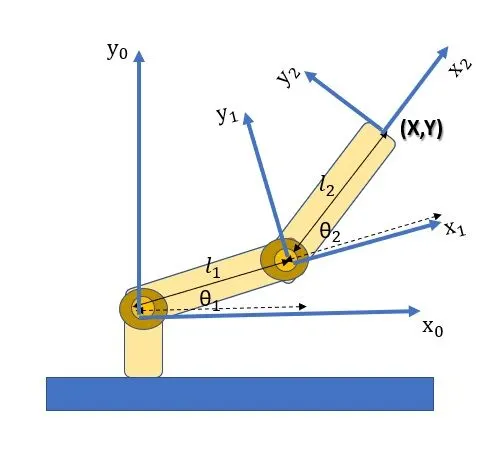
Forward kinematics refers to the use of the kinematic equations of a robot to compute the position of the end-effector from specified values for the joint parameters. The kinematics equations of the robot are used in robotics, computer games, and animation. The reverse process that computes the joint parameters that achieve a specified position of the end-effector is known as inverse kinematics.
The diagram below illustrates the Forward kinematics of an Robotic Arm
CODE:
clear all
close all
clc
%inputs
l1=1
l2=0.8
theta1=linspace(0,90,20)
theta2=linspace(0,90,20)
ct=1
for i=1:length(theta1)
THETA1=theta1(i)
for j=1:length(theta2)
THETA2=theta2(j)
x0=0
y0=0
x1=l1*cosd(THETA1)
y1=l1*sind(THETA1)
x2=x1+l2*cosd(THETA2)
y2=y1+l2*sind(THETA2)
%plotting
plot([x0 x1],[y0 y1],[x1 x2],[y1 y2],'linewidth',2)
axis([-0.1 1.5 0 1.5])
pause(0.03)
M(ct)=getframe(gcf)
ct=ct+1
end
end
movie(M)
videofile = VideoWriter('forward_kinematics.avi','Uncompressed AVI');
open(videofile)
writeVideo(videofile,M)
close(videofile)
CODE EXPLAINATION:
1. As the first step the inputs were taken, linspace command was used to generate the values of theta1 and theta2. since it is very much useful in generating values with the inputs given. Then the input for counter value is also given.
2. As for the second step 'for loop' is used thus the total values are taken into account rather than assing values one by one. By doing this the values of THETA1 AND THETA2 are taken.
3. And then the values of xo,yo and x1,y1 and x2,y2 values are generated using the nesessory steps.
4. And then the plotting is done with the linewidth of 2 and the axis([-0.1 1.5 0 1.5]) with the pause(0.03) and then
M(ct)=getframe(gcf) and then ct=ct+1 is taken where ct represents eack and every frame, with that 'the for loop' ends.
5. in this process the movie is created with the code mentioned below.
movie(M)
videofile = VideoWriter('forward_kinematics.avi','Uncompressed AVI');
open(videofile)
writeVideo(videofile,M)
close(videofile)
thus the programming is done.
Errors faced while programming:
1. Nearly 2 or 3 times i have faced typo errors while writing the code and i have solved it by myself just by looking back the code and figuring what might have gone wrong.
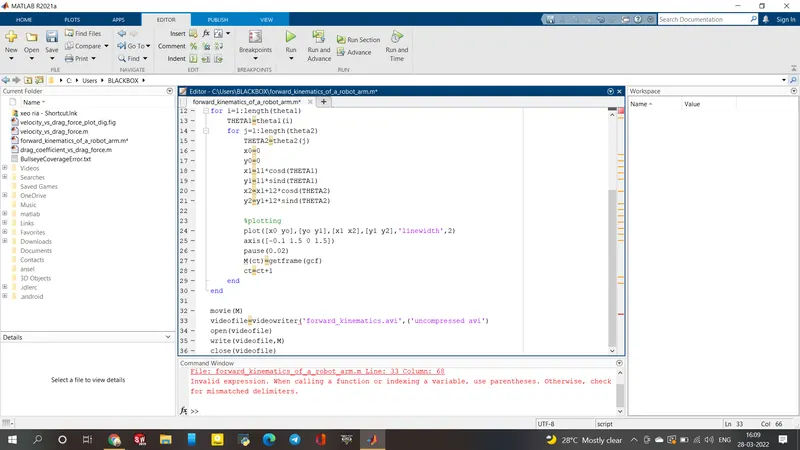
In line 33 where i have forgot to close the bracket.
2. And i struggled a little to open my animation but somehow i cleared it and finished my program in my third attempt.
Result:
Thus the program is to simulate the forward kinematics of a 2R Robotic Arm is done with the required .avi file.
I have also attached the link to the youtube video below.