Week 3 - Solving second order ODEs
PROGRAM TO SOLVE AN ODE
In Engineering, ODE is used to describe the transient behavior of a system. A simple example is a pendulum
The way the pendulum moves depends on the Newtons second law. When this law is written down, we get a second order Ordinary Differential Equation that describes the position of the "ball" w.r.t time.
ODE which represents equation of motion of simple pendulum with damping is given by
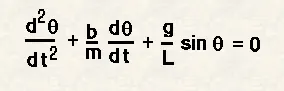
where
g-gravity in m/s^2
l-length of pendulum in m
m- mass of ball in kg
b-damping coefficent
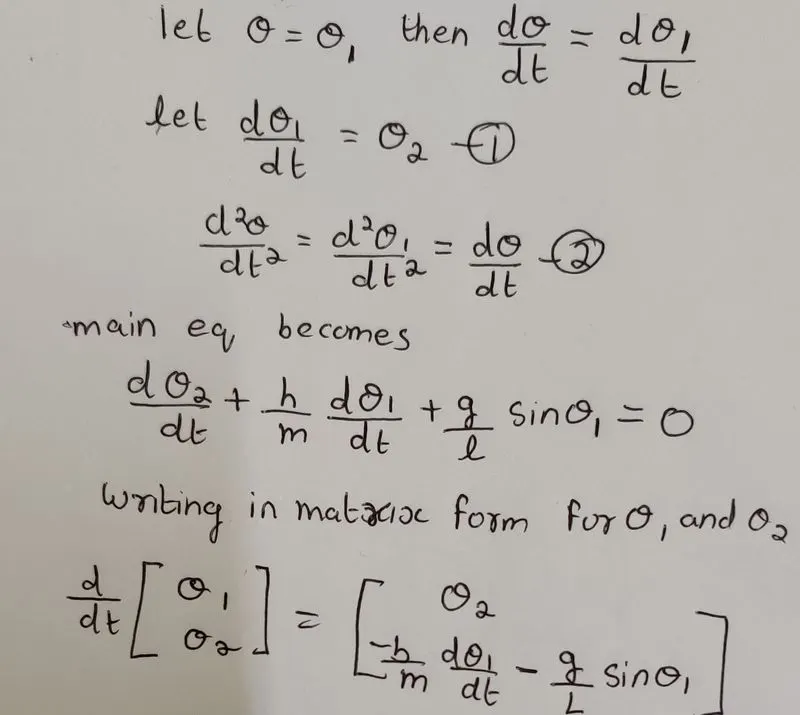
when we are solving the above equation we are basically solving theta and rate at which theta is changing with time
we can breakdown 2nd order ODE to a series of 1st order ODE
MATLAB CODE
clear all
close all
clc
%damping coefficent
b=0.05;
%gravitational force
g=9.81;
%length of pendulum string
l=0.5;
%mass
m=1;
%initial condiotion for displacment and velocity
theta_0= [0;3];
%time span
t_span=linspace(0,20,500);
%solving ODE
%calling the function using results vector
%ODE45 integrates  theta wrt to t during the time interval t_span with
% initial conndition for displacment and velocity
%for each value of time a correcsponding velocity and displacment is
%returned to the vector results
[t,results]=ode45(@(t,theta)ode_func(t,theta,b,g,l,m),t_span,theta_0);
%declaring a variable which stores all the angular displacment values
val=results(:,1);
%declaring a count variable to count the number of frames
ct=1;
%for loop is used to get x and y values for all displacments
for i=1:length(val)
    x0=0;
    y0=0;
    %x value at an instant
    x=l*sin(val(i))
    %y value at an instant
    y=-l*cos(val(i))
   %the blue line is plotted
    plot([-0.4 0.4],[0 0],'linewidth',5,'color','b')
    %hold one plot over other
    hold on
    %pendulum string
    plot([x0,x],[y0,y],'LineWidth',3,'Color','r')
    %bob of pendulum
  plot(x,y,'o','markersize',15','MarkerFaceColor','y','MarkeredgeColor','r')
  title('motion of simple pendulum')
   axis([-1,1, -1.2,0.2])
  hold off
 %getting each frame and storing it to a variable M
   M(ct)=getframe(gcf)
   ct=ct+1;
    pause(0.05)
end
%generating a movie with all frames
movie(M)
%creating objects to write videofile
videofile=VideoWriter('simple pendulum.avi')
%opening videofile
open(videofile)
%writing videofile
writeVideo(videofile,M)
%closing videofile
close(videofile)
ODE Function
%defining a function which is used to pass values for t,theta,b,l and m
function[dtheta_dt]=ode_func(t,theta,b,g,l,m)
theta1=theta(1);
theta2=theta(2);
%ODE EQN
dtheta1_dt=theta2;
dtheta2_dt=-(b/m)*theta2-(g/l)*sin(theta1);
%combining dtheta1 and dtheta2
dtheta_dt=[dtheta1_dt;dtheta2_dt];
end
errors faced while programming
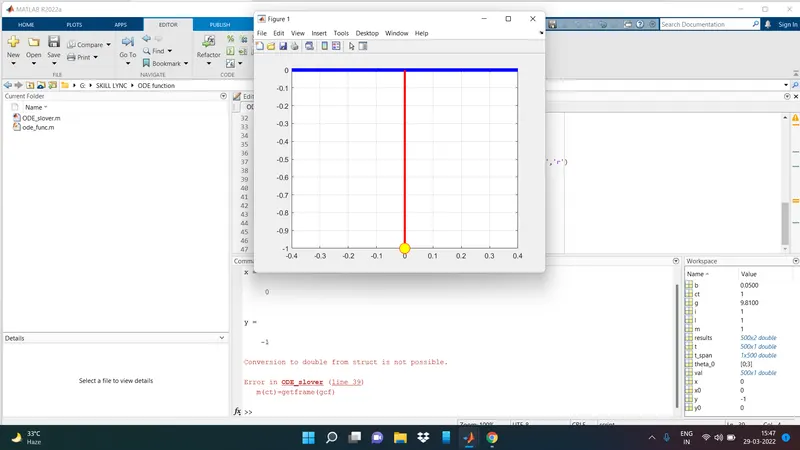
changed the m(ct) to M(ct) and everything works fine
youtube link