Week 2- 2R Robotic Arm Challenge
Program to simulate forward kinematics of a robotic 2R arm
Robotic arm are mostly used for complex appication like welding a frame.
Robtic arm consist of two links, lets say link 1 and 2. Link 1 is inclined at an angle theta1 with the ground and link 2 is incline at an angle theta2 with normal to the grond. To define two attached link in 2D space we need 3 co-ordinates let it be (x0,x1) ,(x1, y1), (x2,y2).
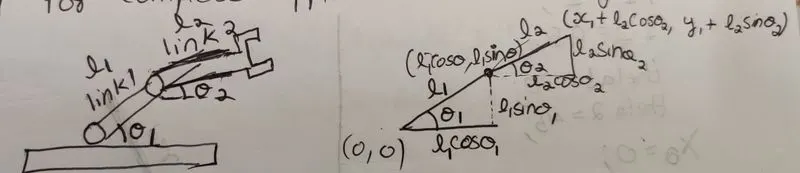
Calculating positon of link 1
let the starting point be (0,0) ie. x0=0, y0=0
end point x1=l1*cos(theta1), y1 =l1*sin(theta1)
calculating position of link 2
start point x1=l1*cos(theta1), y1 =l1*sin(theta1)
end point x2=x1+l2*cos(theta2), y2=y1+l2*sin(theta2)
MATLAB CODE
clear all
close all
clc
%programming a robotic arm
%links l1 and l2 in m
l1=1;
l2=0.5;
%here we are defining 10 values for theta1 and theta2
theta1=linspace(90,30,10);
theta2=linspace(90,30,10);
%declaring a count variable(ct) to assign each frame to a vaiable m
ct=1;
%declaring for loop so that for each iteration the value of THETA1 is changed
for i=1:10;
    %storing theta1 value in a secondary variable so that each time i
    %varies different theta1 values get stored in THETA1
    THETA1=theta1(i);
    %declaring for loop so that for each iteration the value of THETA2 is changed
    for j=1:10;
        %storing theta2 value in a secondary variable so that each time i
    %varies different theta1 values get stored in THETA2
        THETA2=theta2(j);
%intial and final position of links
x0=0;
y0=0;
x1=l1*cosd(THETA1);
y1=l1*sind(THETA1);
x2=x1+l2*cosd(THETA2);
y2=y1+l2*sind(THETA2);
%plotting the arm using points x0,y0,x1,y1,x2,y2
plot([x0 x1],[y0 y1],[x1 x2],[y1 y2],'linewidth',3)
%setting axis constand during the time of plot
axis([-0.1 1.5 0 1.5])
%storing each frame value into a variable m
m(ct)=getframe(gcf);
%incrementing count so that array m stores frames at each instant when for
%loop gewts executed
ct=ct+1;
    end
end
%generating a movie with all the frames
movie(m)
%create objects to write video file
videofile = VideoWriter('forward kinematics.avi')
%opening the video file
open(videofile)
%writinng the video file to get the file in video format
writeVideo(videofile,m)
close(videofile)
Step by step code explanation is given as comment
Additional explanation (plot): for loop
the plot happens such a way that link 1 will have an initail postion (when i=1) this time THETA1 will have a const value, then link 2's postion changes as for loop with "j" executes (this goes on till j increments till 10) dring this time THETA2 will take 10 values.
Again i gets incremented and the link 1 takes the next postion (i=2) THETA1 will also chage and remains constant till THETA2 changes 10 times (j=1 to 10). this repeats till value of i becomes 10. This results in a robotic arm type movement.
The resulting plot is then converted to a movie and linked below
youtube link:
Errors faced while programming
Other than the normal syntax errors, creating a video in matlab was new to me so i faced the following error while running
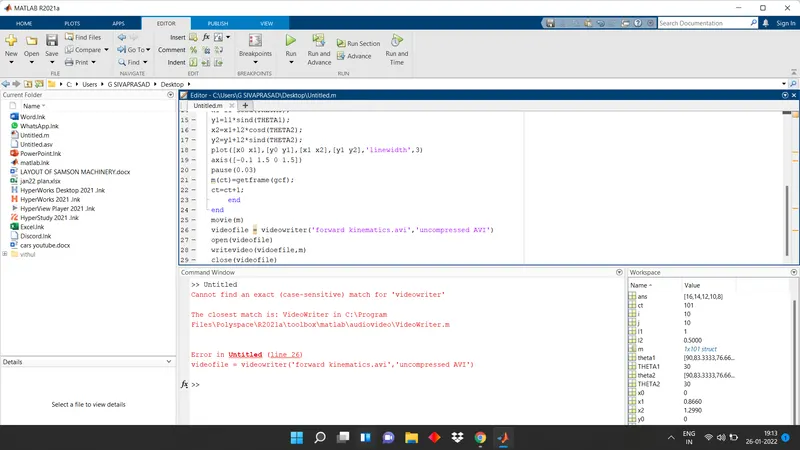
the above first error was corrected by searching videowrite on matlab documentation and found that V and W should be capital same was the case with write video. I also removed the pause(0.3) since it was not necessary. on running again it showed another error
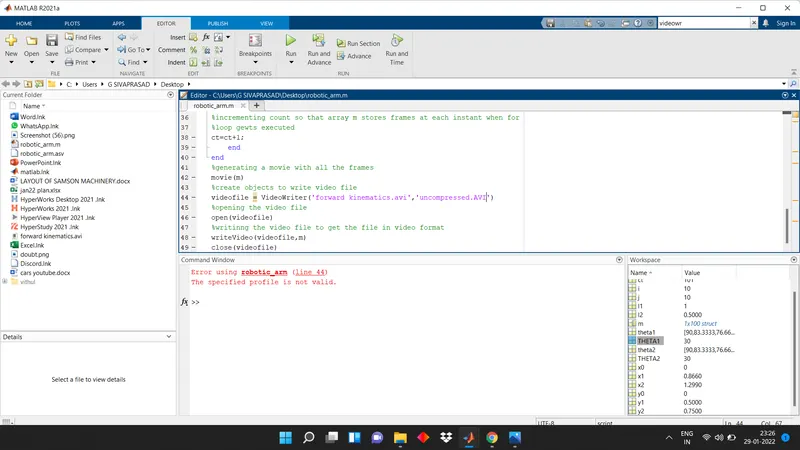
then i searched for syntax on matlab documentation and realized VideoWriter(filename) was only necessary