Week 3 - Solving second order ODEs
Aim ;
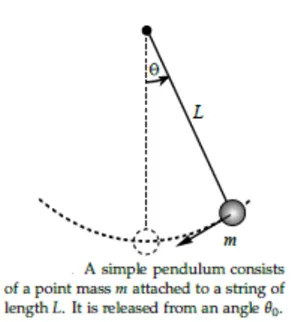
to write Matlab code for pendulum using 2nd ODE
Objective
to write a program that solves the following ODE. This ODE represents the equation of motion of simple pendulum with damping
Code
close all
clear all
clc

%inputs
b=0.05
g=9.81
l=1
m=1

%initial condition
theta_0=[0;4]
%time_points

t_span=linspace(0,20,200)

[t,result]=ode45(@(t,theta)ode_function(b,g,l,m,t,theta),t_span,theta_0)

hold on
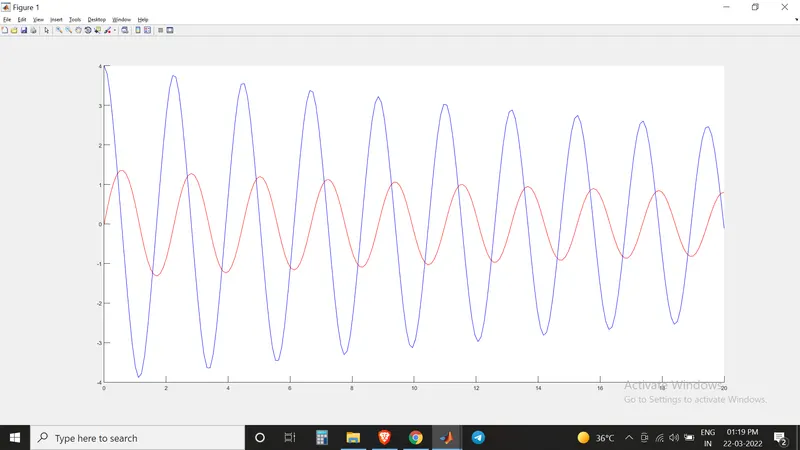
plot(t,result (:,1),'color','r')
plot(t,result (:,2),'color','b')

xlabel('time')
ylabel('velocity')
grid on


% animation

ct=1

for i=1:length(t)
    x0=0
    y0=0

    x1=1*sin(result(i,1))
    y1=-1*cos(result(i,1))

    plot([-2,2],[0,0],'linewidth',3,'color','r')
    line([x0,x1],[y0,y1],'linewidth',4)
    axis([-2 2 -2 2])
    hold on

    plot(x1,y1,'o','markers',20,'markerfacecolor','r')
    hold off


    grid on

    pause(0.03)

    M(ct)=getframe(gcf)
    ct=ct+1

end

movie (M)
videofile=VideoWriter('second_ode.avi','uncompressed avi')
open(videofile)
writeVideo(videofile,M)
close(videofile)
This image I took, before naming X and Y label
Code Explanation
First of all, given parameters are entered.Then initial conditions were given,then time is made as an array.Then after that the funcion is created as second_ode. after creating the function in main program it is used, ODE45 is function in the Matlab,it solves partial differential equation.Then after plotting is done. Inorder to create animation I used movie command and (ct) command
Error faced
I typed clear all,close all,clc while creating the function,but this time I rectified earlier when I found there is no linking sign.
And the typo error I faced, in which it didn't showed error in matlab, but my pendulum was inverted.I founded that there was sign error and corrected it.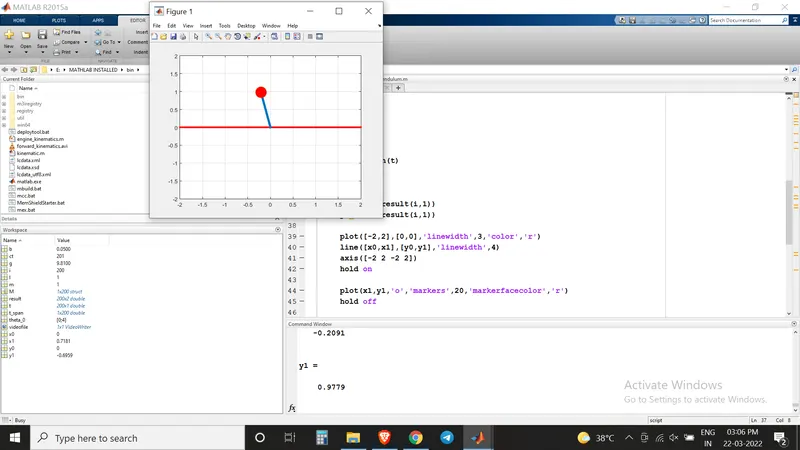
Animation Video Link
https://www.youtube.com/watch?v=a4HVNrzc53w