Week 2- 2R Robotic Arm Challenge
AIM:
To write a program in Matlab to simulate the forward kinematics of a 2R Robotic Arm
Kinematics is the relationship between the position,velocities and acceleration of the links of a manipulators.
A robotic arm is a type of mechanical arm, usually programmable, with similar functions to a human arm.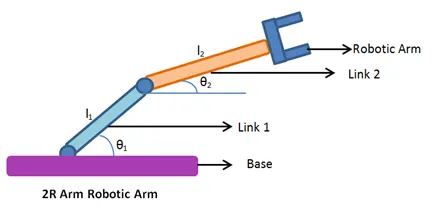
Code for 2R robotic arm is execueted
%Forward kinematics of 2R robotic arm
close all
clear all
clc

%inputs
l1=1
l2=0.5

thetha1=45
thetha2=30

% coordinates
x0=0
y0=0
x1=l1*cosd(45)
y1=l1*sind(45)
x2=x1+l2*cosd(30)
y2=y1+l2*sind(30)

%plotting
line([x0,x1],[y0,y1],'linewidth',3,'color','r')
line([x1,x2],[y1,y2],'linewidth',3,'color','b')
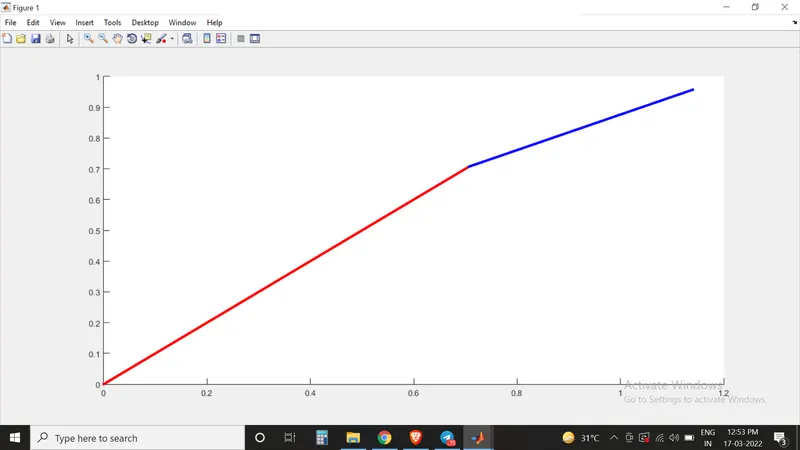
Then to plot the animation the code is written
close all
clear all
clc

%inputs
l1=1
l2=0.5
thetha1=linspace(0,90,10)
thetha2=linspace(0,90,10)

%for loop
ct=1
for i=1:length(thetha1)
    THETHA1= thetha1(i)
    for j=1:length(thetha2)
        THETHA2= thetha2(j)
        % coordinates
        x0=0
        y0=0
        x1=l1*cosd(THETHA1)
        y1=l1*sind(THETHA1)
        x2=x1+l2*cosd(THETHA2)
        y2=y1+l2*sind(THETHA2)

        %plotting
        plot([x0,x1],[y0,y1],[x1,x2],[y1,y2],'linewidth',3,'color','r')
        grid on
        axis([0 2 0 2])


        pause(0.03)

        M(ct)= getframe(gcf)
        ct=ct+1


    end

end

movie(M)
videofile= VideoWriter('forward_kinematics.avi','Uncompressed AVI');
open(videofile)
writeVideo(videofile,M)
close(videofile)
CODE EXPLANATION:
Before starting,
clear all, is used for removing data from the workspace
close all, is used for removing the current fig.
clc, is used for removing data from command section
then the length of arm 1 and 2 were defined.
then by using linspace command thetha 1 and 2 is defined. The purpose of linspace command is to generate lineraly spaced vectors.
then the next step is to use counter. counter is a variable that counts an event in loop and For loop is created. 'ct' refers to counter.
thetha 1 and 2 contains multiple values of the angle, so a new variable is placed inside the loop named THETHA 1 and 2.
THETHA1, is denoted by (i)
THETHA2, is denoted by (j)
then hence calculation is done
the M command is used to capture the current frame everytime when loop runs.
The VideoWriter command was used to assign the video format and .avi was used as video format.
ERRORS FACED WHILE WORKING
There was an expression error for me. I started writing the the code below 'for'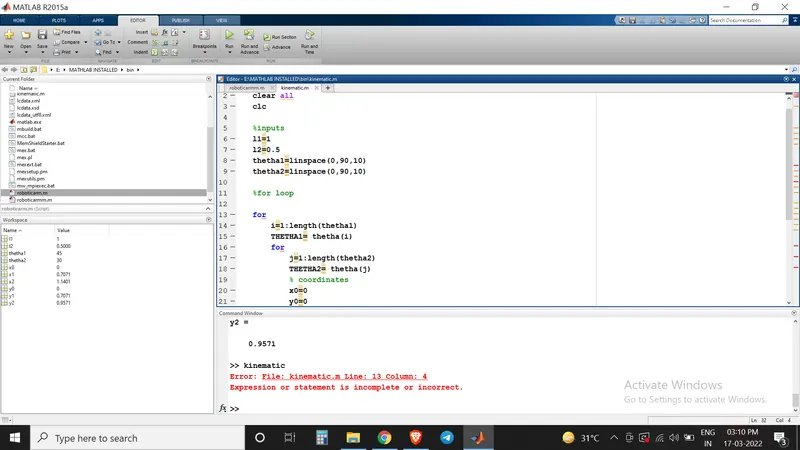
There were several typing errors also.
VIDEO
https://www.youtube.com/watch?v=YRNh7l38K-o