Week 3 - Solving second order ODEs
AIM:
Write a program in Matlab that will simulate the pendulum motion.
INTRODUCTION:
A pundulum is a body suspended from a fixed point so that it can swing back and forth under the influence of gravity. The time interval of pendulum's complete bck-and -fourth movement is constant. Where L is the length of the pendulum and g is the acceleration due to gravity.
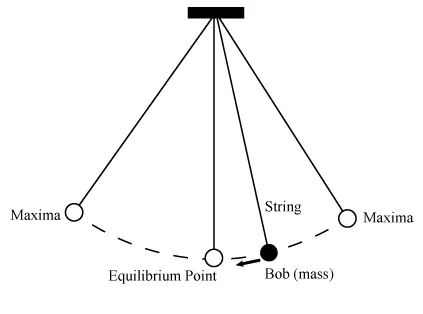
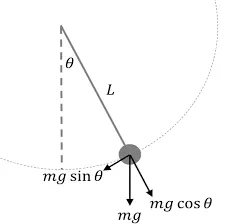
Deffrent types of pendulums have deffrent applications. Example of simple pendulums are found in cloks, swing sets, and even the natural mechanics of swing legs. Tetherballs are examples of spherical pendulums. Schuler pendulums are used in some interial guidance systems, while certain compound pendulums have applications in measuring the acceleration of gravity.
EQUATION:
The above equ is a second order diffrential equation, thats are
g - acceleration due to gravity,
b - damping coefficient,
l - length of the string,
m - mass of the bob,
Lets Theta = Theta 1
d_theta/d_t = d_theta1/d_t1 = theta1 .........(1)
d^2_theta/d_t^2 = d^2_theta1/d_t1 = d/d_t[ d_theta1/d_t ] = d/d_t (theta2) .........(2)
d^2_theta/d_t^2 + b/m d_theta/d_t + g/l sin theta = 0
d^2_theta1/d_t1 + b/m d_theta1/d_t1 + g/l sin theta1 = 0
d^2_theta1/d_t + b/m theta2 + g/l sin theta = 0
d_theta1/d_t = theta2
d_theta2/d_t1 = - b/m theta2 - g/l sin theta1
d_theta/d_t [ theta1 ; theta2 ] = [ theta2 ; - b/m theta2 - g/l sin theta ]
FUNCTION CODE:
function [d_theta_dt] = ode_func(t,theta,b,g,l,m)
theta1 = theta(1);
theta2 = theta(2);
d_theta1_dt = theta2;
d_theta2_dt = -(b/m)*theta2-(g/l)*sin(theta1)
d_theta_dt = [d_theta1_dt;d_theta2_dt]
end
SIMPLE PENDULUM CODE
clear all
close all
clc
b = 0.05;
g = 9.81;
l = 1;
m = 0.1;
ct =1;
% initial condition
theta_0 = [0,5];
% time pointsc
t_span = linspace(0,10,500);
% slove ode
[t,results] = ode45(@(t,theta)ode_func(t,theta,b,g,l,m),t_span,theta_0);
% plot
plot(t,results(:,1));
hold on
plot(t,results(:,2));
hold off
grid on
xlabel('time');
ylabel('velocity');
%creating animation
theta2 = results(:,1);
for i = 1:length(theta2)
theta_x = theta2(i);
x0 = 0;
y0 = 0;
x1 = 1*sin(theta_x);
y1 =-1*cos(theta_x);
% ploting the pendulum
figure(2)
plot([-1 1],[0 0],'Color','b','LineWidth',6);
hold on
plot([x0 x1],[y0 y1],'Color','g','LineWidth',3);
plot (x1,y1,'o','Marker','o','MarkerFaceColor','r');
hold off
grid on
xlim([-2.5,2.5])
ylim([-2.5,2.5])
pause(0.002);
M(ct) = getframe(gcf);
ct = ct+1;
end
movie(M)
videofile=VideoWriter('pendelum_ode.avi','Uncompressed AVI')
open(videofile)
writeVideo(videofile,M)
close(videofile)
STEPS:
- Since we have created a function that reprtesents the given IDE for the simple pendulum.
- Next provide the inputs for time, theta, b, g, l, m using these inputs we can slove the code and generate the output.
- Then simplified the second order ODE into first orde ODE and included two variables for theta1 and theta2.
- create the amin cod eand provide the input values.
- The initial cunditions like angular displacement and angular velocity are assigned to the varoable theta_0. the time span given to 20.
- The sloving difrential equation is by using the code
[t,results] = ode45(@(t,theta)ode_func(t,theta,b,g,l,m),t_span,theta_0);
The ode 45 is inbuilt diffrential equation command is used to differenciate the function.
-
At the time function call is made to the function ode_fun(t,theta,b,g,l,m), which will take the values of defined variables and calculates the column matrix having two values.
-
The for loop is used to calculate the motion of pendulum at different time intervals and positionsof the pendulum.
-
Markers command is used to create the ball at the position of (x1,y1).
-
GEtframe (gcf) to get all the images at every pointand to assgin to variable M.
-
Movie is created using the command movie.
OUTPUT:
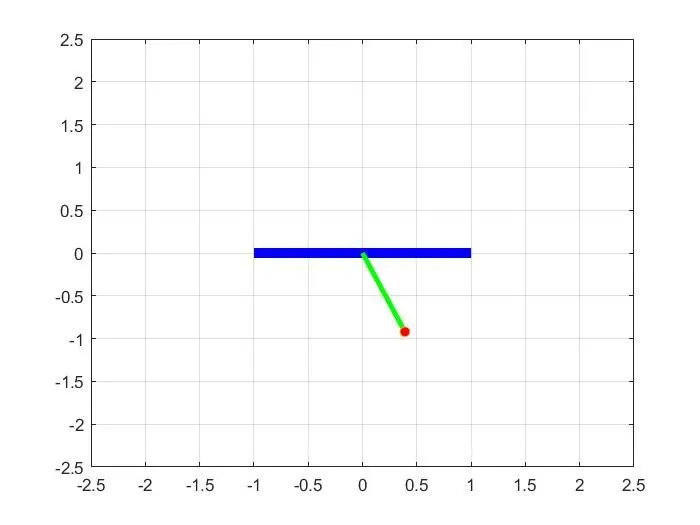
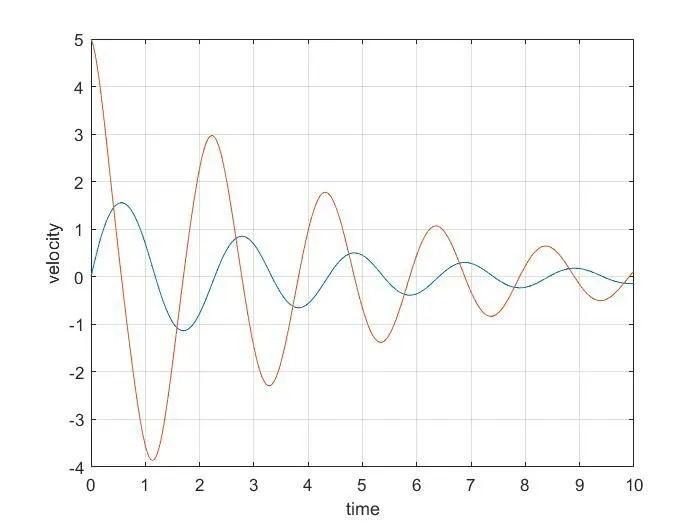
CONCLUSION:
First no error found during the run time. By this annalysis the differential equation of the simple pendulum is studied. by alternative different variables and diffrent results are obtained. By changing the damping factor, time tacken to come equliprium position is noticed. The diffrent commands used to create the pendulum animation is also understood.
Youtube link
https://youtu.be/kC_TpbItkws