Week 2- 2R Robotic Arm Challenge
AIM:
To Write a program in Matlab to simulate the forward kinematics of a 2R Robotic Arm.
INTRODUCTION :
A robotic arm is a mechanical arm that can be programed to function similar to human arm.That arm is a faster then the human arm, that can be finished the work without error.The link of the manipulator are connected by joints which can allow either rotational motion or translation motion. Hence the links from a kinematic chain.
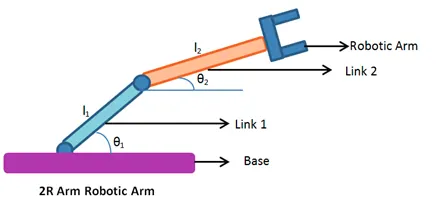
The above fig is a 2R arm Robotic arm, thats can be generally divided by base, links and robotic arm. Thats are used by governing equation, thats are
- co-ordinates of orgin
X0 = 0
Y0 = 0
- End co-ordinates of link 1
X1 = L1*cosd(theta1)
Y1 = L1*sind(theta1)
- End co-ordinates of link 2
X2 =X1+ L2*cosd(theta2)
Y2 =Y1+ L2*sind(theta2)
L = Length of the arm
Theta = Angle
STEPS:
- Open the matlab, start the program using commends.
- Providing inputs variables the length/values of the robotic arm.
- Providing values of the theta 1&2 using linspace commands for theta =0 to 90 degrees for 10 values.
- Create a flor loop generation of frames and declare a variable named counter (ct) to start with.
- For one count loop i, j would finish complete rotation and compute the values .
- Use plot commands then create plot image.
- Finally the counter will increment by (ct+1).
- Then getframe() capture the individual frame and stores it in an array M.
- To create an animation of all the frames generated.
- using movie commands to combine all the figures saved in the M file to make an animation.
- At end saving movie in .avi format.
PROGRAM:
% forward_kinematic_robotic_arm
% inputs
l1 = 1;
l2 = 0.5;
theta1 = linspace(0,90,10);
theta2 = linspace(0,90,10);
ct =1;
for i = 1:length(theta1)
THETA1 = theta1(i);
for j = 1:length(theta2)
THETA2 = theta2(j);
%coordinates
x0 = 0;
y0 = 0;
x1 = l1*cosd(THETA1);
y1 = l1*sind(THETA1);
x2 = x1+l2*cosd(THETA2);
y2 = y1+l2*sind(THETA2);
%ploting
plot([x0 x1],[y0,y1],[x1 x2],[y1 y2],'LineWidth',3);
axis([0 3 0 3]);
pause(0.03);
M(ct) = getframe(gcf);
ct = ct+1;
end
end
movie(M)
videofile = VideoWriter('forward_kinematic.avi','uncompressed avi');
open(videofile)
writeVideo(videofile,M)
close(videofile)
OUTPUT:
* No error found in during run.
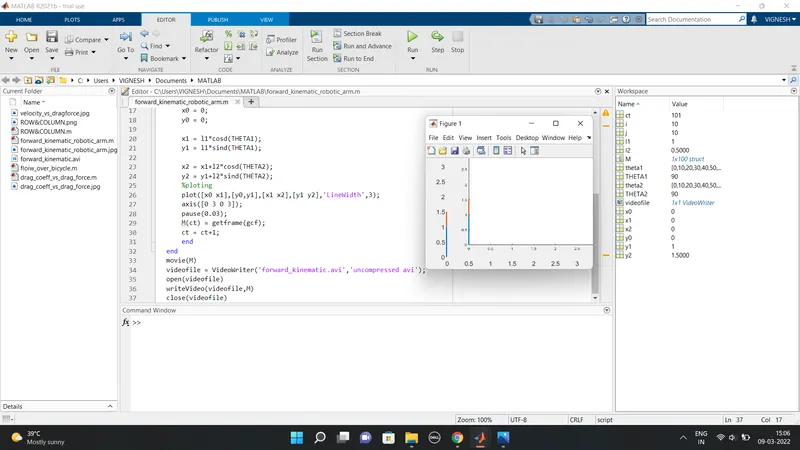
RESULTS:
A simulated 2R arm robotic arm by using the matlab programming and also created a movie /animation from the plots obtained from the program.
YOUTUBE LINK