Week 3 - Solving second order ODEs
AIM
To write a program that solve the ODE. This ODE represents the equation of motion of simple pendulum.
To write a program that will simulate the pendulum motion.
The double order ODE is
(d^2 theta / dt^2) + (b/m)*(dtheta / dt) + (g/l) sin theta = 0
FORMULAS AND DATA GIVEN
DATA GIVEN
-
L=1 metre,
-
m=1 kg,
-
b=0.05.
-
g=9.81 m/s2.
-
Simulate the motion between 0-20 sec, for angular displacement=0,angular velocity=3 rad/sec at time t=0.
FORMULA OR EQUATIONS WE DERIVED
- theta1 = theta(1)
- theta2 = theta(2)
- dtheta1_dt=theta2
- dtheta2_dt=-(b/m)*theta2-(g/l)*sin(theta1)
- dtheta_dt = [dtheta1_dt;dtheta2_dt]
CODING
MAINCODING
%solve ODE
close
clear
clc
%input
b = 0.05;
g = 9.81;
l = 1;
m = 1;
ct = 1;
%initial condition
theta_0 = [0,3] ;
%timeponts
t_span = linspace(0,20,600);
%solve ODE
[t, result] = ode45(@(t,theta) ode_function(t,theta,b,g,l,m),t_span,theta_0);
%plot
figure(1)
hold on
plot(t,result(:,1))
plot(t,result(:,2))
xlabel('time')
ylabel('plot')
hold off
grid on
theta = result(:,1)
for i =1:length(theta)
x1 = 0;
y1 = 1;
x2 =-l*sin(theta(i))
y2 =-l*cos(theta(i))
figure(2)
plot ([-1.5,1.5],[1,1],LineWidth=8)
hold on
plot ([x1,x2],[y1,y2],linewidth=5)
plot(x2,y2,'o',MarkerSize=20,MarkerFaceColor='black')
hold off
axis([-1.5 1.5 -1.5 1])
M(ct)=getframe(gcf);
ct=ct+1;
pause (0.02)
end
movie(M)
videofile = VideoWriter('new_Pendulum.avi','Uncompressed AVI');
open(videofile)
writeVideo(videofile,M)
close(videofile)
FUNCTION CODING
function [dtheta_dt] = ode_function(t,theta,b,g,l,m)
theta1 = theta(1);
theta2 = theta(2);
dtheta1_dt=theta2;
dtheta2_dt=-(b/m)*theta2-(g/l)*sin(theta1);
dtheta_dt = [dtheta1_dt;dtheta2_dt];
end
EXPLANATION
- First of all we have convert the double order ODE to single order ODE to create a function.
- This function was created by using simple mathematic calculation and substitution.
- Why we change the double order ODE to single order ODE because here we use the ‘ode45’ command that command is only solve single order ODE.
- We name that function as ‘ode_function’ and we denote that function as ‘ode_function(t, theta, b, g, l, m)’.
- On that function we are using this formula this formula’s (theta1 = theta(1), theta2 = theta(2), dtheta1_dt = -(b/m)*theta2-(g/l)*sin(theta1) , dtheta_dt =[dtheta1_dt ; dtheta2_dt]) this are the formula we used in the function.
- After creating the function we have to determine the given data’s and initial condition data that specified in the function that are (b, g, l, m, ct, theta_o, t_span) and those values are (0.05, 9.81, 1, 1, 1, [0,3], for t_span we use the command ‘linespace’ to the time value, we use like linspace(0,20,600) ).
- After denoting the given data and initial condition data we have to solve the given ODE. We are using the command as “ode45(@(t, theta) ode_function(t, theta, b, g, l, m), t_span, theta_0)” . In this command we use the ‘@(t, theta)’ in the beginning of the command to determine the Matlab to make a differentiation in the this data only. After that we call the function by denoting that name. And we save this result data in the array called ‘[t, result]’. Here we ’t' save the time data and the ‘result’ that save the datas of velocity and displacement.
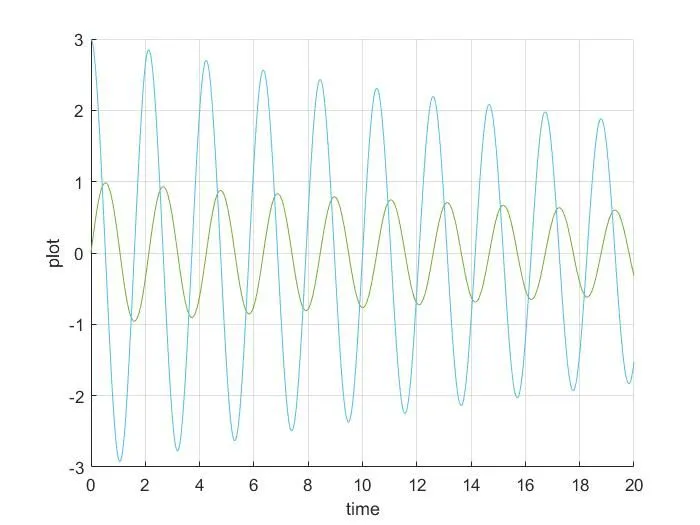
- Then we have to make a first plot that determine the flow of motion with the calculated data t and result. We use ‘plot’ command to make a plot this is a command we used to make a plot here that is with ‘ plot(t, result(:, 1)) , plot(t, result(:, 2)’ and we mark the xlabel as ‘time’ and ylabel as ‘plot’.
- This above plot is create only motion of pendulum we have create the animation or simulation of pendulum motion for that we have to use the ‘for loop’.
- For ‘for loop’ creation we start with’ for i = 1: length(theta)’ here we don’t have the value of the value of theta so we add the line ‘ theta = result(:,1)’ in the end of the figure 1.
- So we get the data of theta after that we mention that ‘i = 1: length(theta)’ and we denote the values of x1 and y1 it is similar to making of motion robotic arm. We denote x1 as o and y1 as 1.
- And after that we make a calculation using the basic mathematical geometry law ‘x2 = -l*sin(theta(i)) and y2 = -l*cos(theta(i))’ . To determine the x2 and y2.
- Then we got the required information to determine the plot and animation.
- Here we name this plot as figure (2). The this plot code is begin with we have make surface that the pendulum fix in that was created with this command ‘plot ([-1.5, 1.5],[1, 1], Linewidth = 8’ it is crate the surface.
- After create the fixed surface we have to crate the pendulum body with the command ‘plot ([x1, x2], [y1, y2], Linewidth = 5) this create the string.
- We have to create the ball or circular surface at the end by crating the circle in the end of the pendulum (x2, y2) by using this command ’Marker’ and this used in code ‘plot( x2,y2,’o’, Markersize = 20, Markerfacecolor = ‘black’) in this command we Markersize command to determine the size of the circle at the end and the Markerfacecolor to determine the colour of the circle.
- We have to denote the axis by using this command ‘axis({-1.5 1.5 -1 1]’.
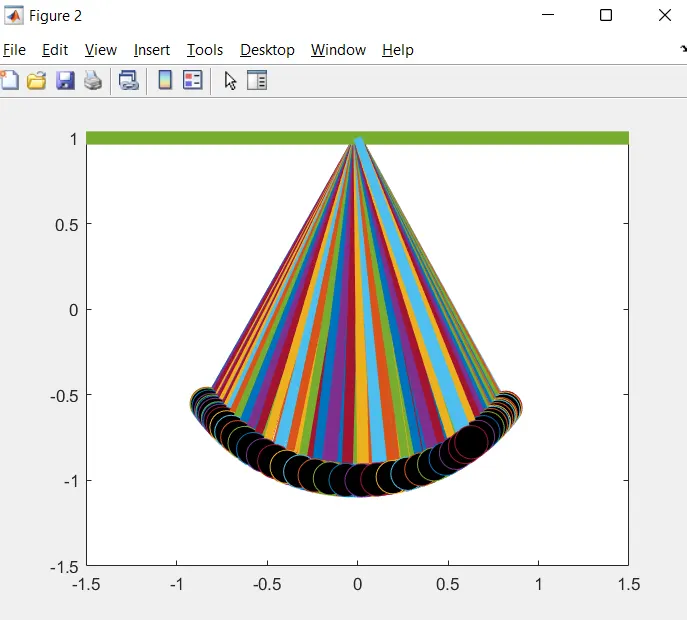
- This Plot is Quite messy so we are making the different figure(frames) . we generally make different figures (frames) and making that to change one by one in uniform speed as frame per second we get the video. For that we denoting ct = 1 in input and every time loop executed the ct= ct + 1. This method was we previously used In the kinematics of robotic arm.
- We using the array called 'M(ct)' to save the all the figures in it by using the command called ‘getframe(gcf)'.
- And below the end of the for loop we use the command called 'Movie(M)' to generate the movie. And after that we are going to create the avi file to gather all those frames by using the command ‘VideoWriter' or 'writerVideo' here this command needs the name and profile of the video we are going to name the video as “new_Pendulum.avi” and we are giving the profile as "Uncompressed AVI”.
- After that we goin to open the file by using the command "open(videofile)" and after that we going to write the file by using the figures in the array 'M' by using the command "writeVideo(videofile,M)" and after that we want to close the video file so we use the command that "close(videofile)".
OUTPUT IMAGE
First output image or FIGURE 1
OUTPUT VIDEO LINK : https://youtu.be/eXryEZ3ZZeI
ERRORS
Errors i faced while doing the coding are
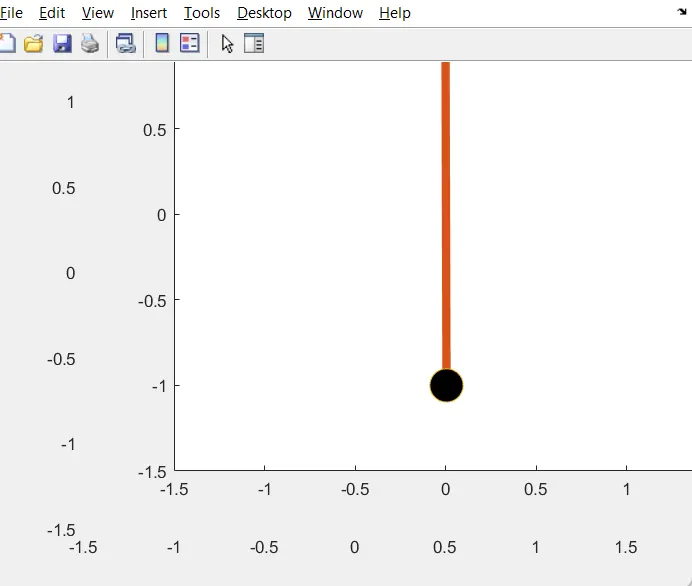
- ERROR 1 - In the Figure 2 we use sin and cos in the formula x2 =-l*sin(theta(i)) ,y2 =-l*cos(theta(i)) instead using sin and cos i used sind and cosd. It cause no motion in the figure two so it affect the video.
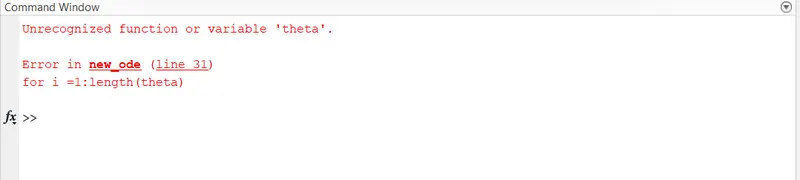
- ERROR 2 - I forget to address theta 'theta = result(:,1)' before the 'for loop' it cause error.
- ERROR 3 - I also didn't know about that we have use 'hold off' command if we use that in that code. it cause the messy look to the 'second figure'.
REMEDIES FOR ERRORS
- ERROR 1 - I didn't know about this till error appear so I connect with support engineer. After that i make that change in sind and cosd as sin and cos.
- ERROR 2 - I assign the theta 'theta = result(:,1)' after i saw the error in command tab.
- ERROR 3 - For this error i didn't have any idea so i make one to one session so support engineer helps with this error. They said that i have to add 'hold off' command at the end.
ERRORS IMAGE
ERROR 1
ERROR 2
ERROR 3