Week 2- 2R Robotic Arm Challenge
Actually in this code we making the virtual animation of kinematic motion in 2R Robotic arm.
Explanation of coding
First of all I made the code to determine the static or single position of 2R Robotic Arm.
On the below code Random inputs are given to links and theta.
Here we want to determine the coordinates to find the position of the robotic arm.
The Initial coordinate of the robotic arm (x0,y0) as (0,0) because the one side of the link 1 is fixed. To Determine the coordinate of another side we use the geomentric formulas as 'x1 = l1*cosd(theta1) & y1 = l1*sind(theta1)' to determine the coordinate (x1,y1) . This is derived by basics geomentrical calculations. So, we get intial point of link 1 as (0,0) and we get a equation to find end point of link 1. Here the sind and cosd is used to get the values in degrees.
Then we have to find the coordinate of link2 end positions. Because the initial position of the link 2 is the End position of the link 1. so We already of the intial position of link2 and we find the end positon by the geomentric formulas'x2 = x1+l2*cosd(theta2) & y2 = y1+l2*sind(theta2)' to determine the last coordinate (x2,y2).
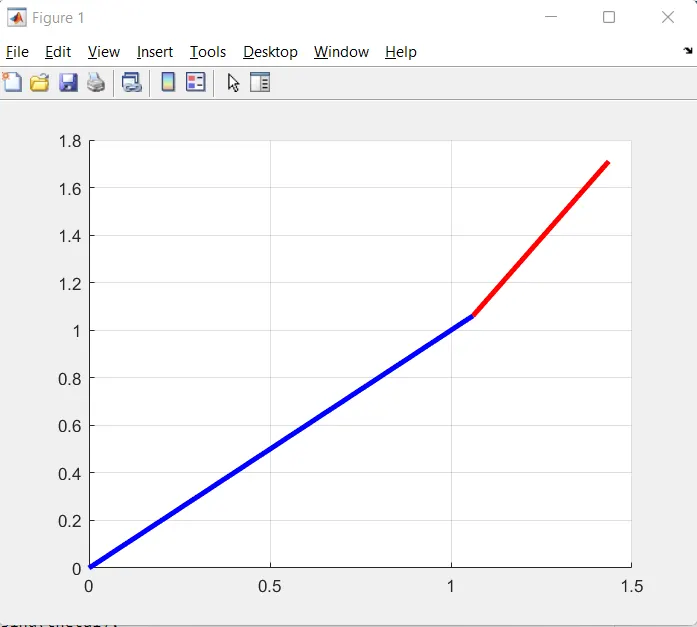
After that we make the plot by using 'line' command to draw the link 1 and link 2 as 'line([x0 x1],[y0 y1],'linewidth',3,'color','b') and line([x1 x2],[y1 y2],'linewidth',3,'color','r').
Here we use the line command because we are connecting two indual line so we use line command here and If we use plot it will use resendly used plot command so we don't get a correct figure here
%forward kinematics for 2r robot
close all
clear
clc
%inputs
l1 = 1.5;
l2 = 0.75;
theta1 = 45;
theta2 = 60;
%coordinates
x0 = 0;
y0 = 0;
x1 = l1*cosd(theta1);
y1 = l1*sind(theta1);
x2 = x1+l2*cosd(theta2);
y2 = y1+l2*sind(theta2);
%potting
line([x0 x1],[y0 y1],'linewidth',3,'color','b')
line([x1 x2],[y1 y2],'linewidth',3,'color','r')
grid on
Here to create the animation we are going to give different values for theta 1 & theta 2.By using linspace command we get different values in between (0 to 90 degrees) for both theta 1 and theta 2. Both theta 1 and theta 2 is a array.
For that we are going to use "for loop" to genarate the 10 different coordinates using ten different theta value linearly by using this command 'i= 1:length(theta1)'.Here we are saying that the i is equal to the value 1 upto the length of theta 1 that means how many theta 1 values is there.
For theta 2 we are going to create the seperate "for loop" because the each position of link 1. The link 2 can take multiple positions. So we creating the different "for loop" here.Denoting this loop we using 'j' as a loop counter variable and for previous loop we use 'i' as a loop counter variable. And we denoting THETA 1 = theta 1(I) and THETA 2 = theta 2(j) for each for loop.
Than we are going to find the coordinates by use the previous Geomentrical formulas and we make small changes in it by replacing theat1 by THETA 1 and theta 2 by THETA 2. So we get ten different position of link 1 and for each link 1 position we get ten different position of link 2.After that we are going to make a plot we get this plot.
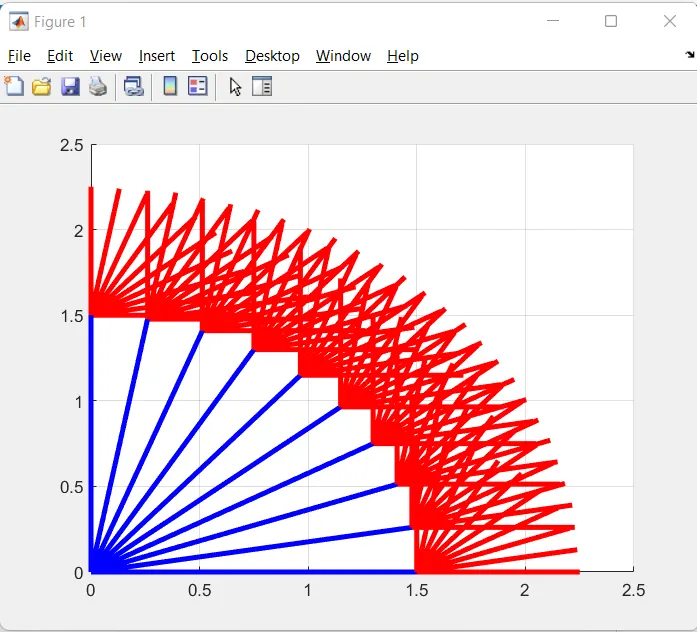
This Plot is Quite messy so we are making the different figure(frames) . we generaly make different figures (frames) and making that to change one by one in uniform speed as frame per second we get the vedio. for that we denoting ct = 1 in input and everytime loop executed the ct= ct + 1. So we get 100 different figures.
We using the array called 'M(ct)' to save the all the figures in it by using the command calles 'getframe(gcf)'.
And below the end of the for loop we use the command called 'Movie(M)' to generate the movie. And after that we are going to create the avi file to gather all those frames by using the command 'VideoWriter'or 'writerVedio' here this command needs the name and profile of the vedio we are going to name the vedio as "forward_kinematics_of_roboticarm" and we are giving the profile as "Uncompressed AVI".
After that we goin to open the file by using the command "open(vediofile)" and after that we goin to write the file by using the figures in the array 'M' by using the command "writeVideo(vediofile,M)" and after that we want to close the vedio file so we use the command that "close(vediofile)".
%forward kinematics motions of 2r robot
close
clear
clc
%input
l1 = 1.5;
l2 = 0.75;
%theta value
theta1 = linspace(0,90,100);
theta2 = linspace(0,90,100);
ct=1;
for i= 1:length(theta1)
THETA1 = theta1(i);
for j = 1:length(theta2)
THETA2 = theta2(j);
%coordinates
x0 = 0;
y0 = 0;
x1 = l1*cosd(THETA1);
y1 = l1*sind(THETA1);
x2 = x1+l2*cosd(THETA2);
y2 = y1+l2*sind(THETA2);
%potting
plot([x0 x1],[y0 y1],[x1 x2],[y1 y2],'linewidth',3)
axis([-0.1 2.5 0 2.5])
M(ct)=getframe(gcf);
ct=ct+1;
pause (0.06)
grid on
end
end
movie(M)
videofile = VideoWriter('forward_kinematics_of_roboticarm.avi','Uncompressed AVI');
open(videofile)
writeVideo(videofile,M)
close(videofile)
REPORT
AIM
To create an animation file of the plot.
FORMULAS AND EQUATIONS USED IN CODING
# x1 = l1*cosd(theta1)
# y1 = l1*sind(theta1)
# x2 = x1+l2*cosd(theta2)
# y2 = y1+l2*sind(theta2)
EXPLANATION
# First of all I made the code to determine the static or single position of 2R Robotic Arm.
# On the below code Random inputs are given to links and theta.
# Here we want to determine the coordinates to find the position of the robotic arm.
# The Initial coordinate of the robotic arm (x0,y0) as (0,0) because the one side of the link 1 is fixed. To Determine the coordinate of another side we use the geomentric formulas as 'x1 = l1*cosd(theta1) & y1 = l1*sind(theta1)' to determine the coordinate (x1,y1) . This is derived by basics geomentrical calculations. So, we get intial point of link 1 as (0,0) and we get a equation to find end point of link 1. Here the sind and cosd is used to get the values in degrees.
# Then we have to find the coordinate of link2 end positions. Because the initial position of the link 2 is the End position of the link 1. so We already of the intial position of link2 and we find the end positon by the geomentric formulas'x2 = x1+l2*cosd(theta2) & y2 = y1+l2*sind(theta2)' to determine the last coordinate (x2,y2).
# After that we make the plot by using 'line' command to draw the link 1 and link 2 as 'line([x0 x1],[y0 y1],'linewidth',3,'color','b') and line([x1 x2],[y1 y2],'linewidth',3,'color','r').
# Here we use the line command because we are connecting two individual line so we use line command here and If we use plot it will use recently used plot command so we don't get correct figure here.
# Here to create the animation we are going to give different values for theta 1 & theta 2.By using linspace command we get different values in between (0 to 90 degrees) for both theta 1 and theta 2. Both theta 1 and theta 2 is a array.
# For that we are going to use "for loop" to generate 10 different coordinates using ten different theta value linearly by using this command 'i= 1:length(theta1)'.Here we are saying that the i is equal to the value 1 upto the length of theta 1 that means how many theta 1 values is there.
# For theta 2 we are going to create the seperate "for loop" because the each position of link 1. The link 2 can take multiple positions. So we creating the different "for loop" here.Denoting this loop we using 'j' as a loop counter variable and for previous loop we use 'i' as a loop counter variable. And we denoting THETA 1 = theta 1(I) and THETA 2 = theta 2(j) for each for loop.
# Than we are going to find the coordinates by use the previous Geomentrical formulas and we make small changes in it by replacing theat1 by THETA 1 and theta 2 by THETA 2. So we get ten different position of link 1 and for each link 1 position we get ten different position of link 2.After that we are going to make a plot we get this plot.
# This Plot is Quite messy so we are making the different figure(frames) . we generaly make different figures (frames) and making that to change one by one in uniform speed as frame per second we get the video. For that we denoting ct = 1 in input and everytime loop executed the ct= ct + 1. So we get 100 different figures.
# We using the array called 'M(ct)' to save the all the figures in it by using the command calles 'getframe(gcf)'.
# And below the end of the for loop we use the command called 'Movie(M)' to generate the movie. And after that we are going to create the avi file to gather all those frames by using the command 'VideoWriter'or 'writerVideo' here this command needs the name and profile of the video we are going to name the vedio as "forward_kinematics_of_roboticarm" and we are giving the profile as "Uncompressed AVI".
# After that we goin to open the file by using the command "open(videofile)" and after that we going to write the file by using the figures in the array 'M' by using the command "writeVideo(videofile,M)" and after that we want to close the vedio file so we use the command that "close(videofile)".
OUTPUT VIDEO LINK : https://youtu.be/EteVzCr9i08
ERRORS FACED WHILE PROGRAMMING
I faced Two errors while writing this program.
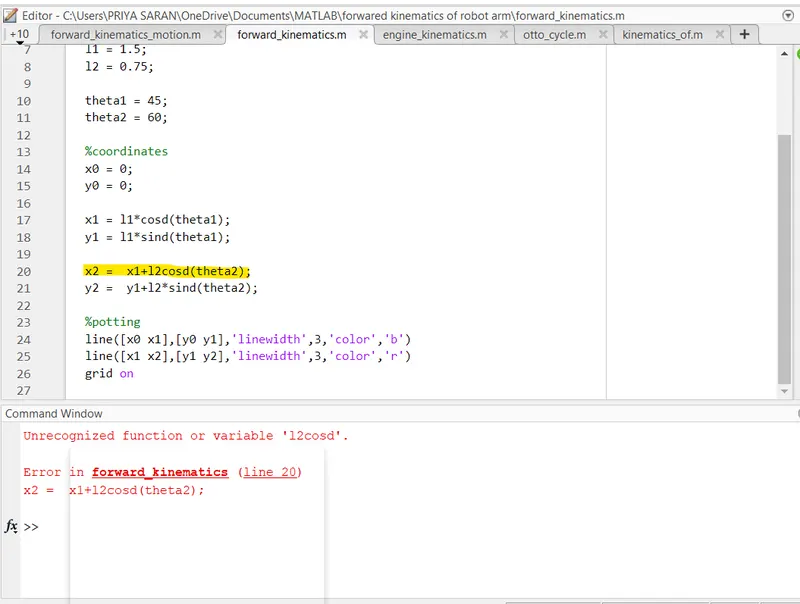
1. I forgot to use '*' this symbol in formula for producting.
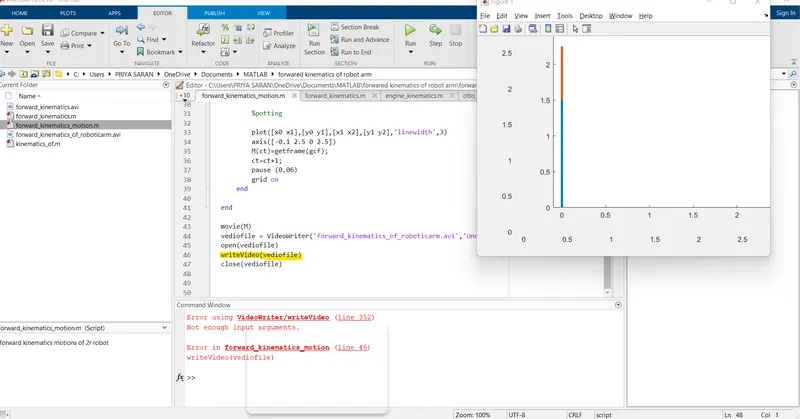
2. I forgot to denote 'M' in the "writeVideo" command. Actually in writeVideo command we want to denote the 'videofile' and the array 'M'.
STEPS TAKEN TO OVERCOME THOSE ERRORS
1. For error no 1 Actually I saw the command box and rectify the error there.
2. For the error no 2 i don't have any idea on this so i make 1 to 1 session and Then I came to know that there is the error in the 'writevideo' command and I forget to add 'M' on that command.
SCREENSHOTS OF ERRORS
Error 1
Error 2