Week 3 - Solving second order ODEs
Objective: To solve the ODE which represents the equation of motion of a simple pendulum with damping.
Equations:
Solving the second order differential equation
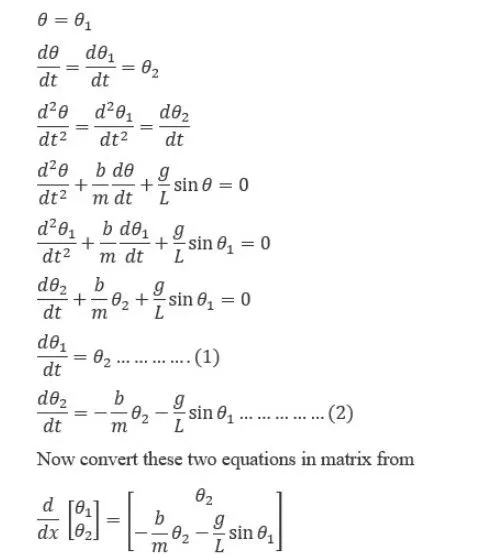
code :
close all
clear al
clc
%inputs
b=0.05;  %damping coefficient
g=9.81;  %gravity
l=1;     %length of the pendulum
m=0.1;   %mass of the ball

%initial condition
theta_0=[0;5];

%time points
t_span=linspace(0,10,360);

%solve ode
[t,results]= ode45(@(t,theta) ODE_FUNC(t, theta, b,g,l,m),t_span, theta_0);

figure(1)
plot(t,results(:,1))
hold on
plot(t,results(:,2))
xlabel('TIME')
ylabel('PLOT')

% animation
figure(2)
ct=1
for i=1:length(results(:,1))
    x0=0;
    y0=0;
    x1=1*sin(results(i,1));
    y1=-1*cos(results(i,1));
    plot([-1,1],[0,0],'linewidth',4)
    hold on
    plot([x0 x1],[y0 y1],'LineWidth',3)
    hold on
    plot(x1,y1,'o','markers',20,'markerfacecolor','g')
    hold off
    axis([-2 2 -2 2])
    pause(0.003)
    M(ct)=getframe(gcf)
    ct=ct+1
end

movie(M)
videofile= VideoWriter('2nd_order_ode_pendulum.avi','Uncompressed AVI')
open(videofile);
writeVideo(videofile,M)
close(videofile)
The function in the code:
function [dtheta_dt]= ode_func(t,theta,b,g,l,m)
theta1=theta(1);
theta2=theta(2);
dtheta1_dt=theta2;
dtheta2_dt=-(b/m)*theta2-(g/l)*sin(theta1);
dtheta_dt=[dtheta1_dt;dtheta2_dt];
end
Results:
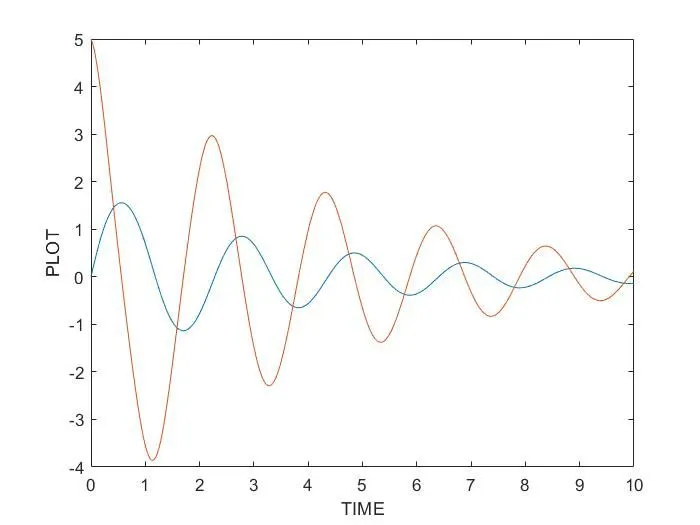
Link of the animation:
https://drive.google.com/file/d/10oRIPOHXlS6RdltO-k9sEIlVgPi48qUD/view?usp=sharing
Explanation:
In the main code :
linspace(0,10,360)- It means that from 0-10 seconds we consider 360 values
ode45- It is a command used to solve differential equations
@(t, theta)- It is defining the ode function in terms of t and theta
ode_func(t,theta,b,g,l,m)- This is calling the function in the name of ode_func
In animation:
In figure(2)- The animation of the pendulum is created
ct- It is used to get all the frames in an animation
x0,y0- They are the initial points of the pendulum
x1,y1- They are the final points of the pendulum
markers- This command is used to create the ball and the number next to it represents the size of it
markerfacecolor- It defines the color
videofile- It is used to create a video file
open(videofile,M)- It opens the file
writevideo(videofile, M)- All the frames in file M are saved here
close(videofile)- closes the file
Error:
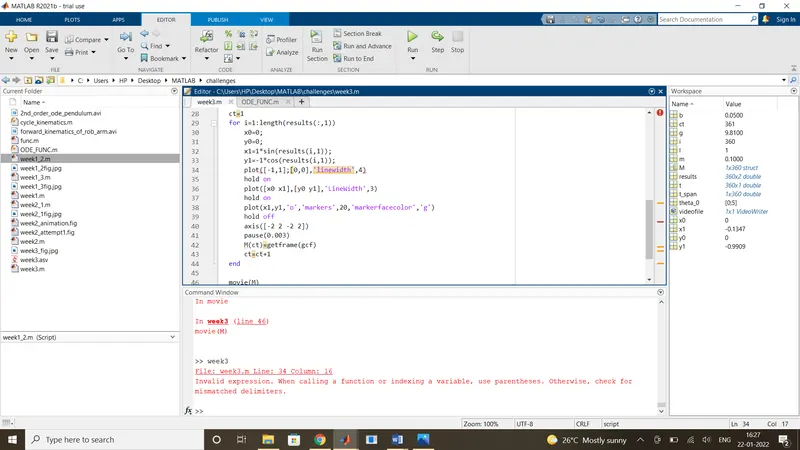
Here, i made and error in line 34 : plot([-1,1];[0,0],'linewidth',4)
instead of ',' i used ';'