Week 3 - Solving second order ODEs
AIM:
To solve second order differential equation of oscillation of simple pendulum.
OBJECTIVES:
- To create animation of simple pendulum by using second order differential equation.
- To create plot between angular velocity and angular displacement of simple pendulum.
- To create an animated movie for motion of simple pendulum.
EXPLANATION OF DIFFERENTIAL EQUATION:
For simple pendulum with damping factor the equation is shown in below.
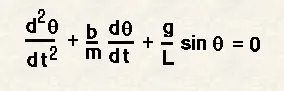
where
g=gravityin m/sec
L=Length of pendulum in mm
b=Damping co-efficient
m=mass of the bob in kg
the above equation in in order of 2 i.e second order differential eqaution form.To solve by using 'ode45' solver we need to convert second order differential equation into first order differential equation form for solving.
let us consider
θ=θ1
dθ/dt=dθ1/dt=θ2---------eq.1
d^2θ/dt^2= dθ2/dt------eq.2
above equations are substituted in second order differential equations formula.
dθ2/dt=-b/mθ2-(g/l)sinθ1
by using these equations,using ode45 solver function we can simulate the motion of simple pendulum.
PROGRAM:
%solving second order differential equation of a simple pendulum
clear all
close all
clc

%intial values
l=1;    %length of the pendulum in meters
g=9.81; %gravitational force in m/s^2
m=1;    %mass of the pendulum bob in kgs
b=0.05; %damping co-efficient

%intial conditions
%angular displacement is 0 and angularvelocity is 3rad/sec at time=0
theta_0 =[0;3];

%timme pints
%pendulum osscilates 0-20sec for given angular velocity and
%angulat displacement
t_span=linspace(0,20,300);

%solving second order differential equation
[t,results]= ode45(@(t,theta) ode_func(t,theta,b,g,l,m),t_span,theta_0);

%plotting
figure(1)
hold on
plot(t,results(:,1))
plot(t,results(:,2))
title('Harmonic motion of a pendulum')
xlabel('Time in seconds')
ylabel('Plot')
legend('Angular displacement','angular velocity')

%For loop
ct=1;
for i=1:length(results(:,1));
x_start = 0;
y_start=0;
x_end=l*sin(results(i,1));
y_end=-l*cos(results(i,1));

%plotting the animation
figure(2)
plot([-1 1],[0 0],'linewidth',6)
hold on
plot([x_start x_end],[y_start y_end],'linewidth',3)
hold on

%FOR CRAETING A SPHERE AT THE END OF STRING
plot(x_end,y_end,'o','markersize',20,'MarkerFaceColor','y')
title('animation of pendulum')
axis([-1.5 1.5 -1.5 1.5])
hold off

M(ct)=getframe(gcf)
ct=ct+1
end

%animation of the pendulum
movie(M)
videofile=VideoWriter('animation_of_pendulum.avi','Uncompressed AVI');
open(videofile)
writeVideo(videofile,M)
close(videofile)
FUNCTION:
function[dtheta_dt]=ode_func(t,theta,b,g,l,m)
theta1=theta(1);
theta2=theta(2);
dtheta1_dt=theta2;
dtheta2_dt=-(b/m)*theta2-(g/l)*sin(theta1);
dtheta_dt=[dtheta1_dt;dtheta2_dt];
end
EXPLANATION OF CODE:
- Firstly used clear all,close all,clc comands used to clear workspace,clear graphs that have already existed and clear command window
- The given inputs used in the program are length of the pendulum l=1meter, gravity g=9.81m/sec^2, mass of the bob m=1kg, damping coefficient b=0.05.
- Given intial angular displacement and angularvelocity at time=0
- Linspace command is used in the program to assign 500 values in between time period of 0 to 20 sec and assigned to t_span used in ode45 function.
- ode45 is a function actually a solver used to solve differential equations in our equation we have 2 degree of differential equations. we need to convert higher order differential equations in constants, so that equation will be changes in simple linear differential equation
- ode45 has a function in which we need to specify t,theta are input variables and output results are stored in t,results
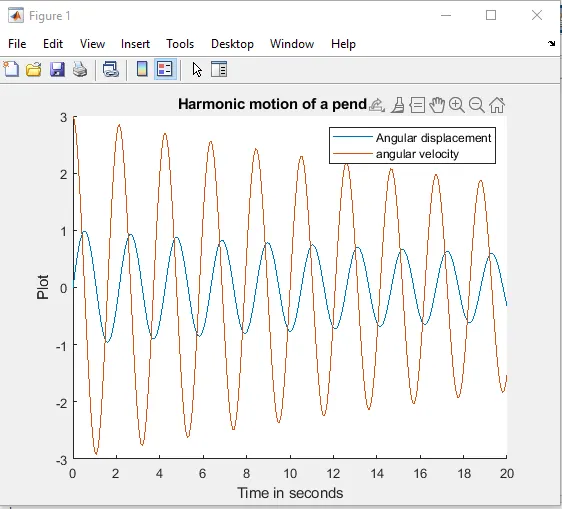
- figure 1 tells how angularvelocity and displacement is actiong and comes to rest.
- plotting the angular velocity and angular displacement
- title command is used to specify the name of the plotting
- xlabel command is used for naming x-axis
- ylabel command is used for naming y-axis
- legend command is used for differentiatin angular velocity and angulardisplacement.
- for loop is used to annimating the pendulum
- intial position for the string is fixed and assigned as x0 and y0
- moving position of the string i.e end position is calculated using a formula
- Plotted the end points and start points of the pendulum and cycle repeats till the itterations are finished.
- At the end of the string to design bob used 'marker size command' and for colour used markerfacecolor command and created bob.
- At the end of for loop we used some commands to create a movie of the animated pendulum.
- movie(M) command is used to create a filim of stored data.
- videoWriter command is used to specify the name of file and type of file.
- Write command is used to create the video animation using .m
- ode_func is a function used in solver in this function we need to specify the differential equation.
OUTPUT:
ERRORS WHILE CODING:
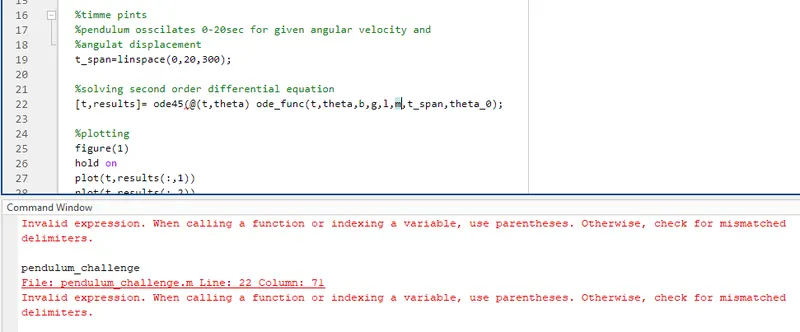
- Forgot to kept paranthasis in ode45 function
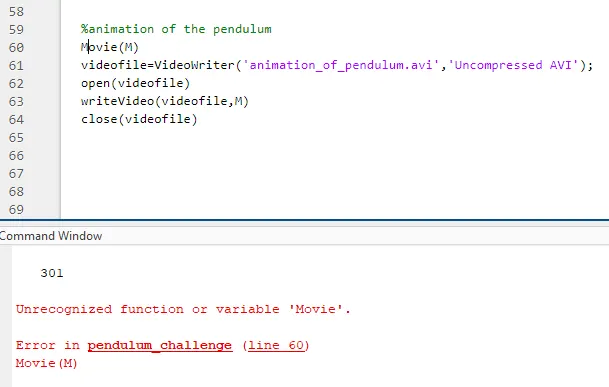
2.Used upper case letter in movie.so, the function is not recognised
RESULT:
The simulation of motion of simple pendulum is sucessfully obtained by solving 2nd order fifferential equation using ode45 solver.The animation movie of simulation is sucessfully obtained and uploaded
YOUTUBE LINK:
https://youtu.be/SFW_JHGG07M