Week 2- 2R Robotic Arm Challenge
AIM:
To simulate the forward kinematics of a 2R robotic arm.
OBJECTIVES:
Main objective of the program is to see how manipulator changes with different values of theta for both the links and finding the required work space for moment of manipulator and also to make animation of the moment of robotic arm.
PROGRAM:
%simulating the forward kinematics of a 2R Robotic arm
clear all
close all
clc
%inputs
%length of first arm
l1=2
%length of second arm
l2=0.8
%angle of first arm
theta1=linspace(0,90,10);
%angle of second arm
theta2=linspace(0,90,10);
ct=1
for i=1:length(theta1)
    THETA1=theta1(i);
    for j=1:length(theta2)
        THETA2=theta2(j);
        x0=0;
        y0=0;
        %formulas for finding end co ordinates for first arm
        x1=l1*cosd(THETA1)
        y1=l1*sind(THETA1)
       %formulas for finding end co ordinates for second arm
        x2=x1+l2*cosd(THETA2)
        y2=y1+l2*sind(THETA2)
        %ploting
        plot([x0 x1],[y0 y1],[x1 x2],[y1 y2],'linewidth',3)
        axis([-0.2 3 0 3])
        pause(0.1)
        m(ct)=getframe(gcf);
        ct=ct+1
    end
end
movie(m)
videofile=VideoWriter('roboticarm_challenge.avi','uncompressed AVI');
open(videofile)
writeVideo(videofile,m)
close(videofile)
EXPLANATION OF PROGRAM:
Given inputs for length of 1st link and 2nd link l1&l2
used linspace command for theta1 and theta2 for number of values in between given starting angle and ending angle
used for loop for more number times itteration of code.using for loop for every value of theta1 calculate coordinates of every value of theta2.and program ends after completion of all values of theta1
used formulas for end points of link1 and link2 and defined in the variables of x1 x2 y1 y2
plotted the all co ordinates of manipulator using plot command.
for animation we have used videofile,writevideo,videowriter commands
YOUTUBE LINK FOR ANIMATION:
https://youtu.be/1mYs6r_CKOM
ERRORS WHILE PROGRAMMING:
ERROR1:
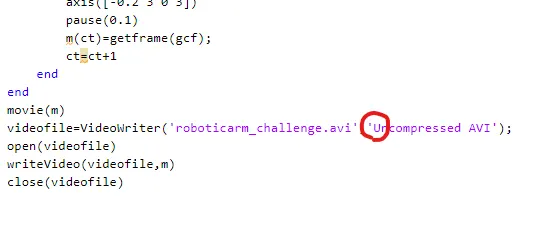
In 'uncompressed' used upper case letter due to this animation video was not saved in my pc
ERROR2:
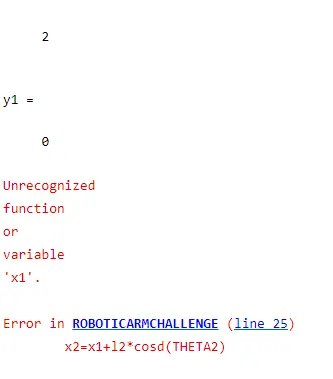
actually i defined for calculating 1st link cocordinates desfined in lower case x, whle calculating co ordinates of link 2 used uppercase letter there i found error.
conclusion:
From the program we have simulated the robotic arm for different angles of two links and we can see workspace of robotic arm at different positions .sucesssfully ploted and created a animation video.