Week 3 - Solving second order ODEs
- Aim: To solve ODE which represents the equation of motion of a simple pendulum with damping.
- Objective:
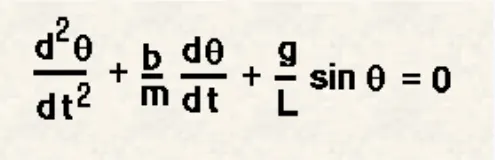
Write a program to solve the following ODE which represents the equation of motion of simple pendulum with damping and create an animation video of output obtained by solving this ODE.
- Given data:
b = damping factor (N-m/s)
m = mass of bob (kg)
g = gravitational acceleration(m/s^2)
l = length of string(m)
- Inputs:
Length = 1 meter
Mass = 1 kg
Gravitational acceleration = 9.81 m/s^2
Damping coefficient = 0.05
Time span = 0-20 sec
Angular displacement = 0
Angular velocity = 3rad/sec at time = 0
Program for the simple pendulum
% PROGRAM FOR SIMPLE PENDULUM USING ODE45
clear all
close all
clc
% INPUT VARIABLE FOR SECON ORDER ODE OF SIMPLE PENDULUM
b = 0.05; % damping coeifficient
g = 9.81; %acceration due to gravity
l = 1; %length of pendulum
m = 0.1; %mass of bob
%initial condition
theta_0 = [0;3];
% time period
t_span = linspace(0,20,500);
% ODE 45 FUNNCTION TO SOLVE ODE
[t,result] = ode45(@(t, theta) ode_func(t,theta,b,g,l,m),t_span,theta_0);
% PLOTTING OF ANGULER VELOCITY AND DISPLACEMENT
plot(t,result(:,1 ))
hold on
plot(t,result(:,2))
xlabel('Time');
ylabel('Velocity')
legend('Anguler displacement','velocity')
grid on
hold off
displacement = result(:,1);
velocity = result(:,2);
%FIXED CORDINATE FOR ONE END FOR SIMPLE PENDULUM
x0 = 0
y0 = 0
ct = 1
for i= 1:length(displacement)
%MOVING CORDINATES OF BOB
x1 = l*sin(displacement(i));
y1 = -l*cos(displacement(i));
figure(2)
%plot fixed link
plot([1 -1],[0 0],'linewidth',5,'color','black')
hold on
%PLOTTING OF BOB MOTION
plot([x0 x1],[y0 y1],'linewidth',3)
plot(x1,y1,'.','markersize',50)
title('Animation of pendulum')
axis([-2 2 -2 2])
hold off
M(ct)=getframe(gcf)
ct=ct+1
end
%TO CREATE A ANIMATION OF SIMPLE PENDULUM
movie(M)
videofile=VideoWriter('oscilation of pendulum.avi','uncompressed AVI');
open(videofile)
writeVideo(videofile,M)
close(videofile)
ode function program:
function [dtheta_dt] = ode_func (t,theta,b,g,l,m)
theta_1 = theta(1);
theta_2 = theta(2);
dtheta1_dt = theta_2;
dtheta2_dt = -(b/m)*theta_2 - (g/l)*sin(theta_1);
dtheta_dt = [dtheta1_dt;dtheta2_dt];
end
- PROGRAM EXPLANATION :
-Clear all, close all, clc are used to clear the workspace and clear the command window.
All inputs are given for the specific data
-t_span is the command used in ode45 solver which specifies the time span for the iteration that is going to solve the ordinary differential equation.
-Ode45 is a function in Matlab that solve ordinary and partial differential equation using a numerical method. In this program, the order is 2. So we have to take 2 constant values so that the equation is changed to the simple differential equation.
-The function should take at least 2 inputs to solve an equation to the approximate result.
-The ode45 function has a syntax in which we need to specify ‘t’ and ‘y’
-Figure(1) is going to tell how the damping is done for the pendulum. The angular velocity and displacement will come to rest at end of the function.
-Plotting the value for the angular velocity and the displacement by the plot command.
-The label command is used to label the X&Y axis.
-legend command is used to label the angular velocity and the displacement.
-To animate the motion of a simple pendulum, a for loop is used to create the specified set of points to keep the boob at a different location.
-x0 and y0 be the fixed point at one end of the string and x1 and y1 be the different positions of the bob.
-At each and every point of the bob the ‘ct’ command is used to count each and every position and store the data.
- At the end of the loop there will be a set of positions for each and every point.
-Movie(M) is used to create a film of the stored data of motion of the pendulum.
-videoWriter command specified the name of the file and the type of data is stored in it.
-Open command is used to open the file where the video is going to store.
-Writevideo command used to create the video animation by using an M file.
-Close command used to close the video file.
ERROR:
While running the program I don’t know the specific command of videowrite so that Matlab shows the above error

To overcome this error I change the spelling mistake of the above VideoWrite.
OUTPUT:
A plot is drawn between angular acceleration and displacement of the motion of the simple pendulum
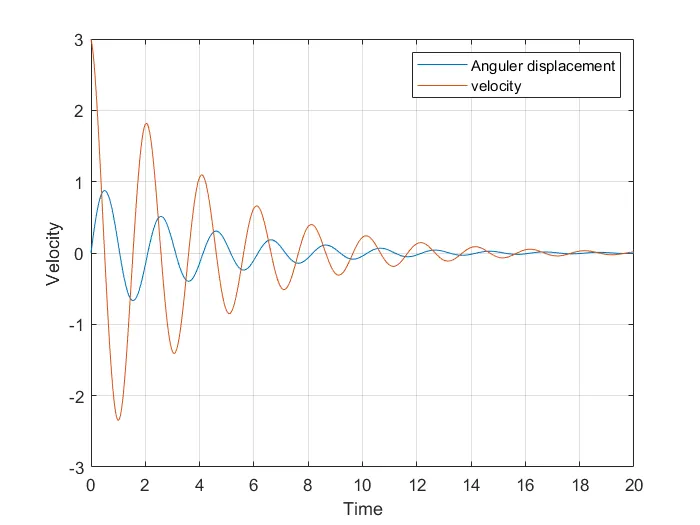
-the blue curve is displacement where it starts from zero and angular velocity start from 3
-at the end of t_span both angular velocity and displacement become zero and the motion of the pendulum becomes zero.
youtube video link
https://youtu.be/MiDsIiEzDNc
CONCLUSION:
We have animated the simple pendulum using ode45 solver where the second-order is reduced to the simple differential equation.
The animation is made using the different points of the bob and the motion of the simple pendulum is created.