Week 3 - Solving second order ODEs
SOLVING SECOND ORDER ODE
Aim
To write a matlab program for the Equation of motion of the simple pendulum with the damping
Objective
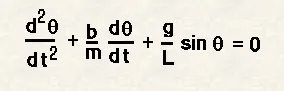
In the above equation,
g = gravity in m/s2,
L = length of the pendulum in m,
m = mass of the ball in kg,
b=damping coefficient.
- To write a program to stimulate the motion of the simple pendulum by using given values
L=1 metre,
m=1 kg,
b=0.05.
g=9.81 m/s2.
- To Simulate the motion between 0-20 sec, for angular displacement=0,angular velocity=3 rad/sec at time t=0.
Formula Derivation
Let,
ϴ1 = ϴ
»`dϴ/dt=dϴ1/dt`
And Let `dϴ1/dt= ϴ2`
And hence the second order given equation becomes `dϴ2/dt+(b/l) dϴ1/dt+(g/l) sinϴ1=0`
Description and Program
function [dtheta_dt] = ode_func (t,theta,b,g,l,m)
theta1 = theta(1)
theta2 = theta(2)
dtheta1_dt = theta(2);
dtheta2_dt = -(b/m)*theta2 -(g/l)*sin(theta1);
dtheta_dt = [dtheta1_dt; dtheta2_dt];
end
First of all a function has to be created in order to execute the formula in a simple manner.
The function is written as [dtheta_dt]
Which the function is called in name of ode_func(t,theta,b,g,l,m)
Where the ode is a function of time,angle,damping coefficient,gravity,length and mass.
Thus the formula can be written as
theta1 = theta(1)
theta2 = theta(2)
and on differentiating dtheta1_dt = theta(2)
and dtheta2_dt = -(b/m)*theta2-(g/l)sin(theta1)
and the function is an array dtheta_dt = [dtheta1_dt;dtheta2_dt]
clear all
close all
clc

b = 0.05;
g = 9.81;
l = 1;
m = 1;

%initial condition
theta_0 = [0;3];
n=500
%time points
t_span = linspace(0,20,n);

%solving ODE
[t,results] = ode45(@(t, theta) ode_func(t, theta,b,g,l,m),t_span, theta_0);


ct=1;
for i = 1:n
    THETA = results(i,1);
    x0 = 0;
    y0 = 0;
    y1 = -l * cos(THETA);
    x1 = l * sin(THETA);

    figure(1)
    plot([x0 x1],[y0 y1],'LineWidth',2)
    axis([-1 1 -1.5 0.5])
    pendulum = ['time=',num2str(t(i))]
    text(-1 ,-1,pendulum)

    M(ct) = getframe(gcf);
    ct = ct+1;
end
figure(2)
plot (t, results(:,1))
hold on
plot (t, results(:,2))
ylabel('plot')
xlabel('time')


 videofile = VideoWriter('ode.AVI');
 open(videofile)
 writeVideo(videofile,M)
 close(videofile)
in the main program
the initial values of the conditions are given with n number of time space for 20s
where
damping co efficient, b = 0.05
acceleration due to gravity , g = 9.81m/s2
length of the pendulum, l = m
mass of the pendulum, m = 1kg
n = 500
and the initial values of theta is given in an array with velocity and displacement
where v = 0; and displacement = 3
the given time for 20s is given with linspace of 500 equal values
for solving the function with time,t and results of velocity and displacement to be derived
[t,results] = ode45(@(t,theta) ode_func(t,theta,b,g,l,m),t_span,theta_0)
Where the function is called with the inbuild ode45 command for solving equation and the ode_func is called with the values.
The output values of velocity and the displacement is to be plotted in a graph using plot command and the output is attached with it
Creating Animation output of pendulum
For loop is used for multiple values of angles and so the motion can be made by joining the plot
Here i is the initial value ranging from 1 to n times which is 500
Here the angle theta is the displacement of the pendulum which is the i part of the result to the value 1
We know the point of one end is fixed so that
x0 = 0
y0 = 0
the value of the other co ordinates changes with respect to the angle theta
y1 = -l * cos(THETA)
x1 = l * sin(THETA)
now the point can be plotted with the obtained values and the axis length is given
the time duration can also be displayes with the numstr command
M(ct) = getframe(gcf)
This command captures the plot and moves to the next plot by the command ct =ct+1;
Finally video file is created using videowriter command
And open and close videofile lets you to play and close the file.
The output animation video is given in the link below
https://drive.google.com/file/d/1ggEsy6kO_0nmIvIHMYWKOxdsFNfduDrz/view?usp=sharing
Error Occured while Programming
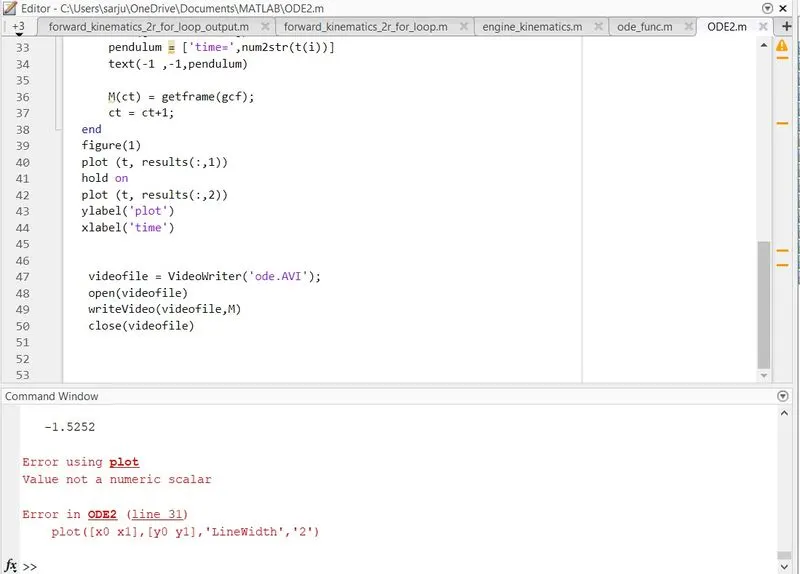
There are few errors occured while creating program.
for the linewidhth the single color should not be given for the scalar number.
and the program is executed successfully.
Result
Thus matlab code is created for the second order differential equation of the simple pendulum and the desired output is obtained.