Week 3 - Solving second order ODEs
1. Explanation of the code.
Starting with initialization and declaration of the parameters like (b=damping coefficient (N-S/m), g=acceleration due to gravity(m/s^2), l=length of the pendulum(m), m=mass of the pendulum(kg).
marking the initial conditions i.e angular displacement = 0; and angular velocity= 5.
time period = 0-10 seconds and 250 values in between.
calculating the ODE using the inbuilt function ode45 The basic Matlab syntax for ode45 is: [y1, y2]=ode45 (@ (t,y) fname (t,y), [t0, t_end], y0) Where: y1, y2 are solution vectors; Matlab returns y2 for each time y1. fname: Function that returns dy = f (t,y). t0, y0: Initial condition representing y (t0)=y0. t_end: Final value until the solution is desired
also we creating a function call to separately calculate dtheta1/dt and dtheta2/dta
Later creating a plot for time period vs displacement and time period vs velocity
And then writing a code for animation of the simple pendulum
Starting by defining all the necessory variables and co-ordinates and then creating a for loop to describe the motion of the pendulum which changes with time
inside the for loop writing the formula to calculate the position of the bob at different intervals of time
and then using the plot command creating the support bar, length of the pendulum, support pin and the bob.
Using the legend command labelling the parts of the simple pendulum.
Later on creating movie out of all the frames.
Code shown below
clear all
close all
clc

b=0.05      % declaring and initializing variable for damping coefficient.
g=9.81;     % declaring and initializing variable for acceleration due to gravity.
l=1;        % declaring and initializing variable for length.
m=1;        % declaring and initializing variable for mass.

theta_0 = [0,3];     %marking initial conditons for displacement and velocity
t_span = linspace(0,20,250);    %time period from o to 10 seconds and 500 values in between.

[t, results] = ode45(@(t,theta) ode_func(t,theta,b,g,l,m), t_span, theta_0);
plot(t,results(:,1))       %plotting t vs results(displacement).
hold on
plot(t,results(:,2))       %plotting t vs results(velocity).
xlabel('time')
ylabel('plot')


%Writing the code to create am Animation of the pendulum.
X0 = 0;
Y0 = 0;
ct = 1; %represents each and every frame
for i = 1:length(t)
    X1 = l*sin(results(i,1));      %Position of pendulum which changes with time
    Y1 = -l*cos(results(i,1));     %Position of pendulum which changes with time
    figure(2)
    plot([-1 1],[0 0],'linewidth',6,'color','k'); %Plot to create the support bar.
    axis([-2 2 -2 2]);                             %defining the axis.
    line([X0 X1],[Y0 Y1],'linewidth',2,'color','b');% to create the length of the
                                                      pendulum
    hold on
    plot(X0,Y0,'o','markersize',3,'markerfacecolor','y'); %Plot to create the support
                                                             pin.
    plot(X1,Y1,'o','markersize',20,'markerfacecolor','r');%Plot to create the bob.
    title('Damping of simple pendulum');
    legend('support rod','length of pendulum','fixed point','bob of pendulum');
    grid on;
    hold off;
    M(ct) = getframe(gcf);     %to create a movie.
    ct = ct+1;                 %incrementing the frames
end
movie(M);
videofile = VideoWriter('simple_pendulum.avi','Uncompressed AVI');
open(videofile)
writeVideo(videofile,M);
close(videofile);
Code for function call
function [dtheta_dt] = ode_func(t,theta, b, g, l, m) % writing function call which we
                                           will be using to call in the main program
theta1 = theta(1);
theta2 = theta(2);
dtheta1_dt = theta2;                              % calculating dtheta1/dt
dtheta2_dt = -(b/m)*theta2-(g/l)*sin(theta1);     % calculating dtheta2/dt
dtheta_dt = [dtheta1_dt;dtheta2_dt]
end
Plot obtained
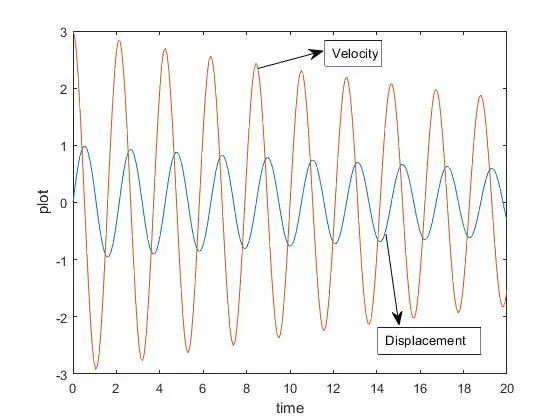
Animation of the plot
Google drive link: https://drive.google.com/file/d/1JGg_lBwdv0EsmTW0Wiws-ng_XUJDi1Rm/view?usp=sharing
Youtube link: https://www.youtube.com/watch?v=ff3VFbasXmQ
3. Errors facced while programming.
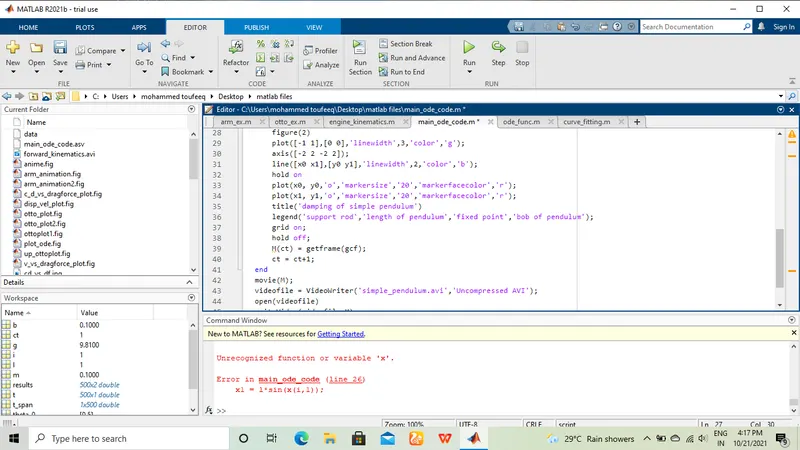
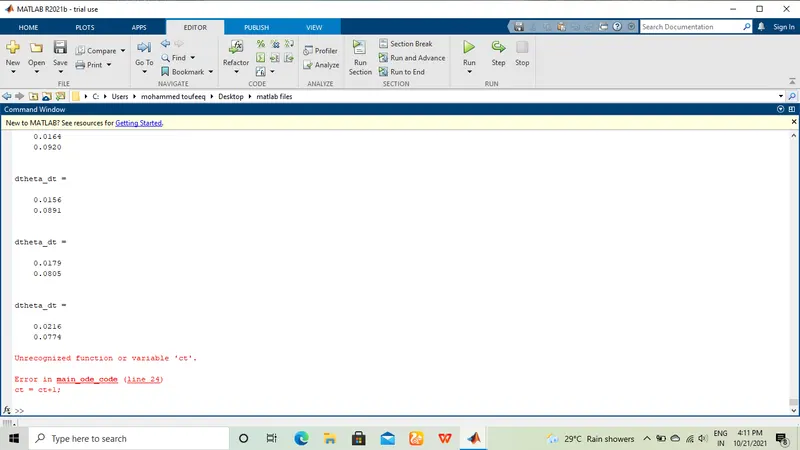
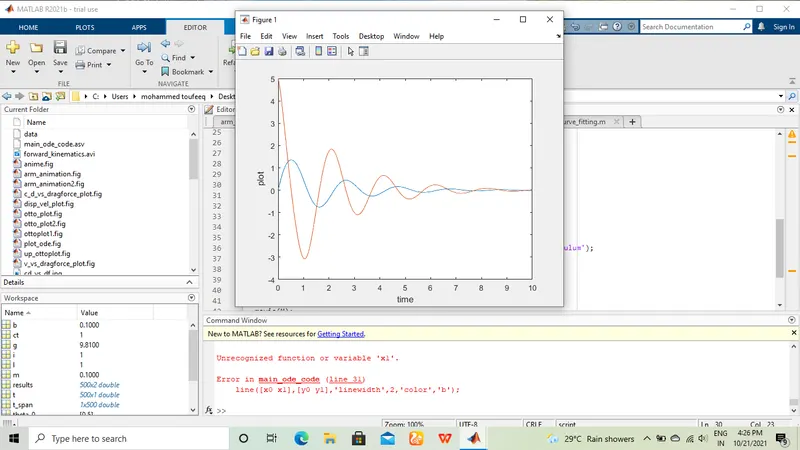
Screenshots below show the errors faced while running the program
4.How the errors were rectified
1.Firstly while defining the ct variable i mistakenly wrote it as 'ct+1' instead of 'ct' so deleting 1 the problem was solved.
2. while writing the code for animation i wrote 'x' instead of 'results' so changing that back solved the issue
3. error=x1 undifined because in place of capital 'X' i typed it as small 'x' so changing it to capital x solved the probem