Week 3 - Solving second order ODEs
PROBLEM
To simulate the simple pendulum using matlab.
ODE45.
ODE45 is usually the function of choice among the ODE solvers. It compares methods of orders four and five to estimate error and determine step size. ODE45 is so accurate that its default behavior is to use its interpolant to provide results at intermediate points.
ODE solvers can solve systems of equations of the form y′=f(t,y), or problems that involve a mass matrix, M(t,y)y′=f(t,y). The solvers all use similar syntaxes. The ode45s solver only can solve problems with a mass matrix if the mass matrix is constant. ode15s and ode23t can solve problems with a mass matrix that is singular, known as differential-algebraic equations (DAEs).
ANONYMOUS FUNCTION.
An anonymous function is a function that is not stored in variable, but is associated with a variable whose data type is function handle . Anonymous functions can accept multiple inputs and return one output. They can contain only a single executable statement.
clear all
close all
clc
b=0.05;
g=9.81;
l=.1;
m=0.1;
%initial condition
theta_0=[0;5];
% time points
t_span=linspace(0,10,500)
% solve ODE
[t,results]=ode45(@(t,theta) ode_func(t,theta,b,g,l,m),t_span, theta_0);
figure(1)
plot(t,results(:,1))
hold on
plot(t,results(:,2))
ylabel('plot')
xlabel('time')
grid on;
%simulation of pendulam
ct=1;
for i=1:length(results(:,1)) %for loop run the program multiple times .
x0=0;
y0=0;
x1=1*sin(results(i,1));
y1=-1*cos(results(i,1));
figure(2)
plot([-0.5 0.5],[0 0]);
hold on
plot([x0 x1],[y0 y1]);
hold on;
plot(x1,y1,'marker','.','markersize',30);
axis([-1.5 1.5 -1.5 0.5]);
%pause(0.1);
M(ct)=getframe(gcf);
ct=ct+1;
hold off;
end
movie(M)
videofile=VideoWriter('ANIMATE.avi','Uncompressed AVI');
open(videofile)
writeVideo(videofile,M)
close(videofile)
%movie command to stitch the multiple plots in the program and to form video file
clear all
close all
clc %Clears the data form previous operations .
b=0.05; % initial conditions for the pendulum
g=9.81;
l=.1;
m=0.1;
%initial condition
theta_0=[0;5]; %Defining the initial time and velocity of the pendulum
% time points % the number of intrevals for calculating the time
%time period of the pendulum.
t_span=linspace(0,10,500)
% solve ODE
[t,results]=ode45(@(t,theta) ode_func(t,theta,b,g,l,m),t_span, theta_0);
figure(1)
%ode45 solver to solve second order differential equation with respect to time and theta.
plot(t,results(:,1)) %to plot the the solved polynomial
hold on % HOLD ON to tempararly pause the program during plotting.
plot(t,results(:,2))
ylabel('plot')
xlabel('time')
grid on;
%simulation of pendulam
ct=1; %counter to display the no of iterations the foe loop has run.
for i=1:length(results(:,1)) %for loop run the program multiple times .
x0=0;
y0=0;
x1=1*sin(results(i,1));
y1=-1*cos(results(i,1));
figure(2)
plot([-0.5 0.5],[0 0]);
hold on
plot([x0 x1],[y0 y1]);
hold on;
plot(x1,y1,'marker','.','markersize',30);
axis([-1.5 1.5 -1.5 0.5]);
%to plot the multiple iterations of the of the program.
%pause(0.1);
M(ct)=getframe(gcf);
ct=ct+1;
hold off;
end
movie(M)
videofile=VideoWriter('ANIMATE.avi','Uncompressed AVI');
open(videofile)
writeVideo(videofile,M)
close(videofile)
%movie command to stitch the multiple plots in the program and to form video file
Errors
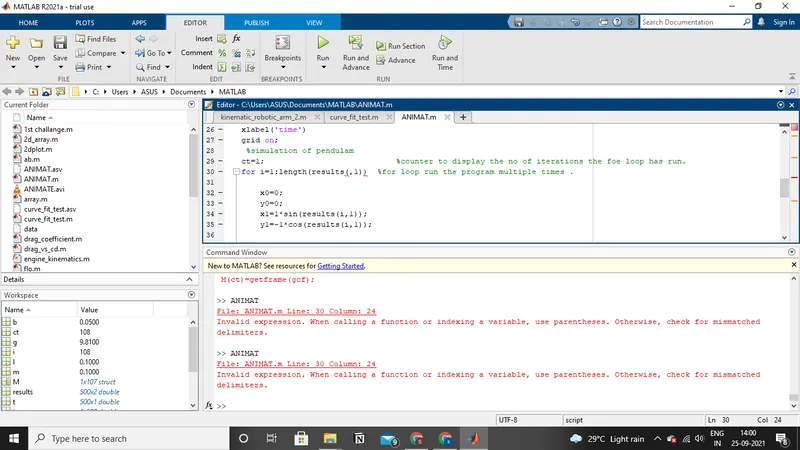
Missed for loop colon and and corrected the same.
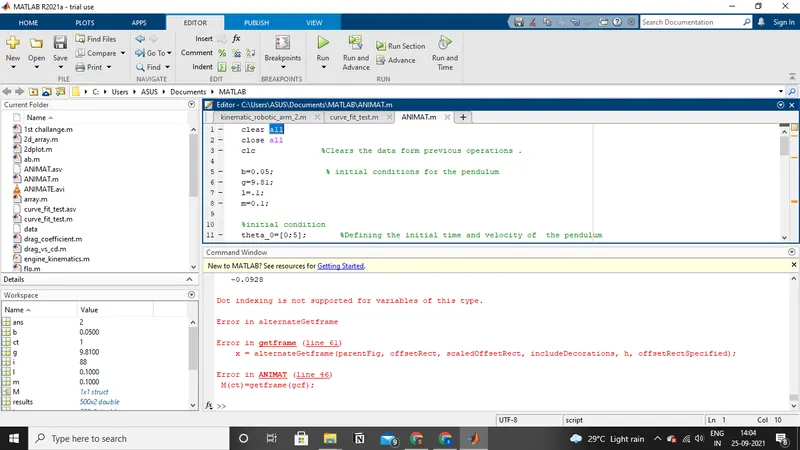
syntax error while using getframe command.
output
https://drive.google.com/file/d/1aJ21QoDknBHBghJQe8Fg-ipg48GuQWnf/view?usp=sharing