Week 3 Sheet metal Bending challenge
Sheet metal Bending challenge
OBJECTIVE:
- The main objective of this challenge is to perform a static structural Analysis on sheet metal bending for 3 Different materials mentioned below. And to run the analysis for the following material:
- Case 1:Aluminium Alloy 1199,Copper Alloy NL and Magnesium Alloy NL. To find out the Equivalent stress, Equivalent elastic strain and Total Deformation in Y direction and compare the results for the three materials.
- Case 2:With the material as Aluminium Alloy, change the friction coefficient to 0.19 and run the analysis as mentioned in Case 1.To compare the results with that in case 1.
- Case 3: Refine the mesh on the plate such that it doesn't cross the academic limit. With Aluminium alloy as material, run the analysis as in Case 1 and compare the results.
Sheet metal Forming:
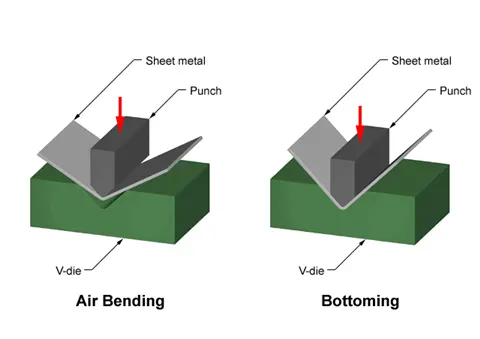
Sheet metal forming processes are those in which force is applied to a piece of sheet metal to modify its geometry rather than remove any material. The applied force stresses the metal beyond its yield strength, causing the material to plastically deform, but not to fail. By doing so, the sheet can be bent or stretched into a variety of complex shapes. Sheet metal forming processes include the following:
- Bending
- Roll forming
- Spinning
- Deep Drawing
- Stretch Forming
Bending:
- Bending is a metal forming process in which a force is applied to a piece of sheet metal, causing it to bend at an angle and form the desired shape. A bending operation causes deformation along one axis, but a sequence of several different operations can be performed to create a complex part. Bent parts can be quite small, such as a bracket, or up to 20 feet in length, such as a large enclosure or chassis.
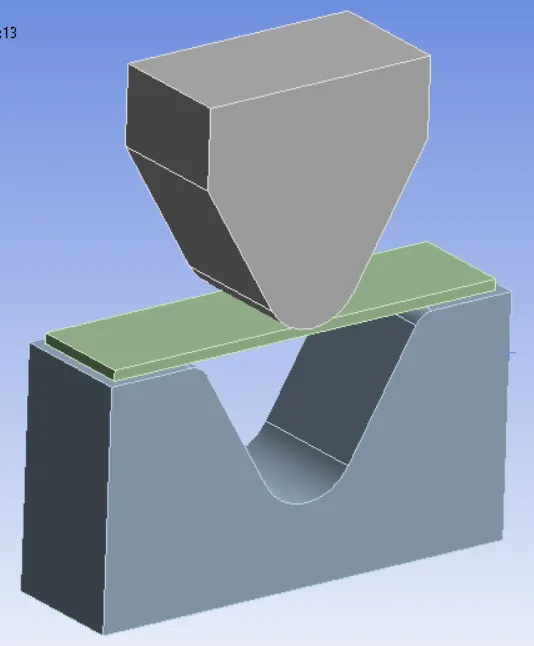
- Geometry:
PROCEDURE:
- Open the ANSYS Workbench software. Under the Analysis system select the Static structural and wait for few seconds to pop up the window, which contains Engineering data, Geometry, Model, setup, Solution and Results.
- Under geometry import the Sheet Metal Bending model.
- Update the model by right click and edit the Model for Preprocessing.
- Assign the material to the model, By classifying the required needs into three cases, And assign material to the model based on the cases.
Sheet Material used:
- Case 1:Aluminium Alloy 1199,Copper Alloy NL and Magnesium Alloy NL. To find out the Equivalent stress, Equivalent elastic strain and Total Deformation in Y direction and compare the results for the three materials.
- Case 2:With the material as Aluminium Alloy, change the friction coefficient to 0.19 and run the analysis as mentioned in Case 1.To compare the results with that in case 1.
- Case 3: Refine the mesh on the plate such that it doesn't cross the academic limit. With Aluminium alloy as material, run the analysis as in Case 1 and compare the results.
Material Properties:
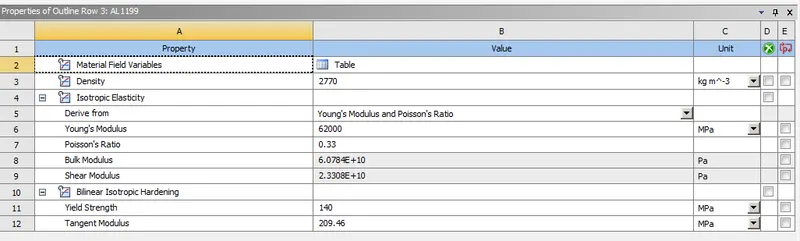
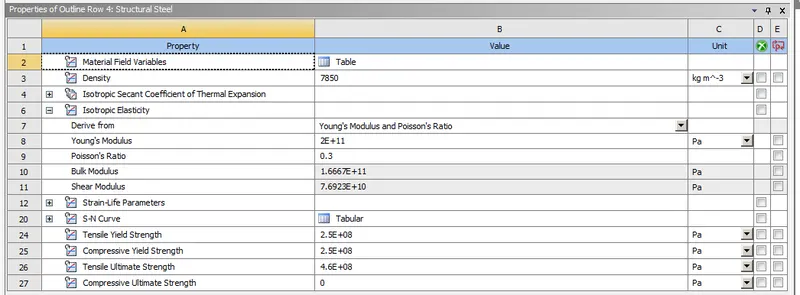
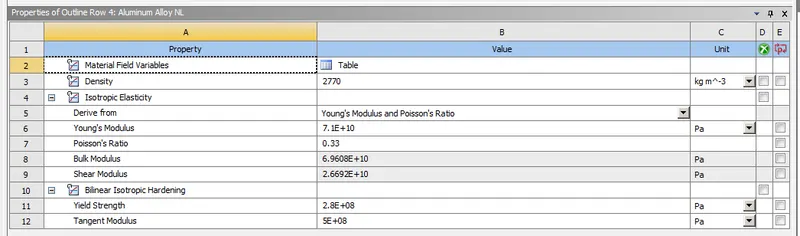
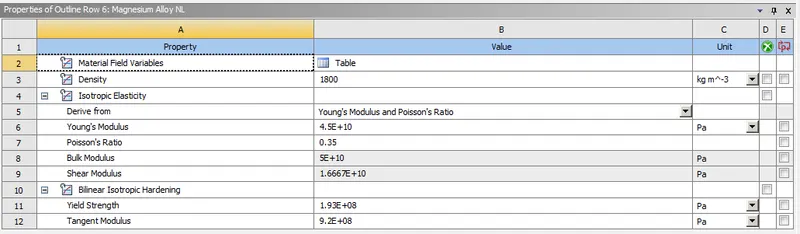
- Frictional contact between the Punch to Sheet and the Sheet to Die are Defined with a frictional coefficient of 0.1.
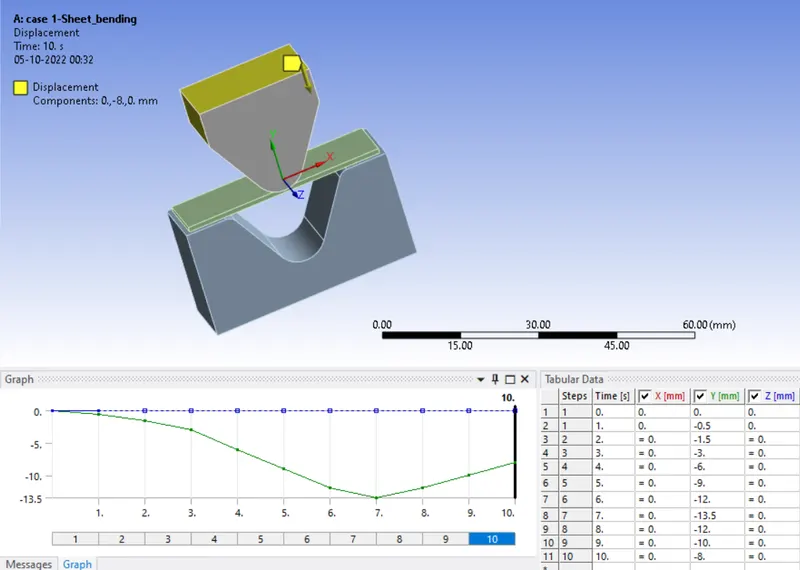
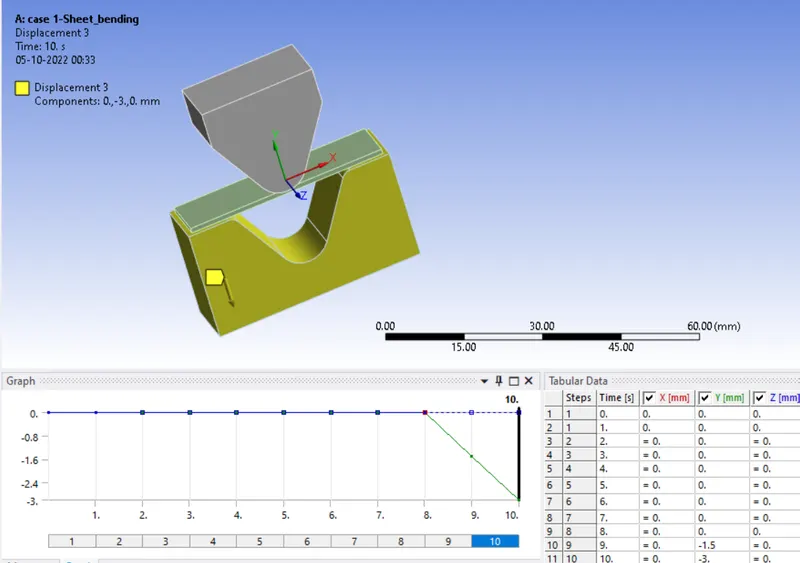
- Insert a Displacement to the punch to move downward, by assigning the necessary values in Y-direction. So click on static structural go to insert and select Displacement . Then select the upper faces of the punch.
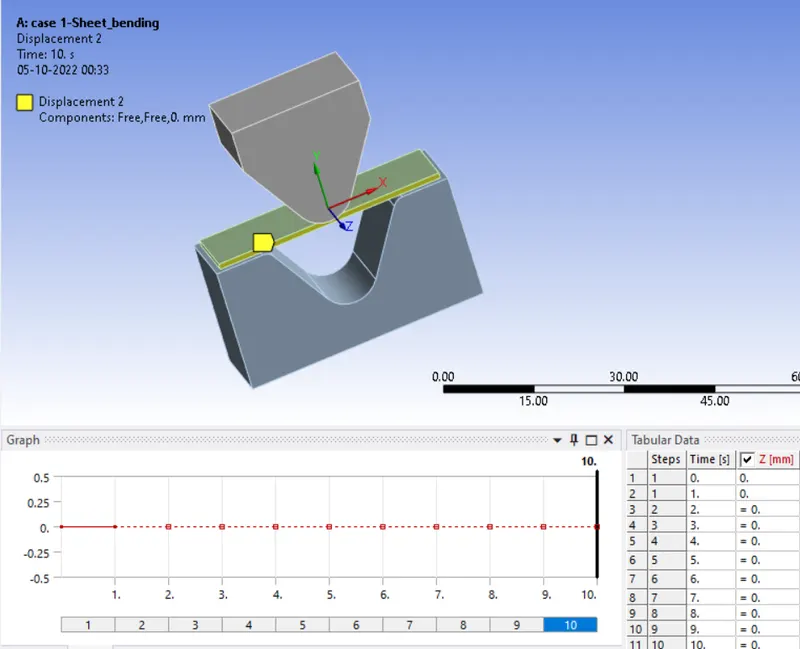
- Insert a Second Displacement to the sheet in order to make it fixed in Z-Direction, by assigning the ZERO in Z-direction. So click on static structural go to insert and select Displacement . Then select the faces of the Sheet as shown below.
- Insert a Third Displacement to the Die in order to make it to move backward after the bending operation is performed. By assigning the Values in Last two step of Y-direction. So click on static structural go to insert and select Displacement . Then select the faces of the Die as shown below.
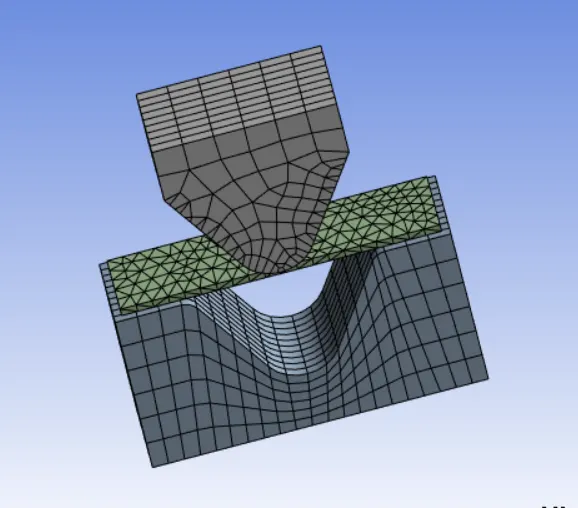
- In ANSYS automatic mesh will be performed with Default mesh size and select the sizing option and select the punch and die, assign the element size as 4mm. Similarly select the plate and assign the value of 2 mm and similarly select the contact face of punch and die with the plate and assign a value of 1 mm. (i.e. Ansys student version will have a limited number of elements and nodes.)
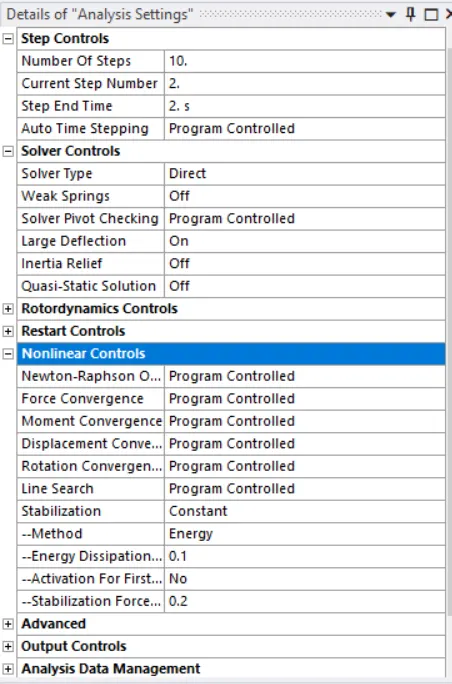
- Analysis settings -
Change no. of steps as 10,
auto time as program control,
large deflection on,
solver type as Direct,
Non linear control-Stabilization as Constant, energy dissipation 0.1.
- Now request for the outputs such as equivalent stress, equivalent elastic strain, directional deformation in Y-Direction.
SIMULATION RESULT:
CASE1:
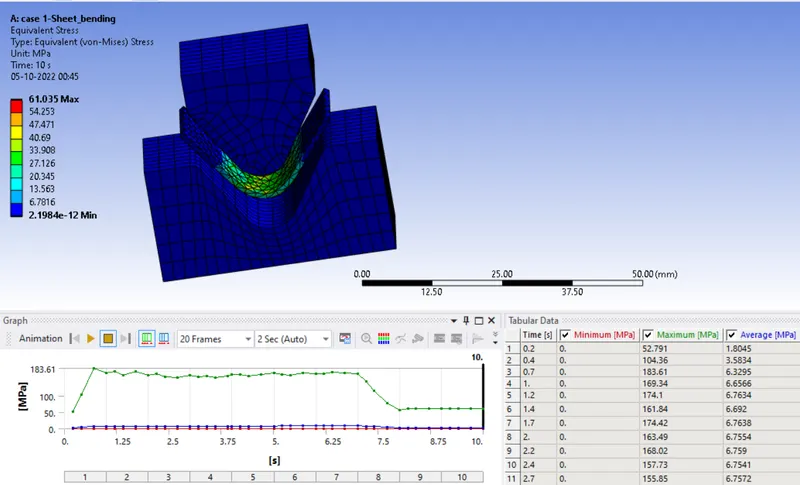
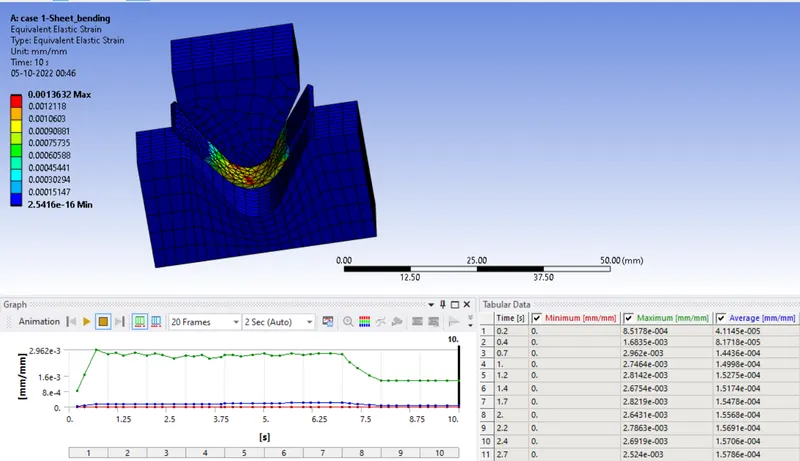
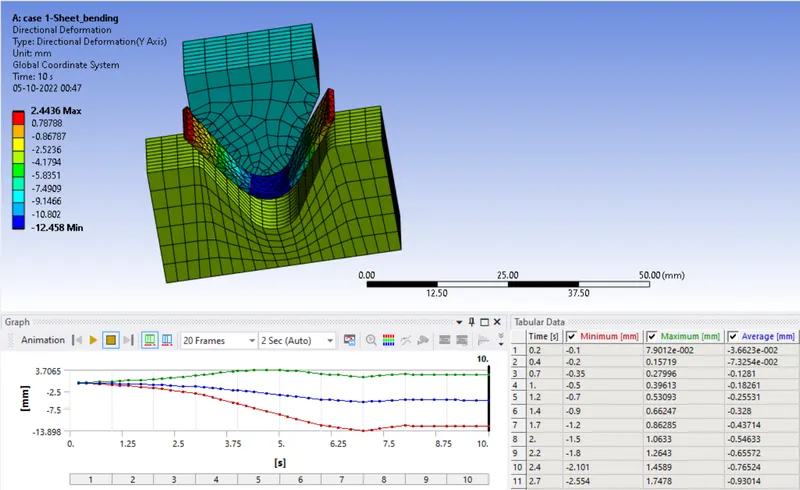
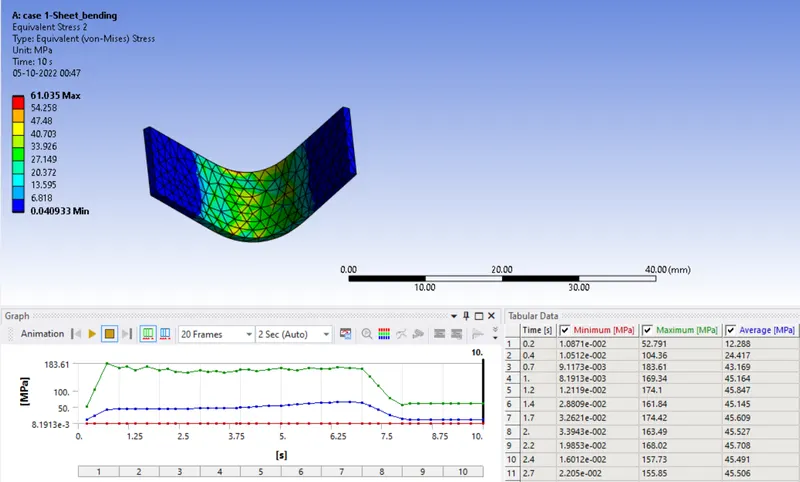
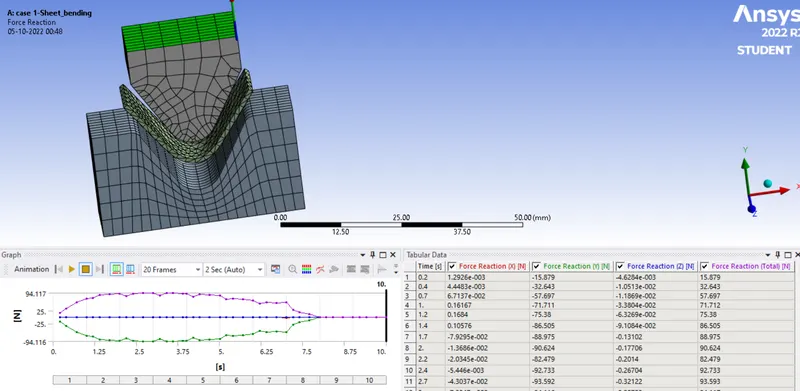
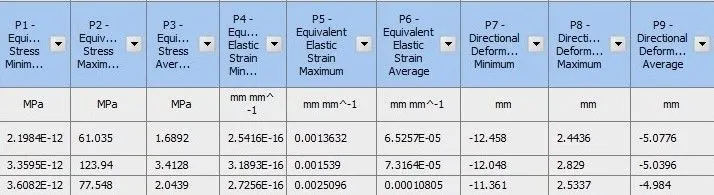
- Simulation results for case-1 the material used for the model are Aluminium Alloy 1199, Copper Alloy NL and Magnesium Alloy NL. To find out the Equivalent stress, Equivalent elastic strain and Total Deformation in Y direction and compare the results for the three materials. only one of the material Aluminium Alloy 1199 results are shown in below and comparison of 3 materials are showing in table
Aluminium Alloy 1199-
- EQUIVALENT STRESS-
- EQUIVALENT STRAIN-
- DIRECTIONAL DEFORMATION (Y-Axis) -
- STRESS ON SHEET-
- FORCE REACTION-
CASE 2:With the material as Aluminium Alloy, change the friction coefficient to 0.19
- EQUIVALENT STRESS-
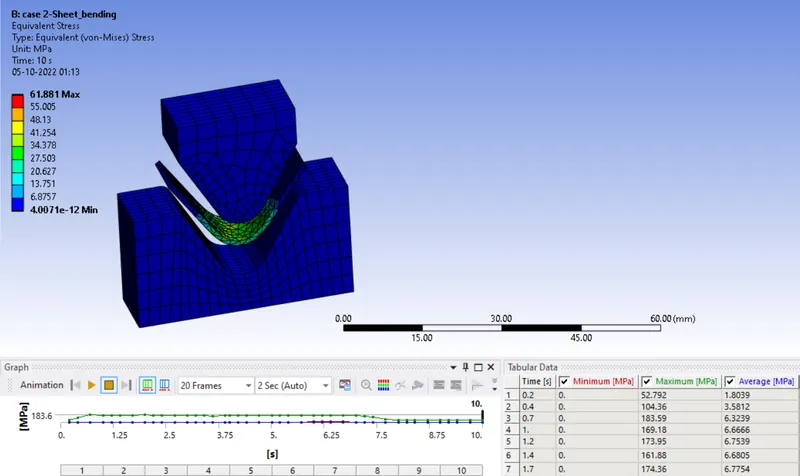
- EQUIVALENT STRAIN:
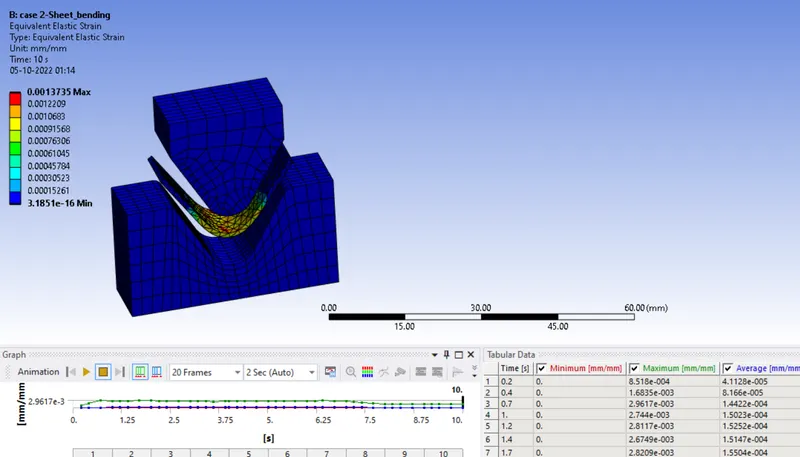
- DIRECTIONAL DEFORMATION (Y-Axis) -
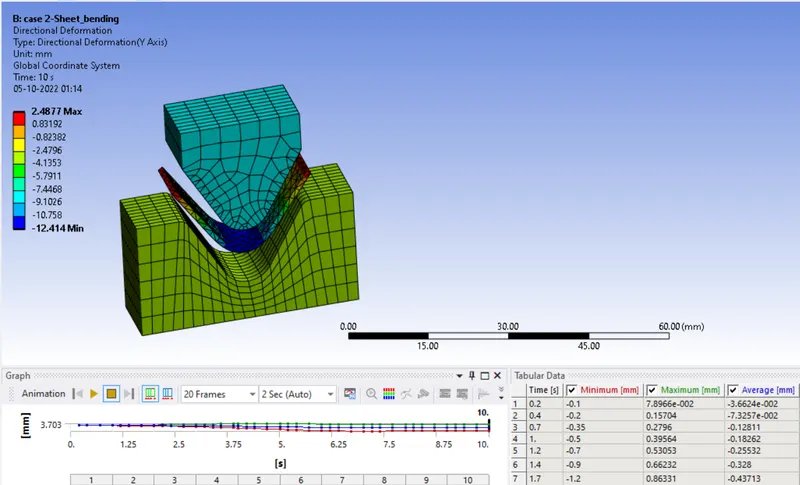
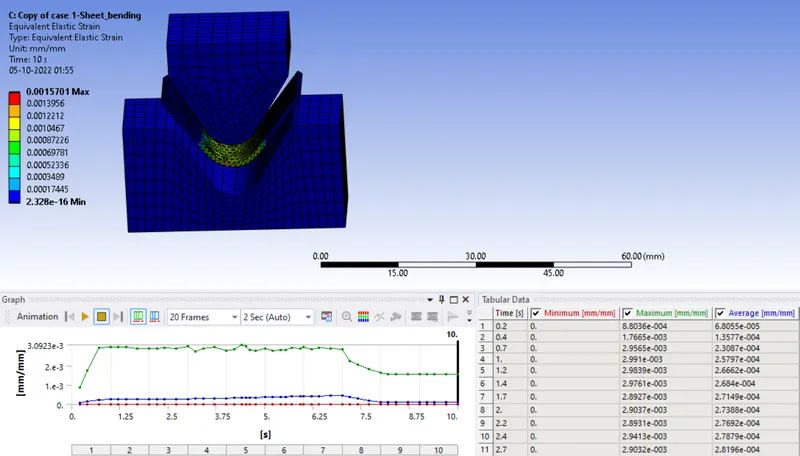
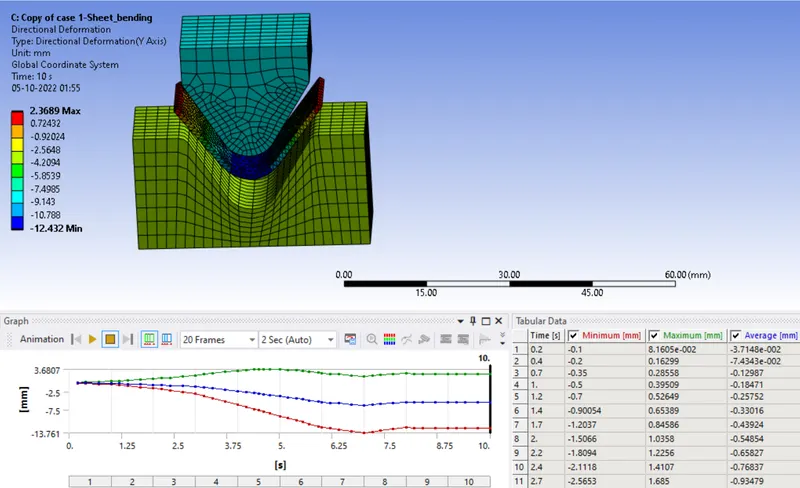
CASE 3: Refine the mesh on the plate such that it doesn't cross the academic limit. With Aluminium alloy as material, run the analysis as in Case 1 and compare the results.
- EQUIVALENT STRESS-
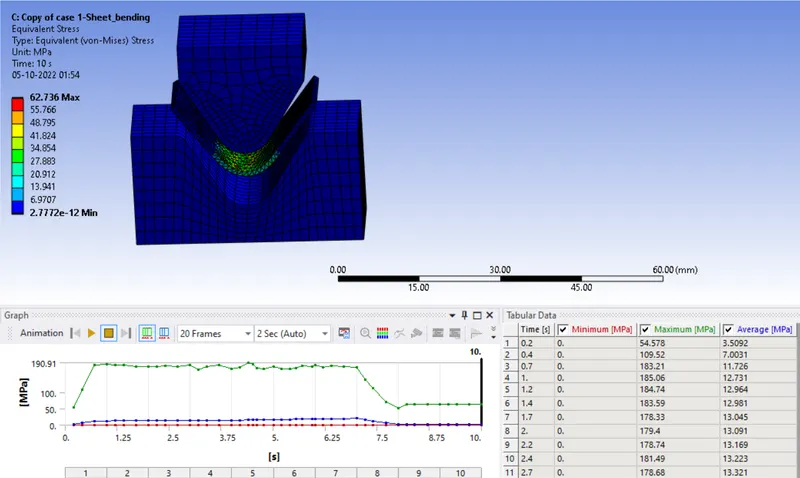
- EQUIVALENT STRAIN:
- DIRECTIONAL DEFORMATION (Y-Axis) -
COMPARISON OF RESULTS: ( by using parameters)
CASE 1:

Sequence:1.Aluminium
2.Copper
3.Magnesium
- The above tabular data shows the variations in the equivalent stress, equivalent elastic strain and directional deformation of various material such as Aluminium 1199, Copper and Magnesium.
- Copper material experiences more stress, aluminum 1199 material experiences less stress and copper experiences more directional deformation, aluminum 1199 experiences less directional deformation. And magnesium experiences more equivalent elastic strain, aluminum 1199 experiences less more equivalent elastic strain.
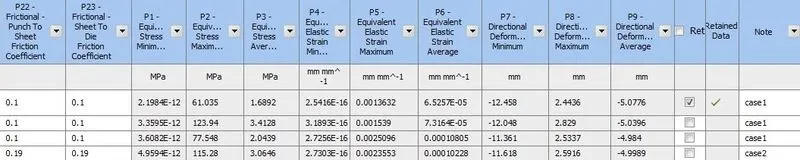
CASE-2 :With the material as Aluminium Alloy, change the friction coefficient to 0.19 and run the analysis as mentioned in Case 1. Compare the results with that in case 1.
| MATERIAL | DIRECTIONAL DEFORMATION (Y-AXIS) (mm) | EQUIVALENT ELASTIC STRAIN | EQUIVALENT STRESS (MPa) |
| ALUMINUM with coefficient of Friction as 0.1 |
MAX: 2.4436 MIN: -12.458 |
MAX: 0.001363 MIN: 0 |
MAX: 61.035 MIN: 0 |
| ALUMINUM with coefficient of Friction as 0.19 |
MAX: 2.5916 MIN: -11.618 |
MAX: 0.002355 MIN: 0 |
MAX: 115.28 MIN: 0 |
- As coefficient of friction increases all parameters increases ( stress, strain, deformation)

clear view
CASE 3: Refine the mesh on the plate such that it doesn't cross the academic limit. With Aluminium alloy as material, run the analysis as in Case 1 and compare the results.
| MATERIAL | DIRECTIONAL DEFORMATION (Y-AXIS) (mm) | EQUIVALENT ELASTIC STRAIN | EQUIVALENT STRESS (MPa) |
|
ALUMINUM ELEMENT SIZE- 4mm~3mm 2mm~1mm |
MAX: 2.3689 MIN: -12.432 |
MAX: 0.001570 MIN: 2.32e-16 |
MAX: 62.736 MIN: 2.778e-12 |
- As due to mesh refining better accurate results are obtained but it takes more computational time
CONCLUSION:
- From the above result copper material experiences more stress when compared with other two material. In case 2 with coefficient of friction as 0.19 experiences more stress, so the higher value of coefficient of friction will results with higher value of output, where as in case 3 refining the element size as 1, keeping the academic version limit, by performing grid dependency test there will be a better approximation in the result. Using the optimized element size is better than that of further reducing the element size will consumes more computational time and high cost.