Week 4.1 - Genetic Algorithm
% Stalagmite Mathematical Model for optimization

clear all
close all
clc

% Defining our search space
x = linspace(0,0.6,150);
y = linspace(0,0.6,150);


% Evaluating the Stalagmite function
for i=1:length(x)
    for j = 1:length(y)
        input_vector(1)= x(i);
        input_vector(2)= y(j);
        f(i,j) = stalagmite(input_vector);
    end
end

surf(x,y,f)
xlabel('x value')
ylabel('y value')

shading interp
[input, fval]=ga(@stalagmite,2)
STEPS
1. firstly we use linspace command to create 150 values from 0 to 0.6 .
2. We use meshgrid command to evaluate the functions of two variables and three dimensional plots
3. We use the stalagmite function for different iterations .
4. We use the ga function to define the stalagmite function for various iterations .
5. We measure the time for each of 50 iterations and the optimum value is obtained .
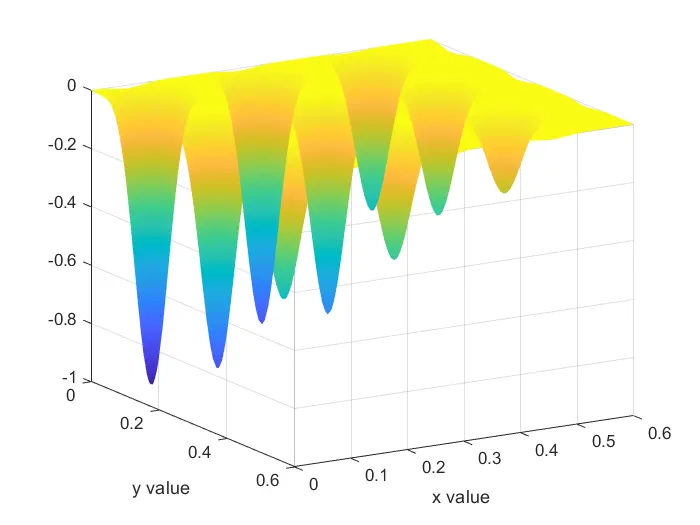
Genetic Algorithm:
Genetic Algorithm ( GA ) is a branch of field of study called evolutionary comutation . It is based on evolution theory by Darwin . GA is used to optimize a given function to find its maximum or minimum value .
The basic components of a GA are-
1. fitness function : It is the function that GA is trying to optimize
2. a population of chromosome : It is the numerical values that represent all the solutions to the function .The selection operator chooses some of the chromosomes ( with replacement ) for reproduction based on probability distribution . fitter the chromosome more likely it is to be selected .
3. cross over : This operator swaps in random a subsequence of two of the chosen chromosomes to create two offspring . Usually each chromosome is converted into binary code and then cross over is done from one parent chromosome into another .
4. Mutation : Mutation operator randomly flips individual bits in the new chromosomes .
The GA syntax in Matlab is given by,
x =ga(fun,nvars,A,B.Aeq.BeqLB,UB.nonicon,intcon.options)
- fun = objective function
- nvars = number of variables
- A and B = subject to linear inequalities of the form A * x < = B
- Aeq and Beq = subject to linear equalities of the form A * x = B
- LB = lower bound
- UB = upper bound
- nonicon = non linear inequalities
- intcon = integer constrained
- options = helps to add contraint tolerance by increasing the population size
% Stalagmite Function

function f= stalagmite(input_vector)
x=input_vector(1);
y=input_vector(2);
f1x=(sin((5.1*pi*x)+0.5)).^6;
f2y=(sin((5.1*pi*y)+0.5)).^6;
f3x=exp(-4*log(2)*(x-0.0667).^2/0.64);
f4y=exp(-4*log(2)*(y-0.0667).^2/0.64);
f = -(f1x*f2y*f3x*f4y);
end
% Stalagmite Mathematical Model for optimization

clear all
close all
clc

% Defining our search space
x = linspace(0,0.6,150);
y = linspace(0,0.6,150);
num_cases=50

% Evaluating the Stalagmite function
for i=1:length(x)
    for j = 1:length(y)
        input_vector(1)= x(i);
        input_vector(2)= y(j);
        f(i,j) = stalagmite(input_vector);
    end
end

% study 1 unbounded plot

for k =1:num_cases
    [ip1 fopt1(k)]=ga(@stalagmite,2)
    xopt1(k)= ip1(1)
    yopt1(k)= ip1(2)
end

figure(1)
subplot(2,1,1)
hold on
surfc(x,y,-f)
shading interp

plot3( xopt1,yopt1,-fopt1,'marker','o','markerFaceColor','r')
xlabel('x data')
ylabel('y data')
title ('unbounded plot')
subplot(2,1,2)
plot(-fopt1)
xlabel('iterations')
ylabel('fopt1')
title ('unbounded plot')


% study 2 bounded plot

for k = 1 : num_cases
    [ip2 fopt2(k)] = ga(@stalagmite,2,[],[],[],[],[0;0],[0.6;0.6]);
    xopt2(k) = ip2(1)
    yopt2(k) = ip2(2)
end

figure(2)
subplot(2,1,1)
hold on
surfc(x,y,-f)
shading interp

plot3(xopt2,yopt2,-fopt2,'marker','o','markerfacecolor','r')
xlabel('x data')
ylabel('y data')
title ('bounded plot')
subplot(2,1,2)
plot (-fopt2)
xlabel('iterations')
ylabel('fopt1')
title ('bounded plot')

% study 3 bounded plot with population
options =optimoptions('ga');
options =optimoptions(options,'populationsize',500);

for k = 1:num_cases
    [ip3, fopt3(k)]=ga(@stalagmite,2,[],[],[],[],[0;0],[0.6;0.6],[],[],options);
    xopt3(k) = ip3(1);
    yopt3(k) = ip3(2);
end

figure(3)
subplot(2,1,1)
hold on
surfc(x,y,-f)
shading interp
plot3(xopt3,yopt3,-fopt3,'marker','o','markerfacecolor','r')
xlabel('x data')
ylabel('y data')
title('Bounded plot with population')

subplot(2,1,2)
plot(-fopt3)
xlabel('iterations')
ylabel('fopt1')
title('Bounded plot with population')
Study 1-Unbounded Plot
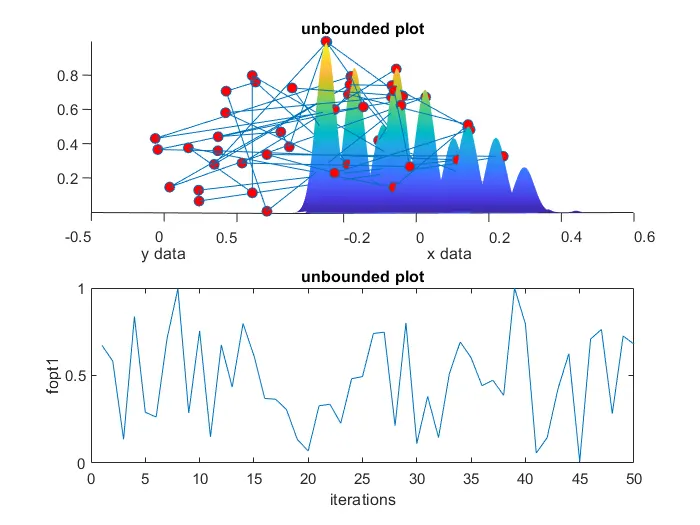
In this first study there are no lower and upper limits hence the GA does not the search space is between 0 and 1.Hence each time program is executed different optimum values are obtained as shown in graph
- Study 2- Bounded plot
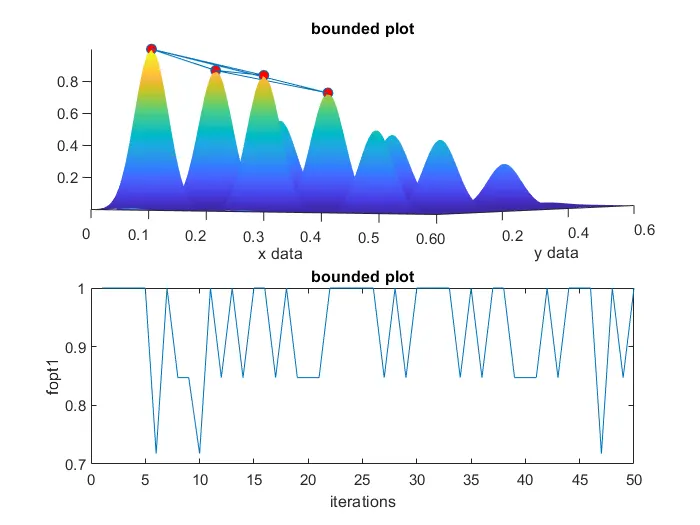
In the 2nd study lower and upper limits are included in the GA. Hence most of the maximum values obtained in each iterations varies between 1 and 0.85. This method narrows down the maximum values to 4 points as shown in the first point.
Study 3- Bounded plot with population
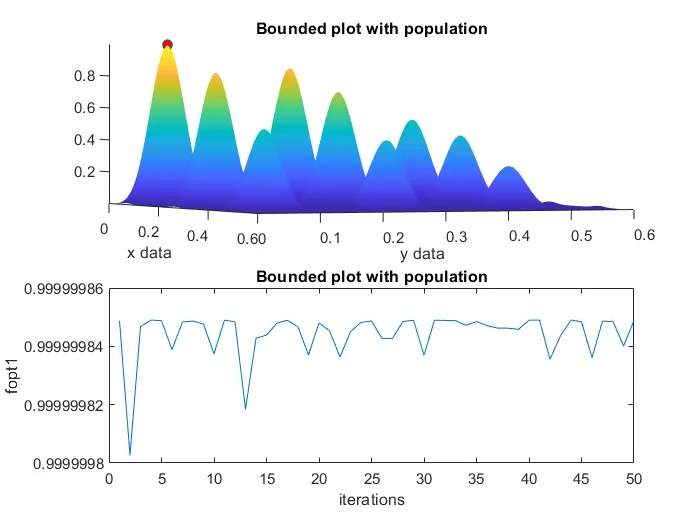
In the 3rd study the global maximum obtained is accurate and is narrowed down to a value of 0.999999 as shown in the graphs .
1. The code starts with defining x and y as inputs using linspace
2. A function known as Stalagmite is defined as shown in the 2nd stage of codes .
3.Two for loops are incorporated in the main code so that all the combinations of x and y values is taken in the stalagmite function
4. In the 1st study GA function runs for 50 iterations . Plots of the stalagmite and maximum values generated in each iteration is shown .
5. In the 2nd study GA function is incorporated with lower and upper bounds and runs for 50 iterations . Plots of the stalagmite and maximum values generated in each iteration is shown .
6. In the 3rd study GA function is incorporated with lower and upper bounds along with the population size . Plots of the stalagmite and maximum values generated in each iteration is shown .