Week 3 - Solving second order ODEs
In Engineering , ODE is used to describe the transient behavior of a system . A simple example is a pendulum . The way the pendulum moves depends on the Newtons second law . When this law is written down , we get a second order Ordinary Differential Equation that describes the position of the " ball w.r.t time .
This ODE represents the equation of motion of a simple pendulum with damping :
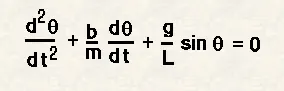
In the above equation
g = gravity in m/s2,
L = length of the pendulum in m,
m - mass of the ball in kg ,
b - damping coefficient .
We have taken the values as :
L = 1 metre ,
m = 1 kg ,
b - 0.5,
g - 9.81 m / s2 .
Now we have to simulate the motion between 0-20 sec ,
for angular displacement = 0 ,
angular velocity = 3 rad / sec2 at time t = 0 .
Now to solve the second order ODE ,we have to brake the equation such that it becomes two equations of first order ODE, after that we have to create function file which solves the equations as our required ODE
The Matlab function created for this purpose looks like this:
function [dtheta_dt]= ode_func(t,theta,b,g,l,m)

theta1 =theta(1)
theta2 =theta(2)
dtheta1_dt = theta2;
dtheta2_dt = -(b/m)*theta2 - (g/l)*sin(theta1);
dtheta_dt =[dtheta1_dt; dtheta2_dt];

end
It is clear from the function that our dtheta_dt is column vector of dtheta_dt and dtheta_dt.
Now the following programme is run which gives us solved second order ODE and video which represents the pendulum motion in given conditions
clear all
close all
clc

% Inputs
b = 0.05;
g = 9.81;
l = 1;
m = 1;
ct=1;

% Initial Condition
theta=[0;3];           % 0 reprsent angular displacement & 3 represent angular velocity

% Time
t_span = linspace(0,20,500);        % time taken as 20 sec

% Solve ODE
[t results] = ode45 (@(t,theta) ode_func(t,theta,b,g,l,m),t_span,theta);

% Plotting for Analyzing pendulum transient behaviour
figure (1)
plot(t,results(:,1))%Plotting graph for Time Vs Result(:,1)which is displacement
hold on
plot(t,results(:,2))  %Plotting graph for Time Vs Result(:,2)which is velocity
xlabel('Time')
ylabel('Displacement and Velocity')
hold off

figure(2)
plot(results(:,1),results(:,2))
xlabel('position-rad')
ylabel('Anguar Velocity-rad/sec')

theta2 = results(:,1)


for i=1:length(theta2)
    theta3 = theta2(i);

        x0=0;          % fixed point
        y0=0;

        x1= l*sin(theta3);
        y1=-l*cos(theta3);

figure(3)
 %Plotting
 plot([-1 1],[0 0],'linewidth',5);   % Plotting fixed point of pendulum
 hold on
 plot([x0 x1],[y0 y1],'LineWidth',2)  % Plotting link where Ball is held
 hold on
 plot (x1,y1,'Marker','o','MarkerSize',30,'MarkerFaceColor','b');   %Plotting the ball of pendulum
 hold off
 grid on
 axis([-1.5 1.5 -1.5 0.5]);  % to adjust axis as our requirement
 pause(0.003);  % Update the figure at interval of 0.00003 sec

 M(ct) = getframe(gcf);
   ct=ct+1;
end

% to create a videofile a movie command is used
movie(M)
videofile =VideoWriter('pendulum20 3.avi','Uncompressed AVI');
open (videofile)
writeVideo(videofile,M)
close(videofile)
Plots: Angular Displacment vs Angular Velocity of pendulum