Week 3 - External flow simulation over an Ahmed body.
For this challenge, you will have to provide answers to the following questions:
Q1. Describe Ahmed's body and its importance.
Q2. Explain the reason for the negative pressure in the wake region.
Q3. Explain the significance of the point of separation.
Expected Results:
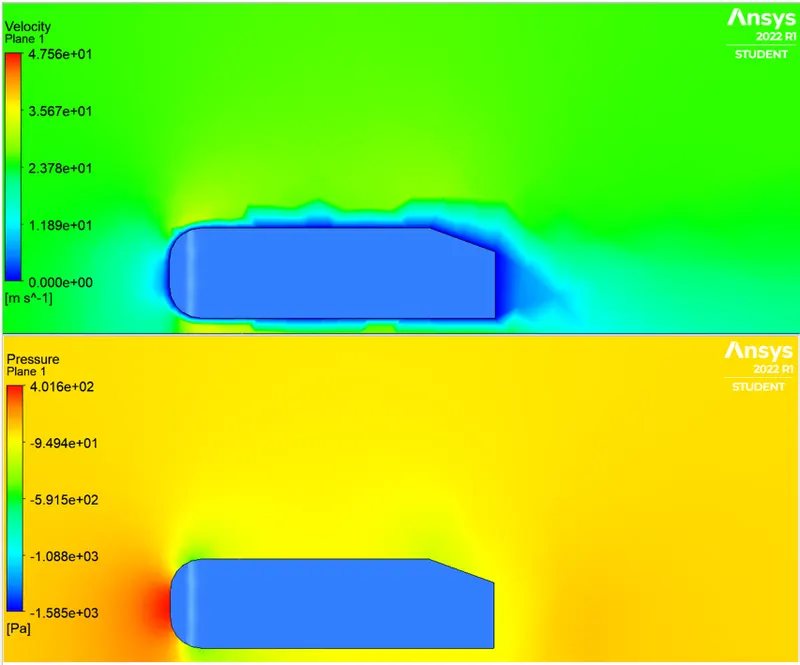
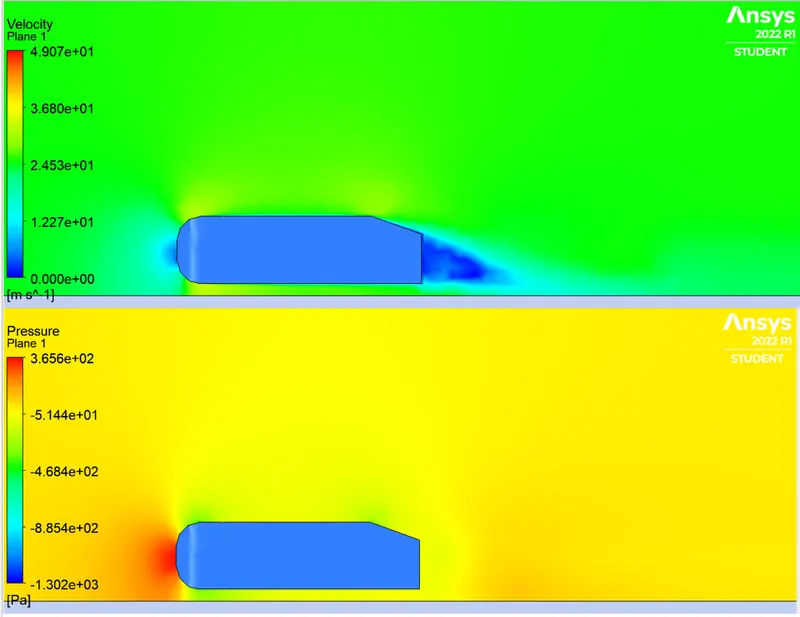
1. Velocity and pressure contours.
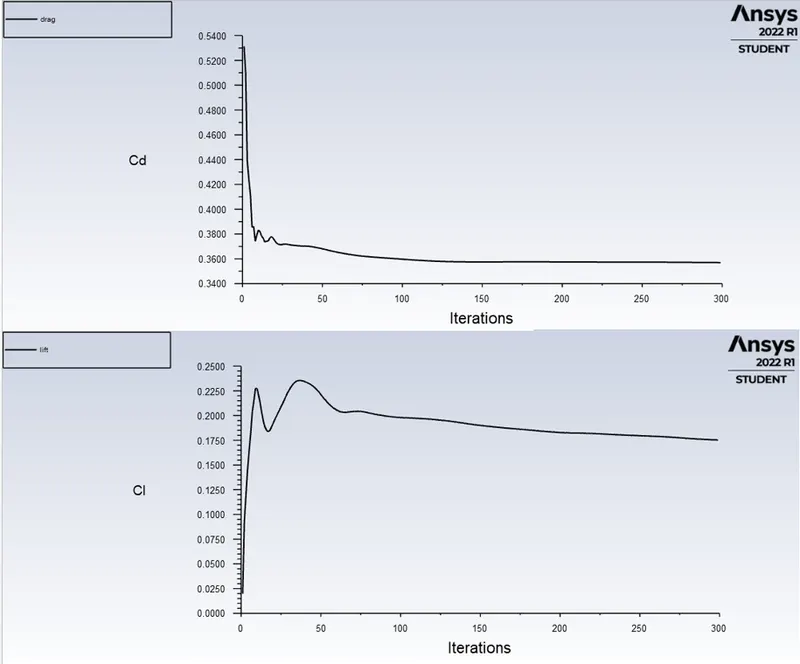
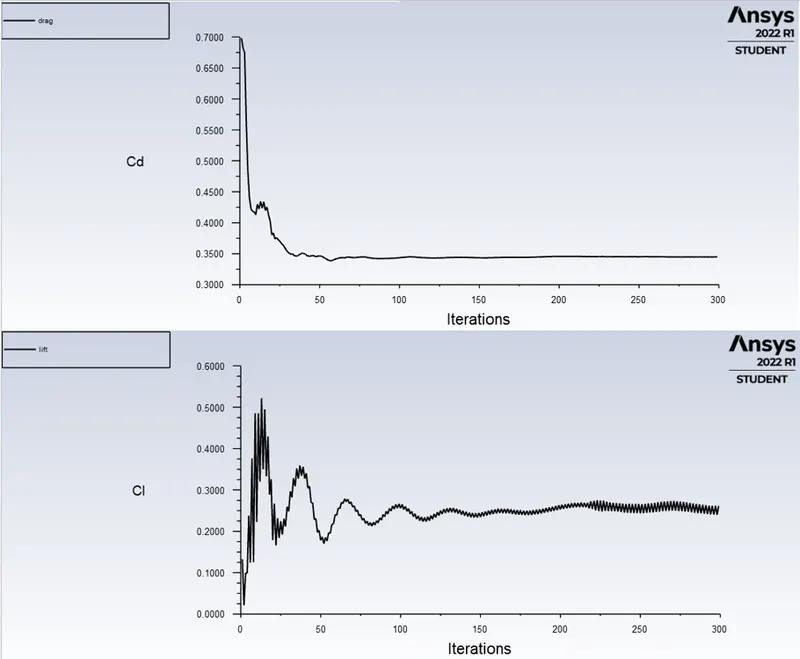
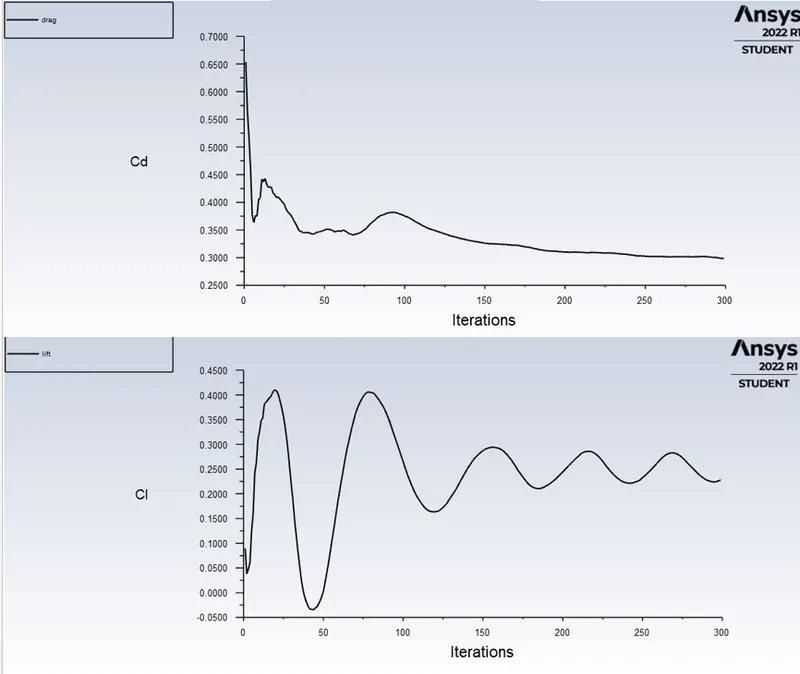
2. The drag coefficient plot for a refined case. ( For velocity of 25m/sec, the drag coefficient should be around 0.33).
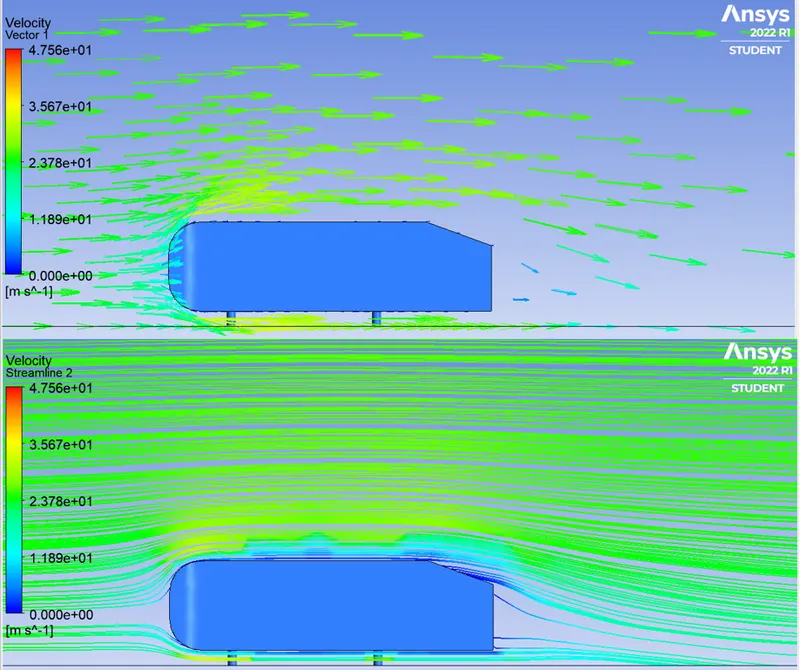
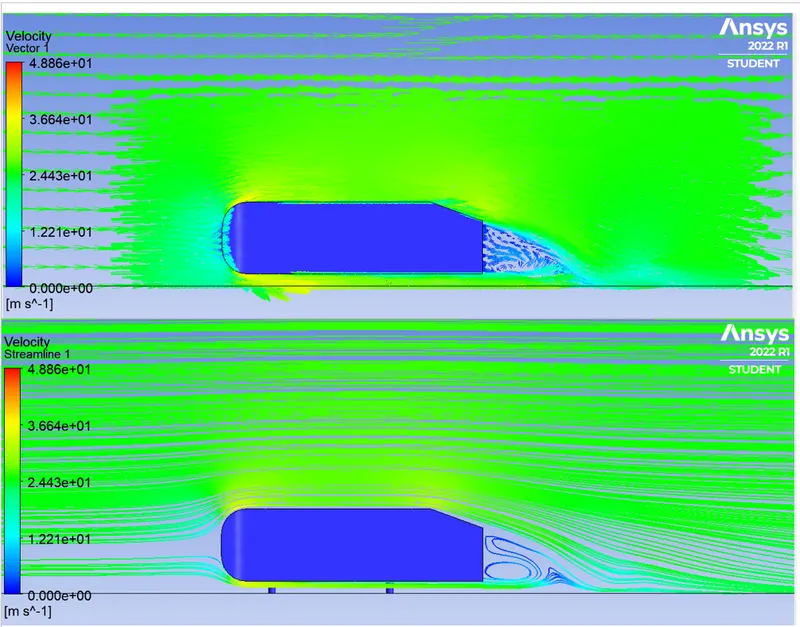
3. The vector plot clearly showing the wake region.
4. Perform the grid independency test and provide the values of drag and lift with each case.
==============================================================================
Aim: To run an external flow simulation around the Ahmed Body and understand the physics and different flow phenomenon taking place around the body.
==============================================================================
Q1. Ahmed Body and its importance.
- There are lot of automobile industires that carry out numerious aerodynamic test before setting it up for production.
- Replecating the exact model into the simulation makes it complex and time consuming to reach the desired results.
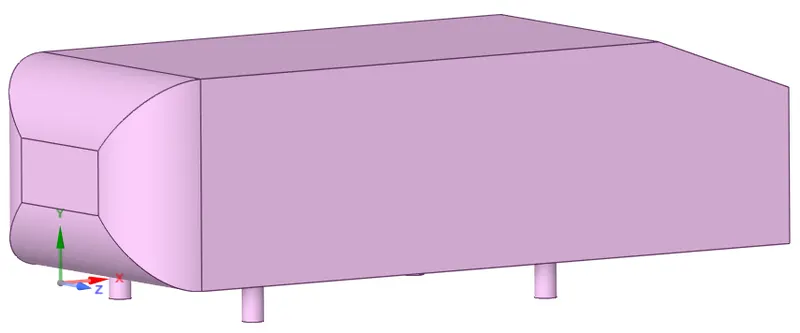
- Here comes the approximated model of the car, 'Ahmed Body', designed by S.R Ahmed.
- This model yeilds close results to that of experimental analysis in the wind tunnel.
- The model can be tweaked easily and the results will reflect with respect to the changes made to the model.
- The main physics to look is the drag coefficient, wake region, the velocity and the pressure around the Ahmed body.
- This could atleast give a rough estimation of flow around a real car.
Q2. Negative Pressure in the wake region.
- The flow behind an object separates from the surface and creates a highly turbulent region behind the object, called the wake.
- The pressure inside the wake region remains low as the flow separates and a net pressure force (pressure drag) is produced.
- In other words, due to the production of pressure drag being produced from flow separation, the pressure in the wake region is low. This is what is causing the vacuum.
Q3. Point of Seperation.
- Whenever there is relative movement between a fluid and a solid surface, whether externally round a body, or internally in an enclosed passage, a boundary layer exists with viscous forces present in the layer of fluid close to the surface.
- Flow separation or boundary layer separation is the detachment of a boundary layer from a surface into a wake.
- Flowing against an increasing pressure is known as flowing in an adverse pressure gradient.
- The boundary layer separates when it has travelled far enough in an adverse pressure gradient that the speed of the boundary layer relative to the surface has stopped and reversed direction.
- The flow becomes detached from the surface, and instead takes the forms of eddies and vortices.
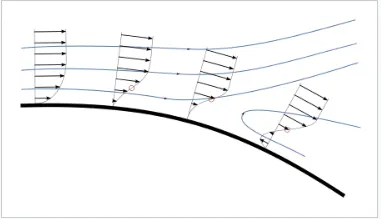 ref: wikipedia.
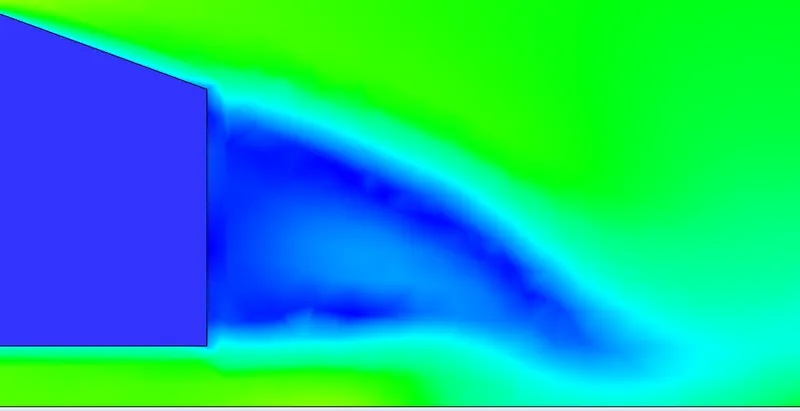
- Boundary layer can be seen and the flow detaches at the sharp edge and forming vortices or reverse flow. (shown below)
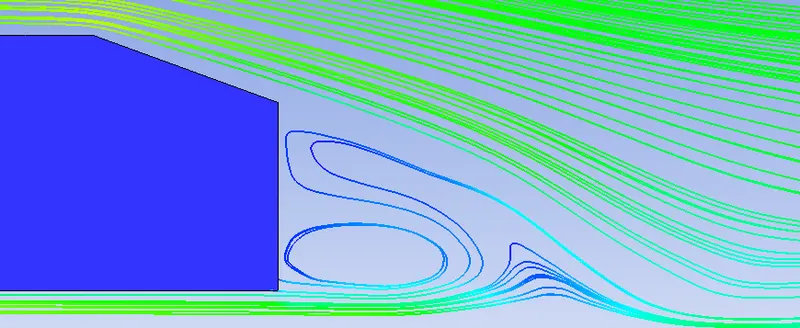
==============================================================================
Cases:
1. Base Mesh
2. Medium Mesh
3. Refined Mesh
Geometry is common to all the cases, however the computational domain changes only with respect to refinment.
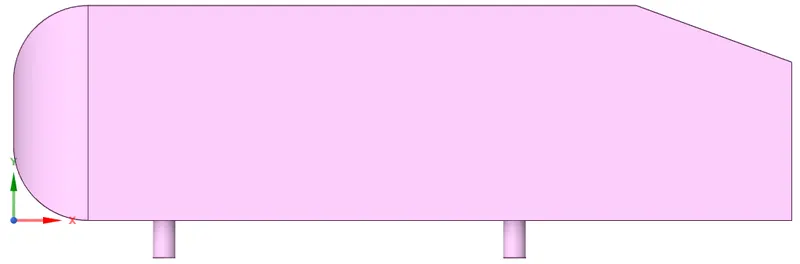
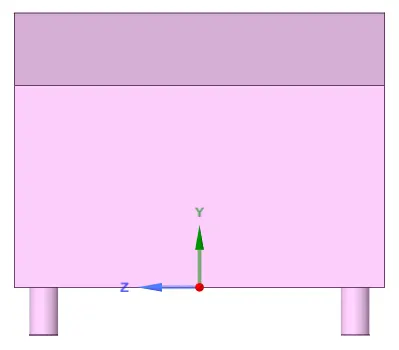
Geometry
- Create geometry.
==============================================================================
Case 1: The one with the Base Mesh.
Computational Domain:
- Import the geometry.
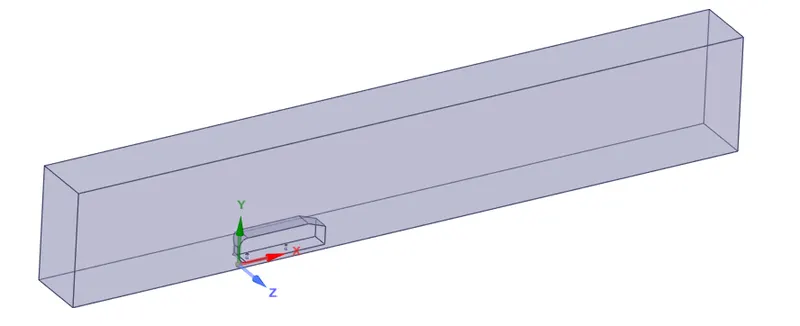
- Create the domain using the enclosure tool (Prepare --> Enclosure). Make sure you uncheck symmetry option for better control over the domain.
- Select the planes option located in the design tab and select the coordinate axis in the GUI to create all the three planes.
- Hover over to split body tool and select the plane running along the logitudional direction and cut the domain exactly into two halves.
- We want to simulate external flow dynamics, so, we will make sure that we avoid meshing inside the Ahmed body. In order to do that, select 'suppress for physics' option for solid Ahmed body by right clicking on it.
- Spaceclaim will create a void representing the Ahmed body.
Meshing:
- Initially it is best practice to assign the 'Named Selection' to the geometry.
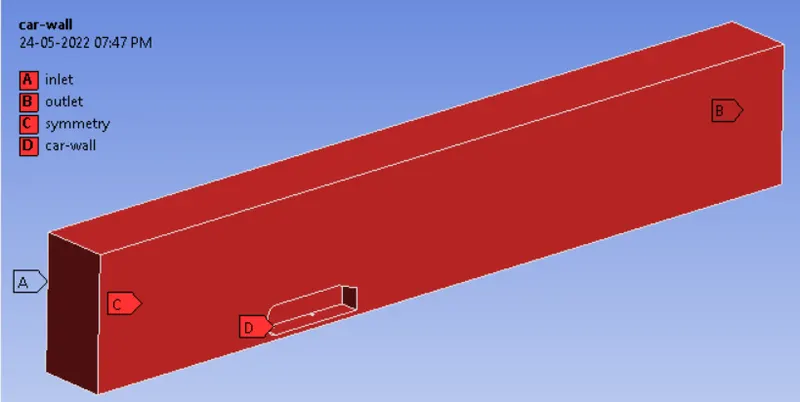
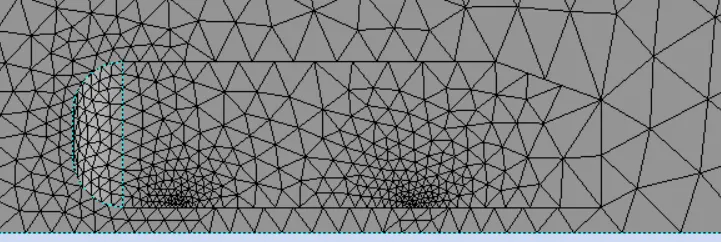
- Click on generate mesh with default settings to obtain baseline mesh. (below)
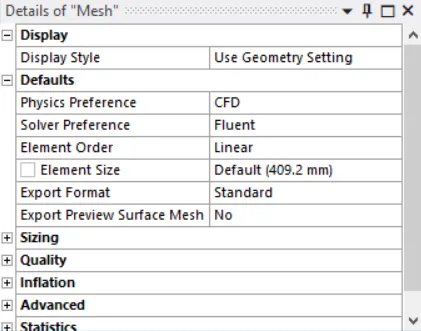
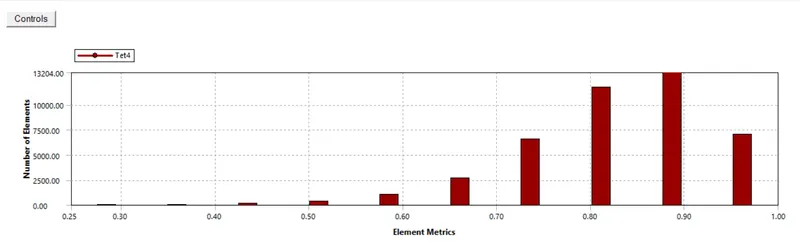
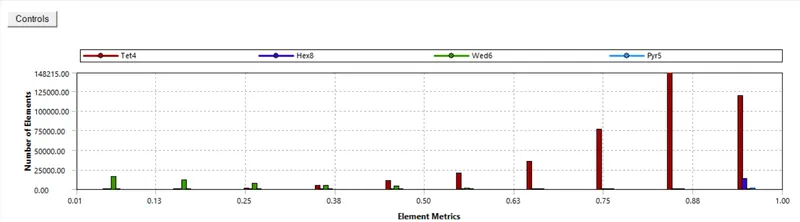
- Element metrics should not fall below 5%.

Setting up the physics:
- Conduct a Steady State simulation.
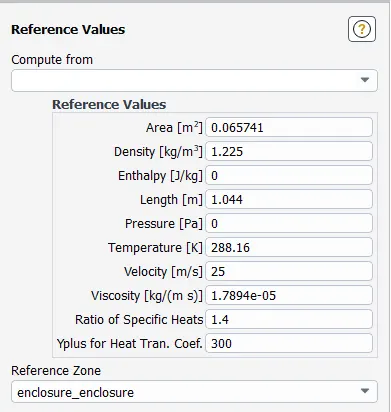
- Head over to outline view, and click on 'Reference Values'. Change the values of area and length as 0.065741 and 1.044 respectively. Compute form inlet.
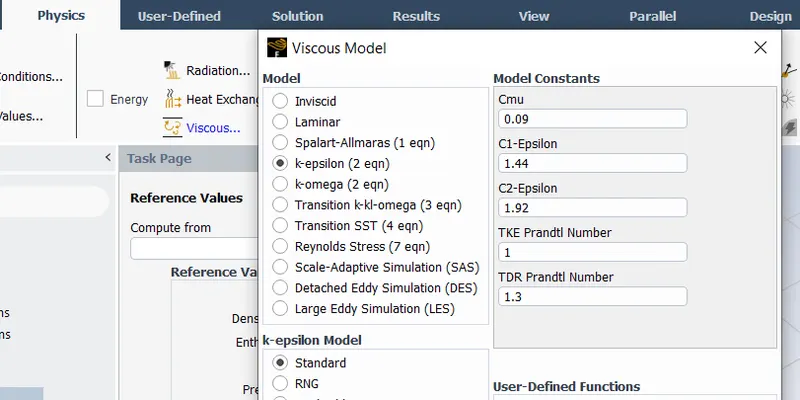
- Go to 'Physics' tab and select viscous. Select k-Epsilon model.
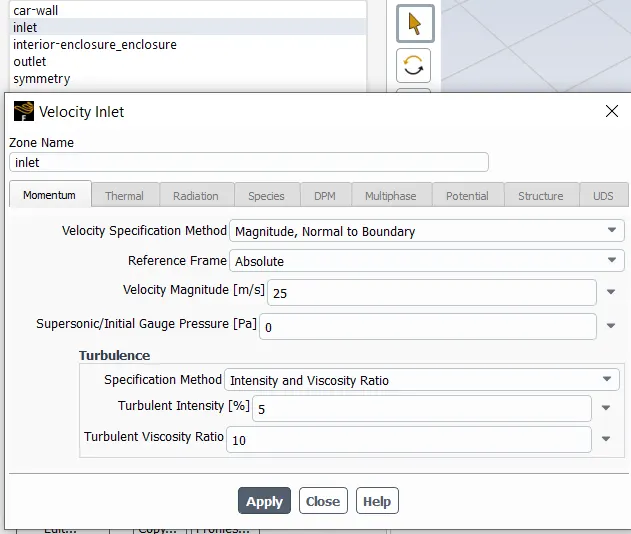
- Select 'Boundaries' and select inlet to provide a velocity of 25 m/s.
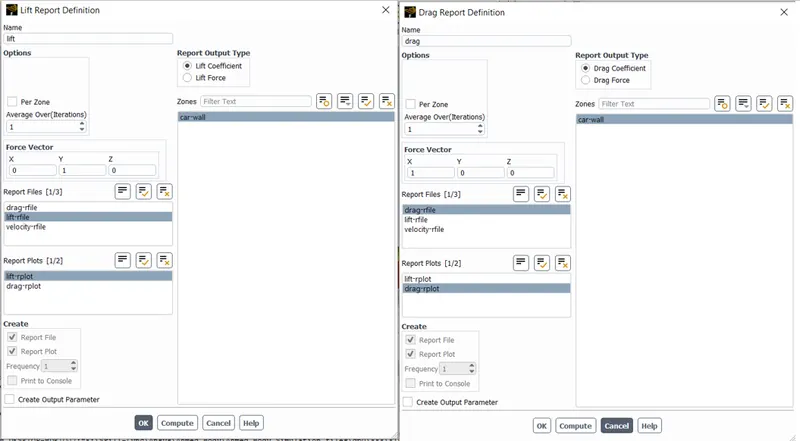
- Go to 'Solutions' tab and selec 'Definition'.
- First create drag report. (definition --> Force Report --> Drag --> car-wall).
- First create lift report. (definition --> Force Report --> Lift --> car-wall).
- Select SIMPLE scheme.
- Hybrid Initialize.
- Iterate the simulation.
Results:
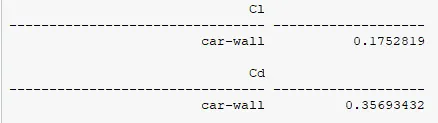
- Coefficient of Drag and Lift Report:
- Velocity and Pressure Contour:
- Vector and Streamline Plot:
==============================================================================
Case 2: The one with the Medium Mesh
Computational Domain:
- Import the geometry.
- Create the domain using the enclosure tool (Prepare --> Enclosure). Make sure you uncheck symmetry option for better control over the domain.
- For refinement to capture the wake behind the car, create another enclosure with the dimensions smaller than the main domain.
- Select the planes option located in the design tab and select the coordinate axis in the GUI to create all the three planes.
- Hover over to split body tool and select the plane running along the logitudional direction and cut the domain exactly into two halves.
- We want to simulate external flow dynamics, so, we will make sure that we avoid meshing inside the Ahmed body. In order to do that, select 'suppress for physics' option for solid Ahmed body by right clicking on it.
- Spaceclaim will create a void representing the Ahmed body.
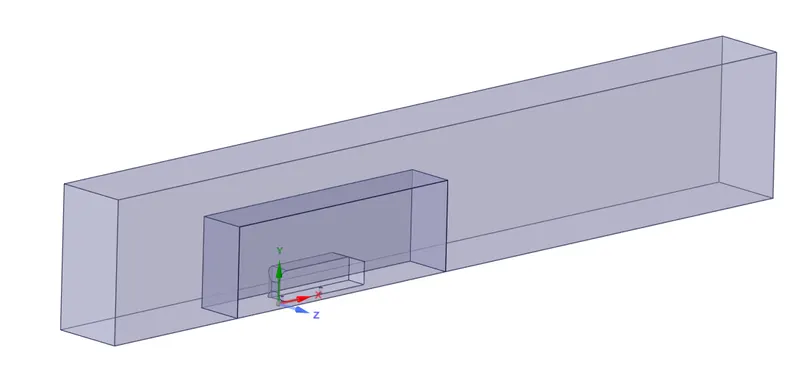
Meshing:
- For refinement we are going to implement Mesh Method and Mesh Sizing options.
- Keep 100 mm as general mesh size.
- First, right click on mesh, select method and then select the 'main domain' and not the other small domain.
- Then again right click on mesh, then sizing and select the small domain that we have created for refinement. Give an element size of say 50 mm. (free to choose the size). Make sure its a body selection.
- Similarly, again select sizing, but this time select the two face of the legs and give mesh element size of say 5 mm (free to choose the size).Make sure its a face selection.
- Since we need to capture near wall flow conditions, add few inflation layer.
- The first layer distance is calculated using the concept of y+. Formulae are shown below:
Calculation of y and y+:
Step 1: Calculate the Reynolds number.
`Re = (rho* U_(infty)*L_(c))/(mu)`
Step 2: Calculate `C_(f)`
`C_(f)= 0.0576*Re^(-1/5)`
Step 3: Calculate wall shear `tau_(w)`
`tau_(w)= 1/2*C_(f)*rho*(U_(infty))^2`
Step 4: Calculate `u_(t)`
`u_(t)= sqrt(tau_(w)/rho)`
Step 5 : Calculate y, assume the value of `y^+` as 50.
`y=(y^+*nu)/(u_t)`
For `y^+`= 50, the first layer thickness comes out to be 0.7303 mm.
- Select mesh and scroll down to select inflation. Select inflation option as 'First Layer Thickness'. Assign the value as 0.7303 mm and generate mesh.
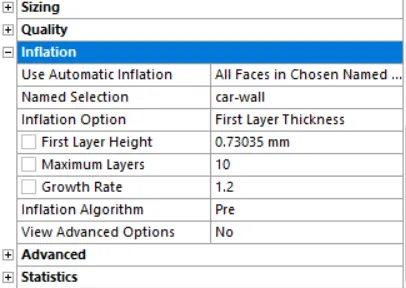
Element Metrics should not be below 5%.
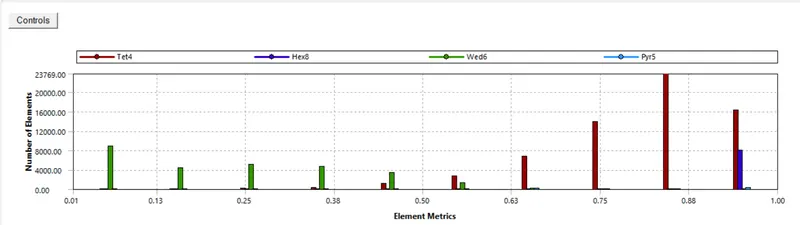
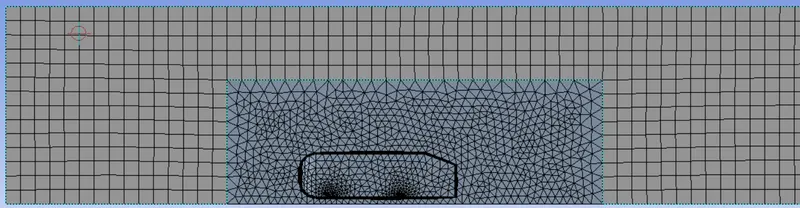
- Do not forget to update the mesh before starting setup.
Setting up the Physics:
It is same for all the cases.
Results:
- Coefficient of Drag and Lift Report:
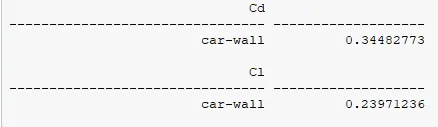
- Velocity and Pressure Contour:
- Vector and Streamline Plot:
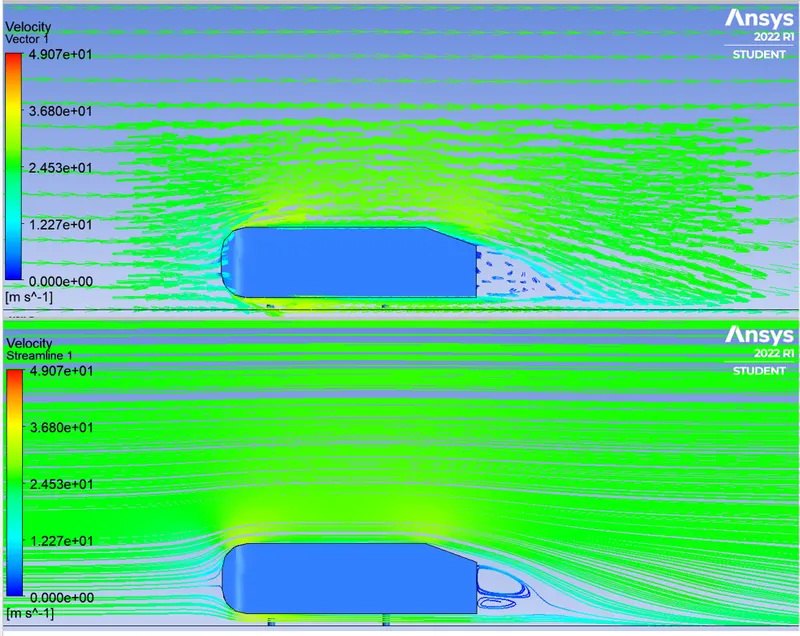
- Recirculation zone is observed due to seperation of boundary layer and adverse pressure gradients at the rear of the car.
==============================================================================
Case 3: The one with the Refined Mesh
Computational Domain:
The setup is similar to that of case 2.
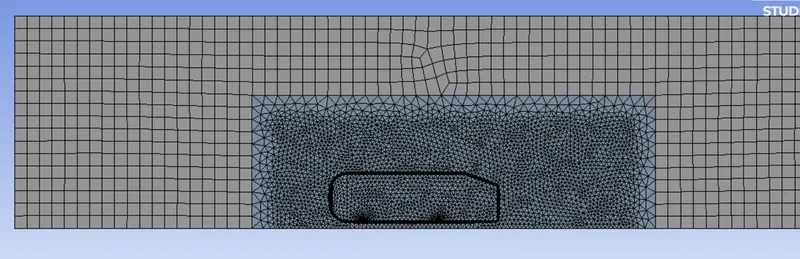
Meshing:
- Approach is similar to that of case 2.
- The difference is the element size.
- For general mesh the element size is 80 mm.
- For Body sizing, the element size is 25 mm.
- For Face sizing, the element size is 5 mm.
- Inflation layer settings are same as case 2.
Setting up the Physics:
Similar to above cases.
Results:
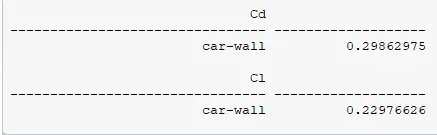
- Coefficient of Drag and Lift Report:
- Velocity and Pressure Contour:
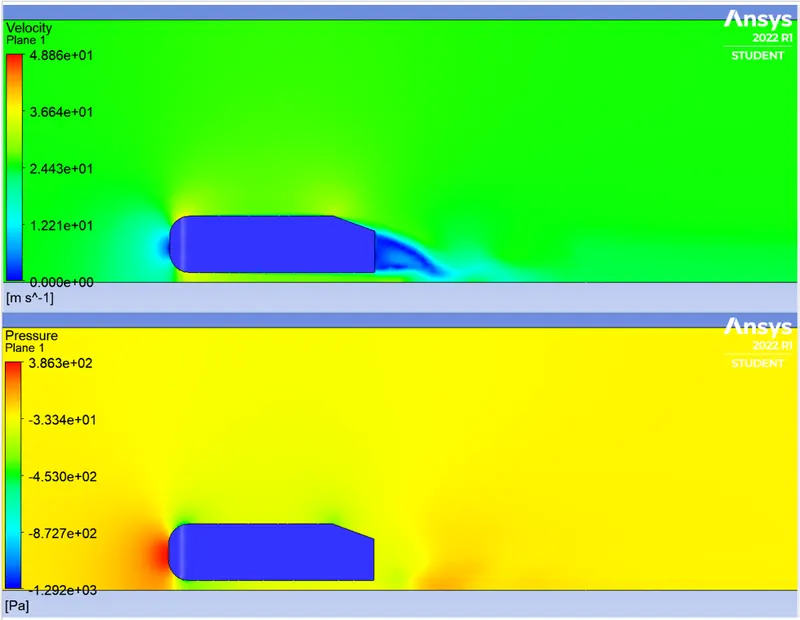
- Vector and Streamline Plot:
==============================================================================
Mesh/Grid Independent Study:
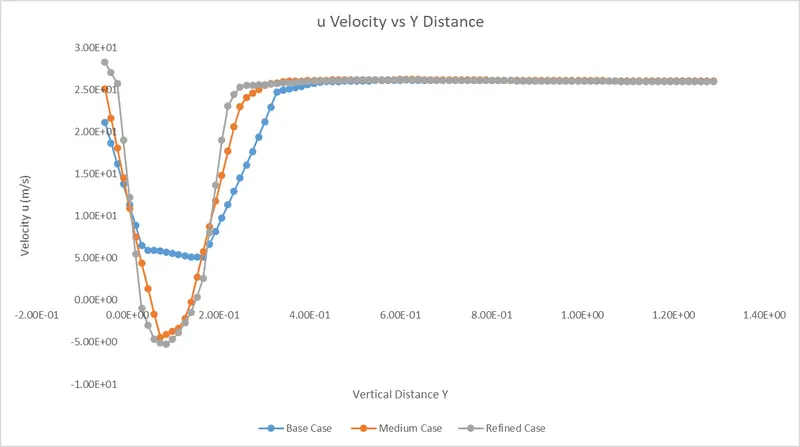
- Grid independence study is a point where after refinement of mesh the values of any parameter do not change. Then we can say that we have reached GRID INDEPENDENCE.
- As it is clearly evident from the grapgh that 'Base Mesh' provides very poor results.
- On the other hand the other two cases have very close values.
- This concludes that GRID INDEPENDENCE STUDY is a very vital part of any CFD case.
Summary Table:
| Base Case | Medium Case | Refined Case | |
| Coefficient of Drag |
0.35693432 |
0.34482773 |
0.29862975 |
| Coefficient of Lift |
0.1752819 |
0.23971236 |
0.22976626 |
Validation with paper:
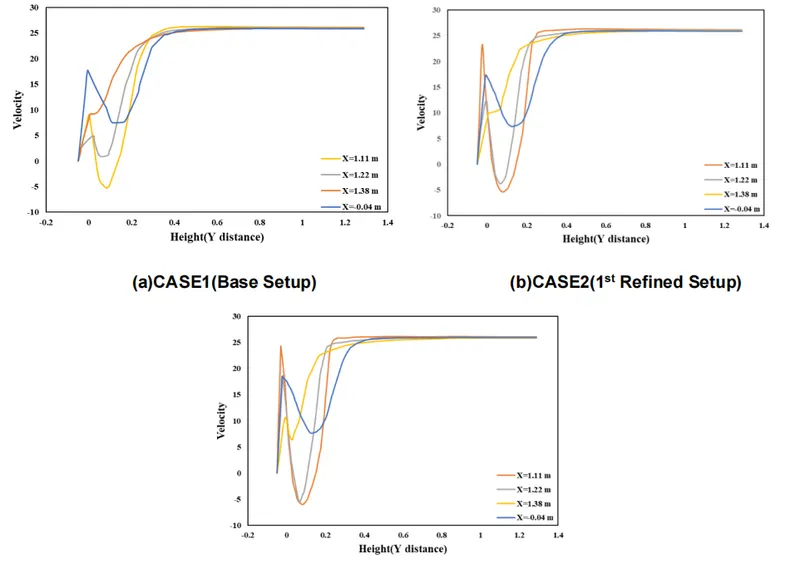
- Look for x= 1.11 m.
- Value of velocity in the present study is plotted along the Y direction at x = 1.12m.
- The values match with the paper. (click on the below link to access the paper)
Reference: Aerodynamic Study of an Ahmed Body with the help of CFD Simulation.
Conclusion:
- Grid Independence study place a mojor role.
- Slant angle is a crucial parameter with respect to flow seperation and wake region formation.
- Further refinement of mesh can be done for assurance. (Restiriction due to Student Licence).