Week 3 Challenge : CFD meshing on Turbocharger
Aim: For the given model the geometrical errors to make appropriate volumes. create and assign PIDs to perform surface mesh with the given target length. also, perform Vol. mesh for the required volumes.
Procedure :
- First, use the toppo command to confirm that we have overlapped surfaces by seeing the triple cons, and also if we see single cons that means the mean, the surface is missing.
- You can use the delete command to delete the surface but we can't be sure if it's the surface we required or not.
- To delete the correct surface (pink) you have to select the cross-edge to delete the pink surface you can also use the option PID region from the bottom left corner to select the whole region instead of only one surface.
- Then we used a new face option to create a surface where there were single cons.
- So sometimes you might not get the desired surface by using the new face command .so you need to project multiple hotpoints using the multi-project option and select Hotpoint already present .and middle click and select the opposite side single command do middle click.
- By doing that you enable to get a proper but smaller surface select the new face option, select cons, and select the small cons made before by those Hotpoint and middle click.
- Now it would be easy to use the fill hole command and select the loop option and select the con. It will automatically select the loop and show the preview of the surface. Once you got the right desired surface do the middle click.
- Now this surface is not joined together but they just penetrated each other. So we use the intersect command to click the first selection. Then select the bigger surface then the middle click's the select the second and smaller surface and does middle click. Then it will be joined and should show the triple con.
- then we use the delete command to delete unnecessary surfaces.
- In the shaft, there is some overlapping of surfaces delete it by selecting a correct cross-edge and there are triple cons created so delete that first use release command to disintegrate that i.e triple cons will become 3 single cons after deleting the unnecessary Hotpoint and use toppo command to get double cons which is right.
- Now there is a surface that is not planar its turned. Click parametric operation click direction and have distance 0.5 create several Hotpoint at equidistance on the curve. Do the same thing for the other side to get a smoother surface.
- Now do the new face option, choose entity instead loop mode try to use the first 2 entities, and create the surface. By looking preview if not getting click alt option then middle click.
- Recheck the geometry by clicking checks manager.
- There are still a few triple cons that need to be rectified do 1 by 1
- To remove the triple con in the shaft, first delete and see if the circular surface if the cons are going or not.
- There are different smaller objects made due to triple con, we would delete the unnecessary part and make them a single object.
- To separate 2 different overlap surfaces, use the project option in cons. select the cons, do a middle click, and project on this pink surface.
- the projection is not correctly visible so uauxiliariesions in auxiliaries and clicks multiple times to get the desired surface. In this way, you can improve your con resolution.
- Select all circular cons from the lart circular shaft and project it on a blue surface with the middle click.
- Once you made a circular surface you can delete it. and do a geometry check with single and triple cons and execute and now should be errors.
- After that write different PIDs in the property section and assign them to the proper surface.
- Then we use the length command to give length in perimeter and macros. We have to do it one by one because there are different lengths according to PIDs or object set the some as their length and element type should be'tria'.
- Then do the spot mesh and before doing the next object or PID make sure to freeze the PID which is meshed.
- After completing the whole object you can unfreeze it.
- After meshing do V.mesh click on define and click on autodetect and select the whole db, click ok.
- It would detect 8 different volumes in toppo mode itself. The volume doesn't require and should be deleted.
- After getting the desired volume do V.mesh in tetra CFD.
Learning outcome:
- If the Hotpoint is connected to the con. It can be deleted.
- toppo command is the exact opposite of the release command.
- Not every time triple con is an error sometimes it must be there.
- Vol. mesh is surface mesh with tria element. It converts 2D elements to 3D elements.
- Vol. mesh can be only done after surface mesh.
- we take volumes where fluids can flow in volume mesh.
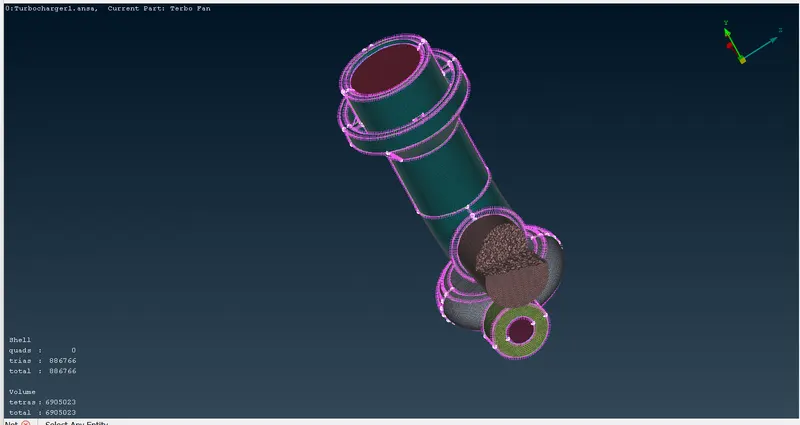
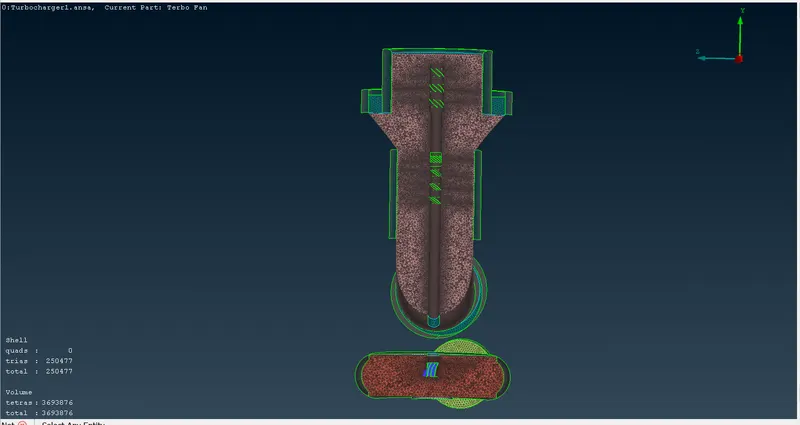
Result: Vol. mesh where two objects are connected had a smaller mesh and as it goes away connected part the mesh increases. this is due to mesh length differences.
https://drive.google.com/file/d/1xBA0WiyNb_RMfD5jkYbCC0D-l1a9FMbn/view?usp=sharing