Week-3 Challenge: ADVISOR Tool
Aim) The main of this Chllange is to Simulate the given Data by usimg the ADVISOR tool in MATLAB.
ADVISOR TOOL:-{ADvanced VehIcle SimulatOR}
>>This Tool is Created by the NREL(National Labouratory For Renewable Energy) department.
>>ADVISOR tool Development phase is From 1994 to 2004.
>>This tool is ADvanced VehIcle SimulatOR, is a set of model, data, and script text files for use with Matlab and Simulink. It is designed for rapid analysis of the performance and fuel economy of conventional, electric, and hybrid vehicles.
>>ADVISOR also provides a backbone for the detailed simulation and analysis of user defined drivetrain components, a starting point of verified vehicle data and algorithms from which to take full advantage of the modeling flexibility of Simulink and analytic power of MATLAB.
ADVISOR Tool is Download from the below bink :-
https://sourceforge.net/projects/adv-vehicle-sim/
Click on link and then we get windoe like this:-
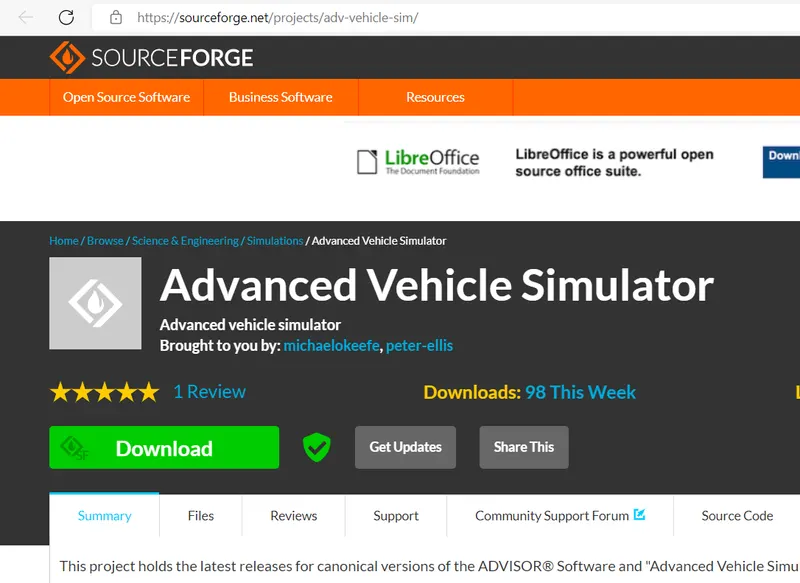
>>By clicking on Download Icon we can get the (Zip -File ) and then extract the all file to MATLAB tool .
>> After Extraxt the ADVISOR File ,Now open the MATLAB Tool.
>>After open the MATLAB Tool , in Command Windoe Tipe ''ADVISOR".
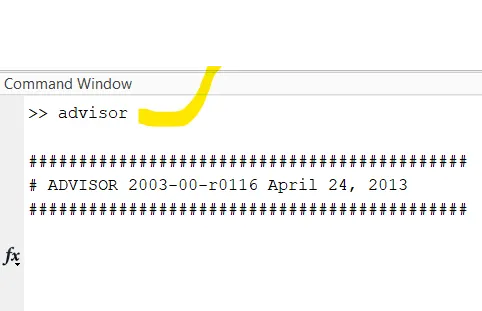
>>Then we get the window box as followes.
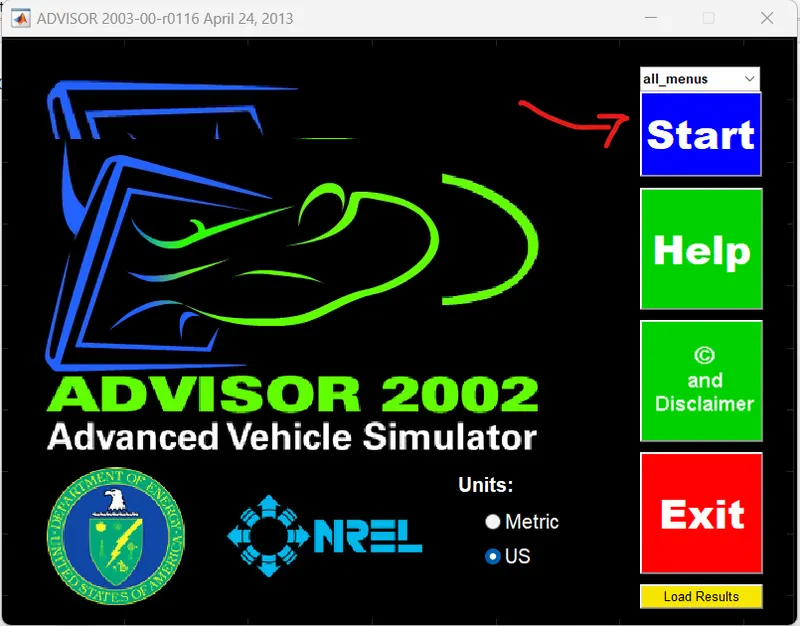
>> By Clicking the Start Icon ,open new window of ADVISOR tool.
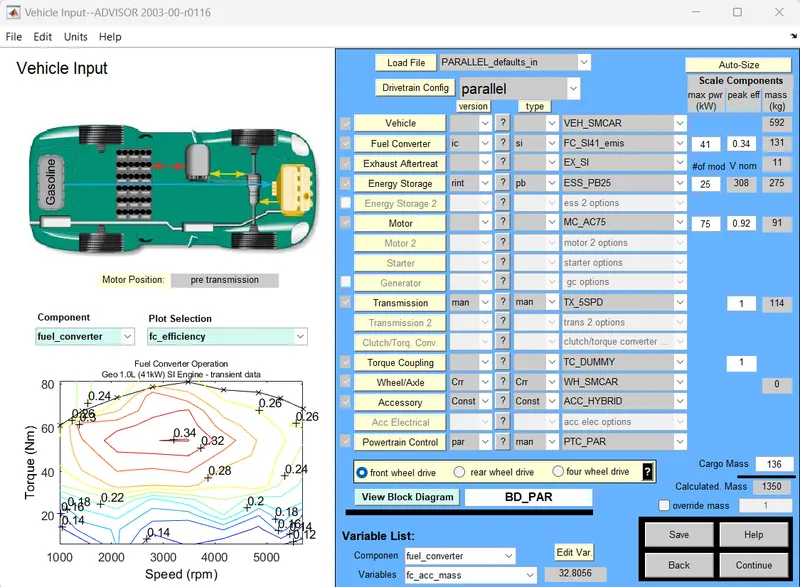
>>From this Window we can simulate the vecicle with reqired data.
ADVISOR TOOL BENIFITS:-
- Estimate the fuel economy of vehicles that have not yet been built.
- Learn about how conventional, hybrid, or electric vehicles use energy throughout their drivetrains.
- Compare relative tailpipe emissions produced on a number of cycles.
- Evaluate an energy management strategy for your hybrid vehicle’s fuel converter.
- Optimize the gear ratios in your transmission to minimize fuel use or maximize performance, etc.
1. For EV_defaults_in file, if cargo mass is 500 kg with all other default conditions, can the vehicle travel for 45 km with FTP drive cycle? Conclude your observations.
Aim) By using given data Simulate the vechicle in ADVISOR tool :-
Given Data :-
Load file :-EV_defaults_in
Cargo mass /Pay load weight = 500 kg.
Drive Cycle :-FTP Drive Cycle
For Simulate this vechicle Dat a by using ADVISOR tool with following Steps :-
Step 1:- Open the AdVISOR tool in matlab: then we get the default window like followes:-
Step 2:- From the data we have to change then Load file as EV-default_in. as followes :-
>> At load file Icon seelct the down drop(▼)we can select the required load file.
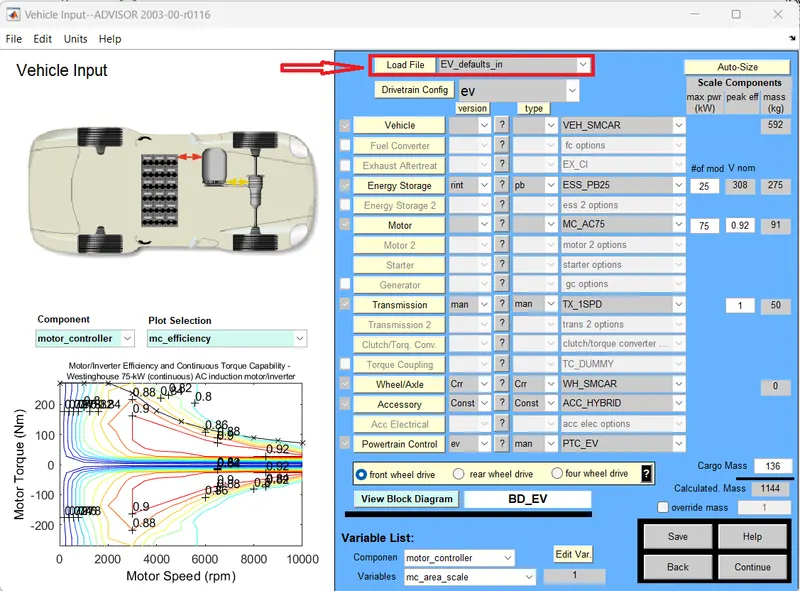
Step-3):- Change the Cargo mass as 500 kg (This is avalbele at right side bottom of ADVISOR window) as followes :-
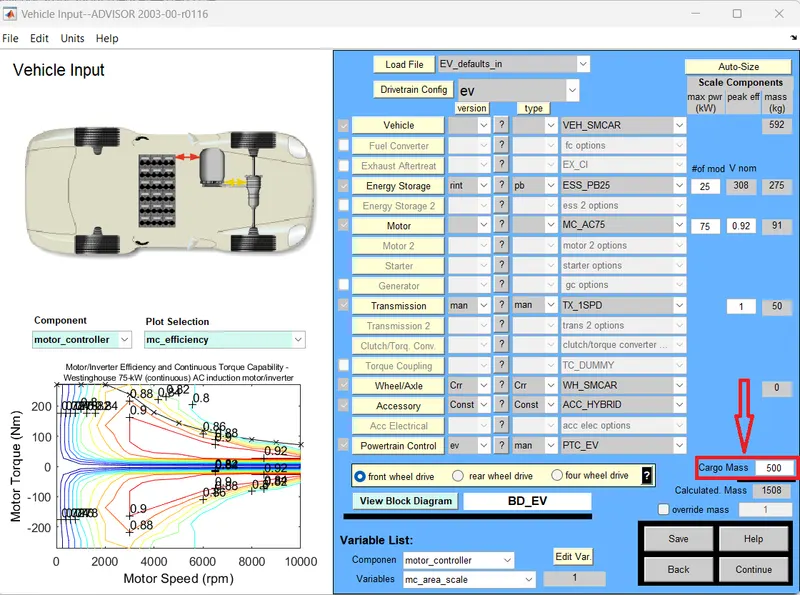
>> Changeing the cargo mass then we saw the change in the total mass of the vehicle.
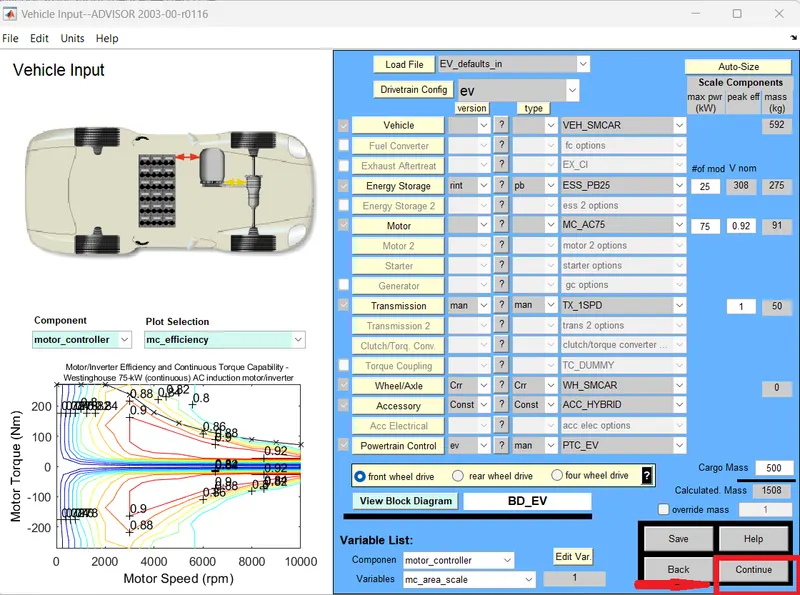
Step 4:- Clicking on the continue button after that a new window simulation parameter will pop up.
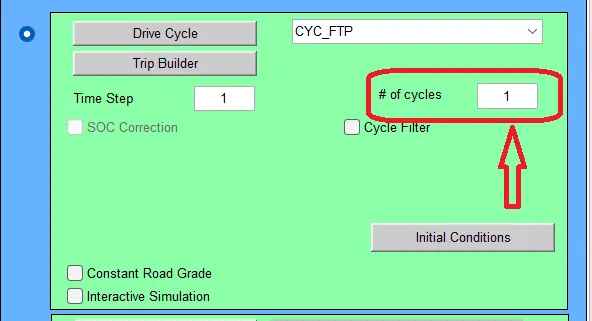
Step 5:- Change the Drive Cycle as FTP Drive Cycle as followes :-
>> In Simulation Parameter window change drive cycle to CYC_FTP by selecting the drop-down menu.
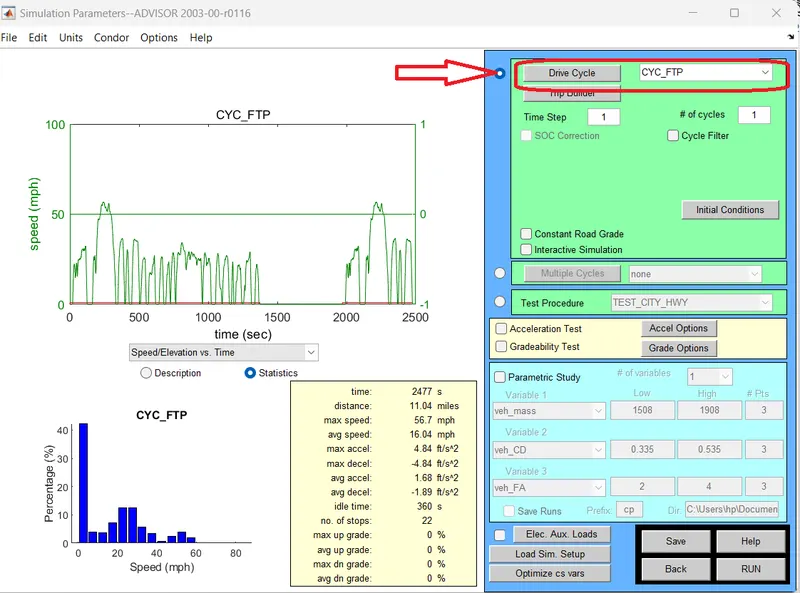
Step 6:-Now click on the "Run"Icon (Right Bottom corner) , then simulation will starts.
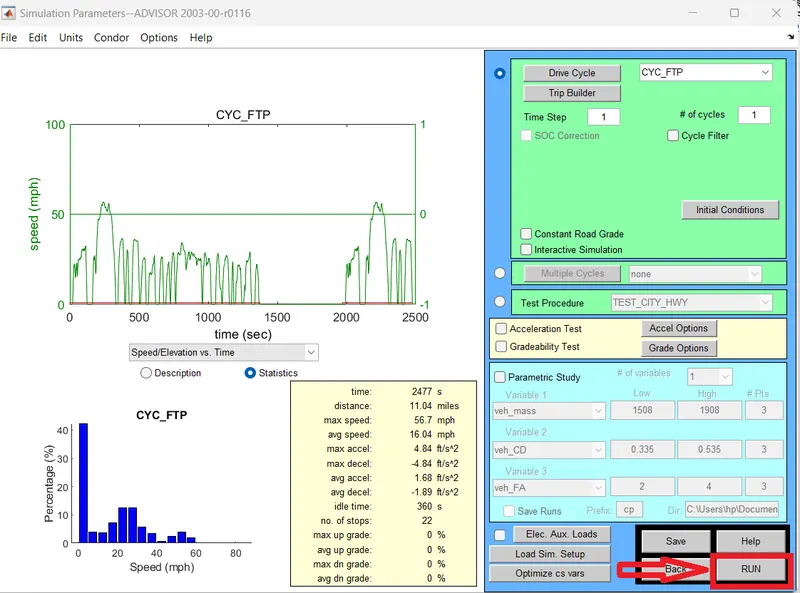
Simulation process :-

Now we get the Results for # cycle -1 in a new window as followes:-
Results Plot:-
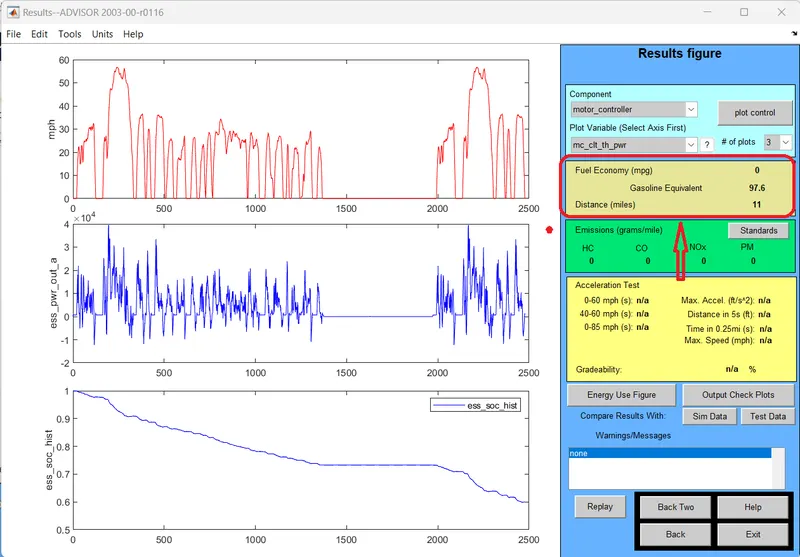
>> For # 1 no of drive Cycle the vechicle travelleddistance upto 11-miles (17.7 Km ) with SOC 38 % to 40 %
The Results for # cycle -2 in a new window as followes:-
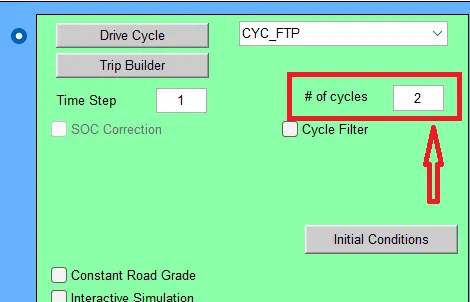
Results :-
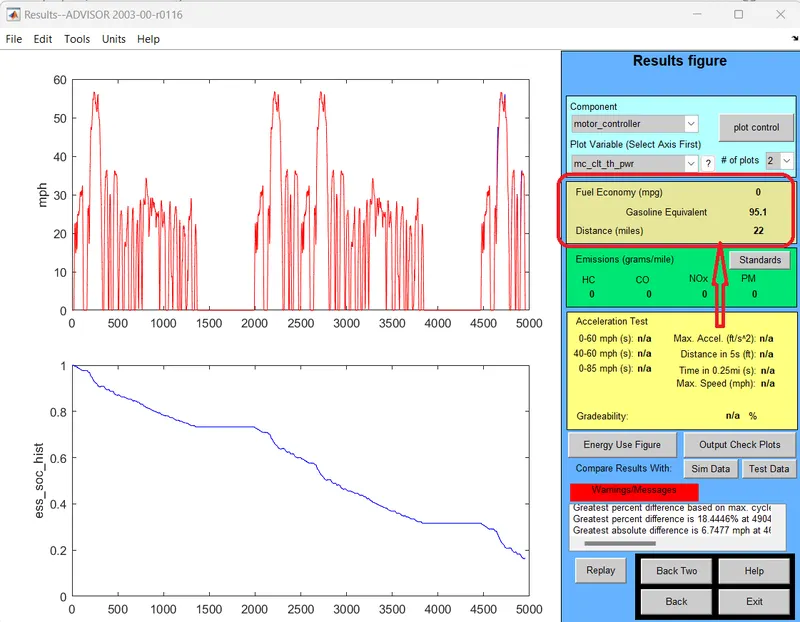
>> For # 2 drive Cycles The vechicle Travelled Up to 22 miles (35.4 Km)
>> From Graph (2) The SOC Uses upto 80 % .
The Results for # cycle -3 in a new window as followes:-
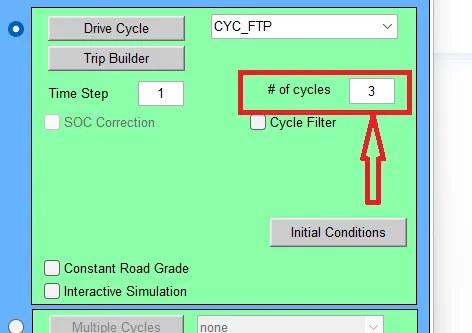
Results :-
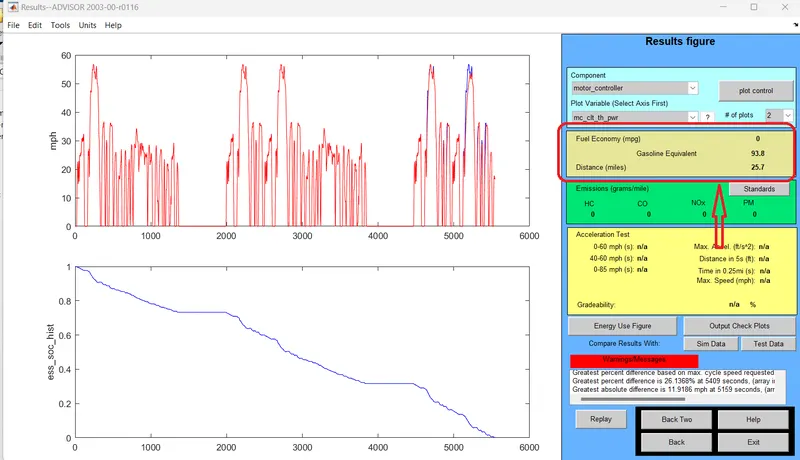
>> For # 3 drive Cycles The vechicle Travelled Up to 25.7 miles (41.36 Km)
>> From Graph (2) The SOC Uses Completely 100%.
Conclusion :-

>> From this comaparision The minimum distance travel by car is 17.7 km with drive cycle CYC_FTP – 1 whereas the maximum distance travel by car is 41.36 which consumes 100% of battery in 3 Drive cycles.
Therefore :-
EV_default_in Load file cannot travel distance of 45 km with Given data
Given Data :-
Load file :-EV_defaults_in
Cargo mass /Pay load weight = 500 kg.
Drive Cycle :-FTP Drive Cycle
due to insufficient SOC.
__________________________________________________________________________________________________
2. In the above case, try changing the battery capacity and repeat the simulation.
Aim :- The main is simulate the above load file data with diffferent Battery capacity :-
for this simulation we are following below steps :-
step 1:-
>> In-Vehicle Input window we will change the capacity of battery form energy storage.
>> “#of mod V nom” describes the battery capacity, so we will change the module number of batteries from the first box and we will see that changes in voltage and weight of the battery respectively boxes.
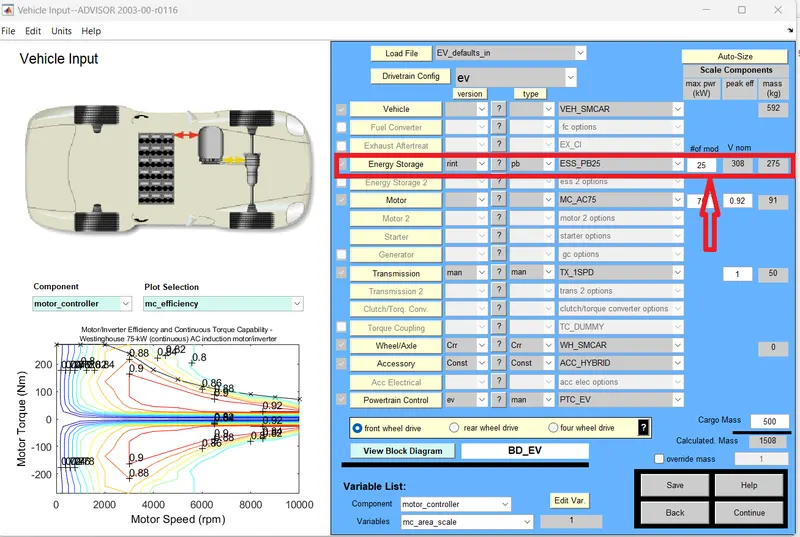
Now check different Battery modulas 3 cases with the no of drive cycle to 1
case 1:- Now we are checking the simulation for # nos Of drive cycles 1 With Battaery wth modules 25 nos :-
Battery modules :-

# Nos of Cycles :-
Results :-
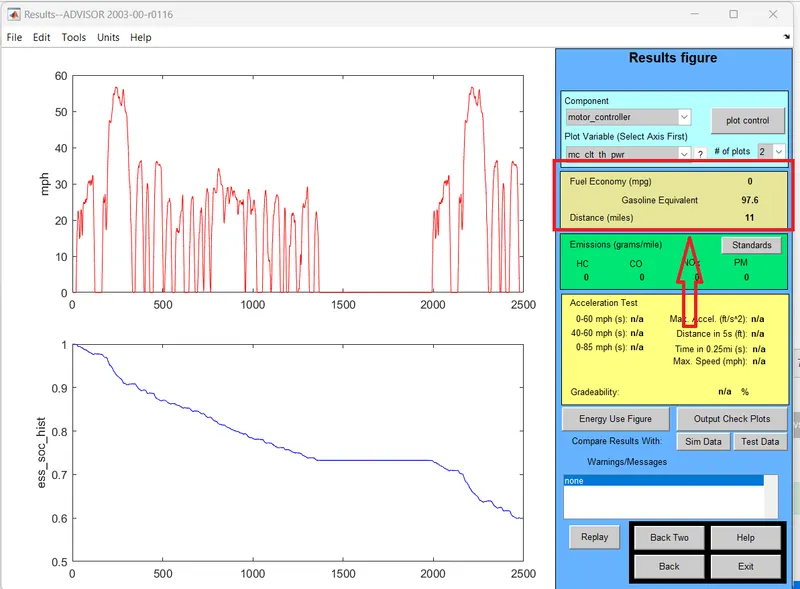
>> from Above results the vechicle with ''1'' nos of drive cycle and 25 battery moduls having voltage of 308 v can travel 11 miles (17.7 km) distance
case 2 :- Now we are checking the simulation for # nos Of drive cycles 1 With Battaery wth modules 26 nos :-

Results:-
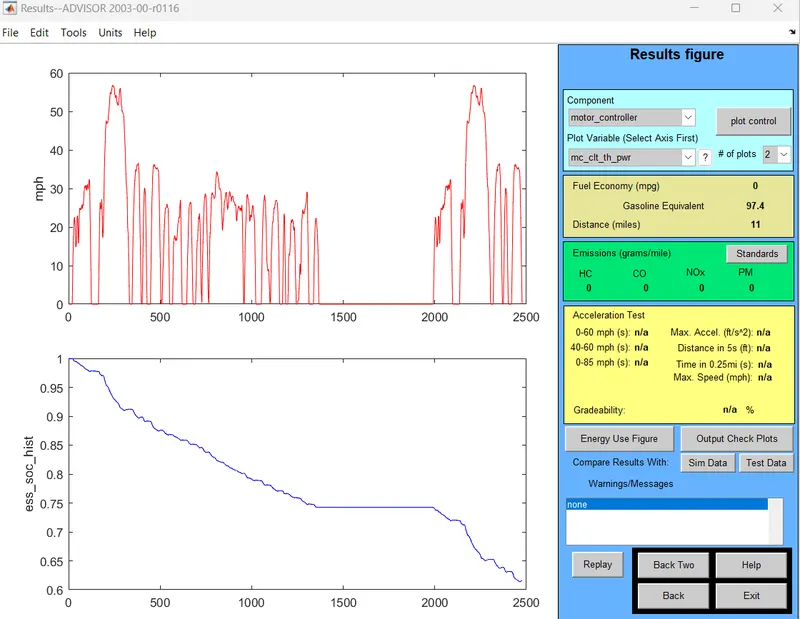
>> from Above results the vechicle with ''1'' nos of drive cycle and 26 battery moduls having voltage of 321 v can also travel 11 miles (17.7 km) distance
case 3 :- Now we are checking the simulation for # nos Of drive cycles 1 With Battaery wth modules 28 nos :-

Results:-
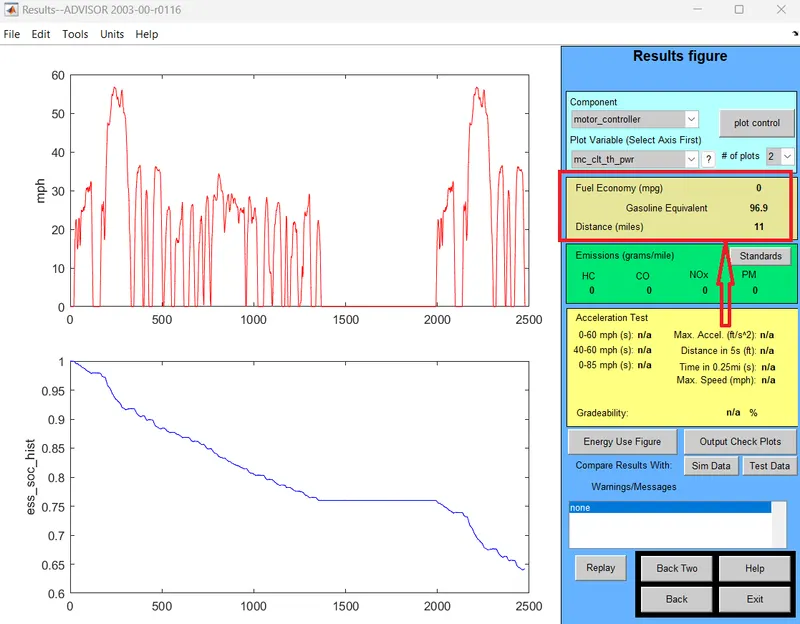
>> from Above results the vechicle with ''1'' nos of drive cycle and 28 battery moduls having voltage of 345 v can also travel 11 miles (17.7 km) distance
Now check different Battery modulas 3 cases with the no of drive cycle to 3
case 1:- Now we are checking the simulation for # nos Of drive cycles 3 With Battaery wth modules 25 nos :-
Battery Modules :-
# No o drive cycles :-
Results :-
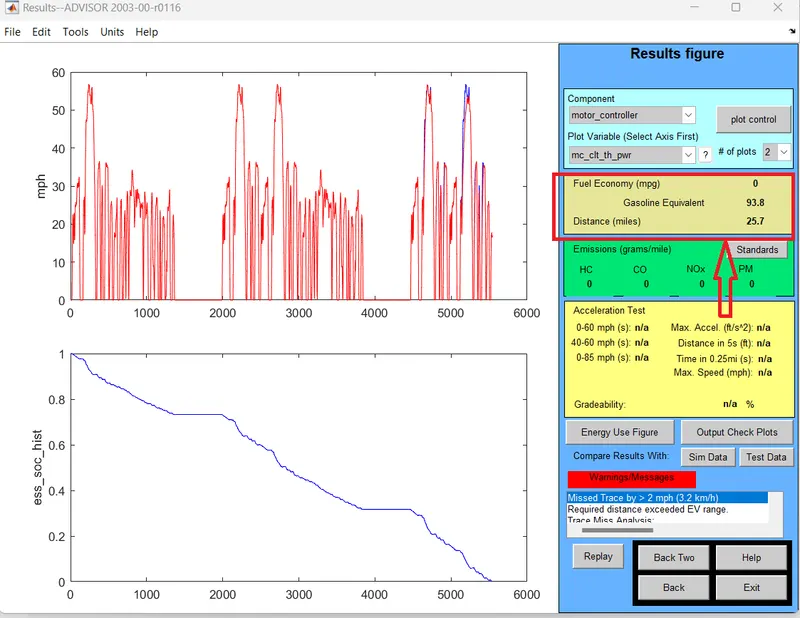
>> from Above results the vechicle with ''3'' nos of drive cycle and 25 battery moduls having voltage of 308 v can travel 25.7 miles (41.36 km) distance .
case 2 :- Now we are checking the simulation for # nos Of drive cycles 3 With Battaery wth modules 26 nos :-
Results :-
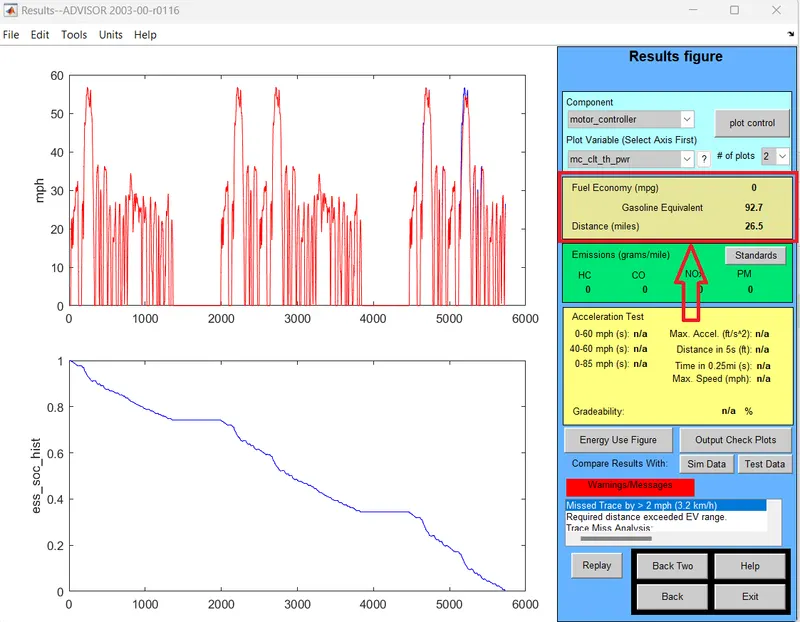
>> from Above results the vechicle with ''3'' nos of drive cycle and 26 battery moduls having voltage of 321 v can travel 26.5 miles (42.64 km) distance .
case 3 :- Now we are checking the simulation for # nos Of drive cycles 3 With Battaery wth modules 28 nos :-
Results :-
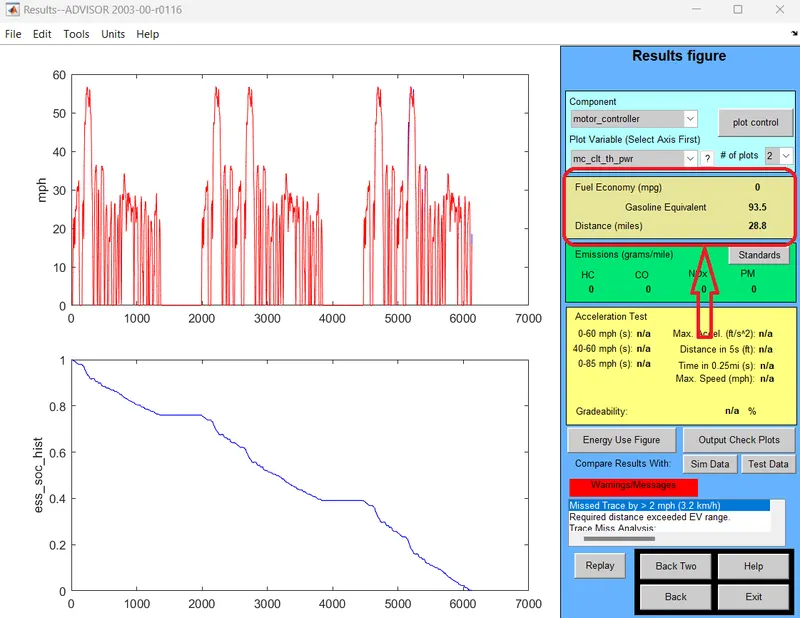
>> from Above results the vechicle with ''3'' nos of drive cycle and 28 battery moduls having voltage of 345 v can travel 28.8 miles (46.34 km) distance .
Conclusion :-
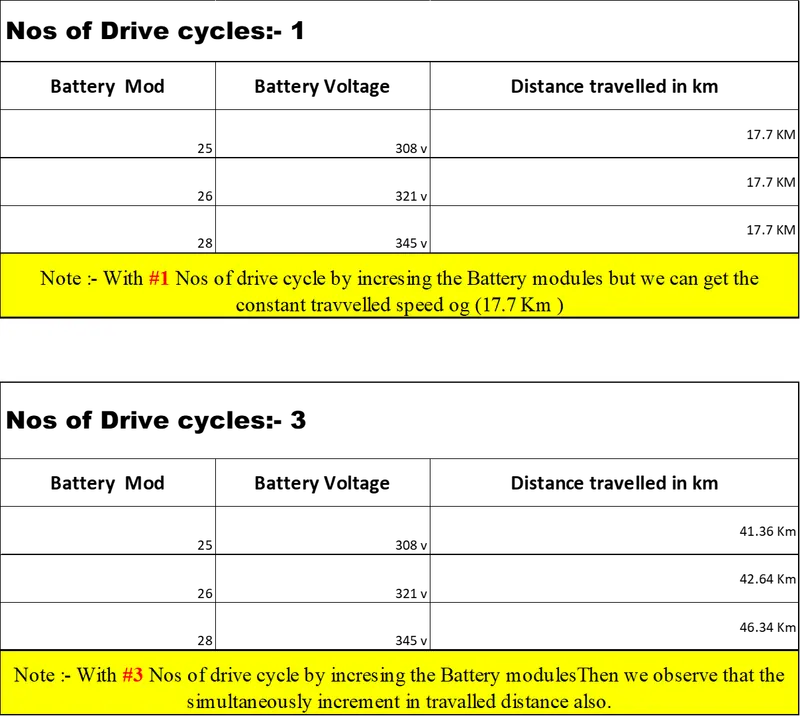
From above comparasion we can conclude that :-
Excell link :- battery_mod.xlsx
1) With #1 Nos of drive cycle by incresing the Battery modules but we can get the constant travvelled speed og (17.7 Km)
2) With #3 Nos of drive cycle by incresing the Battery modulesThen we observe that the simultaneously increment in travalled distance also.
To cover 45km distance a 28 module 345-volt battery with 3 no's of drive cycles is required.
---------------------------------------------------------------------------------------------------------------------------------
3) Perform gradeability test with PRIUS_Jpn_defaults_in file and Compare your results in table and conclude.
Aim :-The main aim of this is to do a gradability test on PRIUS_Jpn_defaults_in Load file By using ADVISOR Tool.
Gradability:-
>>Gradeability is the steepest gradient a machine can climb, compared to the Operating Angle which is the steepest gradient a machine will operate on.
>> Gradeability is widely calculated as a percentage rather than degrees. It can be confusing to convert between these two values and to visualise a percentage value in terms of an angle.
A 45° angle equates to 100% gradeability.
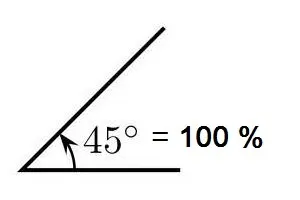
Formula to convert a percentage to degrees:
Degrees = Tan-1 (Slope Percent/100)
>>Occasionally access machinery specifications may show inclines expressed as degrees. This could be confusing if you are comparing between machines and both are expressed in different values.
Formula to convert degrees to a percentage:
Percentage = [ Tan ( Degrees ) ] x 100
For Gradability test by Using ADVISOR tool using following stpes :-
Step 1:- Open the AdVISOR tool in matlab: then we get the default window like followes:-(Default Window)
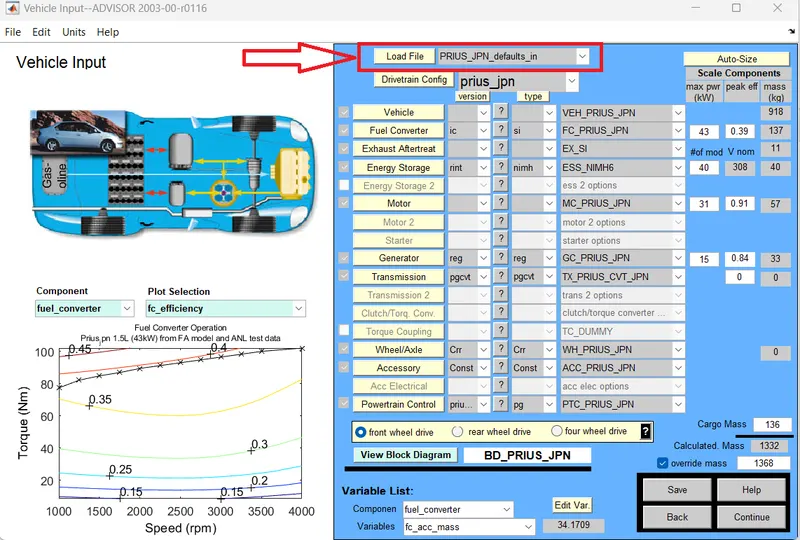
Step 2:- From the data we have to change then Load file as PRIUS_Jpn_defaults_in file as followes :-
>> At load file Icon seelct the down drop(▼)we can select the required load file.
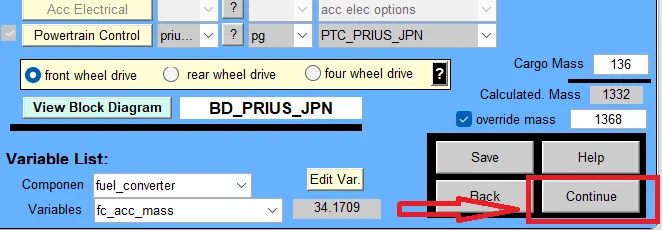
Step 2:-Now Click On Continue Icon
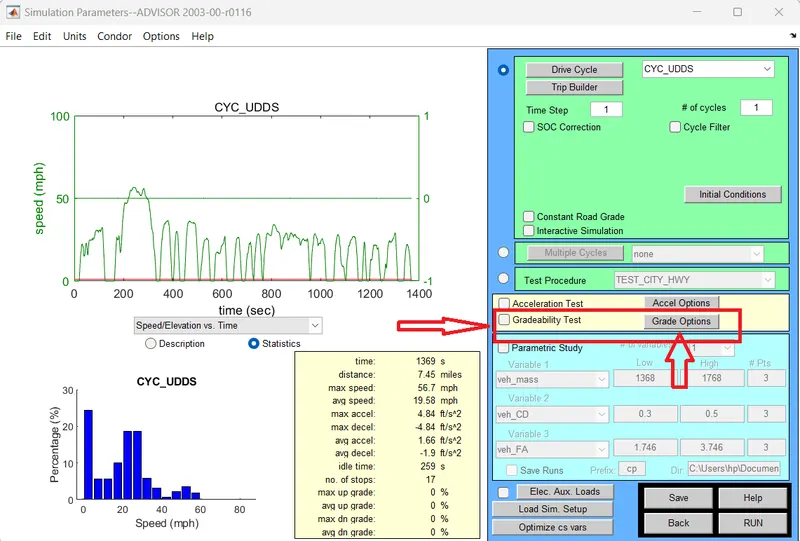
Step 3:- After we get the new windoe as followes ,,and this window select the gradability test
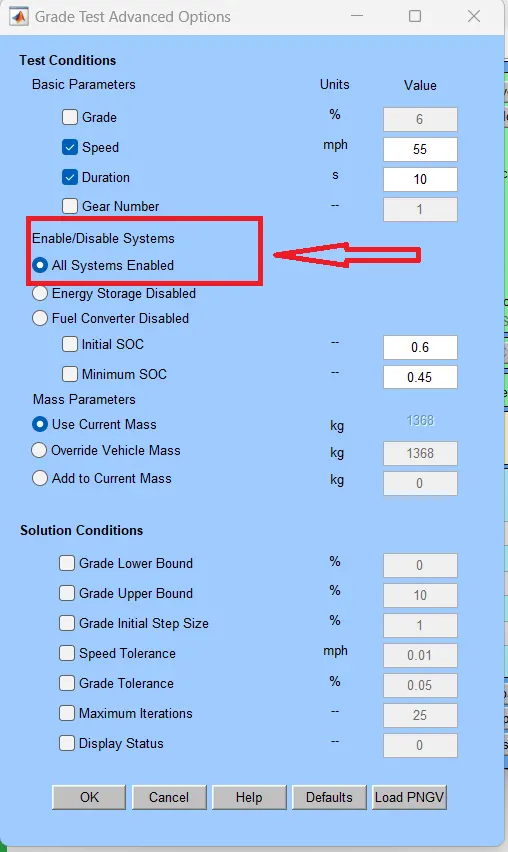
Ste 4 :- Now click on the grade options then we get the ''Grade test advanced options '' window as followes :-
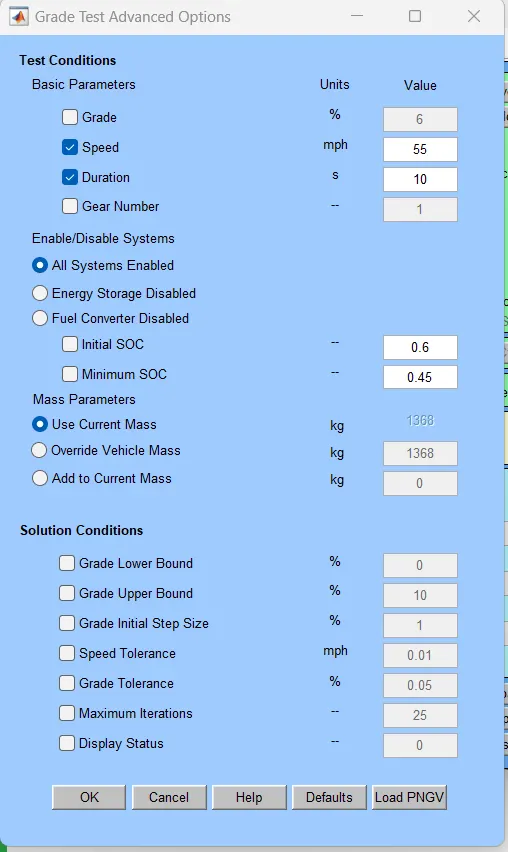
Step 5:- From this windoe enable the allsystem enabled option as followes
step 6 :- Now we are performing The gradability Test with Different Speeds
we can change the spped value from above window '' Test Condition options''
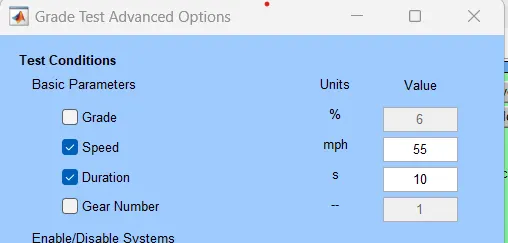
Case 1:- Gradability test at speed of 55 mph (88.5 Kmph)
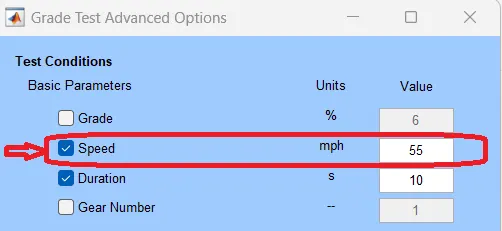
>>> Afte set the spped then, Now click on '' ok'' Icon :-
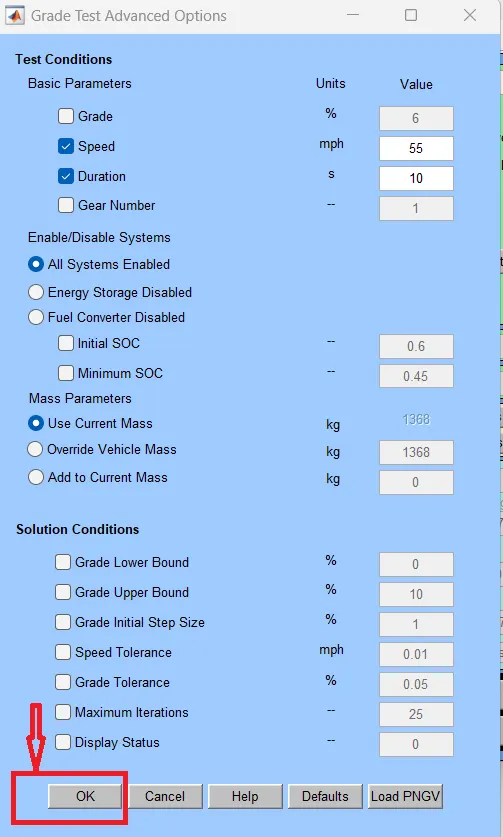
>> After that Click on the ''Run'' Icon
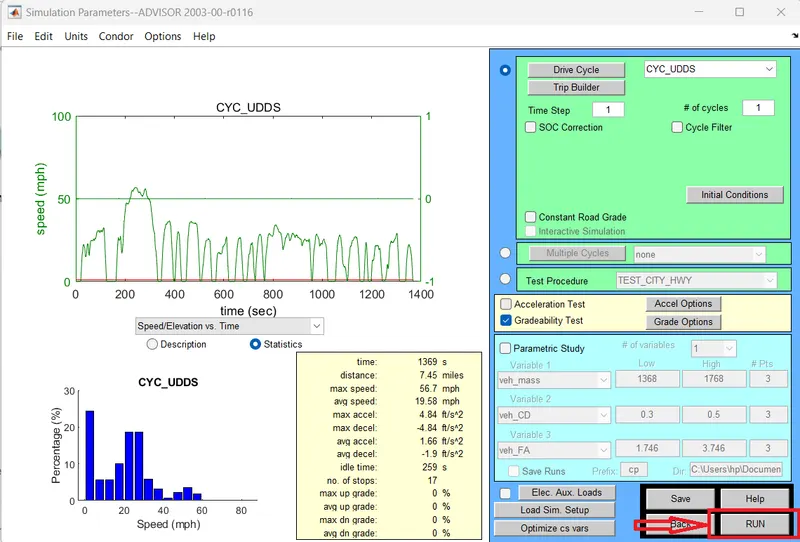
>> After we get the result as foloowes :-
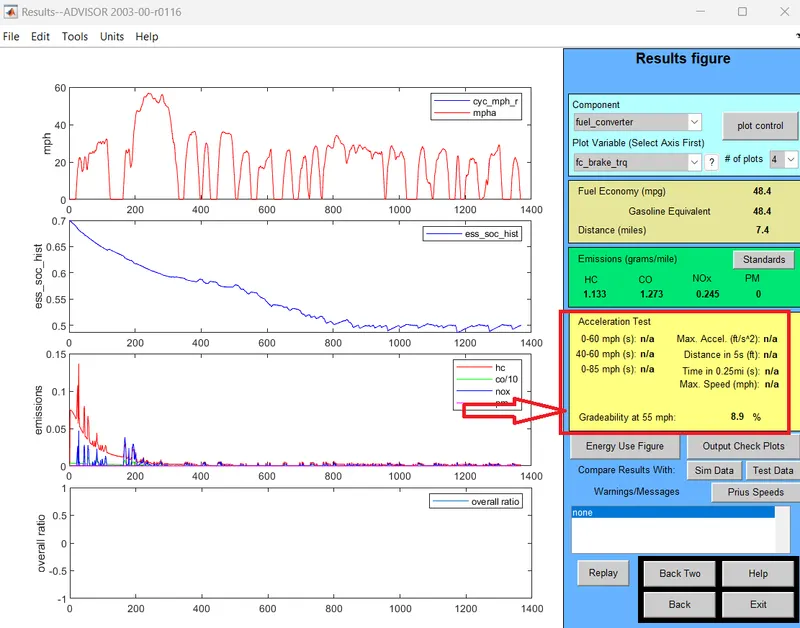
>> From the above results at sped of 55 mph(88.51 kmph) we get the % of Gradability as 8.9 %
Case 2:- Gradability test at speed of 58 mph (93.3 Kmph)
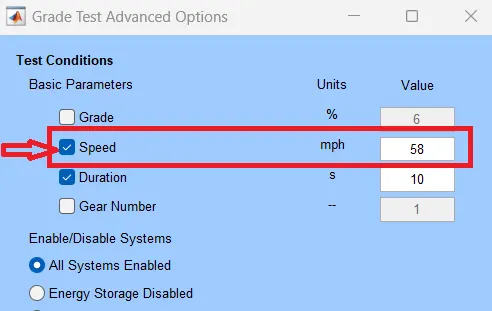
Results :-
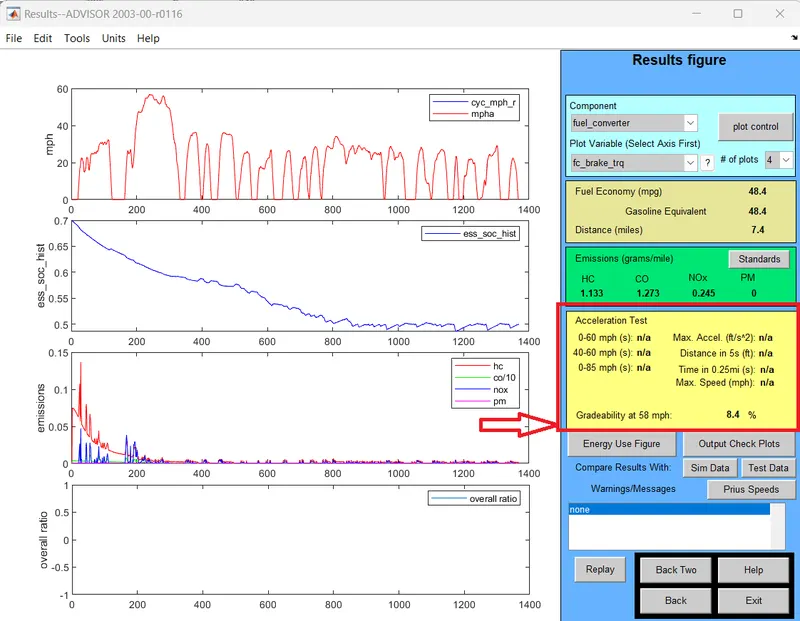
>>>From the above results at sped of 58 mph(93.3 kmph) we get the % of Gradability as 8.4 %
Case 3:- Gradability test at speed of 60 mph (96.5Kmph)
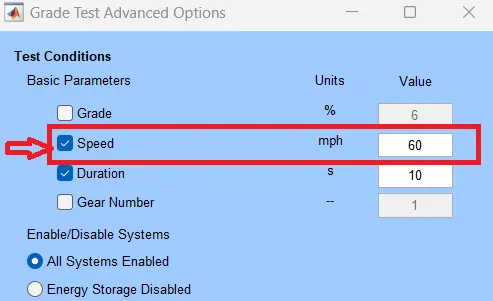
Results :-
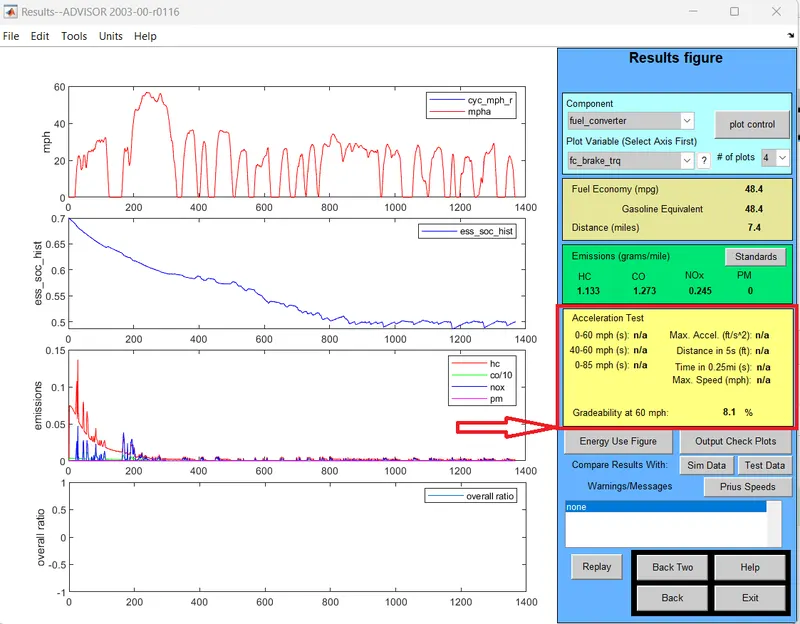
>>> From the above results at sped of 60 mph (96.5Kmph) we get the % of Gradability as 8.1 %
Case 4:- Gradability test at speed of 53 mph (85.29 Kmph)
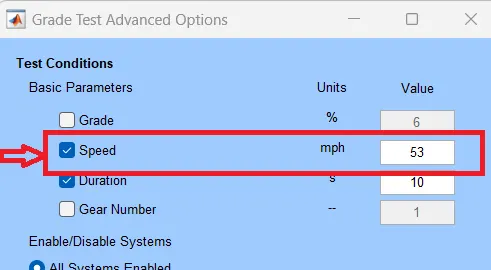
Results :-
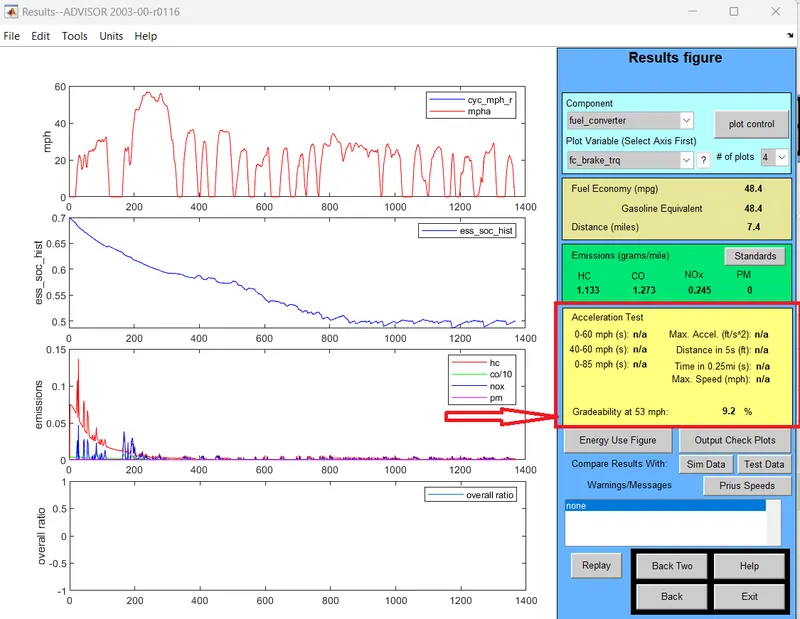
>>> From the above results at sped of 53 mph (85.29 Kmph) we get the % of Gradability as 9.2 %
Case 5 :- Gradability test at speed of 50 mph (80.46 Kmph)
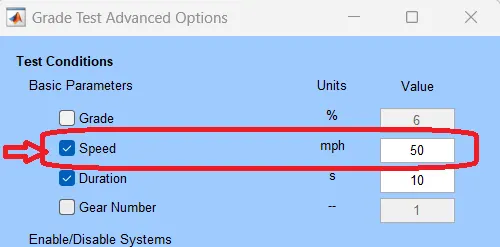
Results :-
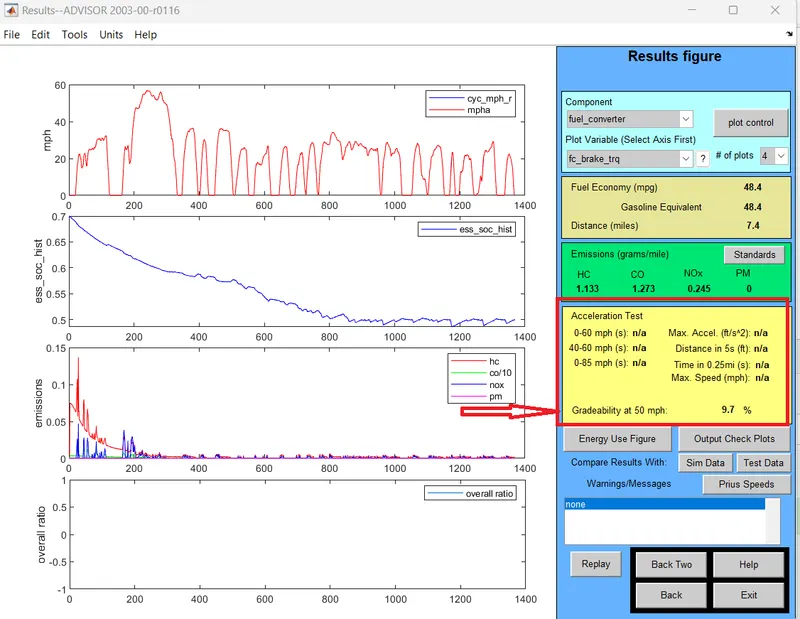
>>> From the above results at sped of 50 mph (80.46 Kmph) we get the % of Gradability as 9.7 %
Conclusiuon :-
>>If speed of vehicle is decrease the gradeability will increase
>>If speed of vehicle is increase the gradeability decrease
Tabel formet :-
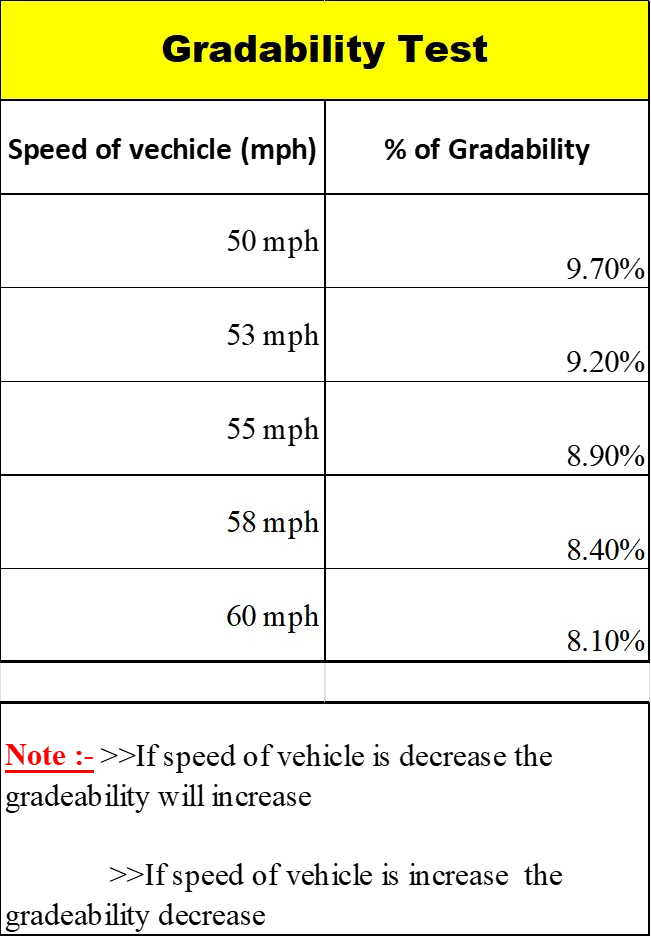
Link :- Gradability_test.xlsx
__________________________________________________________________________________________
Results :-
1) EV_default_in Load file cannot travel distance of 45 km with Given data
Given Data :-
Load file :-EV_defaults_in
Cargo mass /Pay load weight = 500 kg.
Drive Cycle :-FTP Drive Cycle
due to insufficient SOC.
2) To cover 45km distance a 28 module 345-volt battery with 3 no's of drive cycles is required.
3) If speed of vehicle is decrease the gradeability will increase
If speed of vehicle is increase the gradeability decrease
________________________________________________________________________________________________________________________________________________________________________________________________________________________(The End)______________________________________________