Using NREL's ADVISOR Tool for simulating EV Performance.
OBJECTIVE:
To use the NREL’s ADvanced VehIcle SimulatOR (ADVISOR) tool to simulate the following and conclude based on the simulation results:
- For EV_defaults_in file, if cargo mass is 500 kg with all other default conditions, can the vehicle travel for 45 km with FTP drive cycle?
- In the above case, to try changing the battery capacity and repeat the simulation and conclude on the Distance Covered.
- To perform gradeability test with PRIUS_Jpn_defaults_in file. Compare your results in table and conclude.
TOOL INFORMATION:
ADVISOR, NREL’s ADvanced VehIcle SimulatOR, is a set of model, data, and script text files for use with Matlab and Simulink. It is designed for rapid analysis of the performance and fuel economy of conventional, electric, and hybrid vehicles. ADVISOR also provides a backbone for the detailed simulation and analysis of user defined drivetrain components, a starting point of verified vehicle data and algorithms from which to take full advantage of the modeling flexibility of Simulink and analytic power of MATLAB.
SOLUTION:
Solution to Objective 1:
Steps Involved:
- Open MATLAB and set the folder path of MATLAB to the ‘advisor’ folder (Folder downloaded for using the ADVISOR Tool).
- Type ‘advisor’ in the Command Window.
- Click on ‘Start’ Tab when the ADVISOR Tool Window comes up.
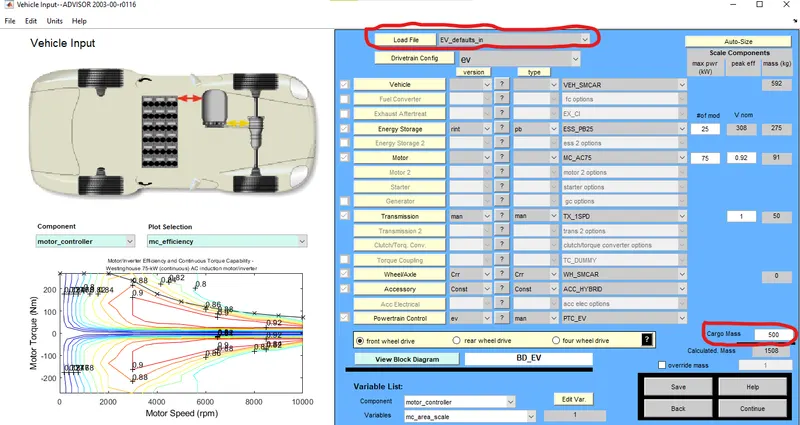
- The ‘Vehicle Input’ Window opens. In the ‘Load File’ section, select ‘EV_defaults_in’.
- Alter the ‘Cargo Mass Parameter’ to 500 kg.
- Click on the ‘Continue’ Tab.
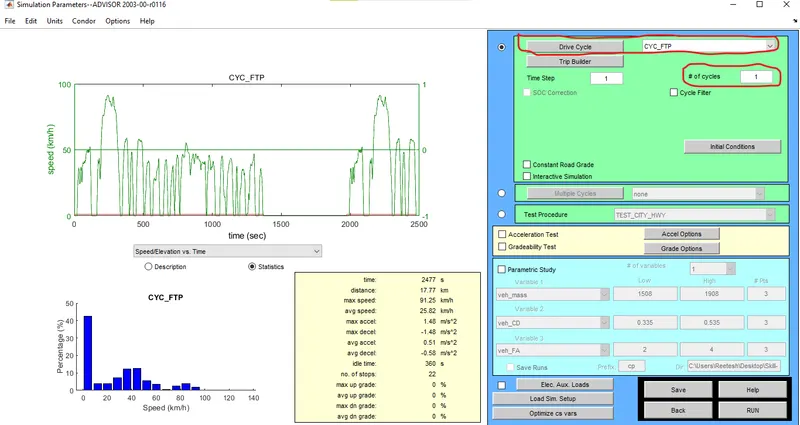
- The ‘Simulation Parameters’ window opens. From the ‘Drive Cycle’ Drop-down Menu, CYC_FTP is selected. The number of Drive cycles can also be repeated using the ‘# of cycles’ tab. As of now, the ‘# of cycles’ is set to 1.
- Click on the ‘Run’ Button.
- After clicking on the ‘Run’ Button, the simulation will start and a new window will open which will show the results of the Simulation.
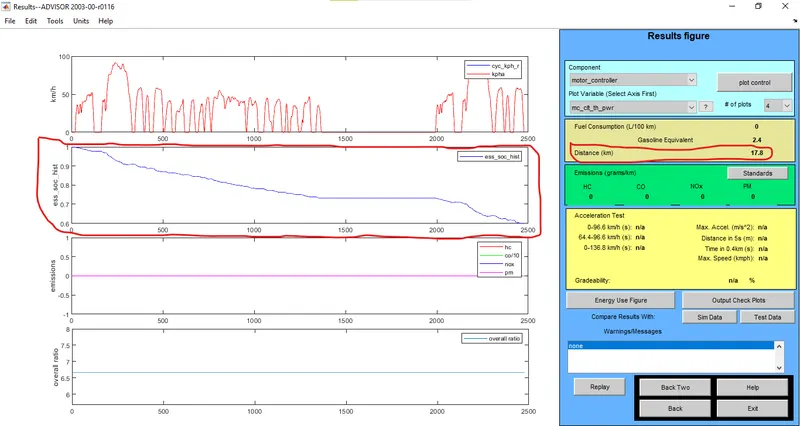
Results Page for # of Cycles=1
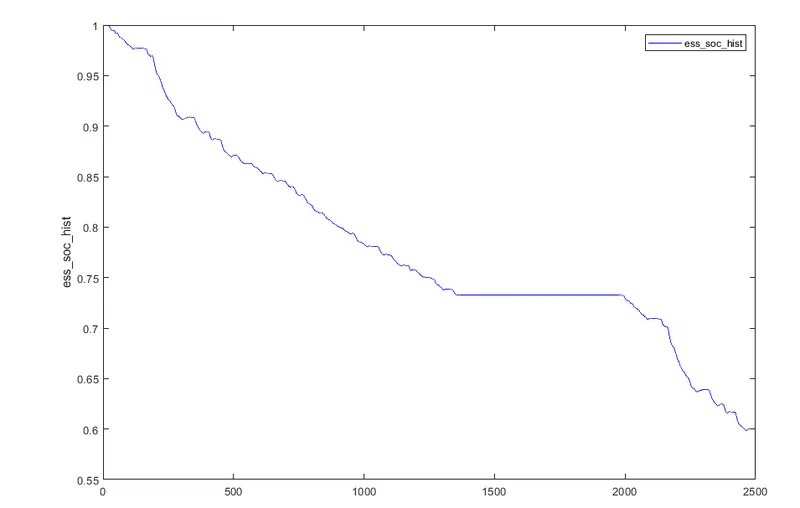
State of Charge(SOC) Curve for the given Simulation Time and # of Cycles=1
- On analysing the results, it can be concluded that the vehicle traverses a distance of 17.8 km for one cycle of the FTP Drive Cycle and having State of Charge (SOC) equivalent to 0.6 (60%) i.e. 40% of Vehicle battery charge is consumed for this particular Vehicle Model, Drive Cycle and number of Cycles.
- Since 60% charge still remains after 1 Cycle of the Drive Cycle, the number of cycles can be increased to check whether the vehicle can traverse a distance of 45 km for the given Battery capacity.
- Now, the ‘back’ Tab is clicked and in the ‘Simulation Parameters’ window, in the ‘# of cycles’ section, the number is changed from 1 to 2 and then the ‘Run’ Button is clicked.
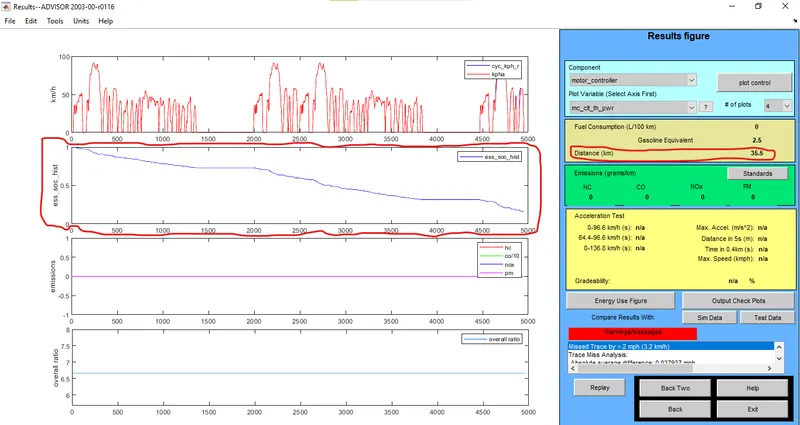
Results Page for # of Cycles=2
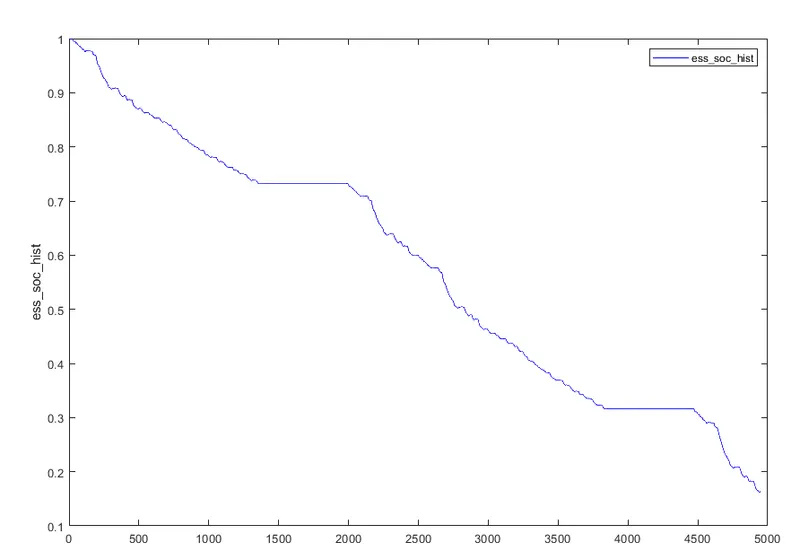
State of Charge(SOC) Curve for the given Simulation Time and # of Cycles=2
- On analysing the results, it can be concluded that the vehicle traverses a distance of 35.5 km for 2 cycles of the FTP Drive Cycle and having State of Charge (SOC) somewhere between 0.2 and 0.1 (~15%) i.e. ~85% of Vehicle battery charge is consumed for this particular Vehicle Model, Drive Cycle and number of Cycles.
- Since ~15% charge still remains after 2 Cycles of the Drive Cycle (35.5 km), the number of cycles can be increased to check whether the vehicle can traverse a distance of 45 km for the given Battery capacity.
- Now, the ‘back’ Tab is clicked and in the ‘Simulation Parameters’ window, in the ‘# of cycles’ section, the number is changed from 2 to 3 and then the ‘Run’ Button is clicked.
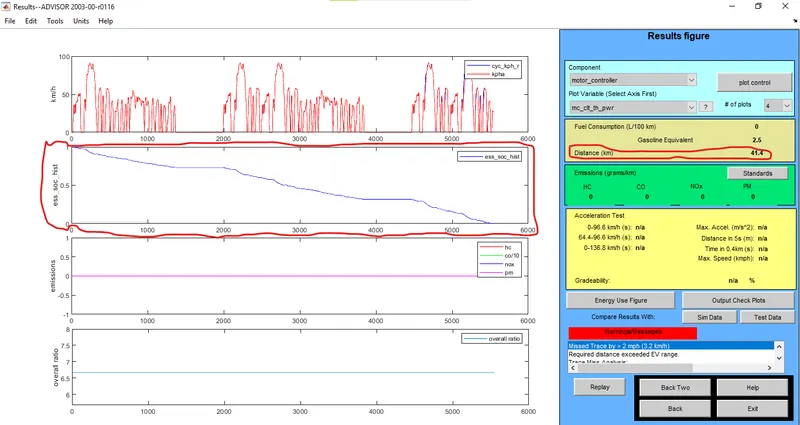
Results Page for # of Cycles=3
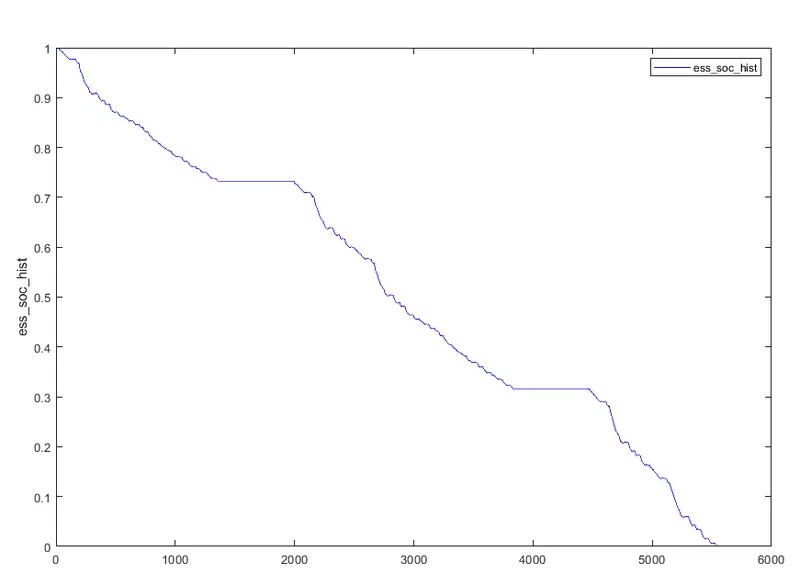
State of Charge(SOC) Curve for the given Simulation Time and # of Cycles=3
- On analysing the results, it can be concluded that the vehicle traverses a distance of 41.4 km for 3 cycles of the FTP Drive Cycle and having State of Charge (SOC) equal to 0 at the end of simulation i.e. 100% of Vehicle battery charge is consumed for this particular Vehicle Model, Drive Cycle=FTP Drive Cycle and number of Cycles=3.
- Thus it can be concluded that the Vehicle cannot complete 45 km (without recharging the vehicle) as the maximum range, the vehicle can cover, starting with 100% battery capacity (along with default Battery parameters) is 41.4 km (3 drive cycles).
Conclusion: The vehicle cannot complete 45 km as the State of Charge (SOC) becomes 0 after 41.4 km.
Solution to Objective 2:
From the previous result, it is evident that the range of the Vehicle given the previous parameters tuned out to be 41.4 km.
So in order to obtain a range of the 45 km for the vehicle, the battery capacity needs to be increased. This can be done by varying the parameters of the battery that contribute to the Battery capacity of the vehicle/range of the vehicle. Increasing the number of modules of the Battery increases the nominal Voltage of the Battery and the mass of the Battery.
In this case, no. of modules of Battery can be increased to meet the given range of the Vehicle (45 km).
Steps Involved:
- Return to the ‘Vehicle Input’ page of the ADVISOR Tool.
- In the ‘# of modules’ section, increase the number from 25 to a higher value.
- Keeping all the parameters similar to the previous Test, the following results were obtained after altering the No. of cycles for the FTP Drive Cycle from 1 to 3:
|
No. of Modules for Battery |
No. of Cycles for the FTP Drive Cycle |
Distance Covered |
State of Charge(SOC) after Simulation |
|
26 |
1 |
17.8 km |
~(61-62)% |
|
26 |
2 |
35.5 km |
~20% |
|
26 |
3 |
42.7 km |
0% |
|
27 |
1 |
17.8 km |
~(63-63.5)% |
|
27 |
2 |
35.5 km |
~(22-23)% |
|
27 |
3 |
44.8 km |
0% |
|
28 |
1 |
17.8 km |
~64% |
|
28 |
2 |
35.5 km |
~(25-26)% |
|
28 |
3 |
46.3 km |
0% |
|
29 |
1 |
17.8 km |
~65% |
|
29 |
2 |
35.5 km |
~(28-29)% |
|
29 |
3 |
47.7 km |
0% |
|
30 |
1 |
17.8 km |
~(66-67)% |
|
30 |
2 |
35.5 km |
~31% |
|
30 |
3 |
49.1 km |
0% |
Conclusion: From the analysis of the above data, it can be said that by increasing the modules of the battery, the possible distance travelled by the vehicle on the basis of the FTP Drive Cycle increases when the Number of Cycles for this particular Drive Cycle is greater than 2. From the above data, the distance travelled by the vehicle exceeds 45 km when the modules of the Battery is greater than 27 and the FTP Drive Cycle is applied for the test more than 2 times.
Solution to Objective 3:
Now the Gradability Tests are to be performed on Toyota Prius Model.
Steps involved:
- Open The ADVISOR Tool and under the ‘Load File’ section of the Vehicle Input page, select ‘PRIUS_JPN_defaults_in’.
- Without changing any of the parameters, click on the Continue Tab which will open the ‘Simulation Parameters’ page.
- In the ‘Simulation Parameters’ page, select the Gradability Test option which then tick marks that checkbox. Clicking on the ‘Grade Options’ button which will then open a new window where parameters related to the Gradbility of the vehicle can be altered. The basic parameters pertaining to Gradability of the vehicle is Speed of the Vehicle and Simulation Time, both of which can be altered in the ‘Grade Test Advanced Options’ Window.
- The Drive Cycle selected as CYC_UDDS and ‘# of Cycles’ value is set to 1.
- The ‘Speed’ and ‘Duration’ values in the ‘Grade Test Advanced Options’ window are altered. Then the OK Button is clicked and the RUN button is clicked to simulate the vehicle model for the given test conditions and then the results are analysed.
- Gradeability of vehicle with ‘All Systems Enabled’ and ‘using Current mass of the vehicle’:
Drive Cycle:CYC_UDDS ; Simulation Time=10 seconds
|
Velocity (in miles/hr.) |
Velocity (in km/hr.) |
Gradeability (in %) |
|
55 |
88.5 |
8.9 |
|
60 |
96.6 |
8.1 |
|
65 |
104.6 |
7.2 |
|
70 |
112.7 |
6.3 |
|
75 |
120.7 |
5.3 |
- Gradeability of vehicle with ‘Energy Storage Disabled’ and ‘using Current Mass’ of the vehicle:
Drive Cycle:CYC_UDDS ; Simulation Time=10 seconds
|
Velocity (miles/hr.) |
Velocity (in km/hr.) |
Gradeability (in %) |
|
55 |
88.5 |
1.7 |
|
60 |
96.6 |
1.5 |
|
65 |
104.6 |
1.2 |
|
70 |
112.7 |
0.9 |
|
75 |
120.7 |
0.7 |
- Gradeability of vehicle with ‘All Systems Enabled’ and ‘using Current mass of the vehicle’:
Drive Cycle:CYC_UDDS ; Simulation Time=15 seconds
|
Velocity (in miles/hr.) |
Velocity (in km/hr.) |
Gradeability (in %) |
|
55 |
88.5 |
10.7 |
|
60 |
96.6 |
9.9 |
|
65 |
104.6 |
8.8 |
|
70 |
112.7 |
7.7 |
|
75 |
120.7 |
6.6 |
- Gradeability of vehicle with ‘Energy Storage Disabled’ and ‘using Current Mass’ of the vehicle:
Drive Cycle:CYC_UDDS ; Simulation Time=15 seconds
|
Velocity (miles/hr.) |
Velocity (in km/hr.) |
Gradeability (in %) |
|
55 |
88.5 |
1.7 |
|
60 |
96.6 |
1.5 |
|
65 |
104.6 |
5.2 |
|
70 |
112.7 |
1 |
|
75 |
120.7 |
0.7 |
Conclusion: From the analysis of the results on conducting the Gradeability Test, it can be said that in general,the Gradeability of the vehicle decreases as the vehicle speed increases. However in one particular case where this was found not to be true is for vehicle Speed at 65 mph when the simulation time was set to 15 seconds the Energy Storage System was disabled and the Gradeabilty saw a sharp increase from 1.5(for 60 mph) to 5.2 in a span of 5 seconds and even more sharp decrease from 5.2 to 1(for 70 mph) in a span of next 5 seconds. It can also be said that the Gradeability of vehicle decreases if the Energy Storage System of the vehicle stops functioning/disabled compared to a scenario where all the systems in the vehicle are functioning. It can also be said that Gradeability of the vehicle increases when the Simulation Time of the test is increased only for the case when all the systems of the vehicle are functioning or enabled. However when the Energy storage System of the vehicle is not functioning or is disabled, then there is hardly any effect of Simulation Time on Gradeability of the vehicle except for one particular case at 65 mph when the Gradeability=5.2 for Simulation Time of 15 seconds while the Gradeabilty =1.2 for simulation time of 10 seconds for the same vehicle velocity.
REFERENCES: