Week 3 Challenge
1. Aim: . 1. State the primary load cases to be considered for design.
2. What is One – Way slab?
3. What is the value of unit weight of structural steel and soil?
4. Name few sections that can be defined using Properties tab in STAAD Pro.
5. Define Primary Beams.
Procedure:
1.
The primary load cases to be considerd for the design are the
- Dead load
- Live load/Imposed load
- Wind load
- Earth quakeload
2.
one way slab:
- The ratio of the longer span to the shorter span is greater than 2 is know as one-way slab. Where LY/ LX is great than 2
- In one way slab, the load is carried in one direction perpendicular to the supporting beam
- One way slab two opposite side support beam /wall
- The deflected shape of the one-way slab is cylindrical.
- Main Reinforcement is in provide short span due to bending.
3.
The unit weight of structural steel and soil is given in IS 875 part 1
- The unit weight of structural steel is 7840 kg/m^3
- The Unit weight of soil is 18 kN/m3
4.
- Circular section
- Rectangular section
- Trepezodial section
- Tee section .
- Genaral section
- Tapered
- Tapered tube
5.
- Primary Beams are the beam located at the exterior of the Structural elements
- The beam can not have much load on the exterior Beams or primary Beams
- Secondary beam are laid on the primary beam
2) Aim: 1. State the factors and parameters that influence the design pressure intensity of a high-rise building.
2. Mention the load transfer process of a Reinforced Concrete Building.
Procedure:
1.
The factors that influence the design presure intensity of a high rise building are
• k1 = probability factor (risk coefficient.)
• K2 = terrain, height and structure size
• k3 = topography factor
Design Wind Pressure - The design wind pressure at any height above mean ground level shall be obtained by the followingrelationship between wind pressure and wind velocity
Pz = 0.6 VA2
2.
The load transfer process of a reinforced concrete building is
1. Slab
2. Secondary beam
3. Primary beam
4. Columns
5. Foundation
3) Aim: 1. Differentiate One-Way and Two way slabs. Elaborate each slab type.
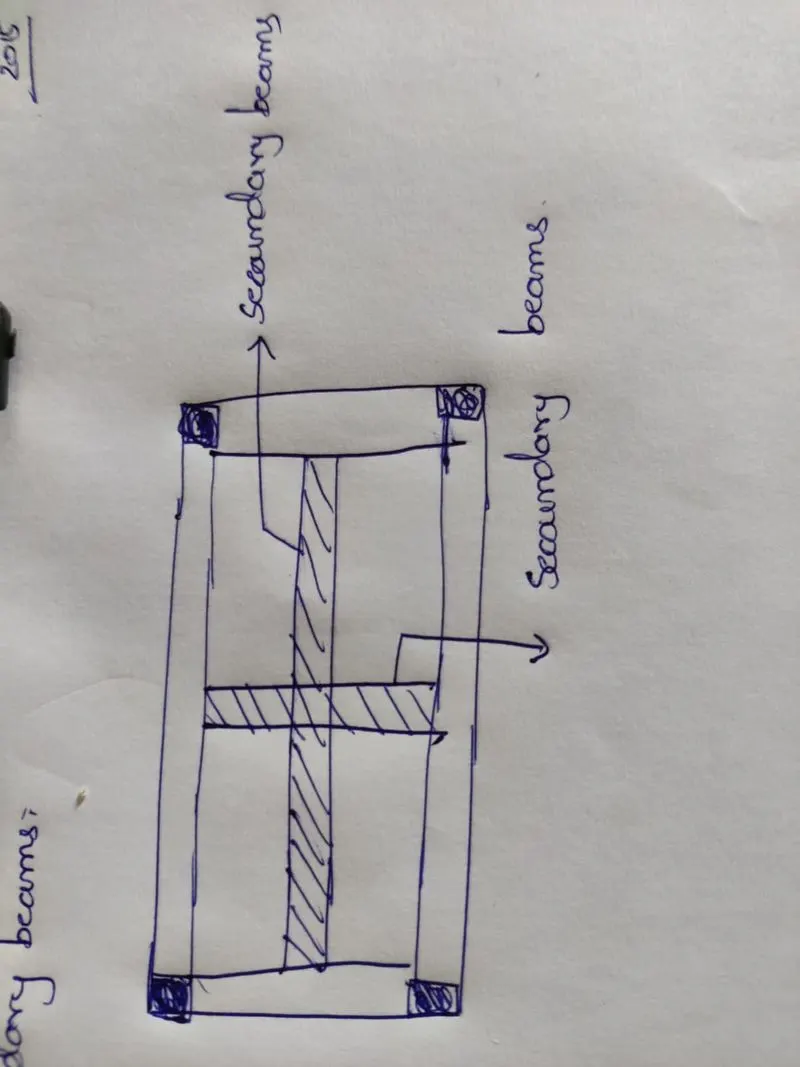
2. Explain the concept of secondary beams with proper sketch.
3. Mention the Primary load cases.
a. State the Indian Standards for each load case
b. Detail the parameters of each load case
c. Brief each load case
4. Detail the steps involved in assigning Properties and Support to a model using STAAD Pro sequentially.
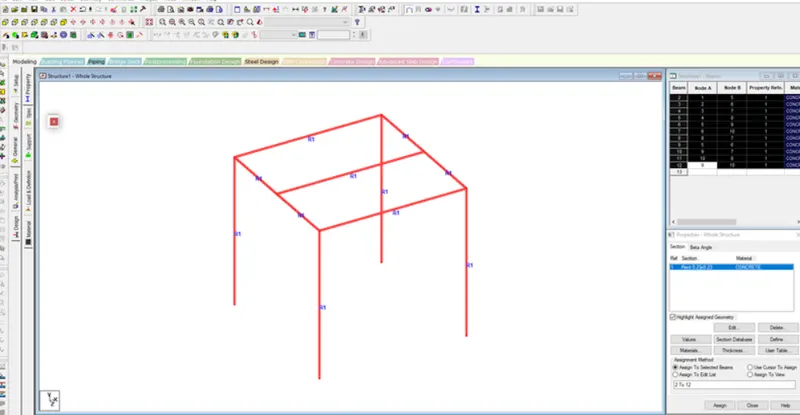
5. Brief the steps to be followed to create and assign secondary beams in STAAD Pro
Procedure:
1.
One-way slab
- The ratio of the longer span to the shorter span is greater than 2 is know as one-way slab.
- Where LY/ LX is greater than 2
- In one way slab, the load is carried in one direction perpendicular to the supporting beam
- One way slab two opposite side support beam /wall
- The deflected shape of the one-way slab is cylindrical.
- Main Reinforcement is in provide short span due to bending.
Two way slab:
- The ratio of the longer span to the shorter span is less than or equal to 2 is know as two way slab
- Where LY / LX is Less than 2
- In two way slab, the load is carried in both directions.
- Two Way Slab four side mins all side supported beam /wall
- In two-way slab, the crank is provided in four directions.
- Whereas the deflected shape of the two-way slab is a dish or saucer-like shape.
2.
Secondary beam are the internal beam that are restrained on the primary beam
• They are the simply supported beam
• In secondary beam the moment is Zero at the end of the beam
3.
a: • For Dead load : Is code 875 Part 1
• Live load :IS code 875 part 2
• Wind load : Is code 85 part 3
• Seismic load : IS 13927
b: • The parameter of Dead load are 1) unit weight 2) Volume of the section that may be rectangular section,
circular section etc
• The parameter of Live load are depend on the building type reidential building, commercial building, industrial
building, Area type room, toilet room, corriodar, roof etc
c: • A load case is a combination of different types of loads with safety factors applied to them.
A structure is checked for strength and serviceability against all the load cases it is likely to experience during its lifetime.
4) Aim: Detail the steps involved in assigning Properties and Support to a model using STAAD Pro sequentially.
Procedure: Go to property section .
• Click on Define material
• Select the section, Rectangular section, circular section etc
• Select the material type concrete, steel, aluminum
• For the rectangular section enter YD and ZD in the column below
• Click add and close
• Select the material type and assign to the selected view For the support
• Click on the support
• Click on the create
• Select the type of support do we want to assign the section
• Click on add close
5) Aim: Brief the steps to be followed to create and assign secondary beams in STAAD Pro
Procedure:
• First create a simple model by using the node in staad pro
• Click on the create beam option and create a beam in the direction of x and Z axis
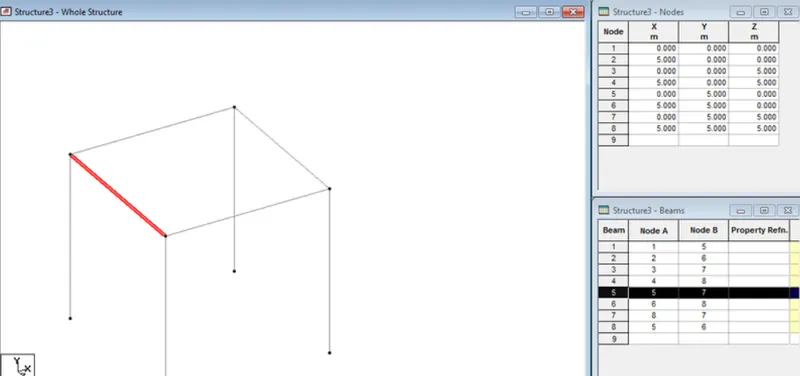
• Click on any primary beam in the section
• Right click and add new node in the beam section a node will be added
• Again click on the create beam
Practical:
Given data:
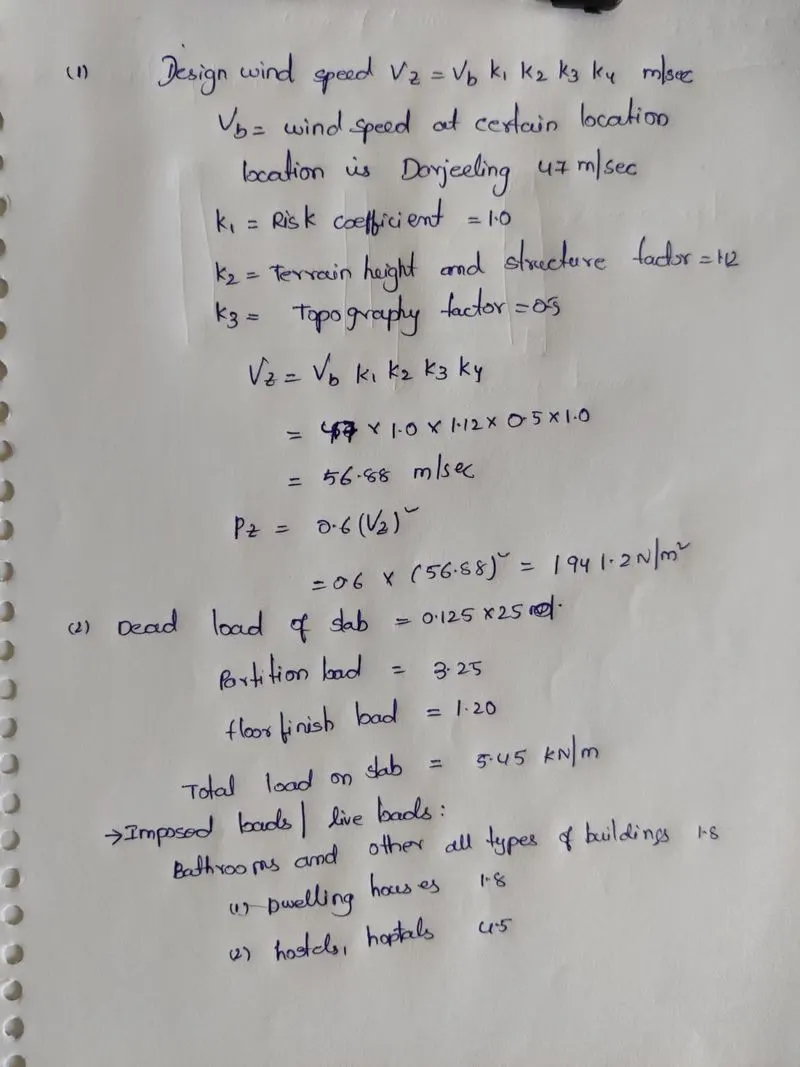
1. Calculate the wind pressure for the given building
a. Building Dimension : 20m x 30m x 20m height RCC
b. Building usage : Hospital block in city centre
c. Location : Darjeeling
2. Calculate the Dead load and Live load for the above building with reference to IS standards ( assume suitable sections )