Week - 3 Perform Shaping Machine, Data sets & Mass-Spring-Damper in Simulink and Simscape.
Que. 1
AIM : To determine the work done by the cutting tool using the Simulink model.
OBJECTIVES :
- To create a Simulink model for a Shaping Machine.
- To determine the work done as the tool moves through a distance of 100 mm.
GIVEN CONDITIONS :
|
Distance (mm) |
0 |
20 |
50 |
60 |
80 |
100 |
|
Force (kN) |
60 |
72 |
65 |
53 |
44 |
50 |
FORMULA :
We know,
Work Done = Force * Displacement
`W = int_0^100 F(x).dx`
| where, | |
| W | Work Done (J) |
| F(x) | Force (kN) |
| d(x) | Distance (mm) |
| x | Time Intervals |
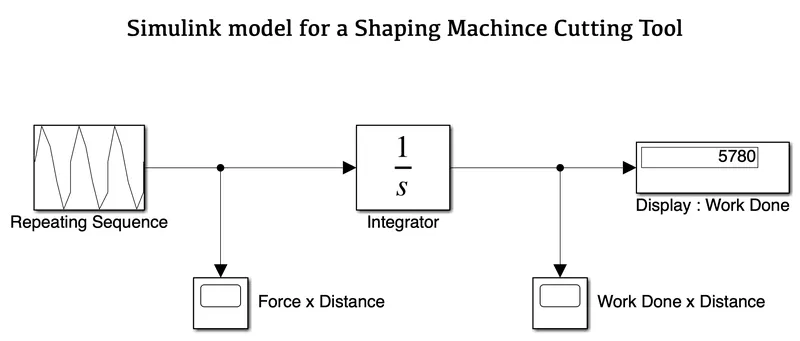
SIMULINK MODEL :
BLOCKS USED :
Here is the list of blocks used in this model -
- Repeating Sequence
- Scope
- Integrator
- Display
EXPLANATION :
- Based on the given shaping machine data, we have used a Repeating Sequence block consisting of distance and force values.
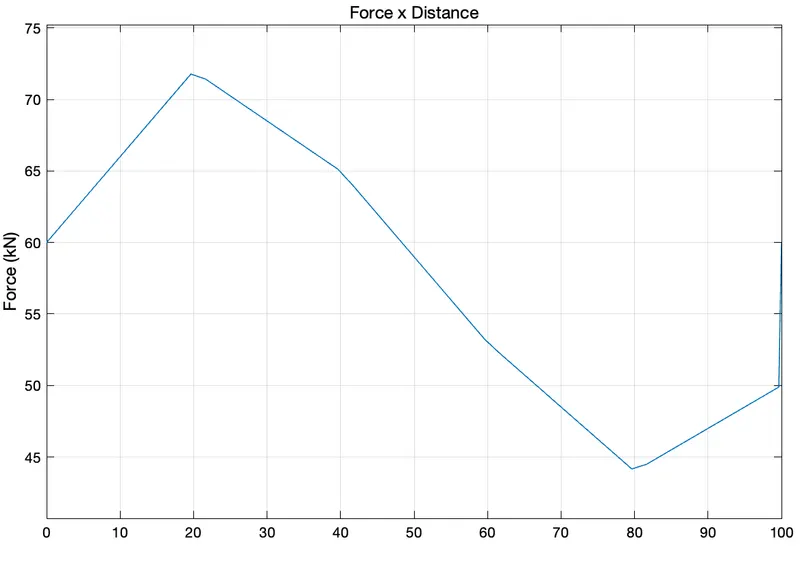
- We have attached a sequence block with a Scope that provides input signals for Force x Distance.
- The sequence block is connected with an Integrator block which performs continuous-time integration of the input signals.
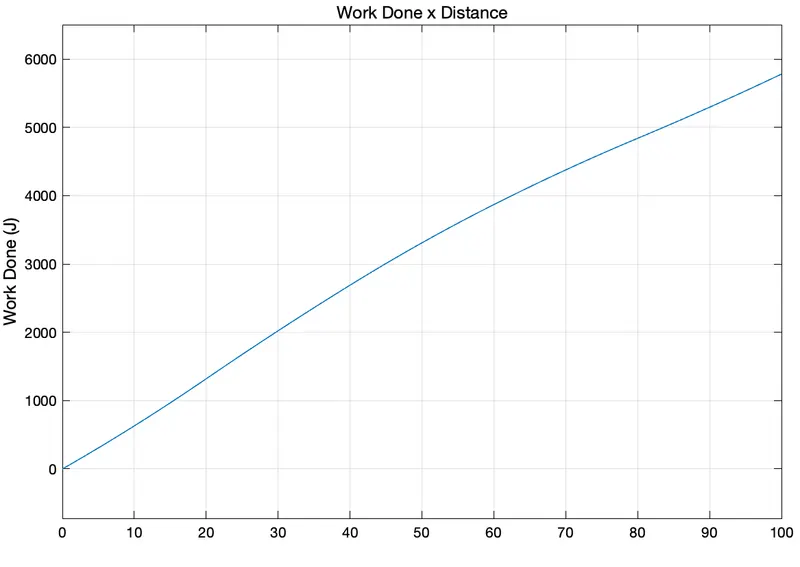
- This integrator is further connected with a Display that shows the output Work Done value and Scope represents the Work Done x Distance plot.
RESULTS :
Input Scope - Force x Distance
Output Scope - Work Done x Distance
CONCLUSION :
Using the Simulink model, we calculated that the Work Done by a shaping machine's cutting tool moving across a distance of 100 mm is 5780 J.
Que. 2
AIM : To implement a given equation z = 3x2 - 5y + 18 using the Simulink model.
OBJECTIVES :
- To create two data set arrays of x and y in MATLAB's command window.
- To store results values using 'To File' block.
- To find the value of z using the given equation.
GIVEN CONDITIONS :
x = [ 22 3 55.6 9 12 10 ]
y = [ 5 31 95 56.3 77 61 ]
EQUATION :
z = 3x2 - 5y + 18
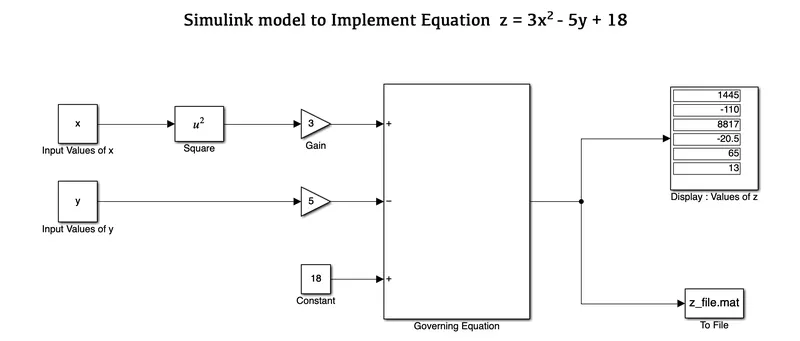
SIMULINK MODEL :
BLOCKS USED :
Here is the list of blocks used in this model -
- Constants
- Square
- Gain
- Sum
- Display
- To File
EXPLANATION :
- We have created two array data sets x = [22 3 55.6 9 12 10] and y = [5 31 95 56.3 77 61] from the command window and saved the file as 'z_file.mat' using MATLAB.
- In Simulink, we listed out all the required blocks for the given equation z = 3x2 - 5y + 18.
- Hence we have provided x and y as input variables with the help of a respective Constant block.
- Constant x block is connected with a Square and next with a Gain block to form 3x2.
- Constant y block is directly connected with a Gain block to form 5y.
- Finally, all the input x and y is then joined to a Sum block along an extra Constant block with a value of 18. This Sum block makes an equation z = 3x2 - 5y + 18. The list of signs used here is '+ - +' and are connected with their respective inputs.
- The output value is displayed using the Display block.
- Once the equation is solved then the output values are stored and saved to the To File block.
RESULTS :
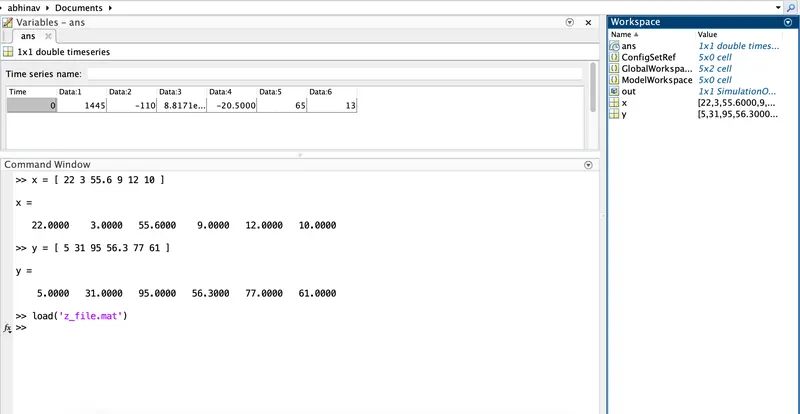
CONCLUSION :
Using the Simulink model and the provided data sets of array x and y, we estimated the value of z from the given equation.
Que. 3
AIM : To perform a Mass-Spring-Damper model in Simulink and Simscape.
OBJECTIVES :
- To derive the governing equation for the Mass-Spring-Damper model.
- Change the value of mass, damper and spring for the Simscape model and plot the results.
- Change the value of mass, displacement as `x_0 = 2` in the Simulink model and plot the results.
- Make the response from Simscape and Simulink as two separate displays.
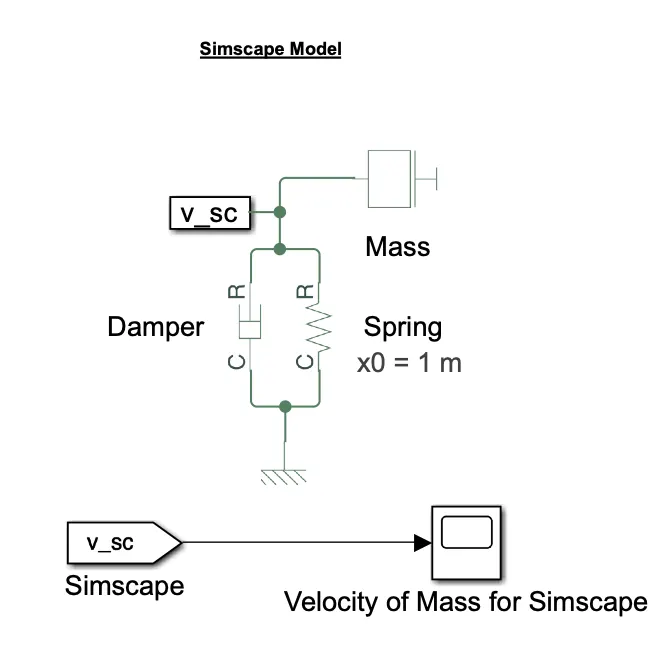
MODEL :
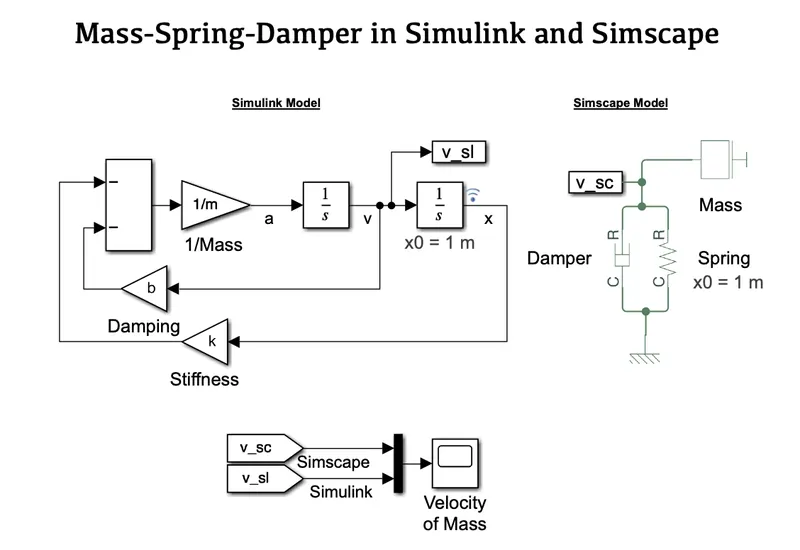
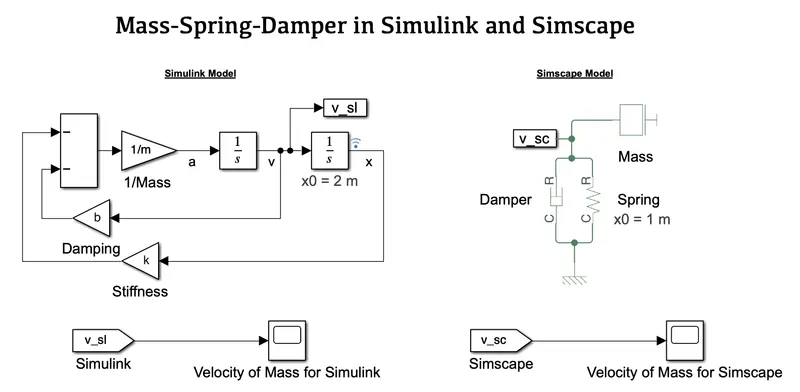
(Simulink and Simscape model with separate Scopes for the Velocity of Mass)
BLOCKS USED :
Here is the list of Simulink blocks used in its model -
- Gain
- Sum
- Integrator
- Scope
- Go To
- InPort
- Mux
- Scope
Here is the list of Simscape blocks used in its model -
- Mass
- Solver Configuration
- Physical Modeling Connection Port
- Ideal Translational Motion Sensor
- Mechanical Translational References
- PS-Simulink Converter
- Go To
- Damper
- Spring
- Mux
- Scope
EXPLANATION :
A. Governing Equation of the Mass-Spring-Damper System with Simple Harmonic Motion
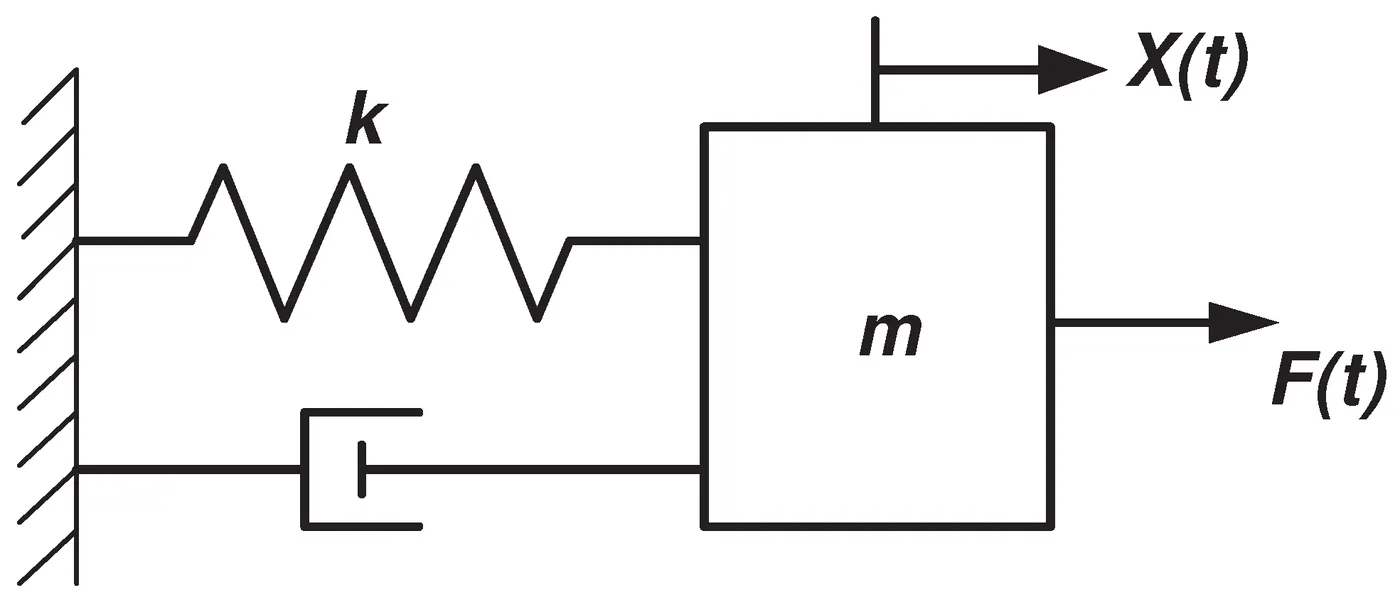
From Newton's Second Law of Motion,
`a = F/m`
`F = m/a`
The Restoring Force of the Spring
`F = -k.x`
Damping Force in the system
`F = -c (dx/dt)`
For Velocity i.e change in position w.r.t time
From Acceleration,
`a = (dv)/dt`
Now,
`a = (d/dt).v`
`a = (d/dt)(dx/dt)`
`a = (d^2x)/dt^2`
Force,
`F = m.a`
`F = m.(d^2x)/dt^2`
Equating all the equations,
`F = m.a`
`-k.x - c (dx/dt) = m*(d^2x)/dt^2`
`m*(d^2x)/dt^2 - c (dx/dt) -k.x = 0`
| where, | |
| m | Mass (Kg) |
| `(d^2x)/dt^2` | Acceleration (`m/s^2`) |
| c | Damping Coefficient |
| `dx/dt` | Velocity `(m/s)` |
| k | Spring Constant |
| x | Distance from the Reference Point |
B. Solve the following Problems
Plot 1 : When the parameters for both Simulink and Simscape models are the same. We can see there is no variation in their paths for a stop time of 5 seconds.
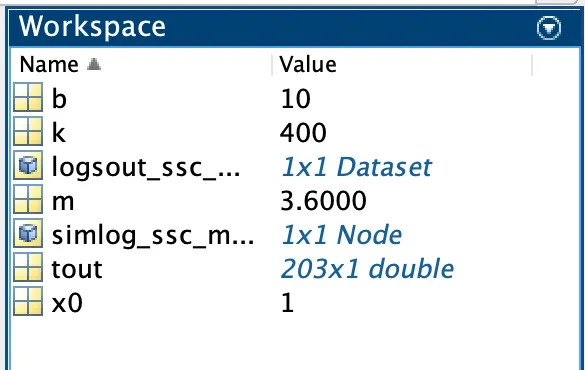
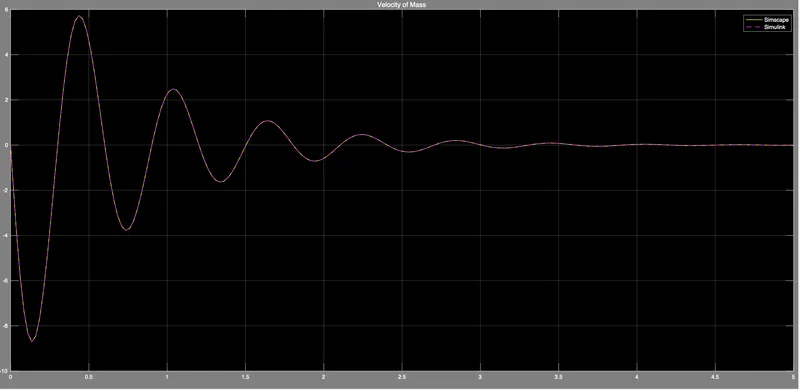
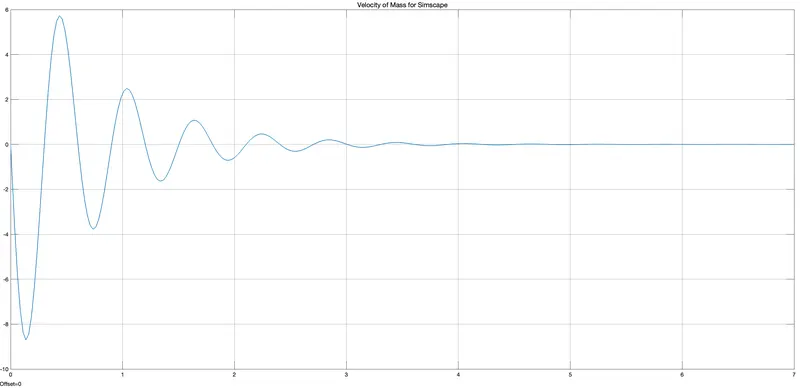
Plot 2 : Change the value of Mass (m), Damper (b), and Spring (k) for the Simscape model and plot the result.
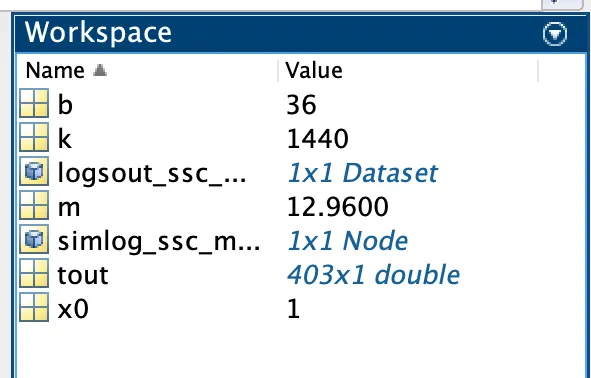
Here we have made some changes by multiplying the values of Mass (m), Damper (b), and Spring Constant (k) by 3.6x times which are shown above in the workspace. For the Simscape model, we set a stop time of 7 seconds to get a better graph.
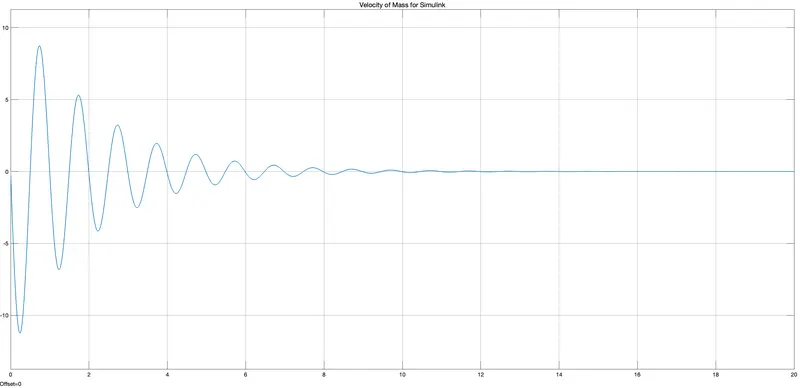
Plot 3 : Change the value of Mass (m), displacement as x0 = 2 in the Simulink model, and plot the results.
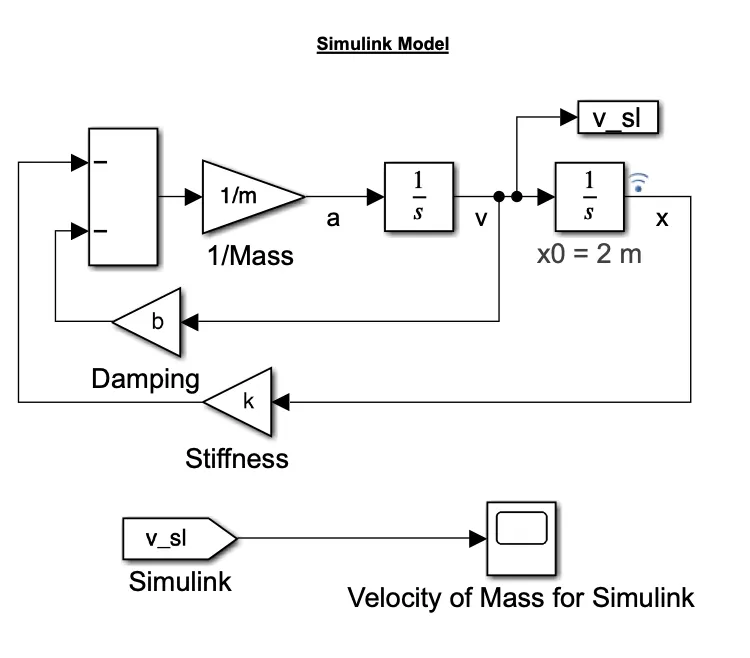
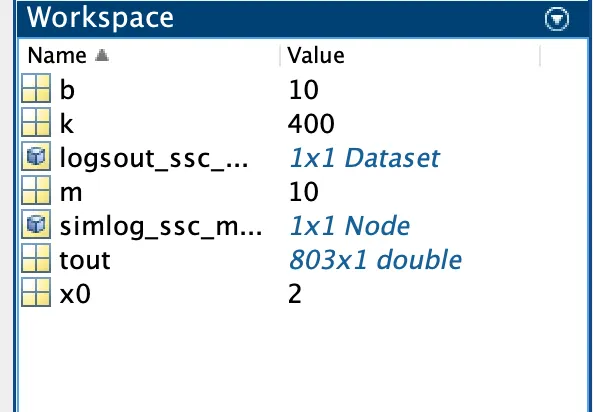
Here we have made changes with mass (m) and displacement (x0) as 10 and 2 respectively. Rest all the values are similar to their initial values. This is also shown in the above workspace figure. For the Simulink model, we set a stop time of 20 seconds to get a better graph.
CONCLUSION :
We addressed the problem using the above Simulink and Simscape models, and with a few tweaks, we constructed their separate plot outputs.
REFERENCE :